

9 Best Multi-Port Chargers: Top Picks and Buying Guide
Best Multi-Port Chargers should combine enough power, useful ports, safe power sharing, and reliable USB-C charging. The right choice depends on total wattage, per-port output, USB-C Power Delivery support, portability, and how power is divided when several devices are connected.
A premium desktop charging hub for users who need several high-power USB-C ports without filling the desk with separate adapters.
A versatile desktop power center that combines fast USB-C charging with AC outlets for monitors, lamps, and other office equipment.
A compact foldable GaN charger for travelers who want one adapter for a lightweight laptop, phone, tablet, and accessories.
The Anker Prime 200W 6-Port Charger is the strongest all-around premium pick for a permanent desk because it offers several ports and enough total output for mixed laptop, tablet, and phone charging. The Anker 9-in-1 Desktop Charger is better when you also need AC outlets. The Anker 735 65W is the more practical travel choice.
Do not choose a charger from the total wattage alone. Check how much power each USB-C port can provide by itself and how output changes when two, three, or more devices are connected.
When comparing the Best Multi-Port Chargers, prioritize per-port output, total shared wattage, cable requirements, portability, thermal protection, seller quality, and warranty support.
| Rank | Product | Ports | Power | Best for | Amazon |
|---|---|---|---|---|---|
| #1 | Anker Prime 200W 6-Port Charger Best Overall | 4 USB-C + 2 USB-A | 200W total | Two laptops plus phones and accessories | View |
| #2 | Anker 9-in-1 Desktop Charger Best Desk Power Center | 4 USB-C + 2 USB-A + 3 AC outlets | Up to 100W USB-C | USB devices plus AC-powered desk equipment | View |
| #3 | Anker 735 65W 3-Port Charger Best for Travel | 2 USB-C + 1 USB-A | Up to 65W | Laptop, phone, and accessory in one bag | View |
| #4 | Anker Prime 67W 3-Port Charger Best Compact Premium | 2 USB-C + 1 USB-A | Up to 67W | Daily carry and lighter laptop charging | View |
| #5 | Belkin 7-in-1 GaN Charging Station 70W Best Mixed AC & USB Station | USB ports + 3 AC outlets | 70W shared USB output | Home offices with USB and wall-powered devices | View |
| #6 | Anker 6-Port Desktop Charger Best for Family Devices | 6 charging ports | Practical multi-device output | Phones, tablets, earbuds, and small electronics | View |
| #7 | Anker PowerPort 6 Best for Legacy USB-A | 6 USB-A | USB-A charging | Older phones, tablets, cameras, and accessories | View |
| #8 | GKUTW 8-Port GaN Charger Most Ports | 8 USB-C/USB-A ports | High shared output | Large collections of phones and accessories | View |
| #9 | Duloch 60W 5-Port Charger Budget Multi-Port Pick | 3 USB-C + 2 USB-A | 60W shared | Phones, tablets, and lower-power accessories | View |
The supplied article included nine multi-port chargers ranging from compact travel adapters to desktop power centers. This redesigned version keeps those products but groups them by real buyer need: premium desktop charging, mixed AC and USB use, travel, legacy USB-A equipment, maximum port count, and budget multi-device charging.
- Total shared wattage
- Maximum output from each USB-C port
- Power distribution with several devices connected
- USB-C Power Delivery support
- Reliable thermal and electrical protection
- Warranty, seller quality, and replacement support
- Assuming every port provides the headline wattage
- Using a low-rated cable with a high-power laptop
- Buying a desktop station for lightweight travel
- Choosing only by port count
- Ignoring seller, plug type, and warranty details
- Expecting USB-A to match modern USB-C PD speeds

A premium desktop charging hub for users who need several high-power USB-C ports without filling the desk with separate adapters.
- Six charging ports in one stable desktop unit
- High total output for mixed laptop and phone setups
- Premium choice for home offices and shared desks
- GaN design keeps the unit smaller than older power bricks
- Heavier than a travel wall charger
- Power is shared when several devices are connected
- Cables should be selected for each device’s required wattage

A versatile desktop power center that combines fast USB-C charging with AC outlets for monitors, lamps, and other office equipment.
- Combines USB charging and AC outlets
- Strong single-port USB-C output for compatible laptops
- Flat plug and multi-side layout help organize cables
- Useful for a complete home-office charging zone
- Larger than a normal wall charger
- High-power charging needs a suitable E-Marker cable
- It should not be treated as a substitute for heavy-duty surge equipment

A compact foldable GaN charger for travelers who want one adapter for a lightweight laptop, phone, tablet, and accessories.
- Compact foldable design
- Can replace several travel adapters
- Two USB-C ports plus one legacy USB-A port
- Strong fit for commuters and carry-on bags
- Power is divided when several devices are connected
- Only one device can receive the highest single-port output
- May protrude more than ultra-flat wall chargers

A compact premium wall charger that balances size, power, and compatibility for everyday phone, tablet, and laptop charging.
- Very compact for its output class
- Two modern USB-C ports
- Foldable plug for easier packing
- Good one-charger setup for daily carry
- Shared output reduces speed with multiple devices
- Charging cables are not included with every listing
- USB-A is useful but less future-focused than USB-C
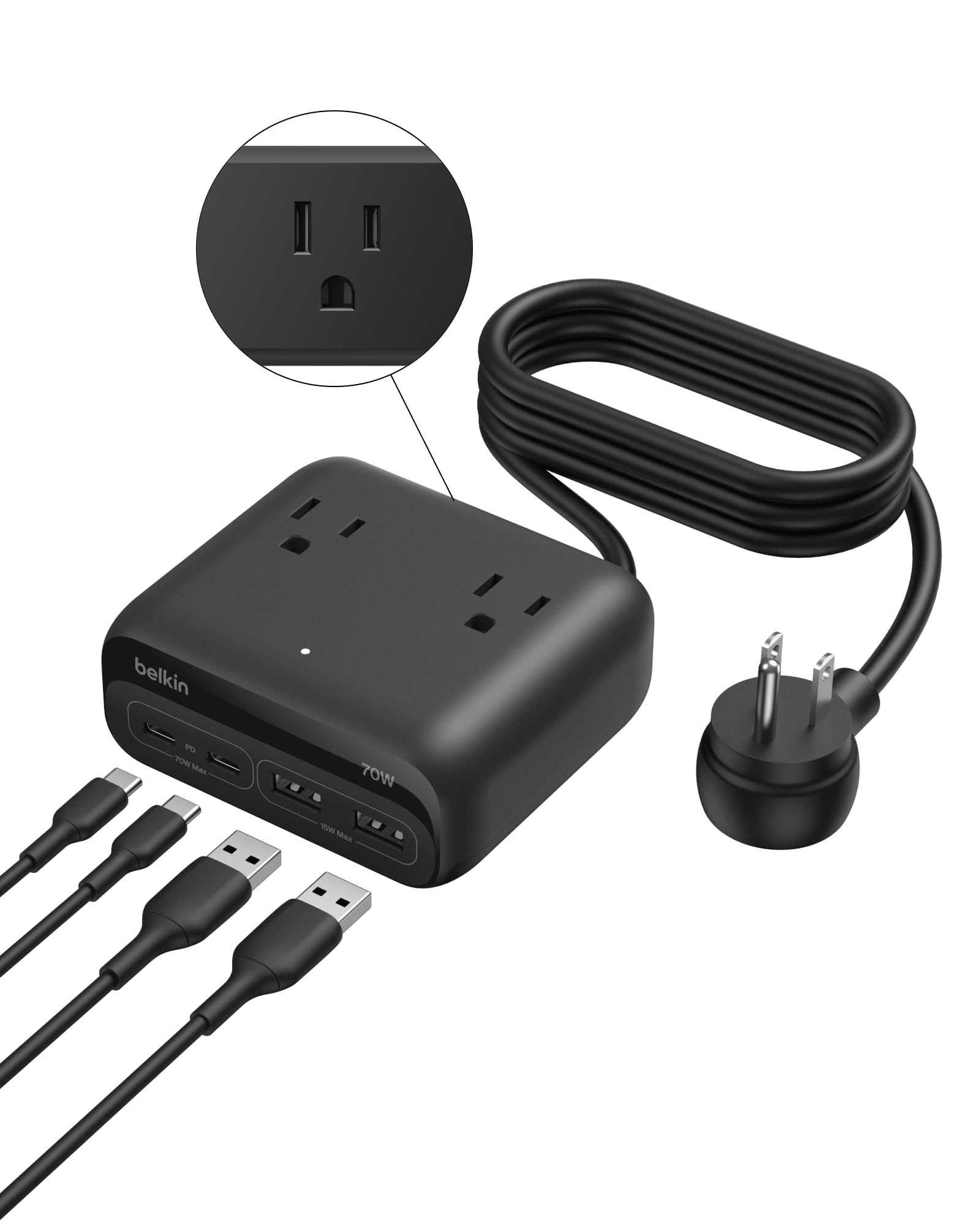
A desk-oriented charging station for users who need USB-C charging and accessible AC outlets in one organized block.
- Mixes AC outlets with USB charging
- Useful flat-plug power cord
- Good fit for desks, lamps, monitors, and mobile devices
- Reduces the number of separate adapters around a workspace
- USB output is shared across connected devices
- Bulkier than a wall charger
- Not intended as an ultra-portable travel solution
Check Belkin 7-in-1 GaN Charging Station 70W Price on Amazon →

A compact desktop charger for families and shared spaces where several lower-power devices need a permanent charging location.
- Charges several devices from one outlet
- Compact desktop footprint
- Good for phones, tablets, earbuds, and accessories
- Helps keep cables in one organized area
- Not the strongest option for high-power laptops
- Top charging speed may be limited to selected ports
- Users may need to supply their own USB-C cables

A simple six-port USB-A station for households that still own many older cables and accessories and do not need USB-C laptop charging.
- Six ports for older USB-A devices
- Simple, compact desktop design
- Useful for cameras, headphones, tablets, and accessories
- Can reduce clutter from multiple old adapters
- No USB-C Power Delivery
- Not suitable for modern high-power laptops
- Slower and less future-proof than current USB-C stations

An eight-port option for users who prioritize maximum device count and want one hub for phones, tablets, accessories, and selected laptops.
- Eight ports for a busy desk or family
- Mix of modern and legacy connections
- GaN-based compact charging-station concept
- Can replace several small adapters
- Power distribution must be checked carefully
- Fewer long-term support signals than established premium brands
- Verify seller, warranty, and included cables before ordering
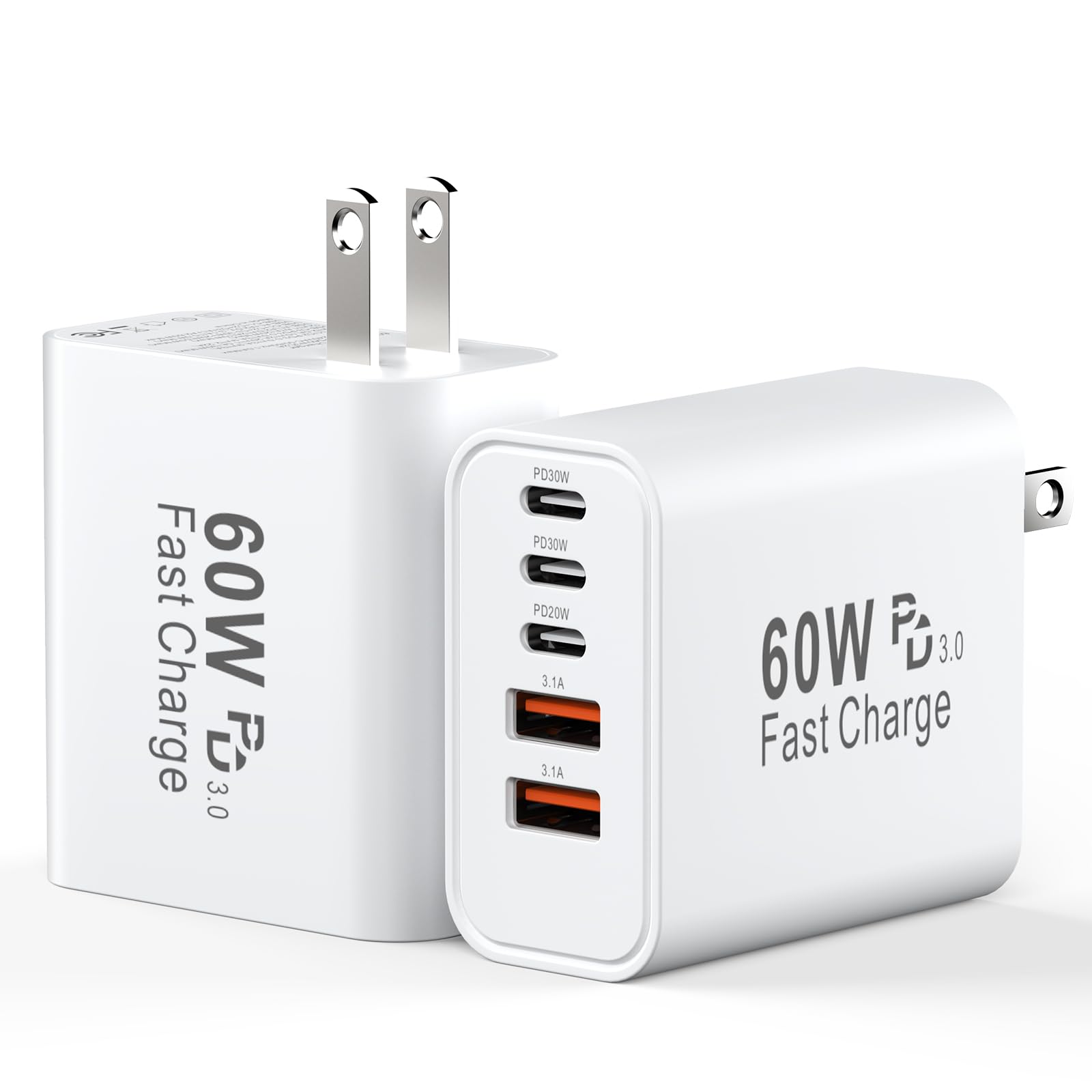
A budget-focused five-port charger for users who need several connections but do not require premium laptop-class output.
- Five ports in a compact unit
- USB-C and USB-A compatibility
- Useful for phones, tablets, earbuds, and accessories
- Lower-cost route into multi-device charging
- Shared 60W output limits high-power use
- Verify plug type and seller before ordering
- Less suitable for demanding laptops
- List every device. Include laptops, tablets, phones, watches, earbuds, cameras, and power banks.
- Find the highest single-device requirement. A laptop may need 45W–140W from one USB-C port.
- Add realistic simultaneous demand. Total wattage should cover the devices you commonly charge together.
- Read the power-distribution chart. Output often changes when more ports are occupied.
- Prioritize USB-C PD. It is the most useful standard for current phones, tablets, and laptops.
- Keep USB-A only when needed. It is useful for older accessories but less future-focused.
- Use the correct cable. High-power USB-C charging may require a 5A E-Marker cable.
- Verify the seller and warranty. Check current listing details before ordering.
| Need | Better charger style | Recommended pick |
|---|---|---|
| Two laptops plus phones | High-output desktop hub | Anker Prime 200W |
| USB devices plus AC equipment | Desktop charging power center | Anker 9-in-1 or Belkin 7-in-1 |
| Laptop, phone, and earbuds while traveling | Foldable 3-port GaN charger | Anker 735 65W |
| Several older USB-A accessories | Legacy desktop hub | Anker PowerPort 6 |
| Maximum device count | Large multi-port station | GKUTW 8-Port |
- Place desktop chargers on a hard, open, ventilated surface.
- Do not cover a charger with bedding, clothing, or paper.
- Replace damaged, loose, discolored, or frayed cables.
- Stop using equipment that sparks, smells burnt, crackles, or becomes abnormally hot.
- Do not overload wall outlets or daisy-chain power strips.
- Use cables rated for the requested USB-C wattage.
- Unplug charging stations during long absences or electrical work.
| Your setup | Best choice | Reason |
|---|---|---|
| Premium home office | Anker Prime 200W | Best balance of ports, power, and desktop organization |
| Desk with monitors and AC devices | Anker 9-in-1 | Combines USB charging and AC outlets |
| Frequent travel | Anker 735 65W | Compact foldable design with three useful ports |
| Family phones and tablets | Anker 6-Port Desktop Charger | Simple permanent charging area for several devices |
| Older USB-A accessories | Anker PowerPort 6 | Six legacy ports without paying for laptop-class output |
What is a multi-port charger?
It is one power adapter or station with several USB-C, USB-A, or AC connections for charging multiple devices from one wall outlet.
How many ports do I need?
Two or three ports are usually enough for travel. A family or permanent desk may benefit from four to six ports.
Do all ports charge at the same speed?
No. Port limits and power distribution vary. Read the product’s port-by-port output chart before buying.
Can a multi-port charger power two laptops?
Some high-output models can, but both laptops must receive enough wattage after power is divided between the ports.
Is a 200W charger faster for a phone?
Not automatically. The phone accepts only its supported charging level. The extra capacity is useful for multiple devices and laptops.
Are GaN chargers better?
GaN technology can support high power in a smaller design, but overall quality, thermal design, firmware, and protection still matter.
Do I need special USB-C cables?
High-power laptop charging may require a 5A E-Marker cable rated for the required wattage.
Can I leave a desktop charger plugged in?
A reputable undamaged charger can normally remain connected, but keep it ventilated and unplug it during long absences, electrical work, storms, or signs of damage.
Should I choose USB-C or USB-A?
Prioritize USB-C Power Delivery for current phones, tablets, and laptops. Keep USB-A ports only for older cables and accessories.
Choose by per-port power and real device needs—not the biggest headline wattage. The Anker Prime 200W is the strongest overall desk recommendation in this roundup.



One Comment