

Sometimes—but only when the connector, charging standard, voltage profile, cable rating, and available wattage match what the laptop accepts. Modern USB-C Power Delivery chargers are the easiest to share across compatible laptops. Proprietary barrel, magnetic, and gaming-laptop chargers require much closer matching.
A compact high-output wall charger with three USB-C ports, one USB-A port, a live display, and an included 240W USB-C cable.
A six-port USB-C desktop charging station designed for multiple laptops, tablets, phones, and other USB-C devices.
Confirm the required wattage, supported voltage profiles, connector, and whether the laptop accepts power through USB-C.
Many laptop chargers look alike, but they are not always interchangeable. A charger must match your laptop’s power needs, connector type, and charging standards to work safely.
Yes, some laptop chargers are interchangeable, especially modern USB-C chargers. However, the charger must provide the correct voltage, enough wattage, and a compatible connector. Using the wrong charger can cause charging problems or damage your device.
Most laptops cannot use just any charger. Always check the connector, voltage, wattage, and manufacturer requirements before plugging in a different charger.
Introduction
One of the most common replacement-charger questions is, “Can I use another laptop charger?” The answer depends on the laptop’s charging system, the charger’s output, and the cable between them.
The answer depends on the charger and the laptop. Some combinations work perfectly. Others may charge slowly or not work at all.
Understanding a few simple power specifications can help you avoid expensive mistakes.
What Makes a Laptop Charger Compatible?
A charger must meet several requirements before it can safely power a laptop.
- Correct connector type
- Correct voltage requirement
- Equal or higher wattage output
- Compatible charging technology
- Good quality cable and adapter
Look at the label on your original charger. It lists voltage and wattage requirements that help you find a compatible replacement.
Are USB-C Laptop Chargers Interchangeable?
In many cases, yes.
USB-C charging has made charger compatibility much easier. Many modern laptops support USB Power Delivery (USB-PD), which allows devices to negotiate power safely.
You can learn more from USB-IF, the organization that manages USB standards.
A USB-C connector does not automatically mean full compatibility. Different laptops may require different power levels.
Best Premium Charger for Multiple USB-C Laptops

The Satechi station provides six USB-C ports and up to 200W total shared output. PD1 and PD2 support USB PD 3.1 and can provide up to 140W to one compatible device, while the remaining ports support USB PD 3.0 for laptops, tablets, phones, and accessories.
- Six USB-C ports
- 200W total shared output
- Two USB PD 3.1 ports up to 140W
- Four additional USB PD 3.0 ports
- Automatic power distribution
- Includes an upright desktop stand
- 200W is the station total, not per port
- All six ports distribute 65W + 45W + four 20W outputs
- Device charging cables may need to be purchased separately
- More than 100W requires a suitable E-Marker cable
- Not suitable for proprietary-only laptop charging ports
| Port Use | Available Power | Best Use |
|---|---|---|
| One device on PD1 or PD2 | Up to 140W | One compatible high-power USB-C laptop |
| All six ports used | 65W + 45W + 20W + 20W + 20W + 20W | One laptop plus tablets, phones, and accessories |
| Two demanding laptops | Depends on selected ports and current allocation | Check both laptops’ minimum wattage before buying |
Can You Use a Charger With Higher Wattage?
Yes. In most situations, a higher-wattage charger is safe.
A laptop only draws the power it needs. For example, a laptop that requires 65W can usually use a 100W charger safely.
| Laptop Requirement | Using Higher-Wattage Charger |
|---|---|
| 45W Laptop | 65W Charger Usually Works |
| 65W Laptop | 100W Charger Usually Works |
| 90W Laptop | 140W Charger Usually Works |

The Anker 140W charger combines three USB-C ports and one USB-A port in a compact wall-plug design. USB-C1 and USB-C2 can each provide up to 140W when used alone, while a color display shows power, port status, and temperature information.
- Up to 140W from either primary USB-C port
- Three USB-C ports and one USB-A port
- USB PD 3.1 support
- Live color display
- Includes a 5-foot 240W USB-C cable
- 100–240V input for travel
- Only suitable for laptops that accept USB-C charging
- Output is divided when several devices are connected
- Some Dell and workstation models may not charge at full speed
- Not a replacement for every proprietary gaming-laptop adapter
Use USB-C1 or USB-C2 for the laptop. When both primary ports are used together, Anker lists 70W + 70W. Adding more devices can reduce the laptop allocation further.
Anker 140W vs Satechi 200W
| Feature | Anker 140W | Satechi 200W |
|---|---|---|
| Best use | Travel or one primary laptop | Premium multi-device desk |
| Ports | 3 USB-C + 1 USB-A | 6 USB-C |
| Total output | 140W | 200W shared |
| Single-port maximum | Up to 140W on USB-C1 or USB-C2 | Up to 140W on PD1 or PD2 |
| Display | Color status display | No live display listed |
| High-power cable | 5-foot 240W cable included | Check package; device cables may be separate |
| Best buyer | Portable premium charger buyer | Home-office power user |
Can You Use a Charger With Lower Wattage?
Sometimes, but it may not work well.
A lower-powered charger may charge very slowly. During gaming or heavy workloads, the battery may continue to drain.
A charger that cannot provide enough power may cause charging interruptions, reduced performance, or battery drain while plugged in.
Laptop Charger Compatibility Comparison
| Situation | Safe? | Expected Result |
|---|---|---|
| Same voltage and same wattage | Yes | Normal charging |
| Same voltage and higher wattage | Usually Yes | Normal charging |
| Same voltage and lower wattage | Sometimes | Slow charging |
| Different voltage | No | Potential damage |
| Wrong connector | No | No charging |
How to Check If a Charger Will Work
Check the sticker on the laptop or the original charger.
Make sure the plug matches your laptop.
The voltage should match the laptop requirement.
The charger should provide at least the required wattage.
USB-C laptops should support the same USB Power Delivery standard.
Compatibility Tags
Why Proprietary and Barrel Chargers Are Different
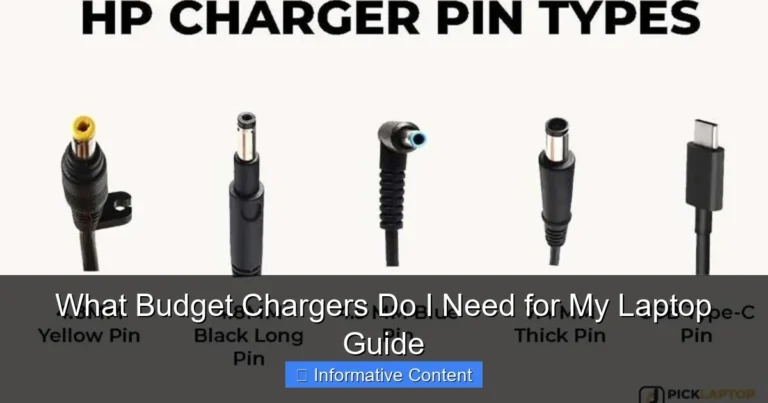
Traditional barrel chargers are less interchangeable than USB-C PD chargers. Two plugs can look identical but use different outer diameter, center pin, polarity, voltage, current, or manufacturer identification.
For barrel, magnetic, or proprietary chargers, use the laptop manufacturer’s exact replacement part number or a reputable replacement that explicitly lists the full laptop model. Do not rely on connector appearance alone.
Common Problems and Solutions
| Problem | Possible Cause | Solution |
|---|---|---|
| Laptop not charging | Wrong connector | Use compatible charger |
| Slow charging | Low wattage | Use higher-wattage charger |
| Battery still drains | Insufficient power | Use charger that meets requirements |
| Intermittent charging | Damaged cable | Replace cable |
| Overheating charger | Poor-quality adapter | Use certified charger |
Safety Tips for Using a Different Laptop Charger
Safety should always come first.
| Safety Practice | Why It Matters |
|---|---|
| Match voltage requirements | Prevents electrical damage |
| Use certified chargers | Improves reliability |
| Inspect cables regularly | Reduces fire risks |
| Avoid damaged adapters | Protects laptop hardware |
| Buy from trusted sources | Reduces counterfeit risk |
Voltage compatibility is the first check for proprietary chargers. A matching connector alone does not guarantee safe charging.
Never use a charger with the wrong voltage rating. This creates the highest risk of hardware damage.
Useful Resources
For more information about charging safety and standards, visit:
- Modern USB-C chargers offer broad compatibility
- Higher wattage chargers are often safe
- One charger can power multiple devices
- Easy to travel with fewer adapters
- Not all connectors match
- Wrong voltage can cause damage
- Lower wattage may charge slowly
- Some brands use proprietary systems
Which Premium Charger Should You Buy?
| Your Setup | Best Choice | Reason |
|---|---|---|
| One USB-C laptop, phone, tablet, and travel use | Anker 140W | Portable, includes a 240W cable, and has a live display. |
| Two laptops and several USB-C accessories at a desk | Satechi 200W | Six USB-C ports and a larger shared power budget. |
| 45W or 65W USB-C laptop | Anker 140W when premium flexibility matters | The laptop requests supported power and the extra ports serve other devices. |
| 230W gaming laptop with proprietary adapter | Original or approved proprietary charger | USB-C may not provide full performance. |
| USB-C port supports data only | Do not buy either as a replacement charger | The laptop cannot accept power through that port. |
Frequently Asked Questions
Are laptop chargers interchangeable?
Some are interchangeable, but only if the connector, voltage, and power requirements match the laptop.
Can I use a 100W charger on a 65W laptop?
Yes. In most cases, the laptop will draw only the power it needs.
Can I use a lower-wattage charger?
Sometimes. The laptop may charge slowly or lose battery during heavy use.
Do all USB-C laptop chargers work with every laptop?
No. USB-C chargers still need to provide enough power and support compatible charging standards.
Can the wrong charger damage a laptop?
Yes. A charger with incorrect voltage can potentially damage laptop components.
How can I find the correct charger specifications?
Check the original charger label, laptop manual, or manufacturer support page.
Is it safe to use a third-party laptop charger?
Yes, if it is certified, high quality, and meets the laptop’s power requirements.
Related Guides
- How to Choose the Right Laptop Charger
- What Laptop Charger Do I Need?
- USB-C Charging Explained
- Can a Power Bank Charge a Laptop?
- How Laptop Battery Health Affects Charging
Conclusion
So, are laptop chargers interchangeable? Sometimes they are, but not always. The charger must match your laptop’s connector and voltage requirements while providing enough power.
If you are unsure, check the original charger specifications before using a replacement. This simple step can prevent charging problems and help protect your laptop.
For beginners, the safest approach is to verify compatibility first and use certified chargers whenever possible.
- Not all laptop chargers are interchangeable
- Voltage compatibility is critical
- Higher wattage is usually safe
- Lower wattage may cause slow charging
- USB-C improves compatibility but does not guarantee it
You can often use a different laptop charger if the connector, voltage, and charging standards match. Always verify specifications before plugging in a replacement charger to ensure safe and reliable charging.
Choose Anker for a premium portable charger or Satechi for a six-port desktop setup—but only after confirming that the laptop accepts USB-C charging at the required wattage.
Check Anker 140W Price
One Comment