9 Best Laptop Chargers for Dell: Top Reliable Picks for Performance and Compatibility
Affiliate disclosure: As an Amazon Associate, Gadget Makers Blog may earn from qualifying purchases. This does not change the price you pay.
Laptop chargers keep Dell notebooks running at home, at work, and on the go. Chargers vary by wattage, connector type, and build quality, and picking the right one means matching a charger to a laptop’s power needs and port type. A good charger should charge reliably, run cool, and last through daily use.
Buyers should check wattage, connector (barrel plug or USB-C), and device compatibility first, since using the wrong wattage or connector can slow charging or fail to work. Durability, safety features (like overcurrent and short-circuit protection), and cable length matter too, because they affect daily convenience and how long the charger will last. This guide compares the best Dell-compatible chargers, how they perform, and which models suit different needs.
9 Best Laptop Chargers for Dell
Below is a curated list of the best laptop chargers for Dell laptops. It focuses on reliable power, correct wattage, and strong safety features to help buyers pick the right charger.
Dell 65W Inspiron Charger

It is a solid choice for Inspiron users who want a genuine Dell 65W charger that fits many models and charges reliably.
Pros
- Official Dell unit, so fits Inspiron models without adapter issues
- 65W output charges laptops at a normal pace for everyday use
- Compact, easy to carry in a laptop bag
Cons
- Uses a 4.5mm barrel plug, not USB-C, which limits compatibility
- A few users report occasional recognition errors on some models
- Higher price than some third-party alternatives
This charger aims to match Dell laptops that need a 4.5mm barrel connector. It lists compatibility with many Inspiron 13–15 models and the 3000/5000/7000 families.
It uses a 65W output so it should handle regular web browsing, document work, and light media tasks. The unit is small and made for travel, with a standard AC power cord included.
Some buyers noted their system did not always accept third-party units, so choosing an official Dell adapter can avoid power or recognition warnings. Still, if a laptop supports USB-C charging, this model will not work without an adapter.
Check the product page for current price and full compatibility before buying: Dell 65W Inspiron Charger.
E ERSY 65W Dell Charger

This charger is a solid budget replacement for many Dell Inspiron and XPS models because it offers the right wattage and common connector options.
Pros
- Good value for the price
- Works with many Inspiron and XPS models
- Includes adapter for two plug sizes
Cons
- Cord is shorter than some originals
- Uses a proprietary connector (not USB-C)
- Third-party unit, not genuine Dell
They list broad compatibility across Inspiron, XPS, Vostro, and Latitude families, so it fits a lot of older Dell laptops that use the 4.5×3.0mm or 7.4×5.0mm plugs. The unit delivers 65W, which matches typical midrange Dell chargers.
Customers often note fast delivery and that the charger charges reliably once plugged in. The product claims CE and FCC safety marks and comes as a new unit from the manufacturer rather than a refurbished part.
Buyers who need a low-cost replacement for a non-USB-C Dell laptop will find this practical, but those who want a longer cord or an official Dell-branded adapter might prefer other options.
Dell 65W USB-C Charger

This charger is a good choice for Dell users who want a genuine OEM USB-C power adapter that fits many recent models.
Pros
- Genuine Dell part for better compatibility.
- Compact and easy to carry.
- Includes power cord for immediate use.
Cons
- May report as underpowered on some higher-end laptops.
- Connector or cable durability concerns reported by some buyers.
- Limited to 65W, which may be slow for power-hungry machines.
It supports USB-C charging and lists many Inspiron, Latitude, XPS, and Chromebook models as compatible. Buyers who want an OEM adapter will like the official fit and the one-year warranty.
Some users say it charges reliably for everyday tasks and travel. Others noted warnings about power levels on large XPS models and a few durability complaints about the cable or plug.
Overall, it suits most mid-range Dell laptops and Chromebooks that accept USB-C at 65W, but buyers with high-performance Dell machines should check power needs before buying.
HHamoyzs 65W USB-C Charger

This charger is a solid budget backup for many Dell laptops because it is compact, charges at 65W, and supports a wide range of models.
Pros
- Small and easy to carry for travel.
- Works with many Dell Latitude, Inspiron, and XPS models.
- Built-in safety features reduce the risk of short circuits.
Cons
- Build quality may not match an original Dell charger.
- Some users report early failures.
- Single USB-C port limits simultaneous charging.
The charger fits into a bag without taking much space, so it suits users who need a spare or travel unit. It aims to deliver the same 65W power as the original but in a lighter package.
Compatibility covers many Latitude, Inspiron, and XPS series, which makes it useful for households with different Dell models. The safety circuitry offers basic protection during charging.
Expect a mix of reviews: many buyers find it reliable and fast, while a few report it stopped working quickly. They should weigh the lower price against the chance of shorter lifespan.
Dell 100W USB-C Laptop Charger
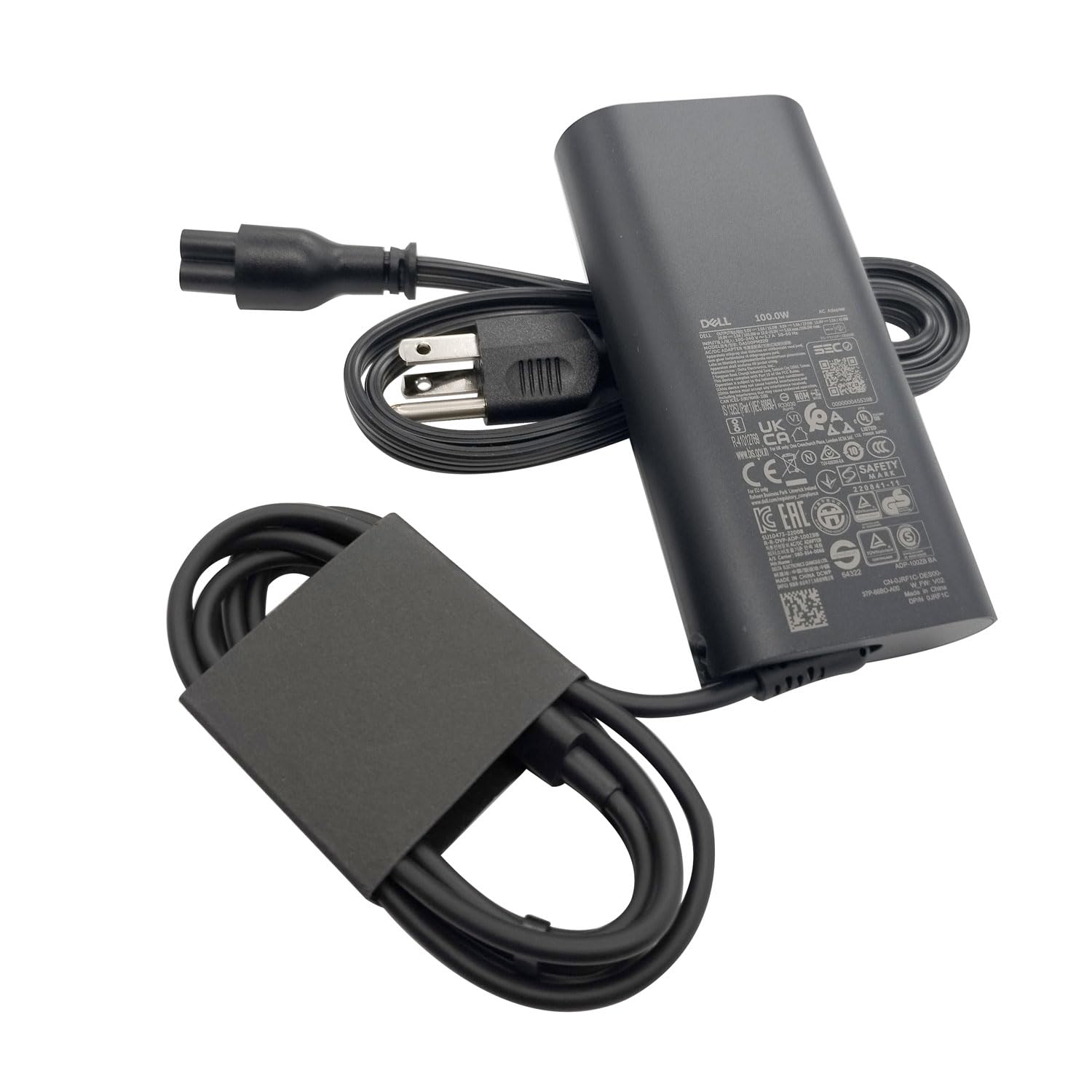
It is a solid choice for Dell owners who need a genuine 100W USB-C charger that supports fast charging and many Precision, Latitude, and Inspiron models.
Pros
- Official Dell unit, so it matches original specs.
- USB-C tip supports multiple power levels for varied devices.
- Compact, portable design with a short power cord.
Cons
- Comes in non-retail packaging.
- Price may be higher than third-party options.
- Some devices might not always report full 100W.
The charger lists as a genuine Dell adapter and aims to replace OEM units. It targets users who want a direct-match power supply for specific Dell models rather than a budget third-party cable.
It offers up to 100W via USB-C and steps down to lower profiles for smaller devices. That makes it useful for laptops, tablets, and phones that accept USB-C power delivery.
Customers note it charges reliably and fits Dell part numbers for Precision and Latitude lines. The one-year warranty gives a basic safety net if there is an early defect.
This unit suits someone who prefers brand-match chargers and fast charging over the lowest price. It helps keep charging behavior closer to what the laptop expects.
Dell 65W USB-C Laptop Charger

The charger is a solid choice for Dell USB-C laptops that need up to 65W and prefer an original-brand adapter.
Pros
- Genuine Dell unit with USB-C output for wide laptop compatibility.
- Supports multiple power levels for fast charging on smaller devices.
- Compact design and included power cord make it easy to carry.
Cons
- Some buyers report early failures after a few months.
- Packaging is non-retail and may arrive with minimal protection.
- Cord length and heat management are average, not premium.
This Dell 65W USB-C adapter suits users who want an original-brand charger for Dell XPS and Latitude models. It matches the power profiles many laptops need and works as a direct replacement for several Dell SKUs.
The unit lists multiple voltage/amperage levels, so it can charge laptops and smaller USB-C devices at appropriate speeds. Buyers should note reports of inconsistent longevity in some reviews.
People who value brand match and compactness will like this. Those who need the longest-lasting or longest-cord option might look at extended-warranty sellers or third-party alternatives.
Find it on Amazon: Dell 65W USB-C Laptop Charger
Ostrich 65W Round-Tip Charger

It is a solid budget choice for Dell users who need a reliable 65W or 45W round-tip replacement with safety features and a convertible tip.
Pros
- Good safety protections and backed by testing claims
- Includes converter cable for two tip sizes
- Affordable and widely compatible with many Dell models
Cons
- Converter tip may not stay firmly attached for some users
- Not USB-C — limits use with newer laptops
- Some buyers report minor fit issues with certain models
This charger aims to replace OEM power bricks without a high price. It covers common Dell Inspiron, XPS, and Vostro models that use the 4.5 x 3.0mm connector and also offers a 7.4 x 5.0mm adapter for wider compatibility.
The product highlights safety features and a lifetime exchange promise, which may appeal to cautious buyers. A converter tip gives flexibility but can feel loose on a few laptops, so users should check fit when it arrives.
It does not use USB-C power delivery, so it won’t work for Dell models that require USB-C charging. For older Dell laptops that need a round connector, it provides a practical, lower-cost alternative.
Buyers can view details and purchase the charger here: Ostrich Charger Compatible with Dell Laptop Computer 65W 45W Round Tip Power Adapter.
IBATTS 130W USB-C Charger

It is a budget-friendly 130W USB-C charger that can fast-charge many Dell models but has mixed reliability.
Pros
- High power for fast charging compatible Dell laptops
- Wide model compatibility across XPS, Precision, Latitude, and Inspiron lines
- Includes safety protections and an 18-month exchange policy
Cons
- Some users report cord or unit failures after short use
- Mixed reports about compatibility through docks or adapters
- Not an official Dell product, so long-term durability varies
The charger targets Dell machines that need up to 130W via USB-C. It aims to match OEM power levels so laptops avoid slow-charge warnings.
They highlight safety features like short-circuit and over-voltage protection. That adds peace of mind but does not guarantee every unit lasts long.
Several buyers praised quick delivery and customer service when problems arose. Others said the cable frayed or the laptop stopped recognizing power after a few uses.
It suits someone who wants a lower-cost alternative with high wattage and broad compatibility. Those wanting guaranteed long-term reliability may prefer an official OEM charger.
Link: IBATTS 130W USB C Laptop Charger
Dell 45W Genuine AC Adapter

This adapter is a solid choice for Dell Inspiron users who want an original OEM charger for reliable, simple charging.
Pros
- Genuine Dell part, reducing compatibility risk
- Compact and lightweight for easy replacement
- Fits many Inspiron models across several series
Cons
- Not USB-C — uses a proprietary connector
- 45W may be slow for power-hungry laptops
- Limited to regions with matching plug type
It provides a straightforward, no-frills power supply that matches Dell specs. Buyers can expect a familiar plug and a reliable charge on supported Inspiron models.
The charger may suit people who prefer OEM parts to avoid warning messages or compatibility issues. It works best for everyday use like web browsing, streaming, and light tasks rather than heavy gaming or intense multitasking.
They should check the laptop’s power needs and plug shape before buying to make sure this 45W adapter fits their model and outlet type.
Buying Guide
Choosing the right charger starts with matching the laptop’s power needs. They should check the laptop’s voltage and wattage on the original adapter or in the user manual. Picking a charger with the correct output prevents slow charging or damage.
Next, consider the connector type and fit. The plug must match the laptop’s charging port exactly. A loose or wrong connector can cause intermittent power or wear the port.
Safety features matter for long-term use. Look for overcurrent, overvoltage, and short-circuit protection. Certified chargers reduce the risk of overheating and electrical faults.
Portability and cable length affect daily use. Smaller, lighter chargers are easier to carry, while longer cables offer more flexible setup at a desk. Some chargers include detachable cables or travel-friendly designs.
Compatibility and smart charging can save headaches. Chargers that support power delivery or auto-voltage adjustment work with multiple models. However, compatibility lists should be checked before buying.
Warranty and customer support provide extra security. A clear warranty helps if the charger fails early. They should prefer sellers that offer easy returns and support.
Quick reference table for priorities:
| Priority | What to check | Why it matters |
|---|---|---|
| Power specs | Voltage & wattage | Matches laptop needs |
| Connector | Plug shape & size | Ensures secure fit |
| Safety | Protections & certifications | Prevents damage |
| Portability | Size & cable length | Fits travel and setup |
| Compatibility | PD/auto-voltage support | Works with multiple models |
| Warranty | Return policy & support | Covers defects and issues |
Editor’s Choice
The editor picks the Dell 65W USB-C Slim as the top choice for most users. It charges reliably, fits most modern Dell laptops, and keeps the charger small and light.
| Feature | Why it stands out |
|---|---|
| Wattage | 65W supports XPS 13, Inspiron, and many Latitude models. |
| Connector | USB-C PD for reversible plug and universal use. |
| Size & Weight | Compact brick that fits in a bag without adding bulk. |
| Safety | Over-voltage and short-circuit protection included. |
| Price | Mid-range cost with strong value for build and performance. |
The editor notes compatibility matters. Users with older Dell models that need barrel connectors should verify the port type before buying.
They recommend buying from Dell or a reputable retailer to ensure authentic parts. Third-party USB-C chargers that advertise PD must list compatible wattage and Dell model support.
A brief buying tip: choose a slightly higher wattage if the laptop will do heavy work. That helps avoid slow charging during gaming or video editing.
Where to Buy – Best Amazon Deals
They can find many Dell-compatible chargers on Amazon with fast shipping and easy returns. Amazon often lists OEM Dell chargers, certified replacements, and high-quality third-party units in one place.
Look for products with clear specs and high ratings. Check wattage, connector type, and model compatibility in the product title and description before buying.
Use these quick checks on Amazon:
- Filter by Prime for faster delivery.
- Sort by Customer Review to see highly rated options.
- Check Q&A and seller info to confirm authenticity.
Consider these purchase tips:
- Buy OEM Dell chargers if they want guaranteed compatibility.
- Choose certified third-party brands for lower cost and good safety features.
- Watch for deals during sales events like Prime Day or seasonal promotions.
Price, warranty, and return policy matter. They should prefer listings with at least a 1-year warranty and a clear return window.
Sample listing details to compare:
- Brand | Wattage | Connector | Warranty
- Dell (OEM) | 65W–130W | Barrel or USB-C | 1 year+
- Certified third-party | 45W–130W | USB-C/Barrel | 6–12 months
They should save the receipt and order details for any warranty claims or returns.
Conclusion
Choosing the right Dell charger helps keep a laptop safe and working well. Readers should match wattage, connector type, and voltage with their laptop model to avoid problems.
A branded Dell charger offers compatibility and warranty support. Third-party chargers can work if they list Dell compatibility and include safety features like overcurrent and short-circuit protection.
For portability, lighter USB-C chargers suit travel and newer XPS models. For power users, higher-wattage, OEM adapters deliver steady performance during heavy use.
Buy from trusted sellers and check reviews for real-world reliability. Keep a spare charger at the office or in a bag to avoid downtime.
Quick checklist:
- Confirm model number and required wattage.
- Prefer chargers with safety certifications.
- Choose USB-C for modern Dell laptops if supported.
- Opt for OEM when unsure about compatibility.
FAQs
Which Dell charger fits my laptop?
They should check the model number on the laptop or the service tag. Dell lists compatible chargers on its support site, and many user manuals include the exact power specs.
Can a higher-wattage charger damage a Dell laptop?
No, a higher-wattage charger will not harm a laptop if the voltage and connector type match. The laptop draws only the power it needs. Use caution with wrong voltage or incompatible smart protocols.
Are USB-C chargers safe for Dell laptops?
Many modern Dell laptops support USB-C Power Delivery. They can use USB-C chargers if the charger provides the right wattage and PD profile. Older models without PD support will not charge via USB-C.
How to spot a fake or low-quality Dell charger?
Look for poor build quality, missing safety labels, or wrong connector size. Official chargers have Dell branding, model numbers, and safety certifications. Cheap third-party units often lack these markers.
Is it okay to use third-party chargers?
Trusted third-party brands can work well if they match specs and have safety certifications. They should provide over-current, over-voltage, and short-circuit protection. Avoid unknown brands and very low prices.
What if the charger charges slowly or not at all?
They should check the cable, connector, and wall outlet first. Updating BIOS and drivers can fix some charging issues. If problems persist, test with a known-good charger or contact Dell support.