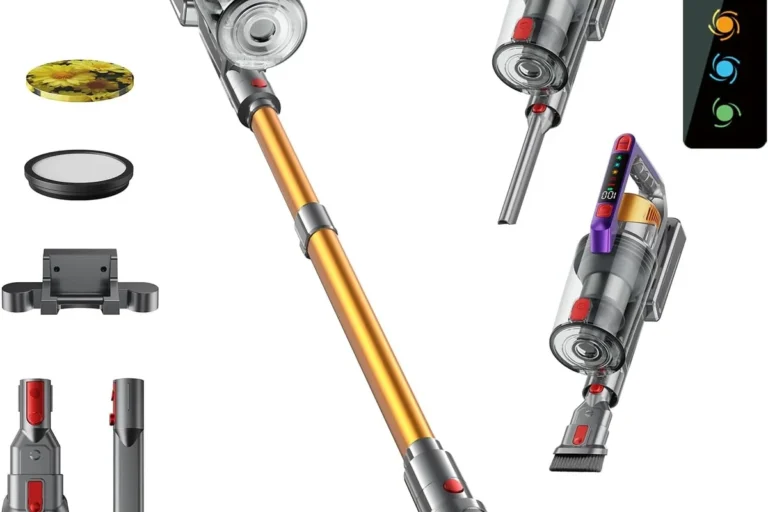
Dyson stick vacuum pulsing usually indicates restricted airflow, a blockage, a clogged filter, or an intermittent power problem. Start with cleaning and isolation tests before buying parts or replacing the vacuum. When repair no longer makes financial sense, the Dyson V15 Detect Plus and Gen5detect are the two premium upgrades compared in this guide.
Most pulsing cases are caused by a blocked airway, full bin, clogged filter, obstructed cleaner head, or incorrectly installed component.
A balanced premium upgrade with 240 Air Watts of listed suction, up to 60 minutes of runtime, dust illumination, and intelligent power adjustment.
Dyson’s higher-power flagship option with 280 Air Watts, up to 70 minutes of listed runtime, HEPA filtration, and advanced maintenance feedback.
A Dyson that repeatedly starts and stops is usually reacting to restricted airflow. Dyson describes pulsing as a protective behavior that alerts the user to a blockage or clogged filter and helps prevent motor damage. The machine may eventually cut out until the obstruction is cleared.
Begin with the bin, cleaner head, wand, inlets, cyclone openings, and filter. If the vacuum still pulses after the airflow path is clear and the filter is fully dry, investigate the battery, charger, electrical contacts, and model-specific alerts. Stop using the machine immediately if the battery swells, sparks, smells burnt, leaks, or becomes severely hot.
Pulsing is the rapid on-off or surging sound that occurs when suction cannot remain steady. It is different from a vacuum that simply has a short battery runtime. Pulsing usually points to airflow restriction; a machine that runs smoothly and then dies may point more strongly toward charge level, battery wear, or electronics.
| Symptom | Most likely direction | First check |
|---|---|---|
| Rapid start-stop pulsing | Blocked airflow or clogged filter | Remove tools, empty bin, inspect airways |
| Runs normally but runtime is short | Low charge or aging battery | Fully charge and compare runtime |
| Pulses only with cleaner head | Head blockage, brush resistance, or electrical connector | Test main body without the attachment |
| Pulses after filter washing | Filter still damp or installed incorrectly | Remove and dry for at least 24 hours |
| No power, flashing warning, or charging fault | Battery, charger, contact, or electronic issue | Use the model-specific Dyson diagnostic guide |
- Switch off and disconnect the charger. Let an overheated machine cool before dismantling or inspecting it.
- Empty the bin below the MAX line. Packed debris and fine dust around the shroud can reduce airflow.
- Remove every tool and attachment. Test the main body briefly according to the model’s official instructions.
- Inspect the wand and inlets. Look for hair, paper, fabric, compacted dust, toys, and other obstructions.
- Clean the brush bar and cleaner head. Remove wrapped hair, thread, and debris that prevents normal rotation or airflow.
- Wash the filter correctly. Use cold water and follow the exact instructions for your Dyson model.
- Dry the filter completely. Dyson commonly instructs users to allow at least 24 hours in a well-ventilated location.
- Inspect battery and charging contacts. Check for looseness, dirt, damage, heat, swelling, or intermittent charging.
Empty the bin as soon as debris reaches the MAX line. Running the vacuum with an overfilled bin can increase filter loading and restrict the airflow path. Fine powder may cling around the cyclone shroud and inlet even after the main debris falls out.
Use only the cleaning method recommended for your model. Do not insert sharp tools into the cyclone or motor body. If debris is tightly lodged and cannot be removed safely, contact Dyson support or a qualified repair service.
Look through the wand from both ends under good lighting. Check the connector bends, narrow inlets, and the airway directly behind the cleaner head. Soft objects can create a flap-like obstruction that is difficult to see from only one direction.
Remove hair and string from the brush bar according to the manual. A heavily wrapped roller can create mechanical resistance, reduce pickup, and trigger cutouts on models that monitor the cleaner head.
| Attachment test | Result | Likely conclusion |
|---|---|---|
| Main body only | Runs normally | Fault is probably in a removed tool, wand, or head |
| Main body plus wand | Starts pulsing | Inspect the wand and connection points |
| Pulses only with floor head | Main body and wand are stable | Inspect roller, airway, motor, and head contacts |
| Pulses with every configuration | No isolated accessory | Check filter, cyclone, battery, and main body |
A clogged filter is one of the most common causes of Dyson pulsing. Dyson support guidance recommends regular filter maintenance and, for many cordless models, washing the filter at least monthly. Homes with pets, fine dust, heavy use, or renovation debris may require more frequent attention.
Rinse or wash only as the model manual directs. Do not use a dishwasher, washing machine, tumble dryer, oven, microwave, open flame, or direct high heat. Leave the filter in moving air for at least 24 hours and reinstall it only when every section is completely dry.
Power problems can mimic airflow pulsing. Compare current runtime with the machine’s earlier behavior under the same mode and attachment. A battery that runs only briefly, fails to charge fully, becomes unusually hot, or cuts out under load may be worn or damaged.
Inspect the charger cable, wall plug, charging connector, battery release, and contact points. Use the charger designed for the exact Dyson model. Stop using any charger with exposed wire, cracked insulation, bent pins, burnt odor, sparking, or severe heat.
- Blockage or filter alert
- Pulsing changes when an attachment is removed
- Visible debris in the wand or cleaner head
- Filter is dirty or was recently washed
- Suction improves after cleaning
- Very short runtime after a full charge
- Charging starts and stops
- Battery becomes abnormally hot
- Machine cuts out even with clear airflow
- Visible swelling, damage, odor, or contact corrosion
Stop home troubleshooting when the vacuum has a swollen battery, burning smell, sparks, liquid damage, cracked electrical housing, or repeated severe overheating. Internal motor, battery-management, or charging-circuit faults should not be repaired casually.
Check the model serial number and warranty before ordering replacement parts. Dyson filters, batteries, chargers, and cleaner heads vary across V-series generations and regional configurations. A connector that looks similar may still be electrically incompatible.
| Condition | Recommended decision | Reason |
|---|---|---|
| Simple blockage or dirty filter | Clean and retest | Usually the lowest-cost solution |
| Worn replaceable battery | Compare official battery cost with vacuum age | A battery may restore normal runtime |
| Damaged cleaner head or charger | Replace the verified compatible part | Avoid replacing an otherwise functional vacuum |
| Multiple expensive parts are failing | Compare repair total with replacement value | A premium upgrade may provide better long-term value |
| Swelling, burning, sparking, or liquid damage | Stop use and seek professional service | Potential electrical and battery hazard |

The Dyson V15 Detect Plus is the more balanced premium replacement for owners moving from an older V7, V8, V10, or V11. Dyson lists 240 Air Watts of suction and up to 60 minutes of runtime. It adds illuminated hard-floor cleaning, automatic power adjustment, an LCD display, a Digital Motorbar cleaner head, and hair-detangling tools.
- 240 Air Watts of listed suction
- Up to 60 minutes of runtime
- Fluffy Optic head illuminates fine dust
- Automatic power adjustment
- LCD runtime and maintenance information
- Digital Motorbar with hair detangling
- Converts to handheld cleaning
- Premium purchase price
- Maximum runtime depends on mode and attachment
- Smaller bin than Dyson’s Outsize models
- Can still pulse when blocked or poorly maintained
- May be unnecessary if your current Dyson needs only a filter or battery
Replacement becomes reasonable when several high-cost components are worn, the machine is out of warranty, compatible parts are difficult to obtain, and repair cost approaches the value of a newer vacuum. A newer model may also make sense when your cleaning needs have changed substantially.
Do not replace solely because the machine pulses once. Pulsing is often a useful warning that maintenance is required. A new premium vacuum will need the same ongoing bin, filter, brush, and blockage care.

The Dyson Gen5detect is the flagship option for buyers who prioritize stronger suction, advanced filtration, longer listed runtime, and detailed cleaning feedback. Dyson lists 280 Air Watts of suction and up to 70 minutes of runtime. Its LCD reports remaining time, cleaning modes, particle information, and maintenance alerts.
- 280 Air Watts of listed suction
- Up to 70 minutes of runtime
- Whole-machine HEPA filtration
- Advanced LCD cleaning feedback
- Dust detection and automatic power adjustment
- Digital Motorbar and Hair Screw tools
- Built-in crevice and dusting tool
- Very high purchase price
- Heavier than many older Dyson stick vacuums
- Maximum runtime changes with mode and floor head
- Can still pulse when airflow is restricted
- Advanced features may be excessive for small apartments
| Feature | Dyson V15 Detect Plus | Dyson Gen5detect |
|---|---|---|
| Best buyer | Most premium households | Flagship performance buyer |
| Listed suction | 240 AW | 280 AW |
| Maximum listed runtime | Up to 60 minutes | Up to 70 minutes |
| Filtration | Whole-machine filtration | Whole-machine HEPA filtration |
| Maintenance feedback | LCD runtime and alerts | Advanced LCD data and alerts |
| Handling | More balanced for general use | Heavier flagship design |
| Main advantage | Better value and balance | Maximum Dyson suction and filtration |
| Pulsing protection | Still requires clear airflow | Still requires clear airflow |
- Empty the bin before debris reaches or compacts above the MAX line.
- Inspect the wand and cleaner head after vacuuming hair, paper, fabric, or large debris.
- Wash the filter on the schedule recommended for the exact model.
- Allow washable filters to dry for at least 24 hours with good airflow.
- Do not use the vacuum to collect liquid, hot ash, or unsuitable construction dust.
- Keep charging contacts clean and use the correct Dyson charger.
- Store the vacuum and battery away from extreme heat, moisture, and direct sunlight.
- Respond to blockage and filter alerts instead of repeatedly restarting the machine.
| Your situation | Best next step | Why |
|---|---|---|
| Pulsing stops after cleaning | Keep the current vacuum | The machine was responding to airflow restriction |
| Battery is the only failed part | Compare verified replacement battery cost | A battery may be cheaper than a full replacement |
| Older model with multiple worn parts | Consider Dyson V15 Detect Plus | Balanced premium performance and modern feedback |
| You want Dyson’s strongest flagship system | Consider Dyson Gen5detect | Higher listed suction, HEPA filtration, and longer runtime |
| Battery swelling, burning, or sparking | Stop use and contact professional support | Potential electrical or lithium-battery hazard |
Why does my Dyson stick vacuum keep pulsing?
Pulsing usually indicates restricted airflow from a blockage, full bin, clogged filter, or obstructed attachment. Some power and battery problems can create similar symptoms.
What should I check first?
Empty the bin, remove the wand and cleaner head, inspect every airway, clean the brush bar, and check the filter.
Can a dirty filter cause Dyson pulsing?
Yes. Dyson states that filter buildup can restrict airflow and make the motor pulse.
How long should a Dyson filter dry?
Dyson commonly instructs users to allow at least 24 hours in a well-ventilated location. Reinstall it only when completely dry.
Can I run the vacuum without attachments to test it?
Many Dyson troubleshooting guides use an attachment-isolation test. Follow the instructions for your exact model and keep hair, clothing, and fingers away from openings.
How do I know whether the battery is failing?
Common signs include greatly reduced runtime, charging failures, intermittent power with clear airflow, unusual heat, swelling, or error lights.
Will the Dyson V15 Detect Plus never pulse?
No. It can pulse if a blockage or clogged filter restricts airflow. Regular maintenance is still required.
Is the Gen5detect better than the V15?
It offers higher listed suction, longer runtime, and HEPA filtration, but it is more expensive and heavier. The V15 is the more balanced choice for many homes.
Should I replace the battery or the whole vacuum?
Replace only the verified failed part when the rest of the vacuum is in good condition. Consider a full replacement when multiple costly components are worn or parts are difficult to obtain.
When should I stop using a pulsing Dyson?
Stop immediately if you notice battery swelling, burning odor, sparks, liquid damage, severe overheating, or damaged electrical components.
Dyson Support: Motor Pulsing and Filter Maintenance
Dyson: V15 Detect Specifications
Most pulsing problems can be diagnosed without replacing the vacuum. When repair is no longer practical, the Dyson V15 Detect Plus is the stronger all-around premium replacement.