7 Best Solar Generators for Charging Laptops: Top GadgetMakersBlog Picks
Affiliate disclosure: As an Amazon Associate, Gadget Makers Blog may earn from qualifying purchases. This does not change the price you pay.
Choosing the best solar generator for charging laptops comes down to more than just battery size. Laptop shoppers usually need the right mix of AC output, USB-C charging, portability, and dependable recharging options for travel, home office backup, or off-grid work.
This GadgetMakersBlog guide compares seven solar generators and power stations from a laptop-and-computer-accessories angle. Ethan Walker focuses on the supplied specs, ratings, and feature bullets so you can narrow down the right fit for school, remote work, commuting, camping, or emergency backup.
If you want the best solar generator for charging laptops, start with the Jackery HomePower 3000 for high-capacity backup, the Jackery Explorer 2000 v2 for a balanced premium option, or the AFERIY 1024Wh model if you want a lighter everyday setup with strong laptop-focused port support.
Quick Product Comparison
| Product | Image | Best For | Check Price |
|---|---|---|---|
| 1. Jackery HomePower 3000 | 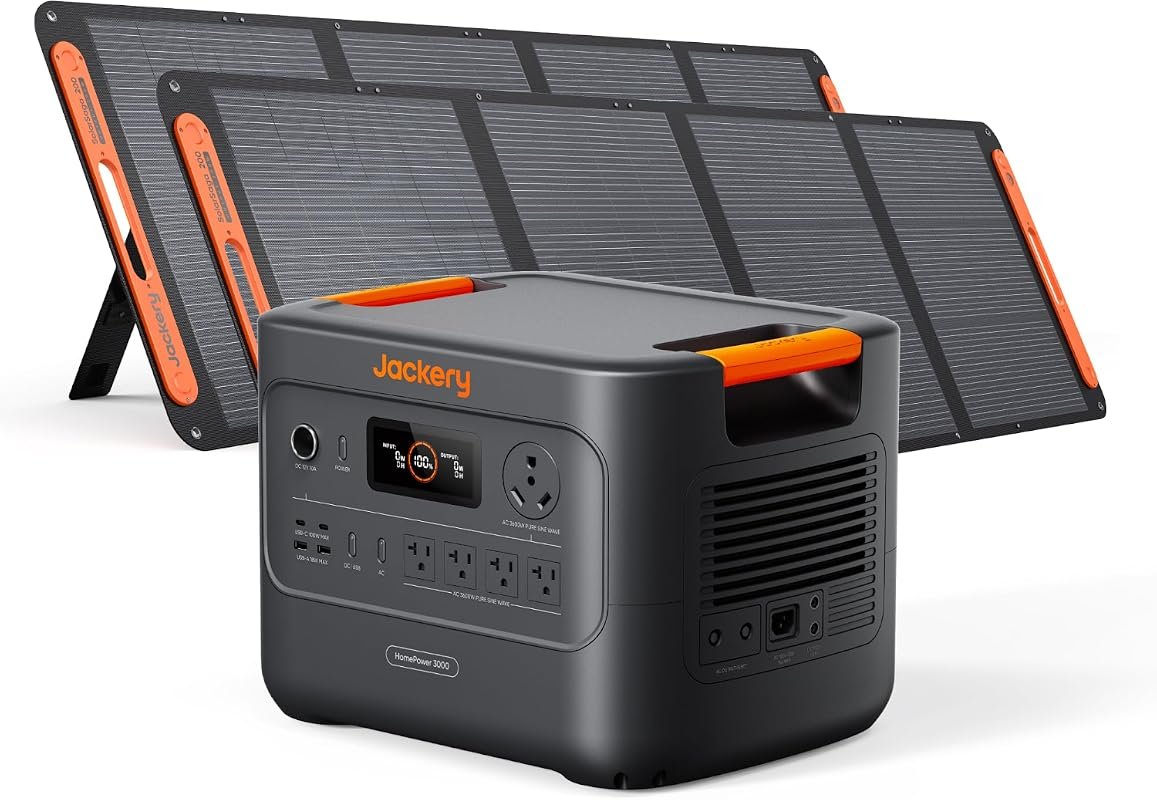 | Whole-home backup and long laptop runtime | Check Price |
| 2. EBL 2400W Power Station | 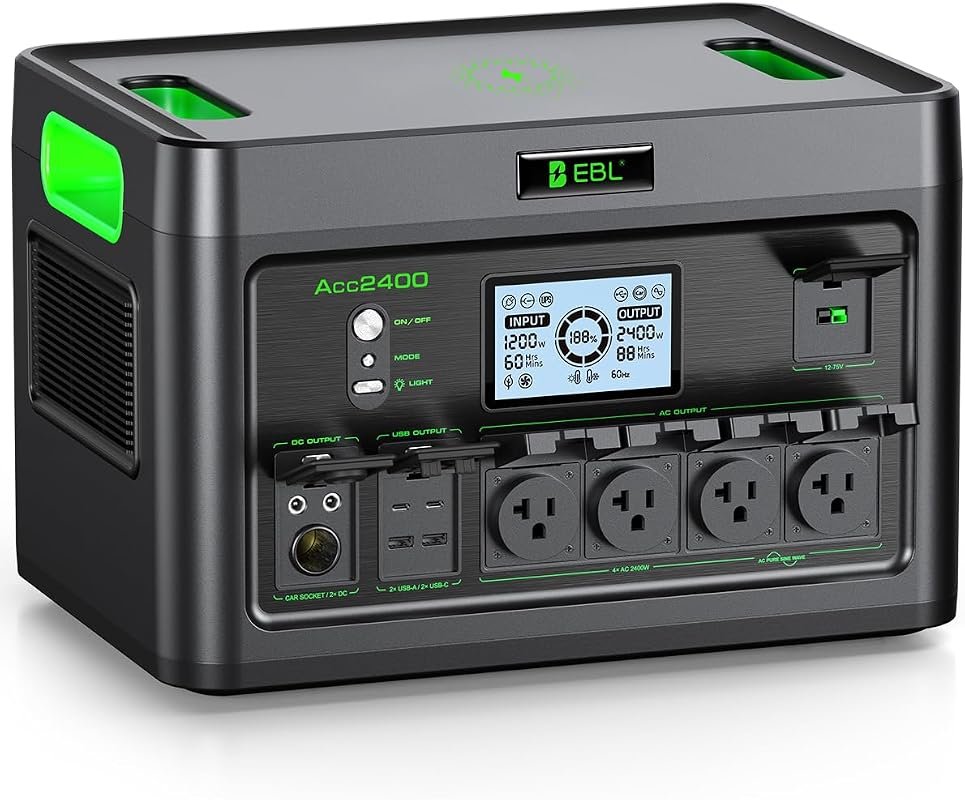 | Multi-device laptop backup for travel or outages | Check Price |
| 3. Jackery Explorer 2000 v2 | 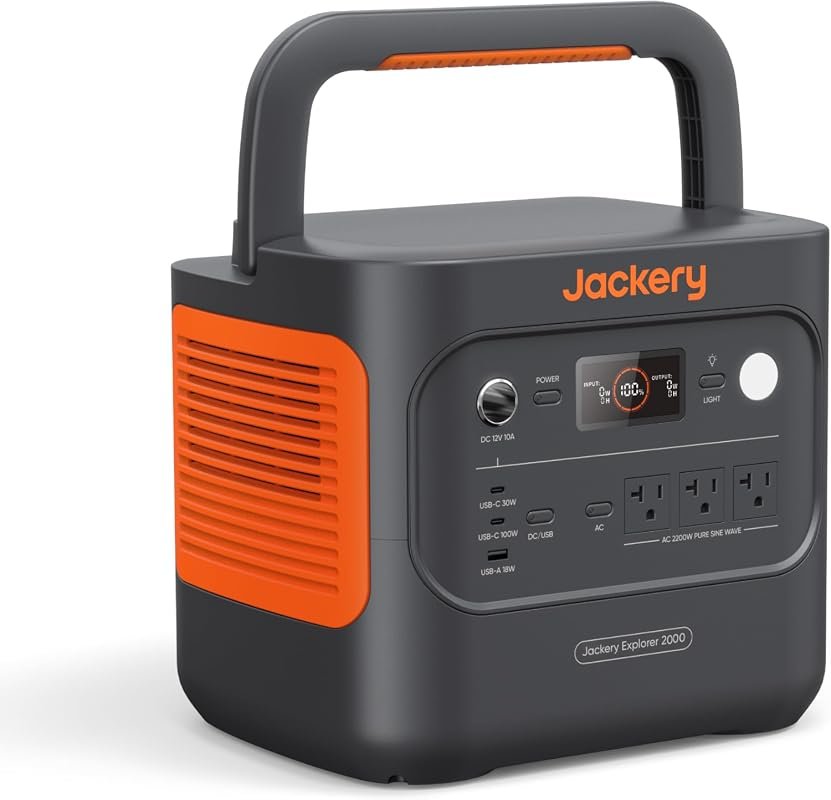 | Balanced premium pick for laptop charging | Check Price |
| 4. Portable Solar Generator 300W | 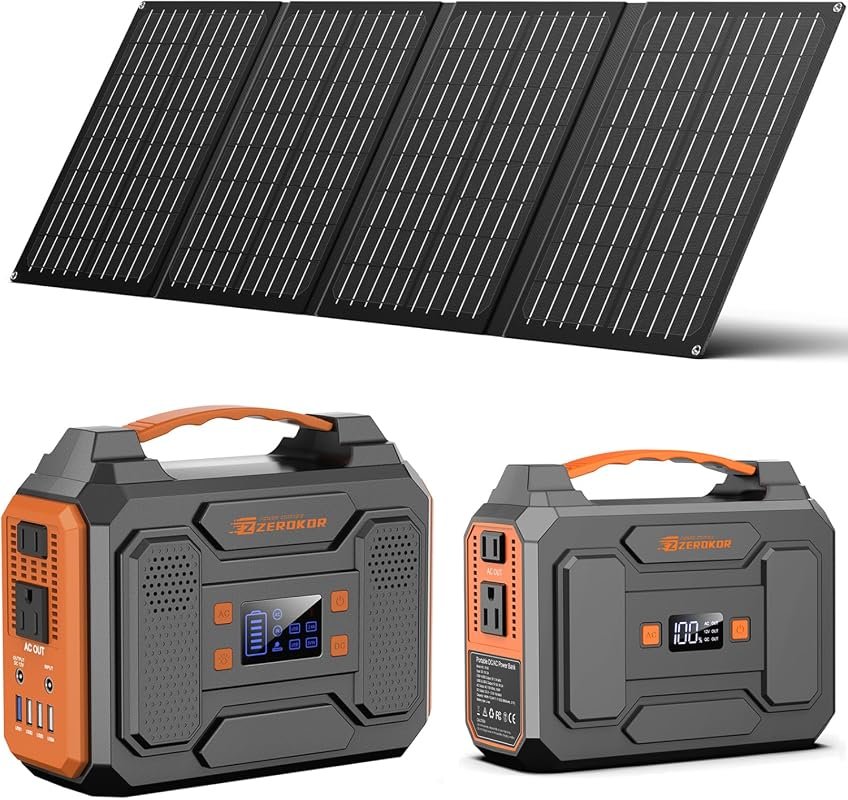 | Budget-friendly laptop charging for light use | Check Price |
| 5. FlexSolar 60W Solar Panel | 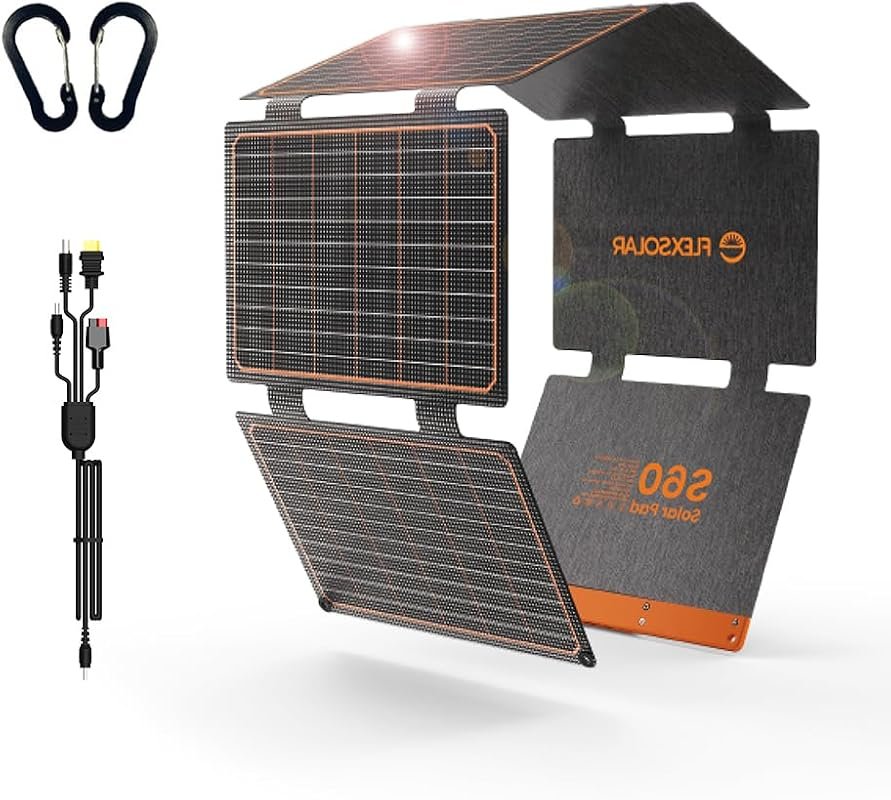 | Solar charging small power banks and compact setups | Check Price |
| 6. AFERIY Portable Power Station | 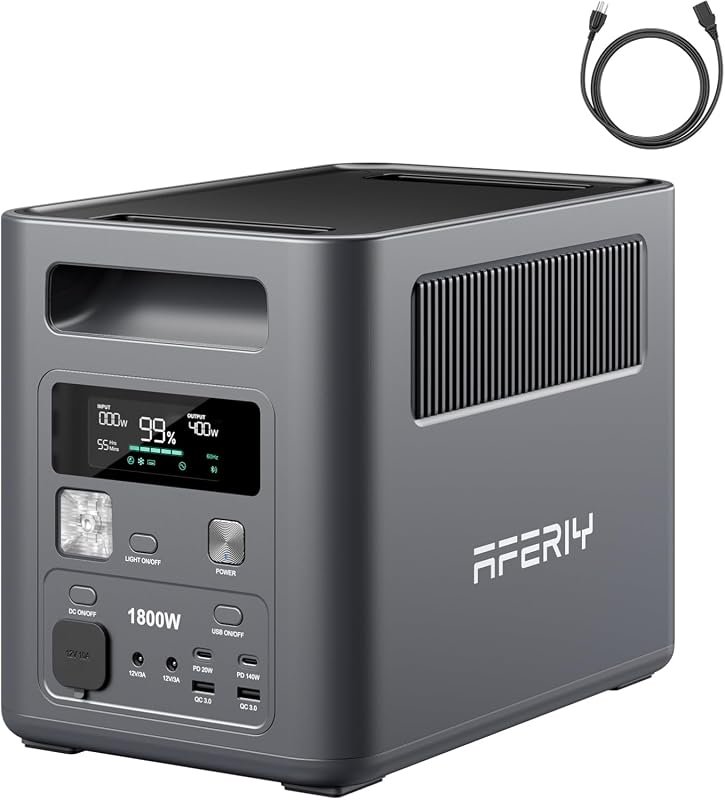 | Laptop-friendly portable backup with fast recharge | Check Price |
| 7. Portable Solar Power Station 100W | 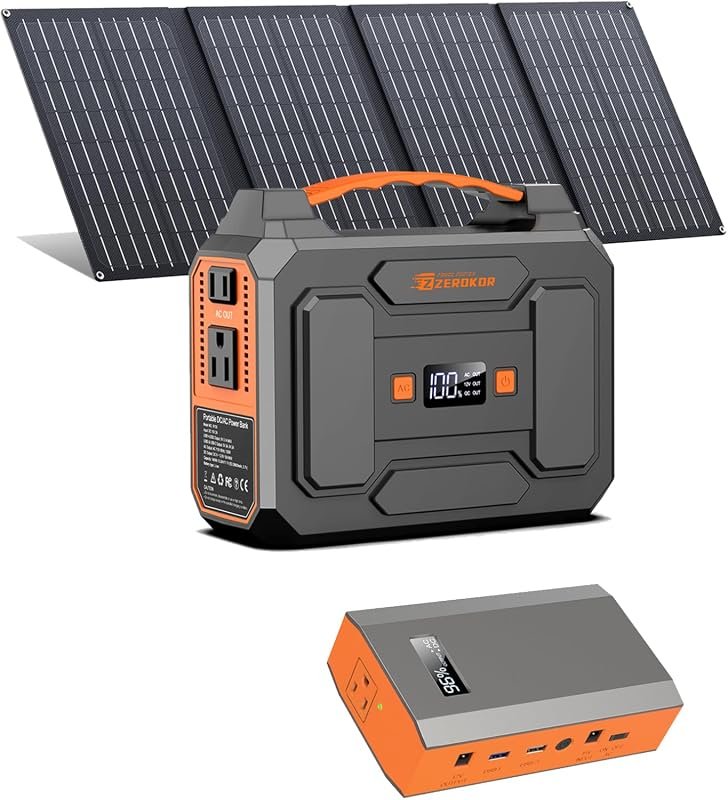 | Ultra-compact emergency charging for small devices | Check Price |
What to Look for in the Best Solar Generator for Charging Laptops
Enough AC and USB-C output for your laptop
For laptop charging, the most important question is whether the unit can supply the power your charger expects through AC or USB-C. If your laptop needs a wall-style adapter, check the AC outlet rating. If you want direct USB-C charging, verify the USB-C PD wattage on the current listing or manual.
Battery capacity that matches your workday
Larger capacity helps if you want to keep a laptop, phone, and tablet going through outages or long travel days. Smaller units can still work for light charging, but shoppers should verify whether the capacity is enough for the number of charges they actually need.
Recharge options for home, car, and solar use
A good laptop power setup is not just about output. It also needs practical recharging, such as AC wall charging, solar input, or car charging, especially if you plan to use it on trips or during outages.
Port mix for a modern computer bag
USB-C, USB-A, and AC ports matter because many laptop users also need to power phones, tablets, hotspots, and accessories. Look for a layout that matches your gear so you do not need extra adapters everywhere.
Portability and noise for desk or travel use
If the unit will sit near a work desk, in a dorm, or inside a vehicle, size and weight matter. Quiet operation is also useful for remote work, video calls, and overnight charging.
Safety features and power management
For computer gear, look for clear protection features, UPS behavior, and stable output claims. Use the manufacturer’s instructions, rated cables, and proper ventilation, especially when charging multiple devices at once.
- Match the generator’s output to your laptop charger, not just the laptop itself, and verify USB-C PD or AC compatibility before buying.
- Keep certified cables and the original laptop charger handy so you can switch between AC and USB-C as needed.
- If you plan to use solar input often, confirm panel wattage, connector type, and charging limits on the current listing.
Our Top 7 Best Solar Generator for Charging Laptops Picks and Reviews
1. Jackery HomePower 3000 Solar Generator with 2x200W Panels, 3072Wh, 3600W Output
The Jackery HomePower 3000 is the heaviest-duty option here, built for users who want laptop charging plus broad household backup. Its large capacity and high output make it more than enough for a work-from-home setup, while the port mix keeps smaller devices charged too.
Key Features That Stand Out
- 3072Wh capacity and 3600W output for demanding backup use.
- Dual 100W PD ports for fast charging phones, tablets, and drones.
- ≤20ms UPS behavior for smoother protection during outages.
- Recharges in 1.7 hours via hybrid AC and DC, or 2.2 hours via AC.
- Supports solar charging with 2× SolarSaga 200W panels up to 80% in 9 hours.
Why It Stands Out
This model stands out because it combines laptop-friendly ports with serious backup capacity. For shoppers who want one unit that can cover computer gear and home essentials, the supplied specs make it the most capable all-around choice in this roundup.
Best For
Pros and Cons
- Very high capacity and output for long laptop runtime.
- Fast recharging options add flexibility.
- UPS support is useful for sensitive computer gear.
- Likely more unit than a casual laptop user needs.
- Solar panel setup and size should be checked before buying.
2. EBL 2400W LiFePO4 Portable Power Station for Home Backup and Emergency Use
The EBL 2400W model is a strong alternative for laptop users who want broad device support and emergency-ready backup. It offers a wide port selection, backup switching, and enough capacity to handle more than just a notebook.
Key Features That Stand Out
- 1843.2Wh capacity with 2400W output.
- Supports simultaneous charging of 12 devices.
- Includes 4 AC ports, USB-A, fast-charging USB-C, car, DC, and wireless charging.
- Emergency power mode switches in 0.1 seconds during blackouts.
- LiFePO4 battery is rated for over 3500 cycles and 10+ years of service life.
Why It Stands Out
This power station is appealing for shoppers who want a practical middle ground between huge home-backup systems and compact laptop chargers. The wired and wireless port mix also makes it easier to support a laptop, phone, and accessories at the same time.
Best For
Pros and Cons
- Wide port selection for mixed-device setups.
- Fast backup transition helps protect computer work.
- Long-life battery design may reduce replacement frequency.
- Weighs 55 pounds, so portability is limited.
- Solar charging details should be checked on the current listing.
3. Jackery Explorer 2000 v2 Portable Power Station, 2042Wh Battery, 2200W AC Output
The Explorer 2000 v2 is a balanced choice for laptop charging if you want a premium-feeling unit without jumping all the way to the largest backup class. It combines strong output, a 100W USB-C PD port, and compact weight for its capacity level.
Key Features That Stand Out
- 2042Wh capacity with 2200W total AC output across 3 ports.
- USB-C PD 100W port supports fast charging for electronic devices.
- Charges to 80% in 66 minutes with AC fast charging.
- Solar charge in as few as 6 hours with 400W panels.
- Silent Charging Mode operates at less than 30dB.
Why It Stands Out
For many laptop shoppers, this is the most practical mix of power, portability, and charging flexibility in the group. The supplied specs suggest enough capacity for serious work sessions while still remaining easier to carry than bulkier backup stations.
Best For
Pros and Cons
- Strong capacity with a useful 100W USB-C PD port.
- Quiet operation is helpful near desks or sleeping areas.
- Fast AC charging reduces downtime.
- Panel compatibility and solar kit details need verification.
- Still larger than compact travel-only options.
4. Portable Solar Generator 300W Power Station with 40W Foldable Panel for Camping and Backup
This bundle is aimed at shoppers who need a light-duty laptop charging option with a solar panel included. It is not a high-capacity workstation backup, but it can suit simple charging needs for smaller electronics and occasional notebook use.
Key Features That Stand Out
- Includes a 300W portable power station and 40W solar panel.
- 280Wh lithium-ion battery pack.
- Two 110V/300W max AC outlets with pure sine wave output.
- USB, DC, and QC3.0 ports for smaller electronics.
- Built-in BMS with short circuit, over-current, over-voltage, and overload protection.
Why It Stands Out
This model makes sense if your laptop use is light and you want a lower-cost way to get into solar backup. The included panel is convenient, but shoppers should keep expectations aligned with the 300W ceiling and verify that their laptop charger is compatible.
Best For
Pros and Cons
- Panel included for a simple starter setup.
- Pure sine wave AC output is useful for electronics.
- Multiple ports support small-device charging.
- Limited 300W ceiling may rule out many laptop chargers and accessories.
- Best suited to smaller, lighter workloads.
5. FlexSolar 60W Foldable Portable Solar Panel Charger, IP67 Waterproof for Outdoor Use
The FlexSolar 60W is a solar panel accessory rather than a full generator, so it suits buyers who already own a small power bank or compact generator. It is most useful as a lightweight charging source for smaller electronics and low-capacity portable batteries.
Key Features That Stand Out
- QC3.0 USB-A, PD3.0 USB-C, and DC output options.
- Designed to directly power small-to-medium solar generators under 300Wh, battery packs, tablets, and smartphones.
- Up to 24% energy conversion with monocrystalline silicon cells.
- IP65 dustproof and waterproof technology for outdoor use.
- 6 folds and 2.6 lbs for easier carry and storage.
Why It Stands Out
This is the right kind of product for a shopper who wants to add solar input to a compact laptop-charging kit. It is not meant to replace a full power station, but it can help keep a smaller setup topped off when sunlight is available.
Best For
Pros and Cons
- Very portable and easy to pack.
- Useful for smaller solar-compatible charging setups.
- Weather-resistant design adds outdoor flexibility.
- Not a complete generator, so it needs compatible gear.
- Output varies with sunlight and weather.
6. AFERIY 1024Wh Portable Power Station Solar Generator, 1800W Fast Recharge Backup Power
The AFERIY model is a strong laptop-focused pick because it combines a 140W PD USB-C port with a compact, lighter design. It is well suited to users who want a portable backup station for work, travel, or emergency charging without moving into the heaviest category.
Key Features That Stand Out
- 1024Wh capacity with 1800W AC output.
- 140W PD USB-C port for fast-charging laptops like MacBook Pro.
- 4 charging methods, including AC, solar, car, and AC plus solar.
- <10ms UPS for uninterrupted backup during outages.
- 13 multi-purpose ports for charging several devices at once.
Why It Stands Out
Among the units here, this one is especially appealing for laptop owners who care about USB-C power delivery and portability. The supplied specs also make it a practical choice for people who want quieter everyday use and quick recharge options.
Best For
Pros and Cons
- 140W USB-C PD is a standout for modern laptops.
- Compact and relatively light for its class.
- UPS and quiet operation are useful for work setups.
- Solar panel compatibility details should be confirmed.
- Not as large as the biggest backup units.
7. Portable 100W Solar Generator with 65W Power Bank and 40W Foldable Panel
This compact ZeroKor bundle is aimed at very light backup use. It is better suited to phones, tablets, and small laptop-adjacent accessories than to full-time notebook charging, but it can still help in emergencies when you need a small portable power source.
Key Features That Stand Out
- Bundle includes a 100W portable solar power station, a 65W portable power bank, and a 40W solar panel.
- 100W unit includes AC outlets, DC, USB, QC, and USB-C ports.
- 65W power bank adds another compact charging option.
- Built-in BMS with short circuit, over-current, over-voltage, and overload protection.
- Includes flashlight modes for emergency use.
Why It Stands Out
The main appeal here is portability and bundled convenience. If your laptop is only one part of a broader small-device kit, this bundle may be enough for short charging sessions, but the 100W limit means buyers should be careful about compatibility.
Best For
Pros and Cons
- Very compact bundle with multiple small-device charging options.
- Includes both a power station and power bank.
- Safety protections are built in.
- 100W limit is restrictive for many laptops.
- Best suited to light emergency use rather than extended work sessions.
If you plan to charge a laptop through a solar generator, verify the charger wattage, connector type, and whether the unit supports USB-C PD or only AC output. Using an underpowered port, non-rated cable, or incompatible adapter can lead to slow charging, shutdowns, or unnecessary heat.
Complete Roundup for the Best Solar Generator for Charging Laptops
Best for light laptop use and emergency kits, with compact capacity, basic ports, and simple solar support.
Ideal for most laptop shoppers who want better capacity, USB-C support, and more flexible charging options.
Best for home office backup and demanding users needing high output, larger capacity, and broader device coverage.
- Choose a model with enough AC or USB-C output for your laptop charger.
- Check the solar input and panel compatibility before relying on off-grid charging.
- Use the manufacturer’s instructions and rated cables for safe setup.
- Do not assume every power station can charge every laptop directly over USB-C.
- Do not overload low-watt models with accessories beyond their stated limits.
- Do not ignore ventilation or heat buildup during charging sessions.
- For MacBook, Windows ultrabook, or Chromebook buyers, confirm the exact USB-C PD wattage your charger needs.
- If you want backup for remote work, favor units with UPS behavior and multiple AC ports.
- For travel, balance capacity with weight so the unit actually fits your routine.
Before buying, match your laptop charger to the generator’s AC output or USB-C PD rating, then confirm cable and plug compatibility on the current product listing or manual.
- Jackery HomePower 3000: best for all-in-one backup and long laptop runtime.
- EBL 2400W Power Station: best for multi-device households and travel backup.
- Jackery Explorer 2000 v2: best for a quieter, balanced premium setup.
- Portable Solar Generator 300W: best for starter solar backup and light laptop use.
- FlexSolar 60W Solar Panel: best for compact solar input on small setups.
- AFERIY Portable Power Station: best for USB-C laptop charging with lighter portability.
- Portable Solar Power Station 100W: best for emergency kits and very small loads.
- General reminder: always verify your laptop’s charging wattage and connector type before you buy.
- General reminder: if solar charging matters, check the panel input limits and included accessories carefully.
Frequently Asked Questions About Best Solar Generator For Charging Laptops
Yes, if the unit supports the right output for your laptop, usually AC or USB-C PD. Check the wattage and connector type on the current listing before buying.
USB-C can be simpler for modern laptops when the generator supports the right PD wattage. AC is still useful if your laptop relies on its original wall adapter.
That depends on how long you want to work and how many devices you plan to charge. Bigger capacity helps if you also need phones, tablets, or router backup.
They can be, but only if the laptop’s charger fits the output limits. Small models are usually better for short sessions, lighter notebooks, or emergency use.
Check panel wattage, connector type, and the generator’s solar input limits. Also confirm whether any adapter or controller is required by the manufacturer.
Several can, especially models with UPS support and enough AC or USB-C output. If your work depends on a laptop and internet gear, verify runtime and port count first.
If you want the broadest backup option, the Jackery HomePower 3000 is the standout for laptop users who also need household coverage. For a more balanced everyday pick, the Jackery Explorer 2000 v2 and AFERIY portable power station offer strong laptop-focused features with easier portability.
For shoppers on a tighter budget or with lighter needs, the smaller ZeroKor bundle and the FlexSolar panel can make sense if your device mix is modest. The safest approach is to match your laptop’s charger requirements to the generator’s output before you buy, then choose the smallest setup that still supports your routine.
This roundup is based on the supplied product titles, feature bullets, ratings, review counts, image filenames, and affiliate links only. Because no verified first-hand testing evidence is available, the recommendations use evidence-based editorial judgment focused on laptop charging fit, output type, portability, recharge options, and safety-minded compatibility checks. When a technical detail was not supplied, readers should verify it on the current Amazon listing, manufacturer page, app listing, or product manual.