

Anker A91C6 Review: Amazon vs Walmart Price Comparison
Affiliate disclosure: As an Amazon Associate I earn from qualifying purchases. We may also earn a commission from qualifying Walmart purchases through our links, at no extra cost to you.
Checked October 19, 2026 (UTC). Walmart observation used the page’s displayed U.S. shipping location, Sacramento, CA 95829. Prices, sellers, delivery, taxes and stock can change. Confirm your own checkout total.
This Anker A91C6 review and Amazon vs Walmart comparison focuses on the 9-in-1, 100W charging station. It is easy to confuse this product with another Anker strip, a 65W station or a desktop charger that has no AC outlets. A similar product title does not make two offers equivalent.
The useful question is whether this station fits your desk and whether the offer you can actually buy is good value. Below, we separate a directly observed Walmart price from Amazon’s retrieved listing status, explain the important power limits, and provide a practical checklist for choosing between the stores.
Consider the A91C6 when desk convenience matters more than having the most AC sockets. Do not choose it expecting two laptops to each receive 100W simultaneously. For the purchase itself, compare a matching new unit from a seller you trust; there is no verified Amazon-to-Walmart dollar saving to report in this check.
Amazon vs Walmart: price and availability
| Store | Offer observed | Seller and limits | Next step |
|---|---|---|---|
| Amazon | Current price not verified. Retrieved listing reported no featured offer. | ASIN B0CSFQQVVT, black. Retrieved information may lag live offers; this does not establish that every seller is out of stock. | Check buying options |
| Walmart | $39.99 before applicable tax; Add to cart available during the live check. | Black variant, displayed as “Balck”; sold and shipped by AnkerDirect. Free shipping shown for the page’s displayed location. | Check your delivered price |
We matched the product family, connection layout and black variant rather than comparing a different station just because it also says 100W. Check the model on the seller’s current specification panel and on the packaging when it arrives. Bundles, refurbished units, color choices and regional versions can have different offers.
A blank Amazon price is not a zero-dollar price and cannot be used in a savings calculation. An old deal article is not a substitute for a current offer either. If Amazon later presents a new offer, compare it with Walmart again before deciding which checkout gives you the better purchase.
What the observed price includes
The Walmart figure is the item price seen on the product page, not a guaranteed final total for every reader. Your delivery address, selected service, optional protection plan and tax can change the amount you pay. Keep those separate from the product price when comparing the stores.
Our recommendation is to open both buttons before placing an order. Check the actual seller line, condition and delivery estimate, then compare the total for the same quantity. If one offer requires a membership or a coupon, decide whether you already qualify before counting that discount as money saved.
What the Anker A91C6 provides
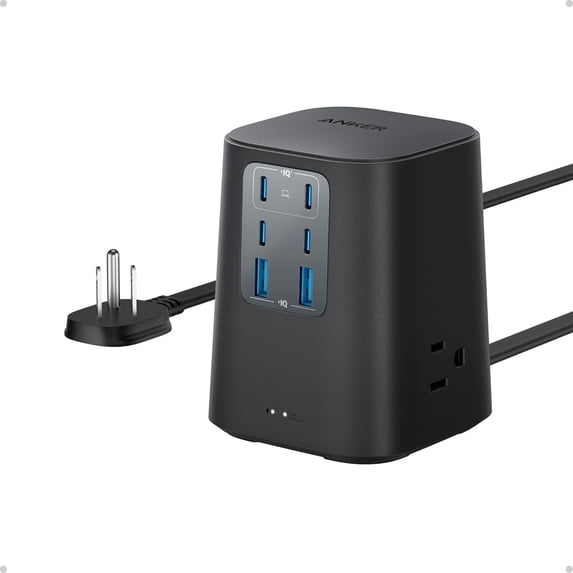
Anker’s official specifications identify three AC outlets, four USB-C ports and two USB-A ports. USB-C1 or USB-C2 can supply up to 100W when used individually. USB-C3 and C4 are listed at up to 15W, while each USB-A output is listed at up to 12W. Total USB output is 100W.
The official AC specification is 125V, 60Hz, 10A, with 1000W AC output. The USB module’s separate input-voltage wording should not be treated as permission to use the complete U.S. strip on a different mains supply. Follow the label and regional manual for the entire unit.
The manufacturer also lists a roughly 3.15-by-3.15-inch footprint and a height of 4.06 inches. Those measurements make a useful starting point for planning your desk, but leave extra clearance for plugs and cable bends. The station is not just the size of the empty housing once everything is connected.
The 100W detail that changes the buying decision
There are two different questions: what one port can deliver and how much the entire USB section can deliver. For this model, a 100W single-port capability sits inside a 100W total USB budget. Adding more USB devices does not create extra capacity beyond that total.
For a simple example, imagine you want a full 100W for a laptop and another 20W for a phone at the same time. That is a 120W request before any other USB accessories. It exceeds the station’s stated total, so this is not the right product if that exact simultaneous output is a requirement.
This example is arithmetic, not a measured charging result or a claim about a particular port split. Consult Anker’s current distribution diagram for your chosen connection combination. We have not tested sustained output, measured efficiency, checked operating temperature or timed any laptop charging with this unit.
Write down what charges together
Before buying, make two short lists: the devices that stay connected and the devices you connect only occasionally. A work laptop, phone and earbuds may call for a different arrangement from two workstations that must both charge quickly through lunch. This small planning step is more useful than counting empty ports.
Also distinguish the gear you can leave on its existing AC adapter. Some shoppers want to replace every charger with USB; others simply want one convenient place to plug things in. Those are different goals. Choose the station for the charging arrangement you intend to use every day.
Who should consider this station?
One laptop and a tidy shared charging spot
The strongest editorial case is a desk where one laptop is the main priority and several smaller accessories need convenient connections. The appeal is organizational: fewer separate charging blocks to manage and one place to check your cables. Whether that saves space depends on your current adapters and outlet access.
We would compare the purchase with the equipment you already own. If you have a reliable charger that meets every device’s needs, this station is mainly a convenience upgrade. If your desk lacks accessible sockets and USB connections, its combined format may solve a more specific everyday problem.
A buyer who can verify compatibility before checkout
Look at your laptop’s charging requirement before interpreting any “compatible with MacBook” or similar wording. A brand name covers many models with different power needs. If the requirement is unclear, find the exact laptop model and its manufacturer’s charging guidance before selecting a replacement setup.
The same approach helps avoid paying for an upgrade you cannot use. A device that accepts less power will not become a different device because a charger has a larger headline number. Start with the device, cable and charging purpose; let the station’s specification answer those needs.
When we would choose another option
Skip this model if the plan depends on two simultaneous 100W USB laptop outputs. Look for a charger whose manufacturer explicitly documents that combination instead. Do not infer dual-laptop performance from the presence of two high-power ports or from the sum of their individual maximum ratings.
Another reason to look elsewhere is outlet count. Three AC connections may be enough for a small desk but inconvenient for a larger setup. Count the plugs you already use, including the ones behind a monitor or under a table, before deciding that a compact station will replace your existing arrangement.
If surge protection is your main purchase criterion, compare that specification independently of charging speed. The A91C6 is advertised with 300J protection. A product with faster USB charging is not automatically the better surge protector, and a larger surge figure does not tell you the USB output either.
Cables: budget for the complete setup
Do not assume the cable lying in a drawer supports the charging mode you want. For a 100W connection, choose a suitable cable rated for that use, such as a compatible 5A electronically marked USB-C cable. Check the cable maker’s stated capability rather than relying on thickness, color or a braided jacket.
USB-IF’s current certified USB-C cable labeling uses 60W and 240W power marks. A suitable higher-rated cable can be useful for a 100W setup, but its label does not increase what the charger or device supports. Older 100W-rated cables require checking their own specifications; the change in logo scheme does not by itself make them unusable.
Treat cable cost as part of the comparison. A low station price may be less attractive if you need several new cables, while a bundle may include cables you do not need. Compare what you will actually use rather than assuming the bundle with the most items is the better value.
For compact portable setups, our short USB-C cable guide explains connector and length choices. A desk may need more reach than a power-bank pouch, so measure the route from the station to the laptop before ordering extra cables.

How to compare the final checkout fairly
1. Match the item and condition
Keep the model, color and quantity the same. If one page offers a restored unit and the other offers a new unit, describe them as different purchase choices. They can both be worth considering, but the price gap alone does not demonstrate a discount on an equivalent new product.
2. Read who sells and ships it
A marketplace name and a seller name are separate details. Record both for each offer. Our observed Walmart seller was AnkerDirect; that observation should not be projected onto every future offer. If the seller changes, review the new offer on its own terms before assuming the previous comparison still applies.
3. Compare costs you will actually pay
Add applicable delivery charges and tax, and remove optional extras you do not want. A protection plan is a separate purchase decision. Do not include a discount unless you qualify for it, and do not spend more merely to unlock a coupon that leaves your overall basket more expensive.
4. Check arrival and return conditions
Decide whether a faster arrival solves a real need. If your current charger still works, waiting may be reasonable; if this is for a planned office setup, timing may matter more. Read the return conditions shown for the selected seller, since a familiar storefront does not replace checking the actual offer.
5. Keep the order details
Save your receipt and the selected model information. When the package arrives, compare its label and included items with what you ordered. If the product differs, resolve that discrepancy with the seller before building your setup around assumptions from a similar listing.
Placement and electrical-use checks
Use the manufacturer’s instructions and the product’s own rating to plan the connected load. ESFI advises against overloading extension cords and using extension cords or power strips with heaters or fans. A convenient extra outlet is not a reason to add equipment that the strip is not suitable to supply.
Keep the station accessible enough to inspect and unplug. Route cords where they will not be pinched, pulled or covered, and avoid placing liquids beside the connections. If a cord, plug or housing is damaged, stop using it and follow the manufacturer’s support guidance instead of treating the damage as cosmetic.
For desk planning, sketch the cable paths before you position the station. Put frequently handled connections where you can reach them comfortably, and leave enough slack to move a laptop without pulling the station. This does not require a new accessory; it simply makes the purchase easier to use.
Frequently asked questions
Is Walmart cheaper than Amazon for the A91C6?
We cannot establish that. Walmart showed $39.99 during our live check, but a current Amazon selling price was not verified. Compare both current offers before paying.
Can both main USB-C ports deliver 100W together?
No. The official total USB output is 100W. A single-port maximum should not be added to another single-port maximum to invent a simultaneous rating.
Does nine-in-one mean nine AC outlets?
No. The layout combines three AC outlets and six USB ports. Count the type of connection you need, not just the overall number.
Have you tested charging speed or surge protection?
No. This is a specification-based buying assessment and retailer offer check. We have not carried out laboratory testing, electrical safety certification or hands-on charging benchmarks.
Can I use the U.S. model internationally?
Do not assume that from the USB module’s input range. Check the complete unit’s electrical label, regional instructions and intended mains supply. A plug-shape adapter does not establish compatibility.
Which offer should I choose today?
Choose an orderable offer for the correct model, with a suitable seller, return conditions and delivered total. The observed Walmart offer is a concrete option to inspect, but there is no verified dollar saving against Amazon in this comparison.
Our buying recommendation
The A91C6 is worth considering for a one-laptop desk that needs convenient AC and USB connections. Decide on the charging layout first, then shop for the exact unit. Avoid buying it for a dual-100W requirement or assuming a high USB rating answers every surge-protection question.
For the retailer decision, Walmart provided a directly observed $39.99 offer from AnkerDirect. Amazon remains a place to check current buying options, but this check did not produce a verified Amazon price. Treat that as an information limit rather than a reason to invent a winner.
Prepared for GadgetMakersBlog by Ethan Walker. This article distinguishes manufacturer specifications, a live Walmart offer observation, retrieved Amazon listing information and our own shopping analysis. Product images are retailer-supplied illustrations. No first-hand testing is claimed.



One Comment