Logitech M720 Review: Amazon vs Walmart Price Check
Affiliate disclosure: As an Amazon Associate I earn from qualifying purchases. We may also earn a commission from qualifying Walmart purchases through our links, at no extra cost to you.
Checked October 19, 2026 (UTC), October 20 in Bangladesh. Walmart used the page’s displayed U.S. shipping location, Sacramento, CA 95829. Prices, sellers, availability and return terms can change. Confirm the offer at checkout.
This Logitech M720 review compares Amazon and Walmart buying options and explains who should consider the Triathlon mouse. Its main attraction is a desk setup that involves more than one device. The purchase makes less sense if you only need a basic pointer and will never use the extra controls.
We checked the manufacturer information, matched retailer listings and inspected a live Walmart offer. We did not perform hands-on testing, measure wireless latency or run battery endurance trials. The recommendations below are buying analysis based on the documented design and practical shopping considerations.
Consider the M720 for everyday office work across a laptop and desktop. At the time of our check, Walmart supplied a buyable $34.99 offer from Newegg Inc. Amazon’s current price remains unverified. Open both stores, match the condition and compare the final total before buying.
Amazon vs Walmart: Logitech M720 price check
| Store | Price evidence | Seller and condition checks | Action |
|---|---|---|---|
| Amazon | Current selling price not verified. | Matched black M720 listing, ASIN B01LF37K80. Retrieved listing showed unavailable; retrieved information can lag live offers. | Check current offers |
| Walmart | $34.99 before applicable tax; Add to cart was available. | Black M720. Live selected offer sold and shipped by Newegg Inc.; free shipping displayed for the page’s location. | Check your total |
These are not two verified live prices. We can report the Walmart observation, but we cannot calculate an Amazon-to-Walmart saving from a missing Amazon price. A past coupon, an old deal page or a search snippet would not fill that gap reliably.
The seller detail matters
The selected Walmart offer was from a marketplace seller, Newegg Inc. That is a different statement from saying Walmart itself sold and shipped the item. The storefront, seller and shipper should be read separately. If the selected seller changes when you open the page, review the replacement offer before relying on this snapshot.
For a fair comparison, keep the model, color, quantity and condition consistent. A restored mouse can be a valid purchase choice, but it should not be described as an automatic saving on a matching new retail unit. Check the included receiver and any condition notes on the specific offer you select.
Check the whole offer
A useful price check includes the item, seller, condition, delivery and return terms. The largest discount label is not enough to identify the best purchase for your setup.
What makes the M720 worth considering?
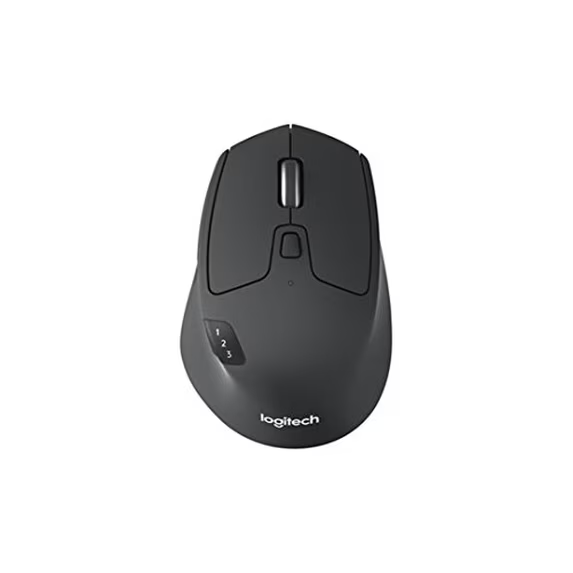
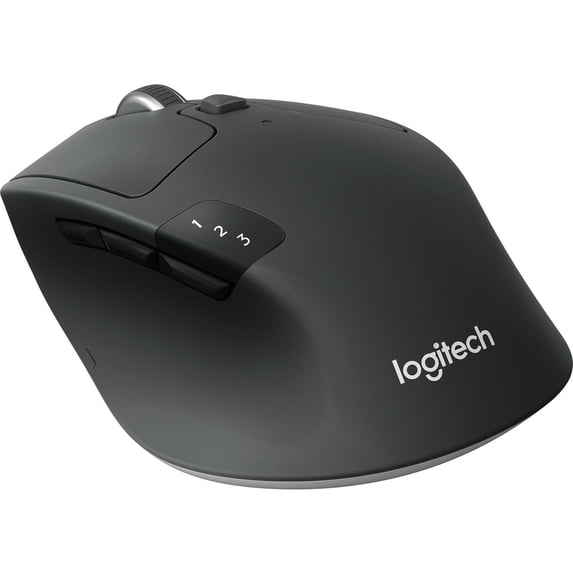
Logitech documents a right-handed, full-size shape, Bluetooth and Unifying receiver connections, switching among three paired devices, dual-mode scrolling and a tilt wheel. Button customization is available through Logi Options+ on supported Windows and macOS systems. Battery life is advertised at up to 24 months; actual life depends on use.
Those features point toward a particular buyer: someone who spends time in documents, browser tabs or spreadsheets and moves between computers. They are less compelling if your current mouse already handles your daily work comfortably. Buy an improvement to a task you repeat, rather than a longer list of features you may never use.
Consider it
You use two computers and want one familiar mouse at your desk.
Check first
You rely on managed work devices or need specific software shortcuts.
Look elsewhere
You need a left-handed shape, a very small travel mouse or documented competitive gaming performance.
Plan the devices before choosing the connection
Start with your actual desk
Write down the computers and tablets you want to control. Beside each one, note the operating system, available ports and whether you are allowed to install software. This simple list prevents a common mistake: buying for the most impressive advertised capability instead of the connection you can use.
A personal laptop and an employer-managed desktop may need different arrangements. You may have full control over the laptop but limited installation rights on the work machine. Confirm the work policy first if a software feature is central to your purchase. A mouse should fit the way the device is managed, not require an unexpected exception.
Bluetooth or receiver?
Think about which connection leaves your desk easiest to use. If an accessible USB port is scarce, assess Bluetooth suitability on your device. If you prefer a receiver arrangement, check the included connector and leave space for it. Do not add an adapter to your basket until you know it is necessary.
The M720’s documented receiver system is Logitech Unifying. If you already own other Logitech peripherals, check their exact receiver requirements before assuming one dongle will serve everything. Shared branding alone does not establish receiver compatibility. Replacing a working setup can create more clutter if you skip this check.
Easy-Switch and Flow solve different problems
Logitech describes Easy-Switch as selecting among paired devices and Flow as moving content between supported computers. Treat those as separate capabilities when planning your purchase. Switching the mouse’s destination and transferring a file are different tasks, even if both sound like working across devices.
For example, you might simply want to answer a message on a personal laptop, then return to a work desktop. Ask whether manual device selection solves that need. A more elaborate workflow is only useful when it is supported and permitted on both computers.
If copying material between systems is part of the plan, review Logitech’s current Flow requirements and your organization’s data rules before relying on it. Do not assume that a feature advertised for a home setup will be approved on a managed office computer. The buying decision should stand on the capabilities you can actually use.
Decide whether the shape fits your habits
Comfort is personal. A product description cannot tell you how a mouse will feel after a long day, and we have not tested this one in hand. Compare its shape with a mouse you already enjoy using. Look at where your thumb rests, how much support you prefer and whether your fingers reach the controls naturally.
A full-size design can be appealing on a permanent desk, but that does not automatically make it ideal for a slim laptop bag. Think about the trip the mouse will take between uses. Someone who leaves it beside a monitor faces a different compromise from someone carrying it on a crowded commute.
For left-handed use, start with a shape designed for that requirement. Do not choose a right-handed model just because its price is attractive. Likewise, a return policy can help with fit uncertainty, but read the exact terms rather than treating every marketplace offer as identical.
Scrolling: choose for the work you repeat
Look at a normal workday before deciding how much scrolling features are worth. If you review lengthy documents, moving through pages can be a regular part of the job. If you mostly open short messages and click a few links, a more elaborate wheel may have less practical value.
Make a short test list for the return window: a long document, a wide spreadsheet and your usual browser workflow. The aim is not to invent a laboratory score. It is to see whether the mouse makes your own work easier and whether its controls behave the way you expect.
Do not translate a feature name into a measured speed claim. We have not timed document navigation or compared this wheel against another mouse. Our reason for considering it is the documented control layout and its possible relevance to office tasks, not a promise that it will make every user faster.
Check customization before paying for it
List two or three shortcuts you would use regularly. They might involve navigation or an application command you repeat throughout the day. Then check whether the software and operating system you use support the assignment you want. A practical shortcut is more valuable than unused controls.
Keep basic operation separate from optional software features. The manufacturer’s broad device compatibility wording should not be read as a promise that every customization feature works on every platform. If you use Linux, ChromeOS or a tablet, verify the precise functions you need rather than assuming desktop software parity.
If the employer controls installations, obtain the relevant guidance before buying for customization alone. You may still want the mouse for its shape or device switching, but evaluate those benefits independently. This makes the purchase easier to justify even if your software plans change.
How to compare the final price fairly
1. Match the selected item
Confirm M720 Triathlon in the title and inspect the selected variant. Check whether you are buying a mouse alone, a bundle or a restored item. Do not let a familiar photograph substitute for reading the actual offer. Save the selected product information with your order receipt.
2. Identify who handles the order
Record the seller and shipper on both stores. If one seller changes during checkout, pause and read the new terms. The offer you receive matters more than a general impression of the marketplace. Our Walmart snapshot should not be projected onto a different seller’s listing.
3. Add the costs you will pay
Compare item price, applicable tax and delivery charges for your address. Leave out optional protection plans unless you intentionally want them. Count a coupon only when it applies to your account and selected item. Membership benefits are relevant only if you already qualify or consciously choose their separate cost.
4. Weigh timing and returns
If your existing mouse works, a small delivery difference may not matter. If you need a replacement before a trip or office move, timing may have real value. Check the arrival estimate and the selected offer’s return terms together, rather than deciding from the price alone.
5. Include any extra hardware
If your planned connection needs an adapter, include that cost. Check what you already own before adding one. The same applies to a replacement receiver on a used offer: a low item price can be less attractive once missing accessories are included in the total.
What to check when the mouse arrives
Compare the package, model and included accessories with your order. Before discarding the packaging, confirm that you received the condition you selected and that the controls are intact. Resolve a mismatch with the seller before spending time adapting your desk around the wrong item.
Use Logitech’s setup guide for pairing. It describes selecting a channel and holding the Easy-Switch control for pairing, then completing the connection on the device. Keep the pairing instructions nearby during setup rather than repeatedly changing settings without a clear sequence.
Spend the first few sessions in your usual applications. Check pointer behavior, button reach and switching between the devices you planned to use. Keep a note of any recurring issue and use the manufacturer’s support steps before concluding that every connection problem is a hardware fault.
If you are organizing a wider workstation, our Anker A91C6 desk charging station guide covers a separate part of that setup. Buy desk accessories to solve specific problems; there is no need to replace working equipment just to make the collection match.
Frequently asked questions
Is the M720 cheaper on Amazon or Walmart?
We cannot establish a winner. Walmart showed $34.99 during our live check, while a current Amazon selling price could not be verified. Compare the matching offers and your delivered totals before ordering.
Was the Walmart offer sold by Walmart?
The selected live offer was sold and shipped by Newegg Inc. Marketplace sellers can change. Read the seller line on the offer you select.
Can the M720 switch between three devices?
Logitech documents pairing with up to three devices and selection through Easy-Switch. Check platform and software requirements separately for optional features such as Flow.
Is this a rechargeable USB-C mouse?
The documented M720 uses a replaceable AA battery rather than USB-C charging. If built-in recharging is essential, choose a model that explicitly provides it.
Is the two-year battery life guaranteed?
No. The manufacturer states up to 24 months, and actual life varies with use. We have not independently tested battery endurance.
Have you tested this mouse for gaming?
No. This is a researched office-use buying guide. We have not measured latency, tracking accuracy or competitive gaming performance.
Our recommendation
Consider the Logitech M720 if its shape, controls and device switching address a real need at your desk. Verify the connection and software requirements before comparing stores. If a simpler mouse already meets your needs, a discount by itself is not a reason to replace it.
Walmart’s observed $34.99 offer gives you a concrete starting point. Check Amazon for current buying options, then compare the seller, condition and final total. Until both current prices are verified, avoid treating either store as the automatic bargain.
This guide separates manufacturer specifications, a live Walmart offer and retrieved Amazon information. Product photos are retailer-supplied. No first-hand testing or measured performance is claimed.
- Logitech M720 product information
- Logitech M720 setup guide
- Amazon matched M720 listing — current price unverified; retrieved availability may lag.
- Walmart matched M720 listing — live selected offer checked October 19, 2026 UTC.