Best Charger Dock for Apple Watch: Top Picks for Fast, Secure Charging
Affiliate disclosure: As an Amazon Associate, Gadget Makers Blog may earn from qualifying purchases. This does not change the price you pay.
Apple Watch users rely on their watches every day for time, fitness tracking, and quick notifications, so keeping them charged is essential. Charger docks hold the watch steady, organize cables, and often speed up nightly charging by putting the magnetic puck in the right spot. They range from simple stands to multi-device stations that charge an iPhone and AirPods alongside the watch.
Buyers should focus on fit, charging speed, and build quality. Compatibility with different Apple Watch sizes and the official magnetic charger matters most, as does a stable base and reliable cable management. A good charger dock keeps the watch aligned with the magnetic puck, protects the band and screen, and fits the user’s charging routine without adding clutter. Read on to see which docks performed best in tests and which features matter most when choosing one.
Best Charger Docks for Apple Watch
Below is a curated list of the best charger docks for Apple Watch to help users find a reliable, neat, and safe place to charge their device. The picks focus on build quality, charging speed, and ease of use so buyers can choose what fits their routine.
Apple Fast Magnetic Charger (1 m)

It is a solid, simple choice for Apple Watch owners who want a reliable, OEM fast-charging cable with a 1 m USB-C lead.
Pros
- Strong magnetic snap that aligns easily.
- Fast-charge support for newer Apple Watch models.
- Durable woven cable that resists tangles.
Cons
- Only 1 meter long, which can feel short for some setups.
- Higher price than third-party alternatives.
- Fast charge only on Series 7 and later (regular speed on older watches).
The cable fits the brand’s usual clean design and works with every Apple Watch model. Buyers can expect a fuss-free magnetic connection that locks the charger to the watch without fiddling.
It supports faster charging on Series 7, Ultra, and later models, so newer-watch owners will notice shorter charge times. People with older watches will still get normal charging, not the speed boost.
Durability looks good thanks to the woven wrap, and the USB-C end suits modern chargers and laptops. The short length and brand price are the main trade-offs to weigh before buying.
Acer 3-in-1 MagSafe Charger
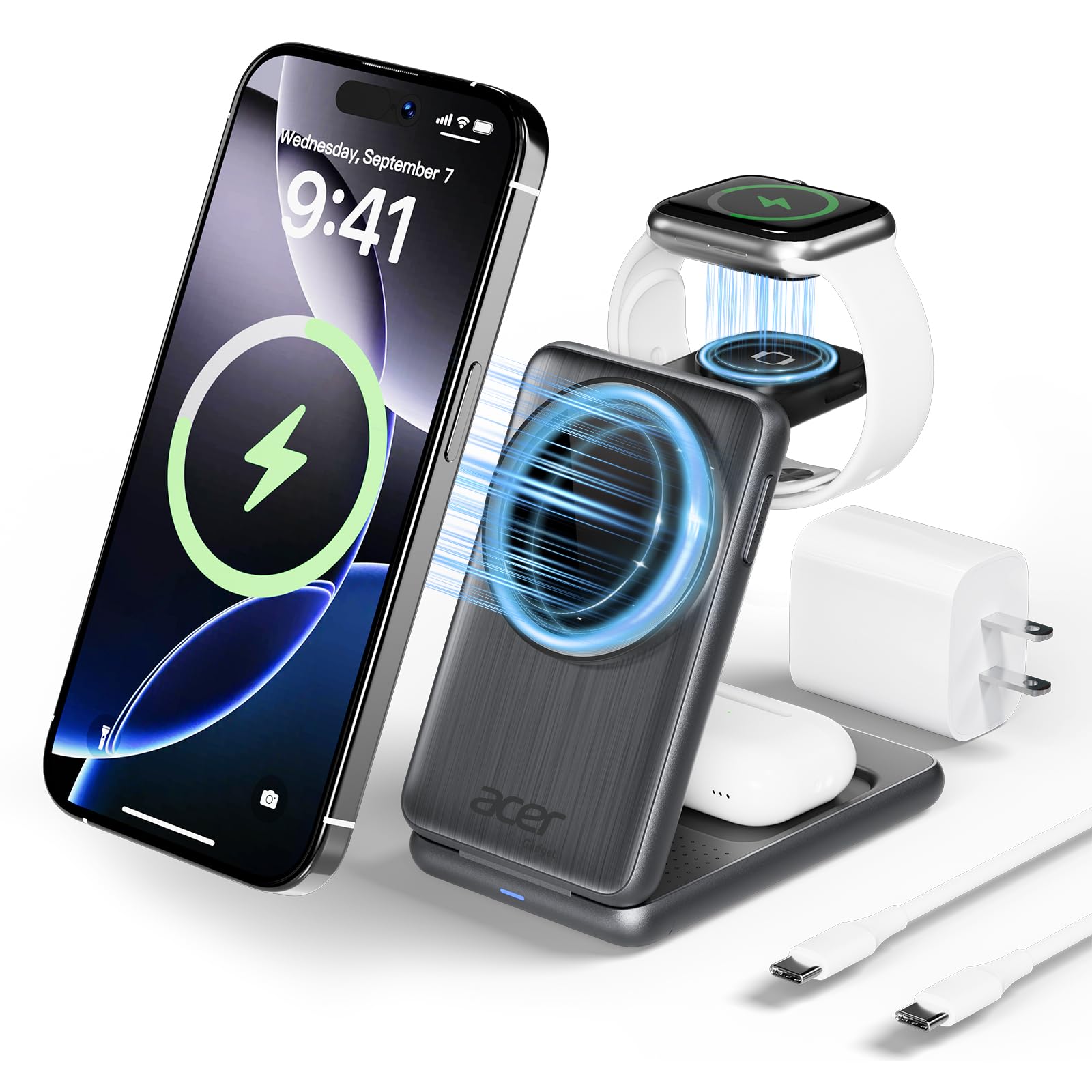
It’s a strong buy for someone who wants one compact dock to charge an iPhone, Apple Watch, and AirPods without extra cables.
Pros
- Charges three Apple devices at once and stays compact.
- Fast MagSafe charging for iPhone and reliable power for watch and earbuds.
- Foldable and easy to pack for travel.
Cons
- Watch charges at a lower wattage than phone and earbuds.
- MagSafe cases or thick cases may reduce charging speed.
- Uses a specific adapter and cable that come with the unit.
The Acer dock keeps devices tidy on a desk or nightstand. Its magnetic MagSafe pad locks an iPhone in place and the watch puck sits where it should for overnight charging.
Users will like the fold-flat design for travel and the non-slip surface that holds devices steady. The product claims safety protections against overcurrent and heat, which helps for daily use.
This unit includes a 27W USB-C adapter and USB-C cable, so buyers won’t need extra cords right away. It works best with MagSafe-compatible cases or no case for the fastest phone charging.
Buy link: Acer 3-in-1 MagSafe Charger
Anker MagGo 3-in-1 Charger
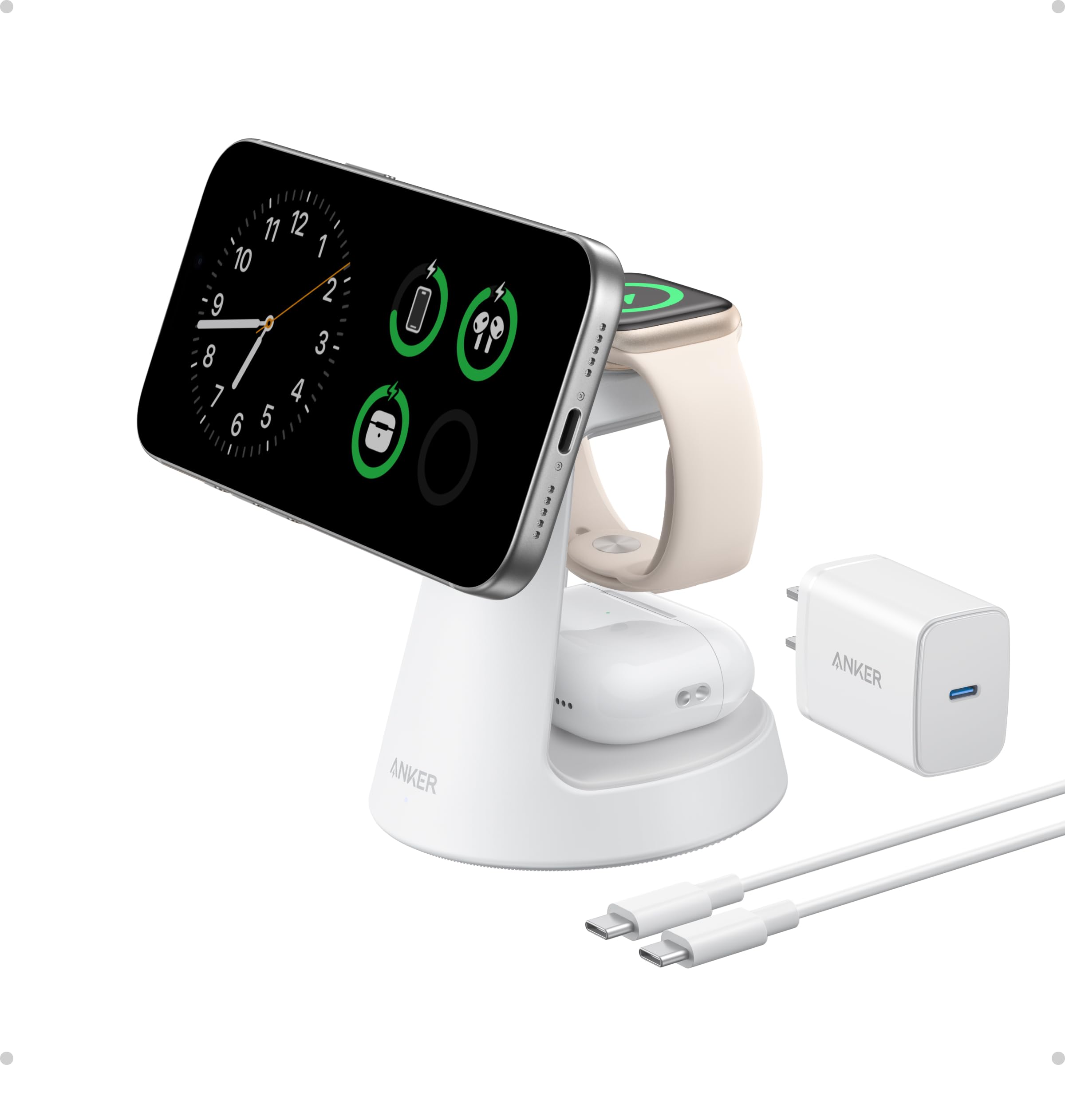
It is a strong choice for someone who wants a compact, MagSafe-compatible dock that charges an iPhone, Apple Watch, and AirPods quickly and neatly.
Pros
- Fast MagSafe charging and official certifications.
- Compact footprint with a stable, weighted base.
- Adjustable angle for StandBy mode and landscape use.
Cons
- AirPods pad can get warm during charging.
- Not portable; designed for a desk or nightstand.
- Higher price than basic single chargers.
The stand looks tidy and keeps three devices in one spot. It fits small spaces without adding clutter.
Users report solid magnets that hold phones well, even with some cases. The angle adjusts so the watch and phone can sit how they need to.
Anker includes a 40W adapter and cable, which removes the need to buy extras. Charging speeds claim to be fast, but real-world times vary by device and settings.
Overall, it suits buyers who want a reliable, well-built dock for daily use and a neat bedside or desk setup.
Belkin UltraCharge 3‑in‑1 Stand
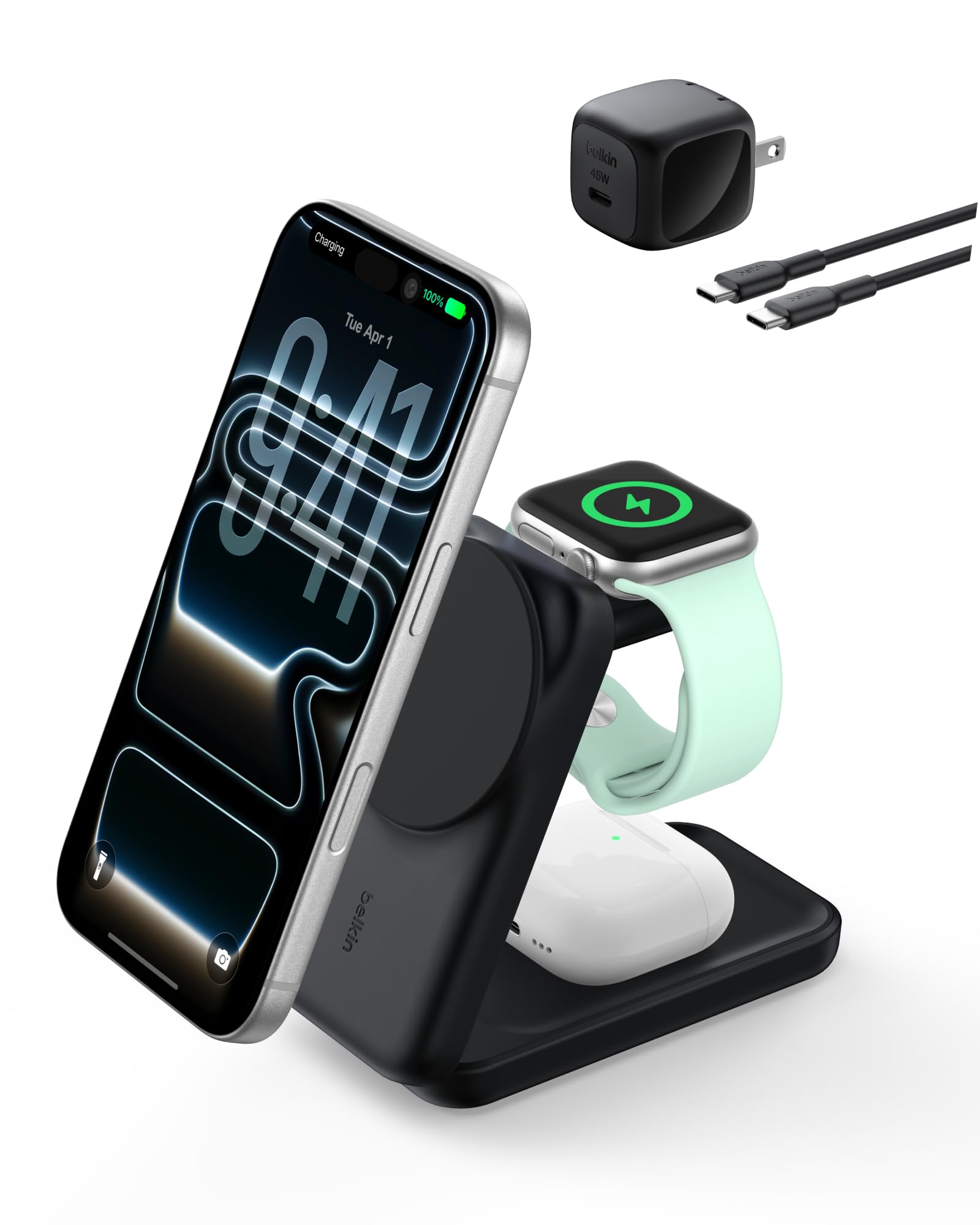
This stand is a strong pick for someone who wants a fast, tidy way to charge an iPhone, Apple Watch, and AirPods at the same time.
Pros
- Fast wireless charging for iPhone with Qi2 support.
- Folds flat for travel and adjusts for bedside or desk use.
- Includes power adapter and cable so it works out of the box.
Cons
- Fast charge needs iOS 26 or newer to reach top speeds.
- Magnetic hold can make removing the phone a bit stiff.
- Bulkier than single-device chargers when packed.
The design aims to cut cord clutter and act as a nightstand or travel charger. It uses passive cooling to keep heat down and recycled materials for the housing.
It supports Apple Watch charging with an included puck and charges AirPods on a separate pad at lower power. The stand snaps an iPhone into place with magnets and lets users view the screen in portrait or landscape.
This bundle ships with a 45W power supply and a USB‑C cable, so no extra purchases are needed to start charging. If someone needs a compact, multi-device solution that charges quickly and travels well, this fits that need.
Belkin BoostCharge Pro 3‑in‑1
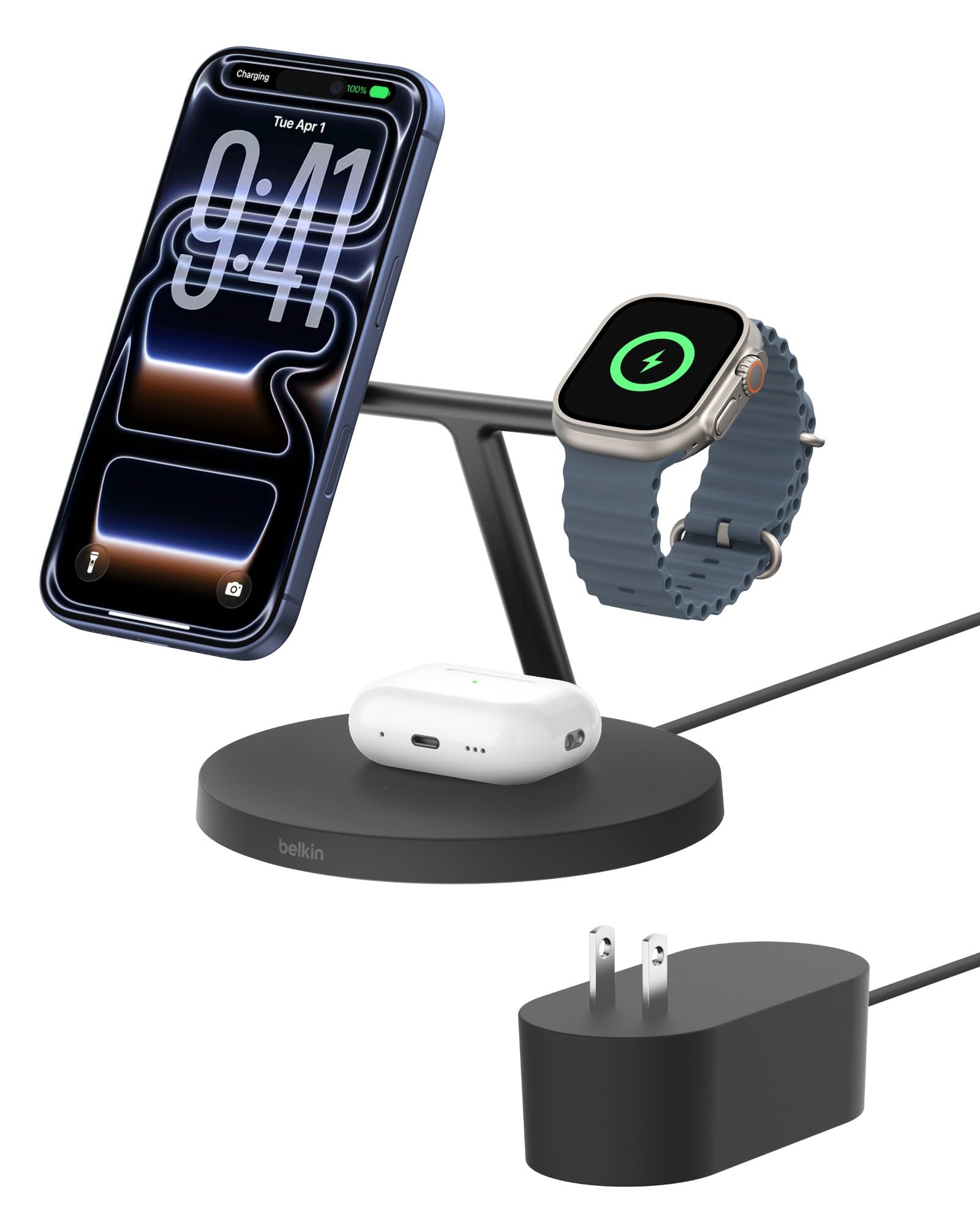
It’s a solid choice for someone who wants a tidy bedside charger that powers an iPhone, Apple Watch, and AirPods at once.
Pros
- Charges three devices at the same time.
- MagSafe-compatible for easy phone alignment.
- Includes a 40W power supply and two-year warranty.
Cons
- Larger footprint than single-device docks.
- Built-in PSU uses a barrel jack instead of USB-C.
- Higher price than simple chargers.
The stand keeps nightstands uncluttered by grouping cables into one base. The magnetic phone pad supports StandBy and makes it easy to view the screen while charging.
Fast charging works for recent iPhones and modern Apple Watches, with Qi2 tech that aims to be more efficient than older wireless pads. The AirPods pad shows charging with an LED so users know it’s connected.
Some may dislike the size and the non‑detachable power cable. Still, the included power supply and warranty add peace of mind for those who want one reliable dock for all Apple devices.
Anlmz 3-in-1 Charging Station
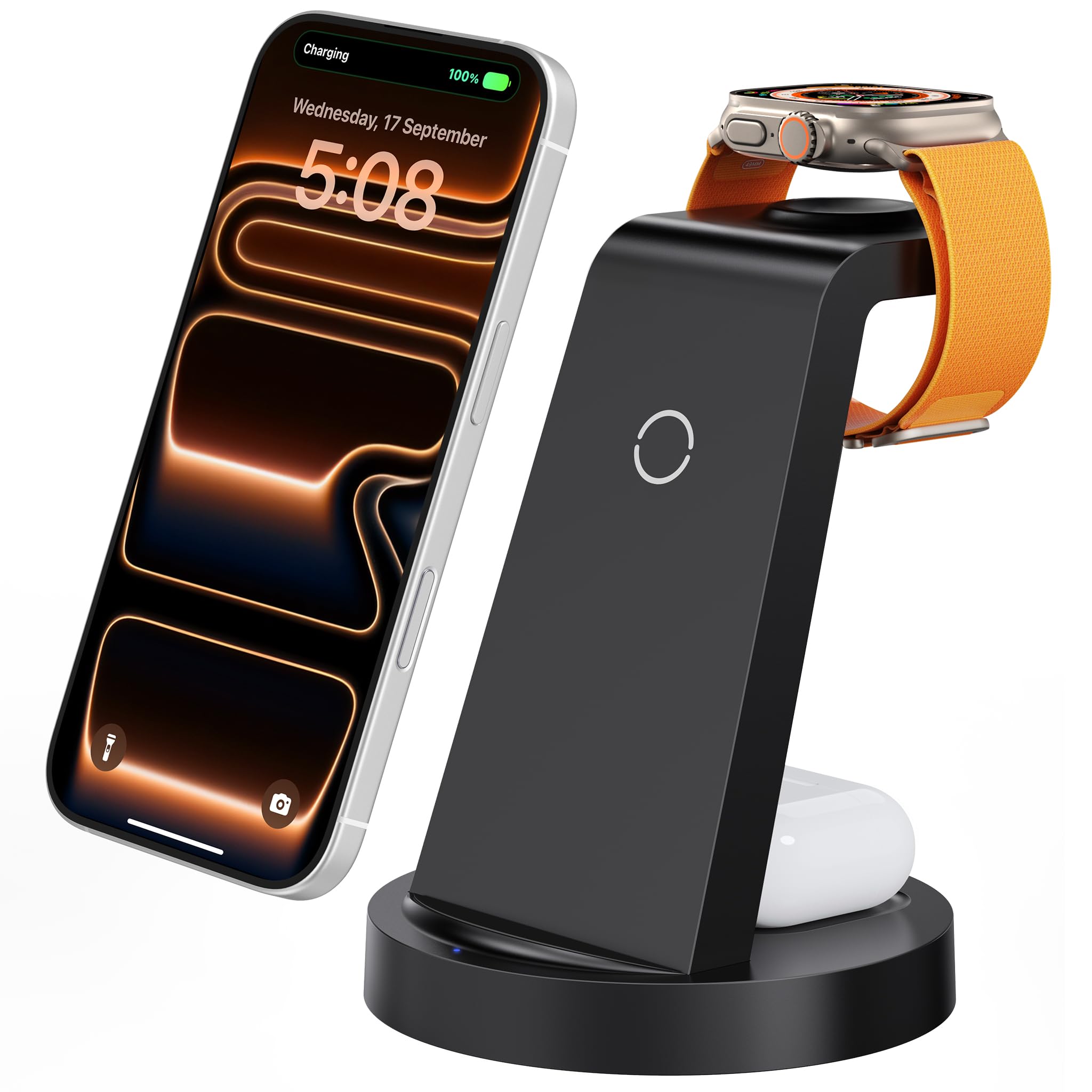
This is a good buy for someone who wants one compact dock to charge an iPhone, Apple Watch, and AirPods at the same time.
Pros
- Saves space by charging three devices with one cable.
- Includes an 18W adapter for faster, steady charging.
- Soft LED and ABS body make it bedside-friendly.
Cons
- Watch charger uses non-MagSafe alignment, so placement matters.
- Some cases or metal items can interrupt charging.
- Not ideal for very thick phone cases.
It holds the phone upright, the watch on a dedicated pad, and the AirPods on a small puck. The single USB-C cable and included adapter cut down on clutter.
It uses smart protection to reduce overcharging and switches to trickle mode when a device is full. The blue LED is soft enough for nightstands.
Users should center their phone and remove thick or metal-backed cases for best results. The dock supports many iPhone and Apple Watch models and comes with a 24-month warranty.
ZAPOGO Magnetic Apple Watch Stand
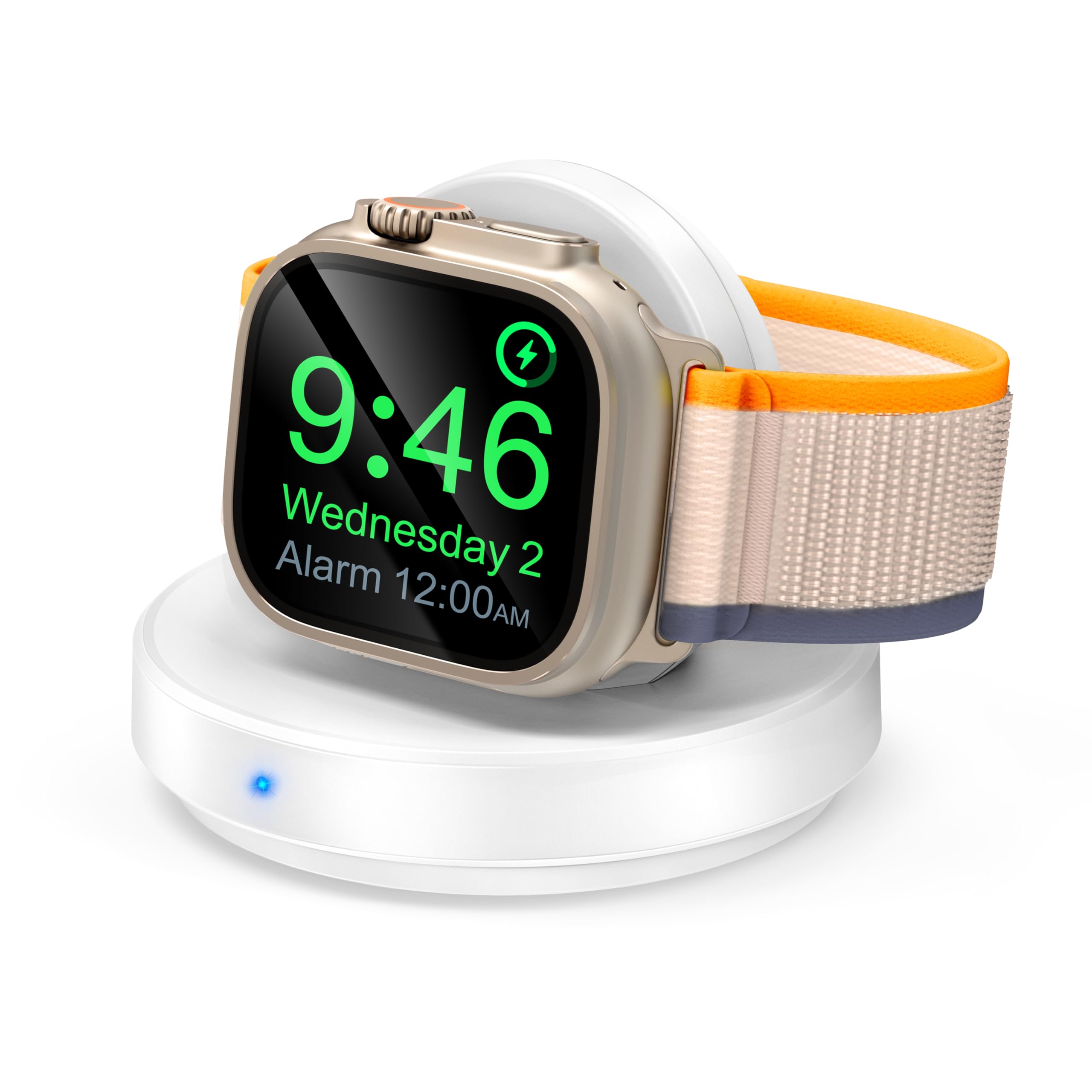
This stand is a simple, portable way to charge an Apple Watch and use nightstand mode, best for someone who wants a tidy bedside or travel charger.
Pros
- Easy one-step docking with a visible blue charging light.
- Built-in magnetic charger holds the watch upright for nightstand use.
- Lightweight and compact for travel and small spaces.
Cons
- Charging can be slower than the official Apple charger.
- Power adapter is not included, so a USB-A or USB-C adapter is needed.
- Not foldable, so it takes up fixed space in a bag or on a nightstand.
The dock makes charging straightforward. Users only place the watch upright and the blue light shows charging has started. It also stops charging automatically when the watch reaches full power.
Nightstand mode works when the watch settings are enabled. The upright position keeps the screen visible as a bedside clock or alarm without extra setup.
This model covers most Apple Watch sizes and types, so buyers with a range of watches will likely find it compatible. Safety features aim to protect against overheating and overcharging.
The stand includes a USB-C cable but not a wall plug, so buyers should plan for a compatible adapter. Overall, it fits people who want a neat, travel-friendly dock rather than the fastest charge.
Lamicall Watch Stand

It is a solid, simple stand that holds an Apple Watch securely and tidies the charger cable, making it a good pick for a neat bedside or desk setup.
Pros
- Stable metal build that resists slipping.
- Cleans up and hides the charging cable neatly.
- Angled design supports Nightstand Mode for easy viewing.
Cons
- Apple Watch charging cable is not included.
- Metal finish can show scratches over time.
- Limited to magnetic Apple Watch chargers only.
The stand uses a thick aluminum body and a silicone base to stay put when placing or removing the watch. It accepts the Apple magnetic charger so users embed their own cable into the hole and tuck the excess away.
Its 45-degree angle makes the watch easy to see while it charges, and it works with Nightstand Mode so alarms and the time remain visible. The minimalist look fits most desks and nightstands without taking much space.
Buyers should note the charger cable must come from the watch box or be bought separately. The stand appeals to people who want a tidy, sturdy holder rather than a full charging kit.
ViiQien 2‑in‑1 Apple Watch & AirPods Charger
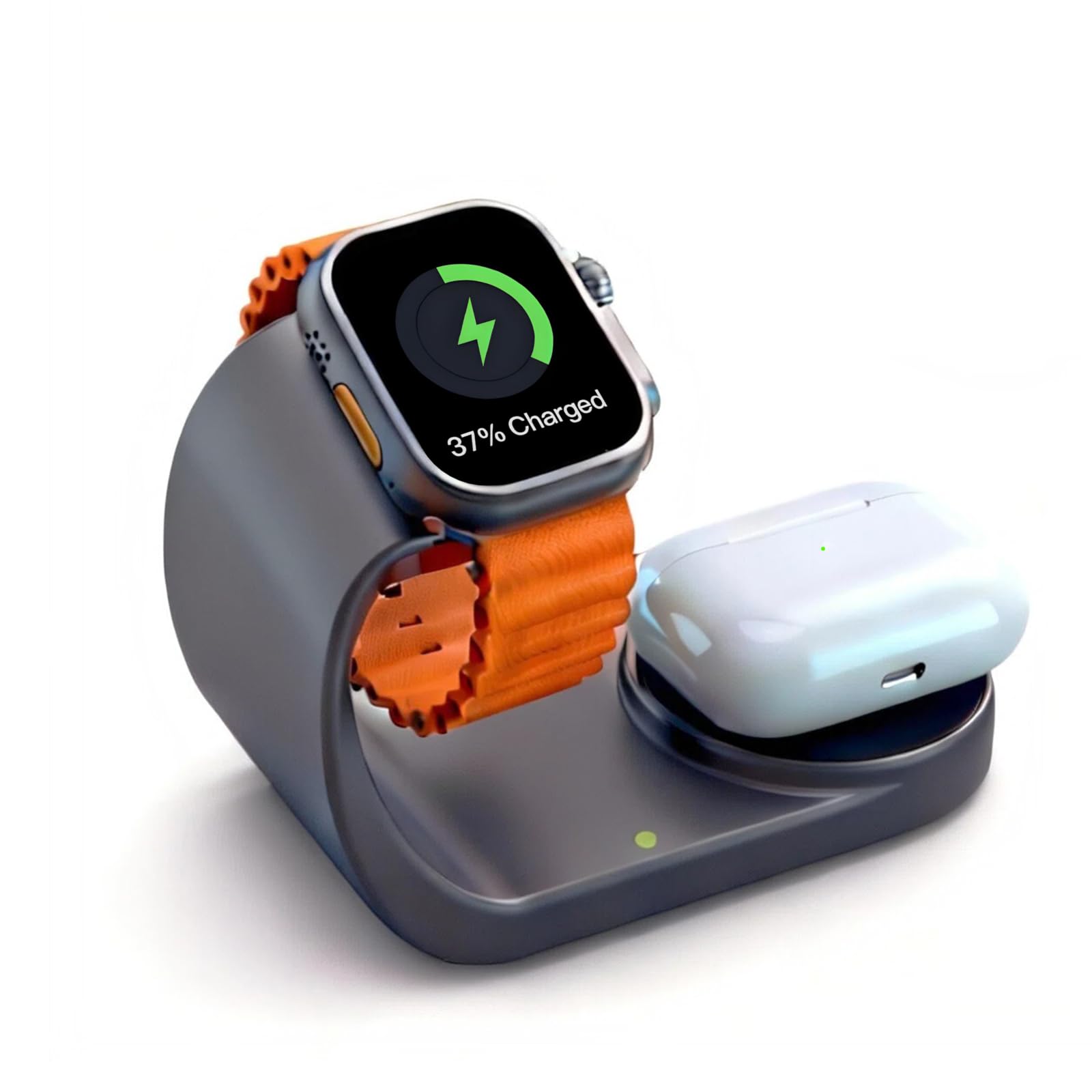
It is a compact 2‑in‑1 charging stand that keeps an Apple Watch and AirPods on one dock and charges them quickly.
Pros
- Charges watch and AirPods together without extra cables.
- Metal‑finish looks clean and resists fingerprints.
- Claims faster charging and built‑in safety features.
Cons
- Stand feels lightweight and can tip when removing devices.
- Some users report inconsistent charging with included cable.
- Limited to one watch and one set of AirPods at a time.
The dock fits a bedside table or desk and cuts down on cable clutter by using a single stand for both devices. The gray finish aims to match modern rooms and stay free of smudges.
It touts faster charge rates and multi‑protection safety systems to guard against over‑charge and overheating. Auto‑sensing claims compatibility across recent Apple Watch models and several AirPods generations.
Some buyers liked the look and speed, while a few noted the product felt light and one reported charging issues that required swapping the cable. Buyers who want a simple, tidy charging station might find it useful, but those who need a heavier, more stable base should consider that trade‑off.
Buying Guide
Choosing a charger dock means balancing size, speed, and convenience. They should match the user’s watch model and charging puck type to avoid fit problems.
Look for charging speed and power delivery. Faster charging helps when time is short, but the dock must support the watch’s specifications.
Check build quality and materials. Sturdy materials and good cable management reduce wear and keep a tidy nightstand.
Consider portability and size if travel is common. Foldable or compact docks make packing easier and often include cable storage.
Verify safety features like overheat, overcurrent, and short-circuit protection. These features protect the watch and the charger during use.
Assess additional features that matter to the user. Built-in Nightstand mode orientation, adjustable angles, or extra USB ports can add convenience.
Compare warranty and customer support options. A clear warranty and easy support help if the dock fails or has defects.
Key factors at a glance:
| Factor | Why it matters |
|---|---|
| Compatibility | Ensures the watch fits and charges properly |
| Charging speed | Saves time; must match watch limits |
| Build quality | Affects durability and daily use |
| Safety features | Protects device and battery health |
| Portability | Important for travel and storage |
| Extra features | Adds convenience (angles, ports, cable storage) |
| Warranty/support | Provides protection if issues arise |
Editor’s Choice
The Editor’s Choice pick is the Belkin BoostCharge Pro 3-in-1 MagSafe Charger. It charges an Apple Watch, iPhone, and AirPods at the same time. The design stays compact and stable on a nightstand.
It uses MagSafe alignment for faster, fuss-free phone charging. The Apple Watch puck locks into place and holds the band neatly. AirPods rest on a dedicated pad for simple charging.
Key strengths:
- Fast MagSafe charging for iPhone (up to 15W with compatible adapter).
- Stable, scratch-resistant surfaces for all devices.
- Neat cable management built into the base.
It costs more than basic stands, but it replaces three chargers with one unit. The build quality feels durable and the charging stays reliable over time.
The pick works well with all Apple Watch sizes and recent iPhone models. It also supports USB‑C power delivery, so users can pair it with a range of power adapters.
Where to Buy – Best Amazon Deals
They can find many top-rated Apple Watch charger docks on Amazon. The platform often lists multiple sellers, so shoppers can compare price, shipping, and warranty easily.
Look for docks with strong customer reviews and recent photos. Prime shipping speeds and easy returns add value for buyers who want fast delivery and simple returns.
Use filters to narrow options by price, brand, and features like magnetic alignment or multi-device charging. Reading the Q&A and verified buyer comments helps spot real-world fit and durability issues.
Deals change often, so check the product page for coupons, lightning deals, or bundle discounts. Sellers sometimes include USB-C cables or adapters as part of a promotion.
Common choices and why people buy them:
- Foldable docks — compact for travel.
- Multi-device stands — charge Watch, iPhone, and AirPods at once.
- Nightstand-friendly docks — show time and charge overnight.
They should confirm compatibility with Apple Watch models and any extra cables needed. Also check warranty and return policy before buying to avoid surprises.
Conclusion
Choosing a charger dock comes down to fit, function, and budget. He or she should pick one that matches their watch model, charging habits, and bedside or desk space.
Durability and safety matter. They should prefer docks with solid build quality and certified charging to protect the watch battery.
For convenience, look for docks that hold the watch at a usable angle and let the band stay on or off as needed. Portable or multi-device docks suit travelers and people who also charge a phone.
A simple decision guide:
- If they want minimalism: choose a compact, single-watch dock.
- If they need extra features: pick a dock with phone charging or USB-C power.
- If they travel: select a foldable or magnetic puck-friendly option.
Price often reflects materials and extras, not just charging speed. He or she can balance cost and features by prioritizing what matters most.
Buy from brands with clear return policies and good reviews. That reduces risk and makes it easier to swap docks if it fails to meet expectations.
FAQs
Which Apple Watch models work with these charger docks?
Most docks support Apple Watch Series 1–9 and SE, plus Ultra models. Buyers should check the product page for any size or case restrictions.
Do these docks charge faster than the Apple magnetic cable?
They do not increase the watch’s maximum charging speed. They hold the official magnetic charger or a built-in charger that matches Apple’s specs.
Can the dock charge other devices?
Some docks include USB-A or USB-C ports for iPhone or AirPods. Read the features list to confirm simultaneous charging options.
Is the watch safe on these docks overnight?
Yes, when used as directed. Quality docks include non-slip pads and proper cable routing to avoid strain and heat buildup.
Are third-party docks certified by Apple?
Few are Apple-branded. Look for MFi certification on the package or product page to ensure compatibility and safety.
How to clean and maintain a charger dock?
Unplug before cleaning. Wipe with a soft, dry cloth and avoid liquids near electronic parts. Check cables for wear periodically.
What should a buyer consider when choosing a dock?
Consider build quality, cable management, port options, and size. Style and price matter, but safety and compatibility come first.