Best Chargers for MacBook Pro should match the laptop’s wattage, support the correct connector and USB-C Power Delivery profile, use a properly rated cable, and provide dependable thermal and electrical protection. A compact 65W charger can suit lighter travel needs, while 100W to 160W models offer more headroom for larger MacBook Pro models and multi-device charging.
A high-power multi-port charger with a display for users who want one compact station for a MacBook Pro, phone, tablet, and accessories.
A premium compact charger aimed at users who want to fast-charge a MacBook Pro while also powering other devices.
A compact three-port charger for a MacBook Pro, phone, and accessory, with a cable included in the supplied listing.
The Anker 140W 4-Port Charger is the strongest all-around recommendation from the supplied list because it combines high output, several ports, a compact design, and a display. The Anker Prime 160W is the premium multi-device choice, while the Anker Nano 100W is the better compact travel option.
| Rank | Product | Power | Ports | Best for | Amazon |
|---|---|---|---|---|---|
| #1 | Anker 140W 4-Port Charger Best Overall | Up to 140W | 4 ports | MacBook Pro plus several smaller devices | View |
| #2 | Anker Prime 160W Charger Best Premium Multi-Device Pick | Up to 160W total | Multiple USB-C ports | High-output desk and travel setups | View |
| #3 | Anker Nano 100W Charger Best Compact 100W Pick | Up to 100W | 2 USB-C + 1 USB-A | Travelers who want 100W and three ports | View |
| #4 | Anker 100W Foldable Charger Best Single-Port Travel Charger | Up to 100W | 1 USB-C | Fast single-device charging on the go | View |
| #5 | Sunveza 118W MacBook Charger Best Budget High-Watt Pick | 118W listing claim | Single laptop-focused output | Lower-cost high-watt MacBook charging | View |
| #6 | Basickaws 120W Mac Charger Best Long-Cable 120W Option | 120W listing claim | Single laptop-focused output | Desk or travel setups needing cable reach | View |
| #7 | IFEART 70W USB-C Charger Best Affordable 70W Pick | 70W | 1 USB-C | Smaller MacBook Pro models and light travel | View |
| #8 | Anker 65W 3-Port Charger Best Lightweight Multi-Port Pick | Up to 65W total | 2 USB-C + 1 USB-A | Smaller MacBook Pro models and everyday travel | View |
| #9 | Apple 85W MagSafe Adapter Best for Older MagSafe MacBook Pro | 85W | Legacy MagSafe connector | Compatible older 15- and 17-inch MacBook Pro models | View |
- Exact MacBook Pro model and wattage requirement
- USB-C PD or correct MagSafe compatibility
- Single-port and shared output
- Correctly rated cable
- Thermal and electrical protection
- Seller, warranty, and return support
- Choosing only by headline wattage
- Ignoring power sharing on multi-port chargers
- Using a cable that cannot carry the advertised output
- Buying legacy MagSafe for a modern MacBook
- Assuming every third-party claim is independently verified
- Ignoring outlet fit and charger weight
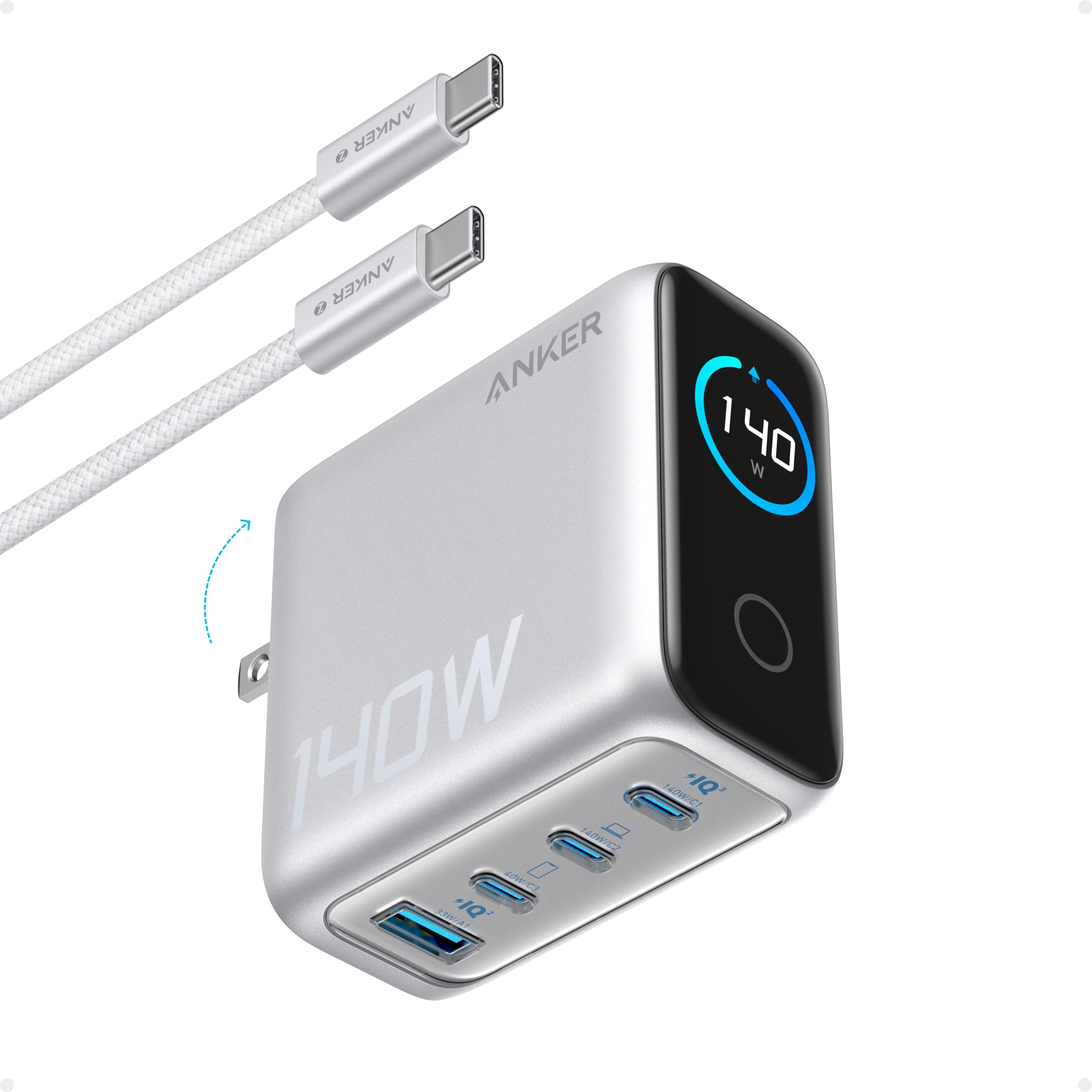
A high-power multi-port charger with a display for users who want one compact station for a MacBook Pro, phone, tablet, and accessories.
Ports: 4 ports
Cable: 5 ft USB-C cable listed
- High output for MacBook Pro charging
- Four-device flexibility
- Display shows charging status
- Compact GaN-style design
- Can run warm under heavy use
- Costs more than basic single-port chargers
- Current cable and port-sharing details should be verified
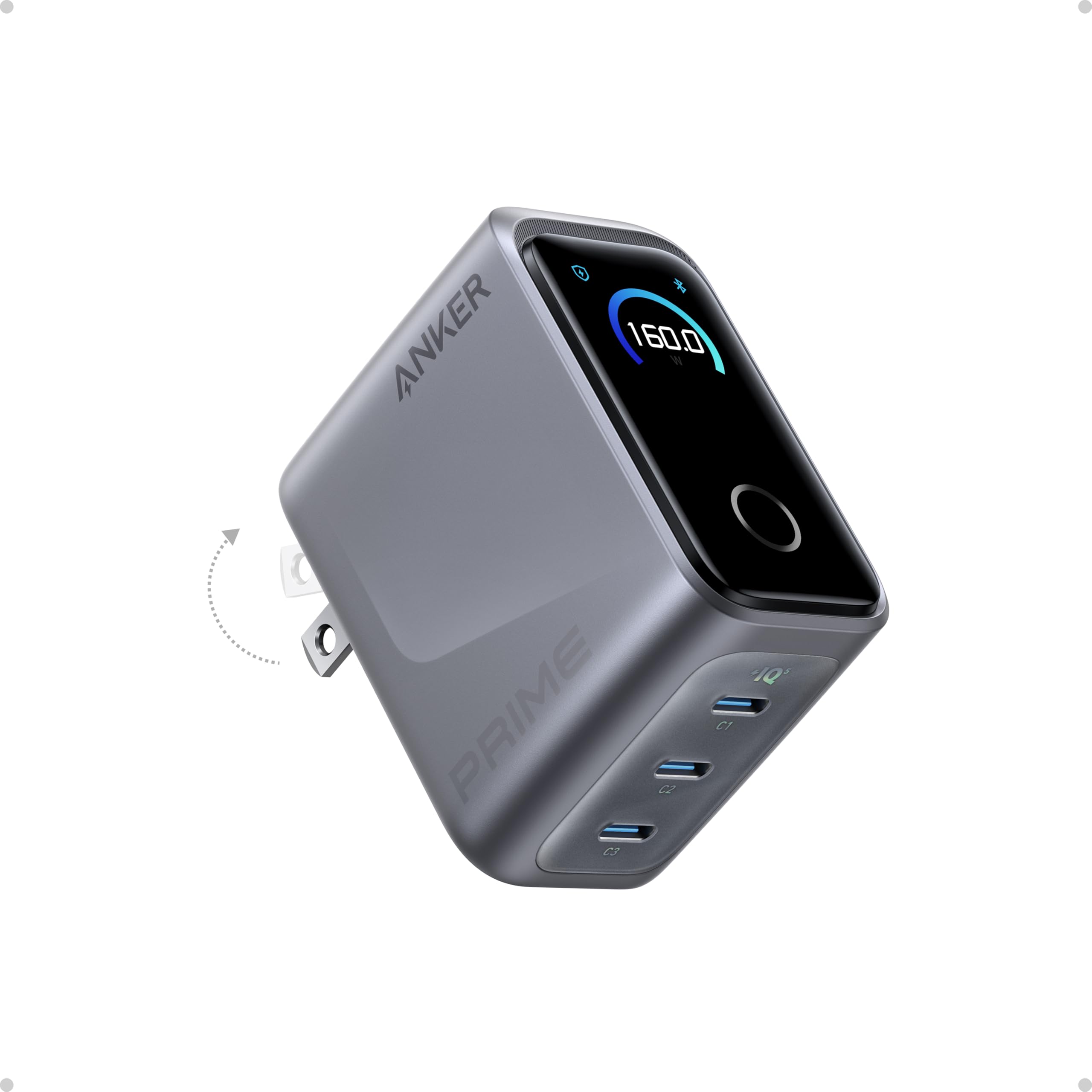
A premium compact charger aimed at users who want to fast-charge a MacBook Pro while also powering other devices.
Ports: Multiple USB-C ports
Cable: Cable not included in source
- Very high total power
- Multi-device charging
- On-device display
- Compact for the output class
- Premium price
- Cable not included according to the source
- Some advanced settings may rely on the app

A compact three-port charger for a MacBook Pro, phone, and accessory, with a cable included in the supplied listing.
Ports: 2 USB-C + 1 USB-A
Cable: 5 ft USB-C cable listed
- Compact for a 100W charger
- Three-device charging
- Included 5 ft USB-C cable
- Useful travel layout
- Heavier than phone chargers
- Premium price
- Check outlet fit and return terms

A straightforward 100W foldable adapter for users who prioritize MacBook Pro charging speed over multi-port flexibility.
Ports: 1 USB-C
Cable: USB-C cable listed
- High single-port output
- Foldable travel design
- Cable and warranty mentioned in the source
- Simple plug-and-charge setup
- Only one charging port
- Larger than ultra-mini adapters
- May feel warm under heavy use

A third-party high-watt charger for users who want broad USB-C laptop compatibility at a lower price than premium-brand options.
Ports: Single laptop-focused output
Cable: 7.2 ft cable listed
- High wattage listing
- Long cable
- Broad compatibility claims
- Safety circuitry mentioned in the source
- Third-party fit and finish may vary
- Seller support and warranty should be checked
- Bulkier than compact GaN options

A third-party 120W charger with a long cable for MacBook Pro users who want high power without a premium-brand price.
Ports: Single laptop-focused output
Cable: Long USB-C cable listed
- High-watt listing
- Long cable
- Broad device compatibility claims
- Foldable plug and safety features mentioned
- Cable may feel thick or stiff
- White finish can show dirt
- Third-party warranty support should be verified

A lower-cost single-port charger with a long cable for users who do not need 100W or higher.
Ports: 1 USB-C
Cable: 6.6 ft cable listed
- Useful 70W output
- Long 6.6 ft cable
- Compact foldable design
- Safety features mentioned in the source
- Single-port design
- Not ideal for larger MacBook Pro models under heavy load
- Battery-longevity claims are not independently verified

A compact three-port GaN charger for users who want one adapter for a MacBook Pro, phone, and accessory.
Ports: 2 USB-C + 1 USB-A
Cable: Check current bundle
- Small and travel-friendly
- Three charging ports
- Useful for laptop and phone sharing
- Foldable GaN-style design
- 65W may be slow for larger MacBook Pro models
- Power is shared between active ports
- May protrude from some wall outlets

An official-style legacy MagSafe option for older compatible MacBook Pro models that do not charge through modern USB-C or MagSafe 3.
Ports: Legacy MagSafe connector
Cable: Integrated MagSafe cable
- Magnetic connector
- Charging-status LED
- Compact cable-wrapping design
- Built for older compatible MacBook Pro models
- Not suitable for modern USB-C or MagSafe 3 MacBooks
- Higher price than many third-party adapters
- Cable strain relief can wear over time
- Identify the exact MacBook Pro model. Different generations and screen sizes can have different charging requirements.
- Match the wattage. Choose a charger that meets or slightly exceeds the laptop’s requirement.
- Confirm the connector. Modern models may use USB-C or MagSafe 3, while the Apple 85W adapter is for older MagSafe models.
- Check USB-C Power Delivery. The charger, cable, and laptop must support compatible power profiles.
- Read the power-sharing chart. Multi-port chargers divide output when several devices are connected.
- Use a correctly rated cable. High-power charging may require a 100W or higher-rated cable.
- Consider portability and outlet fit. Heavy chargers may pull on loose wall outlets.
- Verify safety and support. Check seller, return policy, warranty, and certification information.
| Power class | Best for | Recommended picks |
|---|---|---|
| 65W–70W | Smaller models, lighter workloads, and travel | Anker 65W, IFEART 70W |
| 100W | Balanced travel charging and many MacBook Pro models | Anker Nano 100W, Anker Foldable 100W |
| 118W–120W | Budget high-watt third-party charging | Sunveza 118W, Basickaws 120W |
| 140W–160W | High-output and multi-device charging | Anker 140W, Anker Prime 160W |
| Legacy 85W MagSafe | Older compatible MacBook Pro models only | Apple 85W MagSafe Adapter |
| Your priority | Best choice | Reason |
|---|---|---|
| Best overall | Anker 140W 4-Port | High output, several ports, and display |
| Premium multi-device setup | Anker Prime 160W | Highest total output in the supplied list |
| Compact 100W travel | Anker Nano 100W | Three ports and cable included in the source |
| Single-port simplicity | Anker 100W Foldable | Focused MacBook Pro charging |
| Budget high-watt option | Sunveza 118W | High output claim and long cable |
| Older MagSafe MacBook | Apple 85W MagSafe | Legacy connector compatibility |
- Use a charger and cable rated for the intended wattage.
- Keep the adapter ventilated and away from bedding or paper.
- Stop using chargers that spark, smell burnt, crackle, or become abnormally hot.
- Do not force a legacy MagSafe adapter into a modern MacBook charging setup.
- Check current seller, warranty, return, and certification details before buying.
- Remember that multi-port output changes when more devices are connected.
What wattage charger should I choose for a MacBook Pro?
Match the charger to the requirement of the exact MacBook Pro model. The supplied article references common classes such as 67W, 96W, and 140W.
Can I use a higher-watt charger than the original?
Yes, when the charger and cable support the correct USB-C Power Delivery standard. The MacBook Pro draws only the power it supports.
Can I use a third-party USB-C charger?
Yes, when it supports the required Power Delivery profile and comes from a seller with clear safety, warranty, and return information.
Is 65W enough for a MacBook Pro?
It may be enough for smaller models and lighter use, but larger MacBook Pro models can charge more slowly or lose battery under heavy workloads.
Do I need a 100W or 140W cable?
High-power charging requires a cable rated for the intended output. Check the cable rating before expecting full-speed charging.
Is the Apple 85W MagSafe adapter compatible with modern MacBooks?
No. It is for older compatible MagSafe MacBook Pro models and is not a modern USB-C or MagSafe 3 charger.
Are multi-port chargers slower when several devices are connected?
Often yes. Total power is shared between active ports, so check the current power-distribution chart.
What safety features matter most?
Look for overcurrent, overvoltage, thermal, and short-circuit protection, plus clear certification, warranty, and seller information.
Choose by real wattage, connector, cable rating, power sharing, and warranty—not the largest number on the product page.