Does iPhone 11 Have Wireless Charger A Complete Guide
The iPhone 11 does support wireless charging, so you can charge it without plugging in a cable every time. It uses the Qi wireless standard, which means it works with many pads and stands, but charging speed is slower than a wired fast charger. If you want easy everyday charging, the iPhone 11 is still a solid wireless charging phone.
Does iPhone 11 Have Wireless Charger A Complete Guide
If you have an iPhone 11 and you are wondering, does iPhone 11 have wireless charger support, the short answer is yes. You do not need to plug in a cable every time you want to charge it. Just place the phone on a compatible wireless pad, and it starts charging.
That sounds easy, and it is. But there are still a few things people get wrong. Some expect wireless charging to be as fast as a wall charger. Others buy the wrong pad and think their phone is broken. So let’s clear it up in a simple way.
This guide explains how wireless charging works on the iPhone 11, what speed to expect, what chargers to buy, and when wired charging still makes more sense. If you want a full charger guide for your phone, this will help you make a smart choice.
- Point 1: Yes, the iPhone 11 has wireless charging built in.
- Point 2: It uses the Qi wireless charging standard, so many chargers will work.
- Point 3: Wireless charging is simple and convenient, but it is usually slower than wired charging.
- Point 4: A good charging case should not block wireless charging, but very thick cases can reduce speed.
- Point 5: For best results, line up the phone properly on the charging pad.
- Point 6: If you want the fastest top-up, a wired charger is still the better choice.
- Point 7: The iPhone 11 remains a practical phone for users who like cable-free charging at home or on a desk.
📑 Table of Contents
- Does iPhone 11 Have Wireless Charging?
- How iPhone 11 Wireless Charging Works
- What You Need to Charge iPhone 11 Wirelessly
- Best Wireless Charging Use Cases for iPhone 11
- iPhone 11 Wireless Charging vs Wired Charging
- Buying Tips for the Best iPhone 11 Wireless Charger
- Common Problems and Easy Fixes
- Should You Use Wireless Charging on iPhone 11?
- Conclusion
Does iPhone 11 Have Wireless Charging?
The short answer
Yes, the iPhone 11 has wireless charging. Apple built Qi wireless charging into the phone, so it can charge on many standard wireless pads and stands. You do not need a special Apple-only charger for basic wireless charging.
What “Qi” means
Qi is the common wireless charging standard used by many phone brands. It is the reason the iPhone 11 can work with a wide range of charging pads from different companies. If a charger says it supports Qi, there is a good chance it will work with the iPhone 11.
That said, not all Qi chargers are equal. Some are slow. Some are better built. Some line up the phone better. So yes, the iPhone 11 has wireless charging, but the charger you choose still matters.
How iPhone 11 Wireless Charging Works
Simple magnetic-style power transfer
Wireless charging uses coils inside the charger and inside the phone. When the phone sits on the pad, power moves through the air in a very short distance. There is no cable connection, but the phone still gets energy.
For the iPhone 11, this means charging starts when the phone is placed correctly on the pad. If the phone is off-center, charging may be slow or may stop and start. That is why placement matters so much.
Charging speed expectations
The iPhone 11 wireless charging speed is fine for daily use, but it is not the fastest option. In many cases, wireless charging is slower than using a USB-C to Lightning cable with a strong adapter. If you want quick power before leaving the house, wired charging usually wins.
Still, wireless charging is great for overnight charging, desk use, and light top-ups during the day. If you are not in a rush, it is a very comfortable way to charge.
Heat and efficiency
Wireless charging often creates more heat than wired charging. That does not mean it is unsafe. It just means some energy is lost during the transfer. A little warmth is normal. Too much heat is not.
If your phone gets very hot, move it to a cooler spot, remove a thick case, or try a better charger. Heat can slow charging and may affect long-term battery health if it happens often.
What You Need to Charge iPhone 11 Wirelessly
A Qi-compatible charger
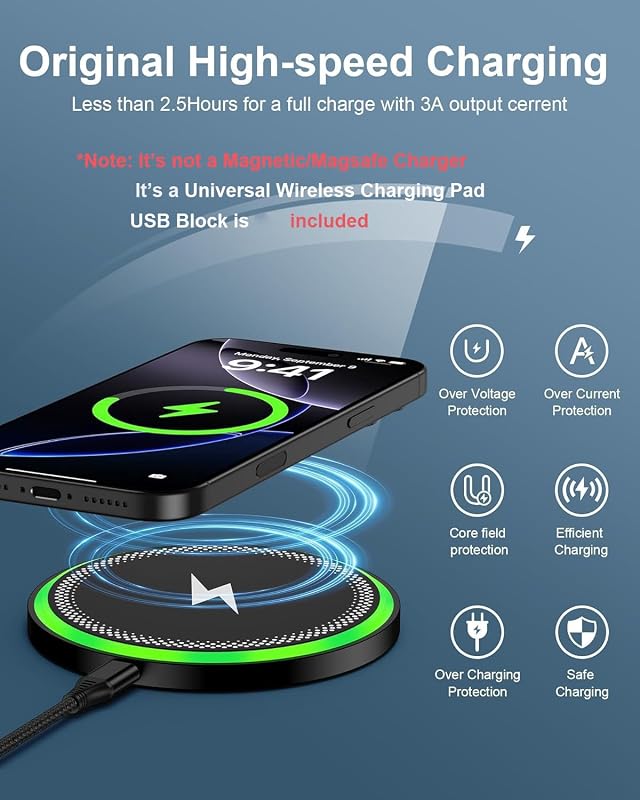
The main thing you need is a Qi wireless charger. This can be a flat pad, a stand, or a multi-device charging station. The iPhone 11 does not need a special dock. It just needs a compatible charger.
If you want to compare charging needs across newer models too, you may also find our guide on what charger does iPhone 14 use useful for seeing how Apple charging habits have changed over time.
A power adapter and cable for the charger
Most wireless chargers need a wall adapter and a cable to power the pad. Some come with both. Some do not. This is one of the most common buying mistakes. People buy the pad and then realize they still need a power brick.
For best results, use the adapter recommended by the charger maker. A weak adapter can make charging unstable or slower than expected.
A case that supports wireless charging
Most normal cases work fine with the iPhone 11. Thin silicone, plastic, and many leather cases usually do not block charging. Very thick cases, metal cases, and cases with credit cards inside can cause problems.
If your phone charges without the case but not with it, the case is likely the issue. That is an easy fix.
Best Wireless Charging Use Cases for iPhone 11
Nightstand charging
Wireless charging is perfect for bedtime. You can drop the phone on the pad, and it will charge through the night. A stand style charger is nice here because you can check the time or notifications without picking up the phone.
Desk and work setup
At a desk, wireless charging is very handy. You can keep the phone upright while working, checking messages, or taking calls. It cuts down on cable clutter and makes your workspace feel cleaner.
Kitchen or shared spaces
Wireless chargers also work well in shared spaces. Put one in the kitchen, living room, or family room, and anyone can use it quickly. The iPhone 11 is a good fit for this because it is easy to set down and forget.
Travel and convenience
Wireless charging is less ideal for travel if you need speed. But it is still useful in hotels, offices, or any place where you want quick convenience. If you travel often, you may also want to read what fast charging power banks work with iPhone for portable backup options.
iPhone 11 Wireless Charging vs Wired Charging
Wireless charging wins on convenience
The biggest benefit of wireless charging is ease. No plugging and unplugging. No worn-out cable ends. No fumbling in the dark. If you charge your phone in the same place every day, wireless charging feels great.
Wired charging wins on speed
If speed matters, wired charging is still better. A cable gives you a more direct connection and usually charges faster. That matters when your battery is low and you need power right away.
If you are comparing charger options more broadly, our article on which iPhone charger is best can help you choose between convenience, speed, and budget.
Battery health considerations
Both methods are safe when you use quality accessories. Still, heat is the main thing to watch. Wireless charging can run warmer, so if battery health is your top concern, mix both methods. Use wireless charging when it is convenient, and use wired charging when you need a fast boost.
Buying Tips for the Best iPhone 11 Wireless Charger
Choose a charger with good alignment
Look for a charger with a clear charging zone or a built-in guide. Some pads are large and easy to use. Others require perfect placement. A stand can also help keep the phone in the right spot.
Check power output
Not every wireless charger offers the same output. Higher-quality chargers often give a better experience, even if the iPhone 11 does not use the maximum power all the time. A well-made charger is usually more stable and less likely to overheat.
Look for safety features
Good wireless chargers should include protection against overheating, overcharging, and short circuits. That is important because the charger may stay plugged in for long periods, especially on a nightstand.
Pick the right style for your space
A flat pad is simple and cheap. A stand is better for desks and bedside tables. A multi-device charger is great if you also charge AirPods or another phone. Choose the style that fits your daily routine.
If you are still deciding what kind of charger setup makes sense for your Apple phone, our guide on what iPhone charger do I need is a helpful place to start.
Common Problems and Easy Fixes
The phone is not charging
If your iPhone 11 is not charging wirelessly, first check the charger’s power source. Make sure the pad is plugged in and the adapter works. Then move the phone slightly to find the correct position.
The charge is very slow
Slow charging can happen if the adapter is weak, the case is too thick, or the phone is not aligned well. Try removing the case and testing again. If it improves, the case was probably the problem.
The phone gets warm
Some warmth is normal. If it gets too hot, stop charging for a while. Heat can build up more when the phone is used while charging or when the room is warm.
Charging stops and starts
This usually means the phone is moving slightly on the pad or the charger is not stable. Try a different surface or a better charger with a firmer grip. A stand can help reduce movement.
Should You Use Wireless Charging on iPhone 11?
Yes, if you want easy daily charging
If your goal is convenience, the answer is yes. The iPhone 11 has wireless charging, and it works well for everyday use. It is great for overnight charging, desk charging, and keeping your setup neat.
Maybe not, if speed is your top priority
If you often need a fast battery boost, wired charging is still the better choice. Wireless charging is more about comfort than speed. That is the trade-off.
Best overall advice
For most people, the best setup is a mix of both. Use wireless charging when you are at home or at work. Use wired charging when you are in a hurry. That gives you the best of both worlds.
And if you are comparing charger needs across Apple’s lineup, our guide on does iPhone come with a charger can also help if you are shopping for accessories or a second phone.
Conclusion
So, does iPhone 11 have wireless charger support? Yes, it does. The iPhone 11 supports Qi wireless charging, which makes it easy to charge without cables. That is one of the phone’s most useful everyday features.
Still, wireless charging is best for convenience, not speed. If you want the fastest charge, a wired setup is better. But if you want a clean desk, simple bedtime charging, and less cable wear, the iPhone 11 is a very good wireless charging phone.
Our recommendation: buy a quality Qi charger from a trusted brand, use a case that does not interfere, and keep a cable handy for fast top-ups. That way, your iPhone 11 stays easy to charge in every situation.
Frequently Asked Questions
Yes, the iPhone 11 has built-in wireless charging support. It works with Qi wireless chargers, so you can charge it on many pads and stands without a cable.
The iPhone 11 uses the Qi wireless charging standard. That means it works with most standard Qi chargers from many brands, not just Apple.
The phone may be off-center, the case may be too thick, or the charger may not be getting enough power. Try removing the case and repositioning the phone on the pad.
Yes, wireless charging is usually slower than wired charging. It is more convenient, but a cable is better when you need a fast battery boost.
Yes, most normal cases work fine. Thin plastic, silicone, and many leather cases should not block charging, but thick or metal cases can cause issues.
Yes, it is safe when you use a quality charger. Some heat is normal, but it is best to avoid very hot charging conditions and use trusted accessories.

Tech & Gadget Reviewer
Ethan Walker is a tech enthusiast and gadget reviewer with over 8 years of hands-on experience testing consumer electronics, smart home devices, and cutting-edge accessories. He helps readers make smarter buying decisions through honest, in-depth reviews.