Do Smart Lights Use More Electricity and Save Energy
Smart lights usually use only a little more electricity than regular LED bulbs because of their standby electronics. They can still save energy when schedules, automation, and better lighting habits reduce wasted runtime.
Smart lights usually do not use dramatically more electricity than regular LED bulbs, but they do use a small amount of standby power when they stay connected to Wi‑Fi, Bluetooth, Zigbee, or a hub. In most homes, the convenience and automation features matter more than the tiny extra energy draw, especially if you choose efficient bulbs and use them wisely.
- Small standby load: Smart bulbs use a little power even when “off” to stay connected.
- LED still matters most: A smart LED is usually far more efficient than an incandescent bulb.
- Automation can offset cost: Schedules and motion control often save more than standby power adds.
- Compatibility is critical: Check fixture fit, dimmer support, app requirements, and platform support first.
Do Smart Lights Use More Electricity? The Short Answer and What Actually Happens
The short answer is yes, but only a little. A smart bulb still uses LED lighting, so the main electricity draw comes from producing light; the “smart” part adds a small always-on load for connectivity, processing, and app control.
That means a smart bulb can cost slightly more to run than a plain LED bulb with similar brightness, but it is usually far more efficient than older incandescent bulbs. If you are choosing based on energy use alone, compare the bulb’s light output, wattage, and how often you actually leave it on.
How Smart Lights Work: LEDs, Chips, and Always-On Connectivity
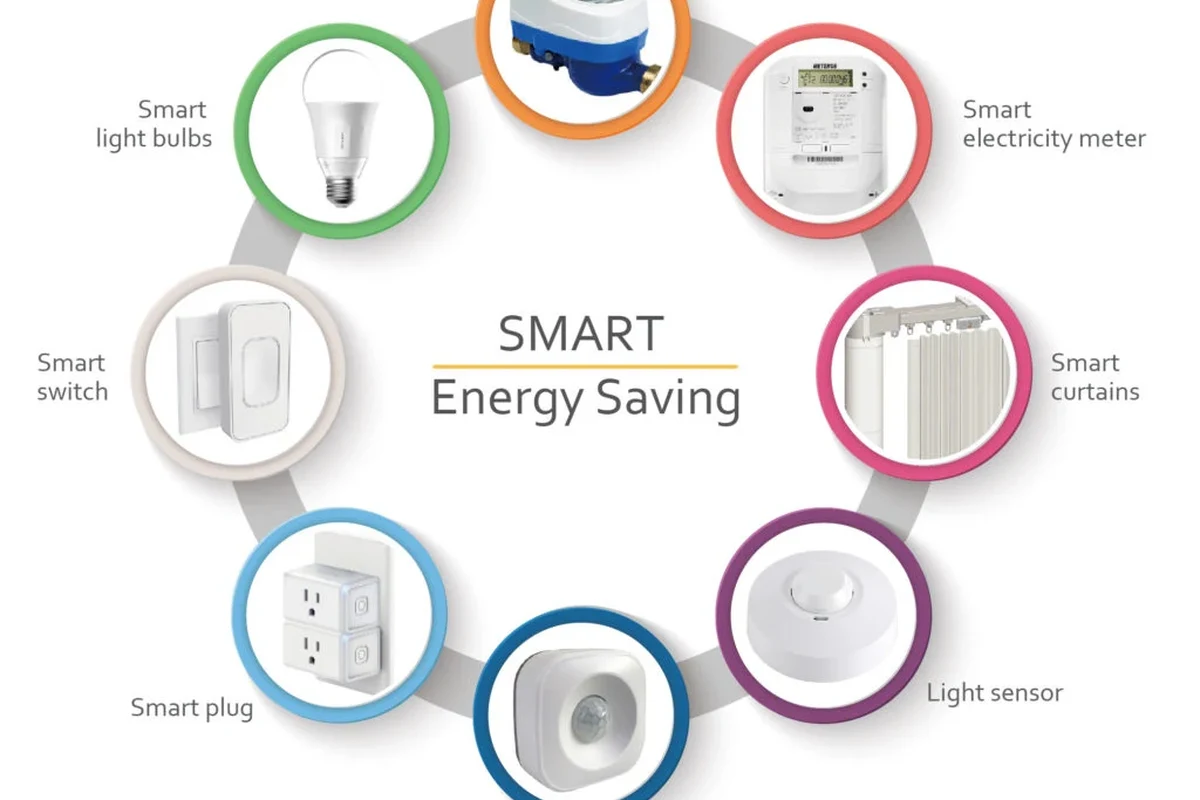
Smart lights combine an LED light engine with a control module. The LED portion creates the light, while the chip inside handles wireless communication, dimming, color changes, scenes, and scheduling.
Because the control module has to listen for commands, many smart bulbs stay partially powered even when they are “off” in the app. This is different from a basic bulb, which only draws power when the switch is on.
Why smart features add a small standby load
The standby load comes from the radio and the electronics needed to keep the bulb reachable. The amount varies by model, network type, firmware, and whether the bulb uses Wi‑Fi, Bluetooth, Zigbee, or a bridge.
In practice, that standby draw is usually small enough that it does not erase the energy savings from LED lighting. Still, if you have dozens of smart bulbs in a large home, the total idle use can become more noticeable than with a few bulbs.
Standby power is model-specific. Check the manufacturer’s specifications or user manual if you want the most accurate estimate for a particular bulb or kit.
How app control, voice assistants, and automations affect usage
App control itself does not usually increase electricity use much, but it can change how long lights stay on. Schedules, motion triggers, sunrise routines, and voice control often help reduce waste because lights turn off more reliably.
If you use a platform like Alexa or Google Home, the bulb may remain reachable through the ecosystem even when you are not actively controlling it. For platform-specific setup details, see Do Smart Lights Work With Alexa and what smart lights work with Google Home.
Use automations for the rooms where lights are often left on by accident, such as hallways, bathrooms, laundry rooms, and home offices.
Electricity Use Breakdown: Smart Bulbs vs Regular LED Bulbs vs Incandescent
The energy story is easiest to understand when you compare the lighting type, not just the “smart” label. A smart bulb with LED technology is still usually much more efficient than an incandescent bulb, and often close to a standard LED bulb of similar brightness.
Typical wattage ranges to compare before buying
Wattage varies by brightness, color capability, and design, so always check the actual product specs. A standard LED bulb is often the lowest-draw option for simple on/off lighting, while a smart LED bulb may use a little more because of its wireless electronics.
Incandescent bulbs are the least efficient of the three because much more energy becomes heat instead of light. If your main goal is lower electricity use, any efficient LED is usually a much better choice than an incandescent, smart or not.
| Option | Best For | Key Consideration |
|---|---|---|
| Smart LED bulb | Automation, schedules, scenes, remote control | Small standby draw and app/platform compatibility |
| Regular LED bulb | Lowest-complexity energy savings | No smart features, but often very efficient |
| Incandescent bulb | Rarely the best choice today | Highest electricity use and more heat |
What standby power means in real monthly cost
Standby power is the electricity a device uses while it is idle but still connected. For one smart bulb, the cost is usually small; for an entire house, the total depends on how many bulbs you have, how long they stay connected, and how often they are actually lit.
Because electricity rates vary by region and utility, it is better to think in relative terms: smart bulbs may add a little overhead, but they can also reduce waste through scheduling and automatic shutoff. If you want the best budget balance, compare the total number of bulbs and the hours they stay on each day.
Many smart lighting systems save more energy from better habits, like automatic off schedules, than they lose from standby power.
Who Smart Lights Fit Best in 2026
Smart lights are most useful when lighting control matters as much as energy use. They fit homes where people want remote access, scenes, motion-based control, or voice commands without walking to every switch.
Best use cases for renters, busy households, and energy-conscious homes
Renters often like smart bulbs because they can improve convenience without rewiring fixtures. Busy households benefit from schedules and scene presets, while energy-conscious homes can use automations to prevent lights from staying on all day.
They are also helpful in spaces with irregular routines, such as bedrooms, nurseries, entryways, and home offices. If you are building a broader smart-home setup, you may also want to compare options in 9 best smart lights and 9 best smart lights for home automation.
When a basic LED bulb is the smarter choice
A regular LED bulb is often the better pick if you only need simple lighting, want the lowest setup hassle, or plan to use a wall switch like a normal light. It is also the safer choice when you do not want to depend on an app, Wi‑Fi network, or platform account.
If the room is used infrequently, the smart features may not justify the extra complexity. In that case, a high-quality LED bulb with the right brightness and color temperature may be the most practical answer.
Key Buying Criteria: Brightness, Compatibility, Connectivity, and App Requirements
Energy use matters, but it should not be the only buying factor. A smart bulb that does not fit your fixture, dim correctly, or connect reliably can become frustrating no matter how efficient it is.
Lumens, color temperature, and dimming performance
Look at lumens for brightness, not just watts. Color temperature affects the feel of the room, with warmer tones often preferred for bedrooms and cooler tones often used in workspaces.
Dimming is another important factor because not every smart bulb dims smoothly at low levels. If you care about mood lighting or late-night use, check whether the bulb supports flicker-free dimming and whether it works with your existing dimmer switch or should be used only with a standard on/off switch.
- Check compatibility, model number, app requirements, dimensions, wattage, and intended fixture type
- Confirm safety guidance, warranty terms, return policy, privacy settings, and update support
Wi‑Fi, Bluetooth, Zigbee, and Matter support
Connectivity affects both convenience and standby behavior. Wi‑Fi bulbs are easy to set up but can depend more heavily on your router, while Bluetooth bulbs can be limited by range and remote-access features.
Zigbee bulbs often work through a hub or bridge, which can improve reliability in some homes. Matter support may simplify cross-platform control, but you should still verify exactly which features are supported by the bulb, app, and ecosystem you plan to use.
Hub requirements, dimensions, and fixture fit checks
Before buying, confirm whether the bulb needs a hub, a bridge, or a specific app account. Also check the bulb shape, base type, and physical size so it fits enclosed fixtures, ceiling fans, lamps, and narrow sconces.
This is especially important for recessed cans and decorative fixtures where heat and clearance matter. If a bulb is too large or not rated for a closed fixture, it may run hotter than intended and wear out sooner.
Real-World Benefits and Limitations of Smart Lighting
Smart lighting can be a real quality-of-life upgrade, but it is not automatically the most energy-efficient choice in every room. The value depends on how much control you want and how often the lights are used.
Convenience, scheduling, and automation savings
The biggest benefit is control. You can set schedules, create scenes for reading or relaxing, and use motion or voice triggers to reduce wasted runtime.
For many households, those habits can save more energy than the bulb’s small standby load costs. That is why smart lighting can make sense even when a plain LED bulb has slightly lower idle power.
Smart lights are best for users who want scheduling, remote control, and scene control in rooms where lights are often left on by mistake.
Common drawbacks: setup complexity, app dependence, and network issues
The tradeoff is complexity. You may need to install an app, create an account, connect to a platform, and update firmware before everything works smoothly.
Network issues can also interrupt control, especially if your router is overloaded or the bulb is placed far from the hub. If you prefer a simple light that always works with a standard switch and no app, a regular LED bulb is less demanding.
Safe Use, Setup, and Maintenance Tips for Long-Term Efficiency
Smart lights are low-power electronics, but they still deserve careful setup and maintenance. Good installation and routine checks help them last longer and keep performance stable.
Installation checks, heat limits, and fixture safety
Always follow the manufacturer’s instructions for bulb type, fixture type, and dimmer compatibility. If the bulb is intended for indoor use only, do not place it in damp or outdoor fixtures unless the product is specifically rated for that environment.
Stop using any bulb or fixture that shows overheating, flickering caused by damage, cracked housing, discoloration, or a loose fit. If a fixture has a dimmer, verify that the bulb is compatible before use.
Cleaning, firmware updates, and when to replace a bulb
Turn power off before cleaning, and use a dry or slightly damp cloth only if the manual allows it. Dust buildup can affect appearance and, in some fixtures, heat management.
Firmware updates may improve stability, compatibility, or security, but availability varies by brand and app version. Replace a bulb when it becomes unreliable, noticeably dimmer, or no longer supported by the manufacturer’s app or platform.
If a bulb keeps disconnecting, check router placement, hub distance, firmware status, and whether the room has weak signal before replacing the bulb.
Warranty details and what to verify before purchase
Warranty terms vary by brand, region, and retailer, so read the official policy before buying. Also check whether support covers the bulb only, the hub only, or both, and whether you must register the product in an app.
For smart-home purchases, it is smart to verify privacy settings, update support, and current compatibility notes from the manufacturer’s manual or product page. If you are comparing lighting ecosystems, you may also find what smart lights work with Apple Home useful for platform planning.
Final Verdict: Do Smart Lights Save Energy or Cost More?
Smart lights can cost a little more to run than plain LED bulbs because of standby power, but they still usually use far less electricity than incandescent lighting. For most households, the practical answer is that smart bulbs are efficient enough to justify themselves when convenience and automation matter.
Best recommendation by user type and budget
If you want the simplest low-cost option, choose a regular LED bulb. If you want control, scenes, voice commands, or automatic schedules, a smart LED bulb is the better fit even if it adds a small energy overhead.
For buyers who want to build a connected lighting system, start with the rooms you use most and verify compatibility before buying more bulbs. That approach keeps costs and complexity under control.
Evidence limits and the practical takeaway for 2026
There is no single electricity number that applies to every smart bulb because wattage, standby draw, connectivity type, firmware, and usage habits all vary by model. The safest buying approach is to compare the manufacturer’s specs, check your fixture requirements, and choose the simplest system that meets your needs.
In real homes, smart lighting is usually more about better control than dramatic power savings. If you use the automation features well, it can be both convenient and reasonably efficient.
Frequently Asked Questions
Usually a little, because smart bulbs keep their wireless electronics powered. The difference is typically small compared with the savings from using LED lighting instead of incandescent bulbs.
The bulb’s chip and wireless radio stay ready to receive commands from an app, hub, or voice assistant. That standby load varies by model and connection type.
They can be, especially if schedules, motion routines, and remote control help lights stay off more often. If you only want basic on/off lighting, a regular LED bulb may be simpler.
There is no universal winner because efficiency varies by bulb and system design. Check the manufacturer specs for standby power, hub requirements, and supported features before buying.
Some do and some do not. Wi‑Fi bulbs often use an app directly, while Zigbee and some Matter setups may require a hub or compatible platform.
Verify brightness, base size, fixture fit, dimming support, app requirements, and compatibility with your smart-home platform. Also review warranty terms and update support from the manufacturer.