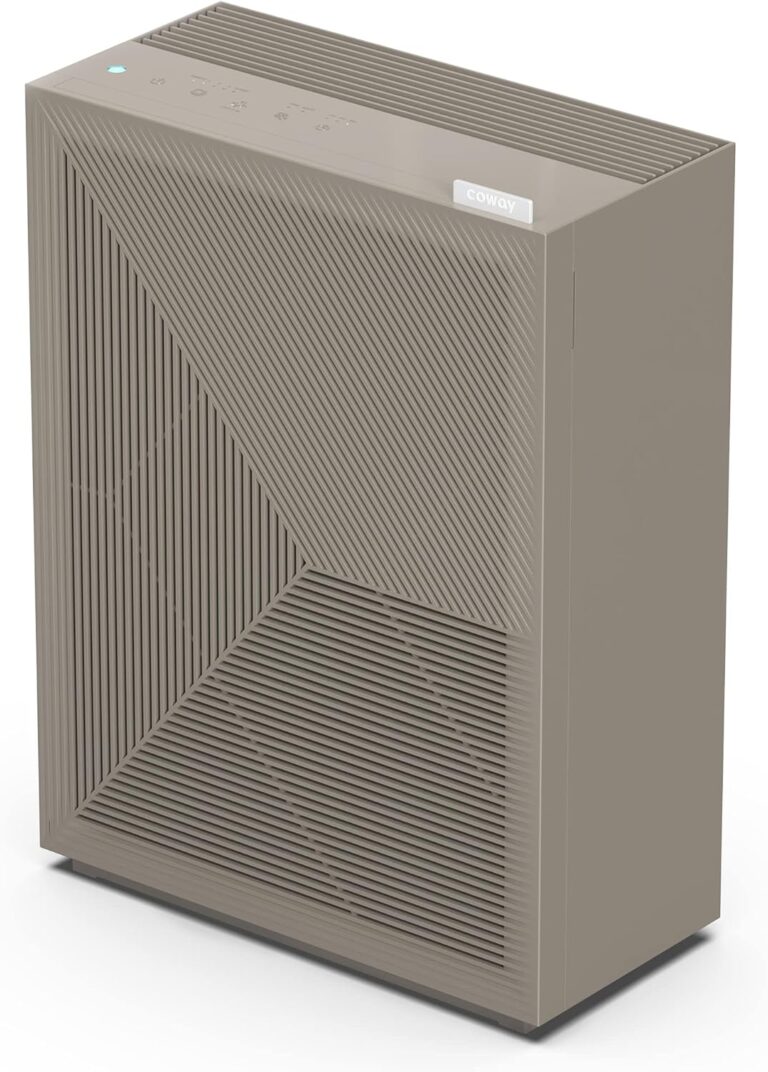
Best HEPA Air Purifier for 3D Printing to Breathe Easier
A HEPA air purifier can be a smart addition to a 3D printing space, especially if you print in shared rooms, apartments, or small studios. The best choice combines true HEPA filtration, activated carbon, and enough airflow for your room or enclosure.
If you print at home, the best HEPA air purifier for 3D printing is usually one that combines true HEPA filtration with a carbon layer, moves enough air for your room or enclosure, and fits safely into your workflow. It can help reduce airborne particles and odors, but it is not a substitute for good ventilation, enclosure sealing, or resin-safe post-processing habits.
- HEPA helps with particles: It is useful around 3D printers, but it does not replace ventilation.
- Carbon matters for odor: Choose a purifier with both HEPA and a real carbon layer if smell is.
- Size it correctly: Match CADR and coverage to your room, enclosure, and print duration.
- Maintenance affects performance: Clean pre-filters and replace filters on schedule to keep airflow strong.
- Safety comes first: Keep cords, heat, and chemicals managed according to the manufacturer’s instructions.
Best HEPA Air Purifier for 3D Printing: What It Can and Can’t Do

3D printing creates different air-quality concerns depending on the material, printer type, and room layout. A HEPA purifier can be a smart part of the solution, but it works best when you understand its limits instead of expecting it to solve every emissions problem on its own.
Quick answer for makers: the best setup for most 3D printing spaces
For most hobbyists and small studios, the most practical setup is a true HEPA purifier with activated carbon placed near the printer area, paired with an enclosure for high-emission materials and basic room ventilation. If you print mainly PLA in a large, well-ventilated room, your needs may be simpler than someone printing ABS, ASA, or working with resin.
Most makers should look for a purifier that balances true HEPA filtration, carbon odor control, adequate airflow, and manageable noise for long print sessions. The best fit depends on whether you need coverage for a single enclosure, a desk corner, or an entire room.
Why this matters in 2025 for home workshops and small studios
More people are running printers in bedrooms, offices, garages, apartments, and shared workspaces, which makes air management more important than it used to be. That is especially true when a printer runs for many hours, when multiple machines share the same room, or when people are nearby for long periods.
Air purifiers are also easier to buy than dedicated exhaust systems, so they often become the first upgrade people consider. The key is to match the purifier to the actual risk: particles, odors, room size, and the way your printer is enclosed or vented.
How HEPA Air Purifiers Work Around 3D Printers

HEPA purifiers do not “remove all printer fumes.” They filter air that passes through them, which means performance depends on how much air the unit can move, where it sits, and how much polluted air reaches the intake.
What HEPA filters capture from PLA, ABS, PETG, and resin-related particles
True HEPA filters are designed to capture very small airborne particles, which is why they are useful around 3D printers. They are especially relevant for ultrafine particles released during printing, sanding, cleaning, or resin handling, though the exact amount generated varies by material, temperature, ventilation, and printer setup.
PLA generally produces fewer odor concerns than ABS or ASA, but that does not mean it produces nothing. PETG sits somewhere in the middle for many users, while resin printing adds a different set of concerns during printing, washing, and curing.
Particle output and odor levels vary widely by printer model, nozzle temperature, enclosure design, and the specific filament or resin used. Manufacturer claims about “low odor” should be treated as material-specific, not universal.
The role of activated carbon for odor control and VOC reduction
Activated carbon helps with odors and can reduce some volatile organic compounds, but it is not the same as a HEPA filter. HEPA handles particles; carbon helps with gases and smells. Most 3D printing buyers need both if they want a more comfortable workspace.
Carbon performance depends on how much carbon is inside the purifier, how long the air stays in contact with it, and how saturated the filter becomes over time. Thin carbon sheets may help with light odor, but they usually do less than a substantial carbon layer or a purpose-built filtration path.
HEPA and carbon filters solve different problems, so a purifier that only advertises one of them may not be enough for a 3D printing setup.
Why airflow, CADR, and room size matter more than marketing claims
Airflow matters because a purifier can only clean the air it actually moves. CADR, or clean air delivery rate, is one useful way to compare models, but it should be interpreted alongside room size, enclosure volume, and the amount of time the printer runs.
A small purifier in a large workshop may make a modest difference near the unit but leave most of the room unchanged. A larger purifier can help more, but only if the placement and filter design allow it to draw air effectively from the printer area.
Who Needs a HEPA Air Purifier for 3D Printing
Not every printer owner needs the same setup. The right answer depends on where you print, how often you print, what materials you use, and whether other people share the space.
Best fit for enclosed printers, apartment setups, and shared living spaces
If your printer sits in an apartment, bedroom, office, dorm, or shared family room, a purifier is easier to justify. Enclosed printers can concentrate emissions, so a purifier near the enclosure may help reduce what escapes into the room.
This is also where comfort matters. Even when emissions are not severe, smell and noise can make a room unpleasant for sleeping, working, or studying.
When ventilation alone may be enough and when it is not
In some garages, workshops, or dedicated print rooms, a window fan or exhaust system may handle much of the burden. That may be enough for low-emission materials and infrequent printing, especially if the room is isolated from living areas.
Ventilation alone becomes less convincing when the room is small, the printer runs often, multiple printers are active, or the material is known for stronger odor and emissions. In those cases, a purifier is a useful layer, not a replacement.
Use cases for hobbyists, schools, makerspaces, and home offices
Hobbyists usually want a balance of cost, size, and noise. Schools and makerspaces often need durable units with easy-to-source filters and simple controls. Home offices need quieter operation and better placement planning so the purifier does not interfere with work calls or desk space.
- Use a purifier as part of a layered approach: enclosure, ventilation, and filtration work better together.
- For resin printing, keep washing and curing areas separate from your main workspace whenever possible.
- If others share the room, prioritize lower noise and easier filter replacement over flashy app features.
Key Buying Criteria: Choosing the Right Model
Buying a purifier for 3D printing is less about finding the “best” model overall and more about finding the right fit for your room, printer, and habits. The most useful features are the ones that match your workspace without adding hassle.
Room coverage, CADR, and sizing for printer enclosures or entire rooms
Check whether the purifier is sized for a small enclosure, a single room, or a larger workshop. If you want it to clean the whole room, the stated coverage should be realistic for the actual room size, not just the marketing maximum.
For a printer enclosure, compact units or ducted solutions may make more sense than a large floor purifier. For open rooms, a higher airflow model is usually more appropriate, especially if the printer runs many hours a day.
Filter stack: true HEPA, pre-filter, and carbon layer
A good filter stack usually starts with a pre-filter that catches larger dust and debris, followed by true HEPA for fine particles, and then carbon for odor and gas reduction. The pre-filter helps the more expensive filters last longer, which matters if you print often.
If a purifier skips the pre-filter or uses a very small carbon element, it may still help with dust but be less effective for 3D printing odors. Always verify the exact filter layout in the manual or product specs.
Noise levels, power use, and rated wattage for long print sessions
3D prints often run for many hours, so a purifier that is too loud may end up being ignored. Noise is highly model-dependent, and advertised low-noise modes may only be realistic at lower fan speeds.
Power use matters too, especially if the purifier runs continuously. Check the rated wattage and whether the unit has a usable auto mode so it is not blasting at full speed when the room is already clean.
Dimensions, placement, cable quality, and safe cord routing near equipment
Measure the footprint before buying. A purifier that blocks access to the printer, sits too close to moving parts, or forces awkward cable routing can create more frustration than benefit.
Keep cords away from hot printer surfaces, moving belts, and walk paths. Do not place any purifier where it can block airflow, overheat, or become a tip-over risk near equipment.
Maintenance costs, filter replacement intervals, and warranty details to verify
Replacement filters are part of the real cost of ownership. Before buying, check how often the manufacturer recommends changing the HEPA and carbon filters, how easy the filters are to source, and whether the warranty terms are clear.
Warranty length alone is not enough. Verify what is covered, whether filters are excluded, and whether the manufacturer supports replacement parts for the specific model you are considering.
Best Features to Look For in a 3D Printing Air Purifier
The most useful features are the ones that help the purifier run consistently with minimal effort. For 3D printing, that usually means strong intake, sensible automation, and parts you can replace without a headache.
Smart sensors, auto mode, and app requirements for remote monitoring
Some purifiers include particle sensors, odor-related automation, or app control. These features can be helpful if you want to monitor a print room remotely or adjust fan speed without walking over to the unit.
That said, app features vary by model and firmware, and some units work perfectly without a phone. If remote control matters to you, confirm the app store listing, permissions, and current support status before buying.
Intake design, fan strength, and how well it handles continuous use
For print spaces, a purifier should be able to run for long periods without sounding strained or losing effectiveness too quickly. Intake design matters because it affects how well the unit pulls in air near the source of the emissions.
Units with poor intake placement may clean the room slowly even if the filter itself is good. For that reason, fan design and airflow path can matter as much as the filter label.
Build quality, replacement part availability, and long-term value
A purifier is a long-term maintenance item, not a one-time gadget. Look for a model with sturdy construction, easy-access filters, and replacement parts that are still available after the initial purchase.
If a brand makes it hard to find official filters, the purifier can become less useful over time. Long-term value usually comes from dependable support, clear manuals, and straightforward upkeep rather than the lowest upfront price.
Safety, Setup, and Best Practices for Cleaner Air
Placement and setup can make a big difference in how much benefit you actually get. A well-chosen purifier in the wrong place may underperform, while a modest unit in the right spot can do more useful work.
Where to place the purifier for the best results in a print area
Place the purifier where it can draw air from the printer area without being blocked by walls, furniture, or the enclosure itself. For open rooms, a location that encourages room circulation is often better than a corner hidden behind equipment.
Put the purifier close enough to the printer to help capture nearby air, but not so close that it interferes with heat, access, or cable routing.
Keep intake and exhaust areas clear so the fan can move air efficiently.
If odor or dust still lingers, reposition the unit or improve ventilation instead of assuming the purifier is defective.
Safe use around heat sources, printers, solvents, and resin post-processing
Do not place a purifier where it can be exposed to direct heat, liquid spills, or solvent fumes beyond its intended use. Resin washing and curing should be handled carefully, with products and chemicals kept according to their own safety guidance.
Stop using damaged electronics, frayed cables, overheated units, or filters that have visibly collapsed or become contaminated. Follow the manufacturer’s instructions if the unit shows unusual odor, smoke, or repeated shutdowns.
Common setup mistakes that reduce filtration performance
One common mistake is assuming that a purifier hidden in another room will solve a printer smell problem. Another is running the unit on a very low setting when the room needs more air movement.
People also sometimes forget to change filters on time, place the purifier behind a desk where airflow is blocked, or rely on it while the printer enclosure has obvious leaks. Any of these can reduce the real-world effect.
Inspection checklist for cables, filters, vents, and signs of overheating
Before each extended print run, take a quick look at the power cord, plug, and intake area. Make sure vents are not blocked by dust buildup, packaging, fabric, or stacked supplies.
- Check the purifier’s coverage, filter type, and noise level against your room size and print schedule.
- Confirm that replacement filters are available from the manufacturer or a reliable retailer.
- Review the manual for placement, maintenance, and safety limits around heat and chemicals.
Maintenance, Storage, and Troubleshooting
Good maintenance keeps the purifier useful and helps you spot problems before they become expensive. Most issues come down to clogged filters, poor placement, or a unit that is too small for the space.
How often to clean pre-filters and replace HEPA and carbon filters
Pre-filters usually need more frequent cleaning than the main HEPA or carbon filters, but the exact interval depends on dust levels, printer use, and the manufacturer’s guidance. If you print often, inspect them more often than the minimum interval in the manual.
HEPA and carbon replacement timing varies by model and usage. If odors return quickly or airflow drops noticeably, it may be time to check the filters even if the calendar says otherwise.
Storage guidance for spare filters and unused units
Store spare filters in a clean, dry place away from direct sunlight, moisture, and strong odors. If you are storing an unused purifier, keep it covered and unplugged, and make sure the filters are not exposed to dust while sitting idle.
For resin or workshop environments, sealed storage matters because filters can absorb nearby odors over time. That can shorten useful life before the filter is even installed.
What to do if odor, noise, or airflow performance drops
If odor increases, first check whether the filter is saturated, the intake is blocked, or the purifier is simply undersized for the room. If noise changes, look for loose panels, dirty filters, or a fan that is working harder than usual.
Do not ignore unusual rattling, burning smells, or repeated shutdowns. Those are signs to stop using the unit and consult the manual or manufacturer support.
When a purifier is not enough and you need better enclosure sealing or ventilation
If the purifier runs constantly but the room still smells strongly, the problem may be upstream. Leaky enclosures, poor exhaust routing, and weak room ventilation can overwhelm even a decent purifier.
In that situation, better sealing, a stronger exhaust plan, or a different printer placement may help more than buying a larger purifier alone. For many users, the best result comes from combining filtration with source control.
Final Verdict: Is a HEPA Air Purifier Worth It for 3D Printing?
Yes, for many makers it is worth it, but only as part of a broader air-quality plan. A HEPA air purifier is most useful when you want a practical layer of protection against particles and odors in a room where printers run regularly.
Best overall recommendation by user type and workspace size
For apartment users, shared rooms, schools, and home offices, choose a true HEPA purifier with carbon, a sensible CADR for the space, and a noise level you can live with during long prints. For enclosed printers or resin setups, prioritize placement, filter access, and room-specific ventilation before chasing premium smart features.
If you want more context on choosing home gadgets that fit real living spaces, our guides on the best cordless vacuum for pet hair and smart lights for home automation show the same kind of practical fit-first thinking. For setup-heavy devices, the right size and maintenance plan usually matter more than the flashiest feature list.
Limitations, trade-offs, and transparent value assessment
The trade-off is simple: purifiers cost money, take up space, and require filter replacements. They also cannot fully compensate for a badly ventilated room or a leaky enclosure, so they should be viewed as one layer in a safer setup rather than the entire solution.
That is why the best value usually comes from a model that is easy to maintain, appropriately sized, and built with real filter support. If a unit looks cheap upfront but has hard-to-find filters or weak airflow, it may cost more in the long run.
Closing takeaway for safer, more comfortable printing in 2025
The best HEPA air purifier for 3D printing is the one that matches your room, your materials, and your tolerance for noise and maintenance. Confirm the specifications in the official manual before buying, and think of filtration as a practical comfort and cleanup tool that works best alongside ventilation and good printer habits.
Choose a true HEPA purifier with carbon if you print often, share space with others, or work with stronger-smelling materials. If your room is large and well ventilated, a smaller unit may be enough, but only if it is sized correctly and maintained on schedule.
Frequently Asked Questions
You may need one if you print in a bedroom, apartment, office, or shared room. It is especially useful when you print often or use materials with stronger odors.
Look for true HEPA filtration, a meaningful carbon layer, and enough airflow for your room or enclosure. Noise, filter replacement cost, and filter availability also matter.
It can help reduce airborne particles and some odors, but it will not solve every gas or ventilation issue. Carbon helps with odor and some VOC reduction, while HEPA handles particles.
Place it where it can pull air from the printer area without being blocked by furniture or walls. Keep it away from heat, spills, and cable hazards.
It depends on the model, dust level, and how often you print. Check the manual, and inspect filters sooner if odors return or airflow drops.
Ventilation may be enough in a large, isolated workshop with low-emission printing and limited use. If the room is small, shared, or heavily used, a purifier is usually a helpful extra layer.