Do Wireless Chargers Work With Cases Find Out Now
Yes, wireless chargers usually work with thin plastic, silicone, or TPU cases. Thick, metal, or accessory-heavy cases can slow charging, cause heat, or prevent it from working well.
Yes, wireless chargers often work through a phone case, as long as the case is thin enough and made from a wireless-friendly material. The biggest factors are case thickness, metal parts, magnetic accessories, and how well the phone lines up on the charger.
- Thin cases usually work: Silicone, TPU, and clear plastic cases are the safest bets.
- Thickness matters: More bulk can reduce charging speed or cause misalignment.
- Metal is a problem: Metal plates, rings, and wallet accessories often interfere.
- Heat is a warning sign: Stop and inspect the setup if the phone gets unusually warm.
- Check the whole system: Phone, charger, cable, adapter, and case all affect results.
Do Wireless Chargers Work With Cases? Quick Answer for 2026
In most everyday setups, the answer is yes. A normal silicone, TPU, or clear plastic case usually won’t stop charging, but thicker rugged cases, metal plates, wallet attachments, and some magnetic add-ons can interfere with power transfer or heat up the phone.
If you want to understand where problems usually start, it helps to compare charger type, phone alignment, and case design. For related charging compatibility basics, see do wall chargers work with all devices and do multi port chargers work with all phones.
How Wireless Charging Works Through a Phone Case
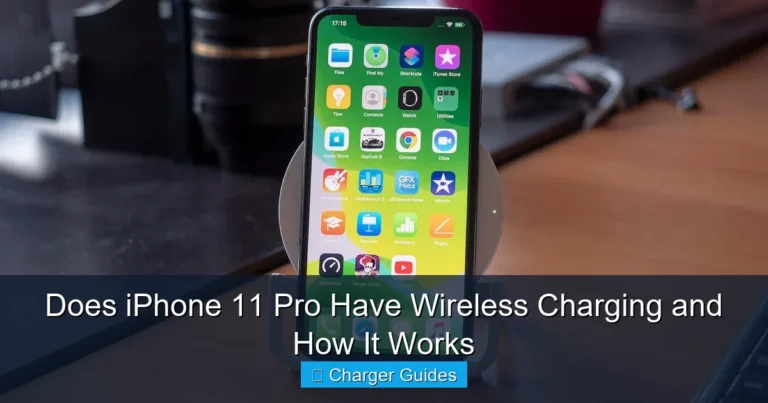
Wireless charging uses electromagnetic induction. The charger sends energy through a coil, and the phone receives that energy through its own coil inside the device.
A case sits between those two coils, so the charger has to push power through extra material. That is why the case’s thickness and composition matter so much, even when the phone and charger are both technically compatible.
Qi and Qi2 compatibility basics
Most wireless chargers are built around the Qi standard, and newer products may also support Qi2 features such as magnetic alignment on compatible devices. In plain terms, the standard helps the phone and charger communicate what power level is safe and practical.
Compatibility still varies by model. A phone may support wireless charging but only at certain wattages, and some cases can reduce the charger’s ability to keep the phone centered on the coil. Always verify the phone maker’s wireless charging guidance and the charger’s official compatibility list.
Magnetic alignment features vary by phone model, case design, and charger brand. If your setup relies on magnets, confirm that the case is explicitly rated for that charging ecosystem.
Why case thickness and materials matter
Thicker cases create more distance between the charger and the phone’s coil. That extra distance can lower charging efficiency, slow charging speed, or cause the phone to shift into a less stable charging position.
Materials matter too. Plastic, silicone, and TPU usually work well because they do not block the signal much. Metal, carbon-fiber-like layers with embedded metal, credit-card pockets, and decorative plates are more likely to interrupt charging or create heat.
Best Case Types for Wireless Charging Compatibility
Some cases are simply easier to use with wireless charging than others. If charging convenience matters to you, the safest approach is to choose a case that is specifically described as wireless charging compatible by the manufacturer.
Thin silicone, TPU, and clear cases
Thin silicone and TPU cases are usually the most reliable options because they protect the phone without adding much distance between the coils. Clear polycarbonate cases can also work well when they are slim and free of metal accents.
These cases are a strong choice for students, commuters, remote workers, and anyone who drops their phone on a desk charger throughout the day. They balance protection and convenience better than bulky alternatives.
- Choose a case that says “wireless charging compatible” in the product details.
- Keep the back of the case flat where the phone meets the charger.
- Remove cards, rings, or magnetic accessories before charging if charging becomes inconsistent.
Cases that can cause charging problems
Rugged cases with very thick backs, built-in kickstands, metal rings, wallet flaps, or battery packs can interfere with charging. Some decorative cases also hide metal elements that are not obvious until charging fails.
If your phone charges only when you place it at a very specific angle, the case may be part of the problem. In that situation, try removing the case temporarily and compare the result with the manufacturer’s guidance.
If a phone, charger, or case becomes unusually hot, stop charging and inspect the setup. Heat is a sign that the phone may be misaligned, the case may be too thick, or the charger may not be suitable for the device.
Key Specs to Check Before You Buy a Wireless Charger or Case
Wireless charging works best when both the charger and the case are chosen with the same setup in mind. Before buying, check the phone’s charging standard, the charger’s rated output, and the case maker’s compatibility notes.
Rated wattage and charging speed limits
Wireless chargers are often sold with wattage claims, but the actual charging speed depends on the phone, the charger, the cable, and the power adapter feeding the charger. A higher wattage rating does not guarantee faster charging for every device.
Also remember that some cases reduce effective speed even when charging still works. If you care about speed, verify the exact wattage your phone supports and confirm whether that speed is available only with a specific charger or magnetic alignment system.
Alignment, magnet strength, and cable quality
Alignment is one of the most overlooked factors in wireless charging. If the phone sits even slightly off-center, charging can slow down or stop and restart repeatedly.
Magnetic chargers can help keep the phone aligned, but only when the case and phone are designed for that system. Cable quality matters too, because a poor cable or underpowered adapter can limit the charger’s performance even if the pad itself is capable of more.
- Check compatibility, model number, app requirements, dimensions, ports, wattage, and intended use
- Confirm safety guidance, warranty, return policy, privacy settings, and update support
Heat management and safety certifications
Wireless charging naturally creates more heat than wired charging in many setups. That does not automatically mean there is a problem, but it does mean heat management matters for battery health and daily comfort.
Look for safety certifications and official compliance claims from the manufacturer rather than relying on vague marketing language. If a charger or case has no clear documentation, confirm the details in the manual or product listing before depending on it for regular use.
Real-World Benefits and Trade-Offs of Charging With a Case On
Leaving the case on is convenient, and for many people that convenience outweighs the downsides. The trade-off is usually a little more heat, a little less efficiency, and a greater chance of misalignment if the case is bulky.
Convenience, protection, and everyday usability
The biggest benefit is simple: you do not need to remove the case every time you charge. That saves time, reduces wear on the case, and keeps the phone protected during daily charging on a desk, nightstand, or kitchen counter.
This is especially useful for people who charge in short bursts throughout the day. If your phone sits on a charger while you work, study, or game, keeping the case on can make the routine much easier.
Wireless charging efficiency can drop when the phone is not centered on the charging coil, which is why small placement changes can make a big difference.
Slower charging, heat buildup, and misalignment risks
The main downside is that not every case allows the charger and phone to connect as efficiently as a bare phone would. That can mean slower charging or more heat, especially if the phone is charging while running demanding apps or sitting in a warm room.
Misalignment is another common issue. A thick case can make the phone sit higher on the pad, which increases the chance that the charging coils do not line up properly. If charging is unreliable, a wired connection may be the better choice for speed and consistency.
Common Mistakes That Stop Wireless Charging From Working
Most wireless charging failures are not mysterious. They usually come from case design, accessory interference, or a simple setup issue that is easy to overlook.
Using thick cases, metal accessories, or pop grips
Thick cases, metal plates, pop grips, wallet attachments, and some phone mounts can block or weaken charging. Even if the phone still charges, these add-ons can make the process inconsistent or generate unnecessary heat.
If you use a detachable accessory, remove it and try again before assuming the charger is broken. For people who switch between accessories often, a slimmer case may be a better long-term fit.
Ignoring debris, worn cables, or damaged chargers
Dust, lint, and debris between the charger and the case can keep the phone from sitting flat. A worn cable or weak power adapter can also create the false impression that the case is the issue.
Check the charger, cable, and adapter together as a system. If one part is damaged or unstable, the whole setup can fail even when the phone and case are both compatible.
Stop using damaged electronics, swollen batteries, frayed cables, overheating chargers, or unstable accessories and follow the manufacturer’s guidance.
Safe Use, Care, and Maintenance Tips for Better Charging Results
Wireless charging is usually simple to maintain, but a few habits can improve reliability and reduce wear. Good care also helps you spot compatibility problems before they turn into repeated charging interruptions.
Inspection, replacement guidance, and storage habits
Inspect the case, charger, cable, and adapter regularly for cracks, loose magnets, bent connectors, discoloration, or unusual wear. If a charger or case no longer sits flat or shows visible damage, replace it instead of trying to force it into service.
When storing a wireless charger, keep it dry and free from dust. If you travel with one, avoid packing it in a way that bends the cable sharply or presses hard on the charging surface.
- Easy daily charging without removing protection
- Less handling of ports and cables
- Convenient for desks, nightstands, and travel
- Can charge more slowly than wired power
- Heat and alignment issues are more common
- Bulky or metal cases may not work well
How to reduce heat and protect battery health
Keep the charger on a hard, ventilated surface rather than under pillows, blankets, or papers. If the phone gets warm, remove extra accessories and avoid charging while running heavy games, video calls, or navigation.
It also helps to use the charger and adapter recommended by the manufacturer. If your phone or case maker provides a compatibility note, follow that guidance first rather than assuming every wireless charger will behave the same way.
Final Recommendation: Who Should Use Wireless Charging With a Case?
Wireless charging with a case on is a good fit for most everyday users who want convenience and already use a slim, non-metal case. It is also a practical option for people who charge often at a desk or bedside and do not need the fastest possible top-up every time.
Best fit by user type and when to switch to wired charging
Choose wireless charging with a case if you value simplicity, use a thin case, and want less wear on your charging port. Switch to wired charging if you use a thick rugged case, rely on fast charging during short breaks, or notice repeated heat and alignment problems.
If you are still deciding on accessories, it can help to compare your phone, charger, and case together rather than separately. For additional compatibility context, read what budget chargers work with iPhone and what MagSafe power banks work with iPhone.
Frequently Asked Questions
Sometimes, but thick cases are more likely to slow charging or stop it altogether. If the case adds a lot of bulk or includes metal parts, check the charger and phone maker’s compatibility guidance first.
Thin silicone, TPU, and clear plastic cases usually work best because they do not block the charging signal much. Metal, wallet-style, and heavily reinforced cases are more likely to cause problems.
Some heat is normal, but extra heat can happen when the phone is misaligned, the case is too thick, or the charger is not well matched to the device. Stop using the setup if the heat feels excessive and check the official guidance.
Yes, metal accessories, pop grips, and some magnetic add-ons can interfere with charging. If charging becomes inconsistent, remove the accessory and retest the setup.
Check the phone’s wireless charging standard, the charger’s wattage, the case’s compatibility notes, and whether the charger needs a specific cable or power adapter. Also verify safety documentation and warranty terms before you buy.
Stop using it if the charger, cable, case, or phone shows damage, if the phone overheats repeatedly, or if charging keeps starting and stopping. Replace damaged accessories and follow the manufacturer’s instructions.