Did Multi-Port Chargers Work for All Devices? A Simple Compatibility Guide
Yes, multi-port chargers work for many devices, but not every device charges the same way. The charging speed and compatibility depend on power needs, charging standards, and cable quality.
Did multi-port chargers work for all devices? In most cases, yes. They can charge phones, tablets, earbuds, smartwatches, power banks, and many laptops. However, some devices may charge more slowly or may not support fast charging if the charger does not match the device’s power requirements.
From my testing as Ethan Walker, multi-port chargers are very useful for everyday gadgets. They work best when the charger supports modern charging standards and provides enough power for all connected devices.
As someone who regularly tests smartphones, USB-C cables, power banks, laptops, and smart home gadgets, I often get asked whether one charger can handle everything. The answer is simple: it depends on the device and the charger.
What Is a Multi-Port Charger?
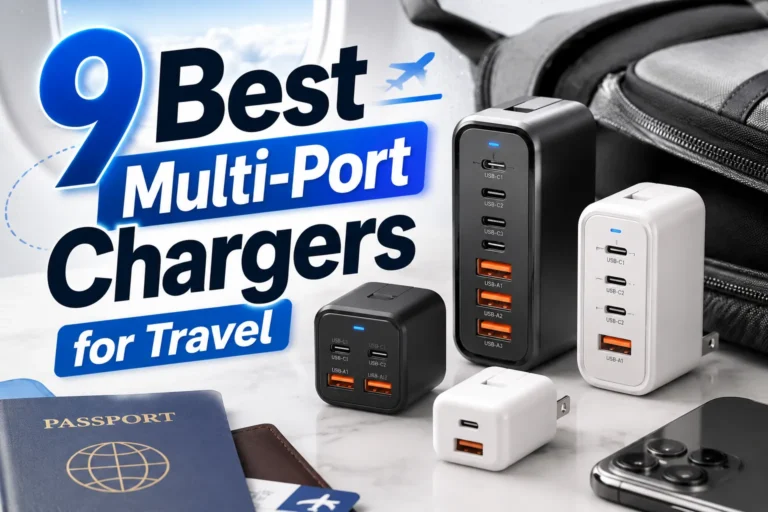
A multi-port charger is a charger with two or more output ports. It lets you charge several devices at the same time.
Some models include USB-A ports, USB-C ports, or both. Many newer chargers can also share power intelligently between connected devices.
A charger with many ports does not always provide full power to every port at the same time. Power may be divided among connected devices.
Which Devices Usually Work With Multi-Port Chargers?
| Device Type | Usually Compatible? |
|---|---|
| Smartphones | Yes |
| Tablets | Yes |
| Wireless Earbuds | Yes |
| Smartwatches | Yes |
| Power Banks | Yes |
| USB-C Laptops | Often Yes |
| Gaming Accessories | Yes |
| Smart Home Devices | Usually Yes |
Most modern gadgets work well with a quality multi-port charger. The biggest issue is usually charging speed rather than basic compatibility.
Use the highest-power USB-C port for laptops and tablets. Leave lower-power ports for earbuds, watches, and accessories.
Why Some Devices Charge Slower
Not all devices need the same amount of power.
A smartphone may need far less power than a laptop. When many devices connect at once, the charger may split its power output.
| Situation | Result |
|---|---|
| One phone connected | Usually fast charging |
| Phone and tablet connected | Power may be shared |
| Laptop and phone connected | Laptop may get priority |
| Four devices connected | Charging speeds may decrease |
Charging Standards Matter
Modern devices often rely on specific charging standards.
Examples include USB Power Delivery and other fast-charging technologies.
For technical charging information, you can review resources from USB-IF.
Using an old or low-quality charger may prevent fast charging and can create extra heat during long charging sessions.
Compatibility Checklist
- Check the charger’s total power output
- Use good-quality charging cables
- Verify your device supports the charging standard
- Use USB-C when possible
- Avoid damaged cables and ports
Device Compatibility Overview
Pros and Cons of Multi-Port Chargers
- Reduces cable clutter
- Charges several devices at once
- Saves wall outlet space
- Great for travel
- Works with many gadget types
- Power may be shared
- Not every device gets maximum speed
- Low-quality chargers can perform poorly
- Some older devices may charge slowly
How to Get the Best Results
Make sure the charger can provide enough power for all connected devices.
Good cables help deliver stable power and support fast charging.
Place laptops and tablets on the highest-power ports.
If the charger becomes unusually hot, disconnect devices and inspect the setup.
Troubleshooting Common Problems
| Problem | Possible Fix |
|---|---|
| Slow charging | Use a higher-power port |
| No fast charging | Check charging standard support |
| Device disconnects | Replace damaged cable |
| Charger gets warm | Reduce device load and improve airflow |
| Laptop not charging | Verify power output requirements |
Safety Tips
| Safety Practice | Why It Matters |
|---|---|
| Use certified chargers | Improves reliability |
| Replace damaged cables | Reduces risk of failure |
| Keep chargers ventilated | Helps control heat |
| Avoid water exposure | Protects electronics |
| Follow manufacturer guidance | Supports safe operation |
For battery care information, visit Battery University. You can also review guidance from Apple Support, FTC, and ENERGY STAR.
In my testing, most charging issues come from poor cables, not the charger itself. Always check cable quality before replacing your charger.
Frequently Asked Questions
They work for most modern devices, but charging speed and features depend on power requirements and charging standards.
Yes. A high-power charger can often charge both at the same time if it provides enough total output.
Yes. Many chargers share power across ports, which can reduce charging speed.
USB-C chargers often support higher power levels and modern charging standards.
A quality charger designed to meet safety standards should not damage compatible devices.
The charger, cable, or device may not support the same fast-charging standard.
Modern devices usually manage charging safely, but it is best to use quality chargers and cables.
Related Guides
- How USB-C charging works
- Fast charging vs standard charging
- How to choose safe charging cables
- Battery health tips for smartphones
Conclusion
So, did multi-port chargers work for all devices? For most phones, tablets, earbuds, smartwatches, power banks, and many laptops, the answer is yes. The key is matching the charger’s power output with your device needs.
Always focus on safety, use quality cables, and check charging standards before connecting several devices. If you do that, a multi-port charger can be a simple and reliable charging solution.
- Multi-port chargers work with most modern devices
- Power output affects charging speed
- USB-C support improves compatibility
- Quality cables matter
- Safety should always come first
Multi-port chargers are a practical way to charge many devices at once. They work best when the charger, cable, and device all support the right power and charging standards.