

Can Multi-Port Chargers Be Used for Multiple Devices?
Can Multi-Port Chargers Be Used for Multiple Devices?
Yes. Multi-port chargers are specifically designed to charge several compatible devices from one power source. Depending on the charger, you can power phones, tablets, laptops, earbuds, smartwatches, power banks, and other USB devices simultaneously.

UGREEN Nexode 500W GaN Charging Station
For readers who want one powerful charging station for a desk full of USB-C devices, the UGREEN Nexode 500W is the premium high-output option in this guide.
Consider: A 500W charging station is unnecessary if you only charge a phone and a few small accessories.
Check UGREEN Nexode on Amazon →UGREEN Nexode 500W
Best suited to demanding desks where several high-powered USB-C devices may charge together.
Check Price on Amazon →Anker Prime 250W
A balanced six-port premium charger for laptops, tablets, phones, and daily accessories.
Check Price on Amazon →Satechi ChargeView 140W
A premium option for a laptop, tablet, phone, and accessory charging setup.
Check Price on Amazon →Quick Answer: Yes, Multi-Port Chargers Can Charge Multiple Devices
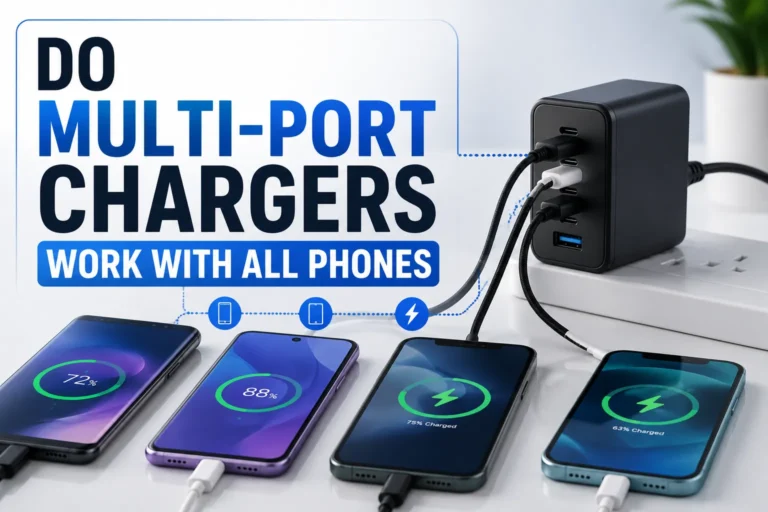
A multi-port charger contains several charging outputs connected to one internal power system. You can connect several compatible devices simultaneously, but the charger’s total available output may be distributed between them.
- Phone + earbuds: usually an easy workload.
- Phone + tablet: works well with most capable multi-port models.
- Laptop + phone: choose enough USB-C PD wattage.
- Several laptops: consider a higher-output charging station.
Our Premium Multi-Port Charger Picks
 Best Overall
Anker Prime 250W
Best for readers who want substantial multi-device capacity without buying a workstation-class 500W charger.
View on Amazon → Premium Alternative
Satechi ChargeView 140W
Best for a cleaner premium laptop-and-mobile-device charging setup.
View on Amazon →How Multi-Port Chargers Work
A multi-port charger uses one internal power supply to provide power through several USB outputs.
When only one device is connected, that port may receive its highest supported output. When you connect more devices, the charger’s internal power-management system can redistribute available wattage.
What Devices Can You Charge?
| Device | Can You Charge It? | What Matters Most |
|---|---|---|
| Smartphone | Yes | Compatible USB cable and charging protocol |
| Tablet | Yes | Enough port wattage |
| USB-C Laptop | Yes | USB-C PD and adequate wattage |
| Earbuds | Yes | Appropriate charging cable |
| Smartwatch | Yes | Compatible watch charging cable or puck |
| Power Bank | Usually | Input charging requirements |
Can Every Device Charge at Full Speed?
Not necessarily. Multi-port charging is a balance between the charger’s total capacity and what each connected device requests.
For example, a phone and earbuds require far less power than two laptops. As the number of demanding devices increases, a higher total wattage becomes more useful.
Anker Prime Charging Station 250W
The Anker Prime is my preferred middle-ground option here because its six-port design and substantial total capacity make it practical for a laptop, tablet, phone, earbuds, power bank, and similar USB devices.
Best for: A premium everyday desk where several different devices need charging.
Check Anker Prime on Amazon →Charging Performance Comparison
| Connected Devices | Expected Situation |
|---|---|
| One phone | Very light load for most multi-port chargers |
| Phone + earbuds | Normally easy to support simultaneously |
| Phone + tablet + laptop | Available wattage may be divided |
| Two or more laptops | Higher total charger wattage becomes important |
| Several high-power devices | A premium desktop charging station may provide better flexibility |
What Wattage Should You Choose?
| Charger Class | Best Use | Verdict |
|---|---|---|
| 30W–65W | Phone, tablet, light accessories | Good compact option |
| 100W–140W | Laptop + mobile devices | Strong everyday setup |
| 200W–300W | Several demanding devices | Excellent premium multi-device range |
| 500W class | Multiple high-power devices and workstation setups | Best for demanding users |
Benefits of Multi-Port Chargers
- Charge several devices from one outlet
- Reduce separate wall adapters
- Keep a desk or nightstand cleaner
- Make travel packing simpler
- Support phones, tablets, laptops, and accessories together
- Reduce cable and power-brick clutter
Checklist Before Buying
- Total wattage: Is there enough power for your devices?
- Individual port wattage: Can the main USB-C port support your laptop?
- Power distribution: What happens when several ports are used?
- USB-C PD: Important for many modern laptops, phones, and tablets.
- Number of ports: Buy enough for your actual charging setup.
- Cables: Use cables rated for the power level you need.
Satechi ChargeView 140W GaN Charger
If your typical setup is a laptop plus phone, tablet, or accessories, you may not need a huge 500W station. The Satechi is the lower-power premium alternative among these three recommendations.
Best for: A cleaner laptop-and-mobile charging desk.
Check Satechi on Amazon →Pros and Cons
✓ Pros
- Charge multiple devices together
- Use fewer wall adapters
- Cleaner desk setup
- Excellent for travel
- High-output versions can charge laptops
Consider
- Power can be shared between ports
- Not every port has equal output
- High-wattage models can be expensive
- Incorrect cables can limit performance
How to Use a Multi-Port Charger Effectively
Use it for your laptop or most demanding device when appropriate.
A high-power charger still needs a suitable cable to deliver its intended performance.
Check the manufacturer’s port-priority or power-distribution information.
Some devices may briefly renegotiate charging when another device is plugged in.
Troubleshooting Slow Charging
| Problem | Likely Cause | What to Try |
|---|---|---|
| Phone charges slowly | Low-output port | Use a suitable higher-output port |
| Laptop reports slow charger | Insufficient wattage | Use the main USB-C PD port or higher-capacity charger |
| Charging changes when another device connects | Power redistribution | Review the charger’s multi-port output table |
| No fast charging | Cable or protocol mismatch | Check charger, cable, and device compatibility |
Are Multi-Port Chargers Safe?
A reputable multi-port charger used correctly can safely charge multiple compatible devices. The important factors are product quality, correct cables, suitable power requirements, ventilation, and undamaged equipment.
Which of These 3 Chargers Should You Buy?
| Product | Best For | My Position | Amazon |
|---|---|---|---|
| UGREEN Nexode 500W | Demanding workstations | Highest-power pick | Check Price → |
| Anker Prime 250W | Most multi-device users | Best overall | Check Price → |
| Satechi ChargeView 140W | Laptop + mobile setup | Premium alternative | Check Price → |
Frequently Asked Questions
Can multi-port chargers be used for multiple devices?
Yes. That is their primary purpose. They can provide power to several compatible devices simultaneously.
Can I charge my laptop and phone at the same time?
Yes, provided the charger offers sufficient power and compatible charging ports for both devices.
Does charging multiple devices make charging slower?
It can. Many chargers redistribute their total available power as additional ports are occupied.
Do all USB-C ports provide the same power?
No. Multi-port chargers often have different maximum outputs for different ports.
Is a 500W charger necessary for most people?
No. It is primarily useful for demanding setups with several higher-power devices. Many users are better served by a lower-output multi-port charger.
Can one charger replace all my chargers?
Potentially, if it includes the ports, protocols, and total output needed by your devices.
Can multi-port chargers fast-charge phones?
Yes, when the charger, device, cable, and selected port support compatible fast-charging standards.
Choose the Right Multi-Port Charger Without Overbuying
The Anker Prime 250W is the strongest all-round recommendation here. Choose the UGREEN Nexode 500W for a demanding high-power workstation, or the Satechi ChargeView 140W for a smaller premium laptop-and-mobile setup.
Conclusion
Can multi-port chargers be used for multiple devices? Yes. That is exactly what they are designed to do.
A good multi-port charger lets you consolidate several power adapters into one charging station. The key is choosing enough wattage and the correct USB-C ports for the devices you want to charge simultaneously.
For most premium multi-device setups, the Anker Prime 250W provides the most balanced option of these three. The UGREEN Nexode 500W makes more sense for a power-heavy workstation, while the Satechi ChargeView 140W suits a simpler premium laptop-and-mobile setup.


One Comment