Do iPhone Chargers Work on iPad?
Do iPhone Chargers Work on iPad?
Yes. Most iPhone chargers can safely charge an iPad. However, an older low-wattage adapter may charge a large iPad battery very slowly.
Best advice: Match the cable to your iPad first. Then use a trusted USB-C Power Delivery charger with enough output. A basic iPhone charger is fine for one device; premium stations make more sense when you also charge a phone, laptop, watch, or earbuds.
Anker Prime 250W
Six ports for an iPad, iPhone, MacBook, and daily accessories at one desk.
Check Price on AmazonAnker Prime 300W Power Bank
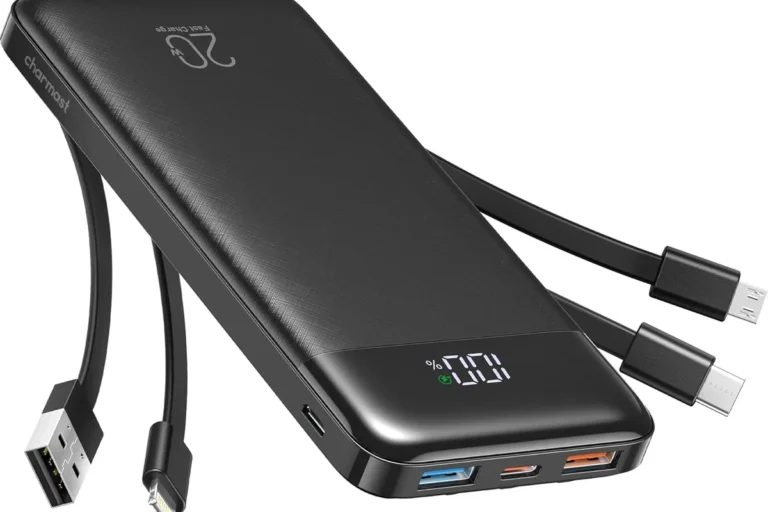
Portable high-capacity power for an iPad, phone, and supported laptop away from an outlet.
Check Price on AmazonUse Your Current Charger
If it is genuine, undamaged, compatible, and fast enough for your needs, you may not need an upgrade.
Check Faster-Charging StepsMost iPhone chargers work safely with iPads when the cable fits. Older 5W adapters are slow. Modern USB-C Power Delivery chargers offer a much better experience on newer iPads.
Do iPhone chargers work on iPad? Yes. Apple devices and standards-compliant chargers manage power automatically. The iPad takes only the power it supports.
The main issue is speed, not safety. An iPad has a larger battery than an iPhone. Therefore, a small charger can take much longer to fill it.
- Check whether your iPad uses USB-C or Lightning.
- A 5W iPhone adapter works, but it is usually too slow.
- A quality 20W or higher USB-C PD charger is a better fit for many modern iPads.
- A higher wattage rating does not mean the charger forces that full power into the iPad.
Can an iPhone Charger Charge an iPad Safely?
Yes. If the adapter, cable, and connector are compatible, an iPhone charger can charge an iPad safely. The charging system negotiates how much power the iPad can accept.
A 100W or 140W USB-C PD port does not automatically send that full amount to an iPad. The device requests a supported power level.
Why Some iPhone Chargers Charge an iPad Slowly
iPads have larger batteries, so low-output adapters need more time. Heat and heavy use can slow charging further.
| Charger type | Expected iPad experience | Best use |
|---|---|---|
| 5W USB-A adapter | Very slow | Emergency top-up |
| 12W adapter | Moderate on older models | Legacy iPads |
| 20W USB-C PD | Good for many modern iPads | Everyday charging |
| 30W+ USB-C PD | Useful where the iPad supports more input | Faster charging and shared use |
If the battery level barely rises while you use the iPad, close demanding apps, lower screen brightness, and try a stronger compatible charger and cable.
USB-C vs Lightning: Match the Cable First
Newer iPads use USB-C. Many older iPads use Lightning. The wall adapter can only help if the cable fits both the adapter and the iPad.
Can a Stronger Charger Damage an iPad?
A reliable USB-C Power Delivery charger should not damage an iPad simply because its maximum rating is high. Power is negotiated between the charger and device.
However, damaged, counterfeit, or poorly made accessories can create heat or unstable charging. Replace anything that smells unusual, sparks, has exposed wiring, or becomes excessively hot.
Use certified cables and trusted chargers. Keep the adapter ventilated and never charge under a pillow or blanket.
What Can Slow Down iPad Charging?
- A low-wattage iPhone adapter
- A damaged or unsuitable cable
- Heat buildup
- Dust or debris inside the port
- Games, video editing, or other heavy use while charging
- Several devices sharing one charger’s total output
How to Charge an iPad Faster
Check whether the iPad uses USB-C or Lightning.
Choose a quality charger with at least 20W for many modern iPads.
A worn or low-quality cable can reduce speed and reliability.
Keep the iPad cool and avoid demanding apps during a fast top-up.
Pros and Cons of Using an iPhone Charger on an iPad
- Safe when the charger and cable are compatible
- Reduces the number of adapters you carry
- Modern USB-C models can charge well
- Easy for travel and backup use
- Old 5W adapters are very slow
- The connector may not match
- Shared chargers divide their total output
- Cheap cables can reduce performance
Troubleshooting iPad Charging Problems
| Problem | Likely cause | What to try |
|---|---|---|
| Very slow charging | Weak adapter or heavy use | Use a stronger compatible charger and let the screen rest |
| Charging stops | Loose or damaged cable | Test a known-good certified cable |
| No charging | Dirty port or connector mismatch | Inspect the port and confirm the cable type |
| Adapter gets too hot | Poor airflow or damage | Unplug it, let it cool, and replace it if the issue returns |
Charging Safety Tips
- Avoid damaged or counterfeit adapters and cables
- Keep the charger on a hard, ventilated surface
- Remove the charger if it becomes unusually hot
- Do not bend cables sharply near the connector
- Follow the iPad and charger manufacturer’s instructions
Final Verdict
Most iPhone chargers work safely on iPads, but they do not all offer the same speed. An older 5W adapter is best kept for emergencies. A reliable USB-C PD charger with enough output is a better daily option.
If you charge one iPad, you probably do not need a 250W station. If you charge several devices at a desk, the Anker Prime Station is the stronger fit. For portable charging away from an outlet, the Anker Prime Power Bank is the more natural choice.
Use your existing iPhone charger if it is compatible and fast enough. Upgrade only when slow charging, several devices, or travel needs justify it.
Compare the Two Premium Charging Upgrades
Choose by where you charge, not by the highest wattage number alone.
| Feature | Anker Prime 250W Station | Anker Prime 300W Power Bank |
|---|---|---|
| Best for | Desk and home office | Travel and backup power |
| Power source | Wall outlet | Internal battery |
| Ports | 4 USB-C + 2 USB-A | 2 USB-C + 1 USB-A |
| Main advantage | Organizes several desk devices | Charges away from an outlet |
| Choose it when | You regularly charge iPad, iPhone, and laptop together | You need portable power for work or trips |
Frequently Asked Questions
Yes. Most iPhone chargers safely charge an iPad when the connector and cable match. Charging speed depends mainly on charger wattage and the iPad model.
Yes, but it will be very slow. The iPad may even gain power slowly while you use demanding apps.
Yes. A reliable 20W USB-C Power Delivery charger is a practical choice for many modern iPads, though some models can accept more power.
A standards-compliant USB-C Power Delivery charger does not force its full rated power into the iPad. The device negotiates and draws the supported amount.
Common causes include a low-wattage adapter, a damaged or unsuitable cable, heat, a dirty port, or heavy use while charging.
Yes, if you use the correct USB-C cable. It is safe, although a higher-output USB-C PD charger may charge some iPad Pro models faster.