

9 Best Charger Gaming Laptop: Ultimate Guide to Choosing the Right Power Adapter
Affiliate disclosure: As an Amazon Associate, Gadget Makers Blog may earn from qualifying purchases. This does not change the price you pay.
Gaming laptops need chargers that deliver steady, high power without overheating or damaging the battery. A dedicated gaming laptop charger supplies the higher wattage and more stable voltages that power-hungry GPUs and CPUs require, and it can mean shorter charge times and fewer performance drops during play. Choosing the right charger helps a laptop run at full speed and protects its battery and internal parts.
Buyers should check wattage, connector type, and build quality first. Wattage must match or exceed the laptop’s requirement; the connector must fit securely (or be the right USB-C PD profile); and good heat management and surge protection reduce risk. Portability, cable length, and compatibility with multi-voltage outlets also matter for travel and mixed-device setups.
This guide reviews top chargers across power ranges and price points, explains what specifications matter, and recommends models for different needs so readers can pick the safest, most reliable option for their gaming laptop.
9 Best Charger Gaming Laptop
This list shows the top chargers for gaming laptops, chosen for power, build quality, and safety. It helps readers find a reliable charger that fits their laptop and gaming needs.
SlimQ 240W Multiport Charger

This charger is worth considering for users who need one compact unit to power a gaming laptop and two USB-C devices at the same time.
Pros
- Charges three devices at once, reducing cable clutter.
- Smaller and lighter than many laptop bricks for easier travel.
- Wide brand compatibility for many laptop models.
Cons
- DC adapter for some laptops must be chosen separately.
- Not all high-wattage gaming laptops will run at full power.
- Heavier draw when all ports are used may limit peak charging speeds.
The SlimQ unit aims to replace multiple chargers with a single metal-bodied brick that supports a DC output and two USB-C PD ports. It sells well with positive ratings, and buyers will like the travel-friendly size and included pouch.
It lists broad compatibility with Dell, MSI, Lenovo, HP, Razer, Asus, and Acer, but users must pick the correct DC adapter for their laptop model. That extra step adds cost and means this is not a true all-in-one out of the box for every gaming laptop.
People who carry a laptop plus phone and headset may find the three-port design handy. Gamers with very high-power laptops should check if their model needs a full dedicated adapter to get top performance.
Ruilezyo 200W Victus Charger
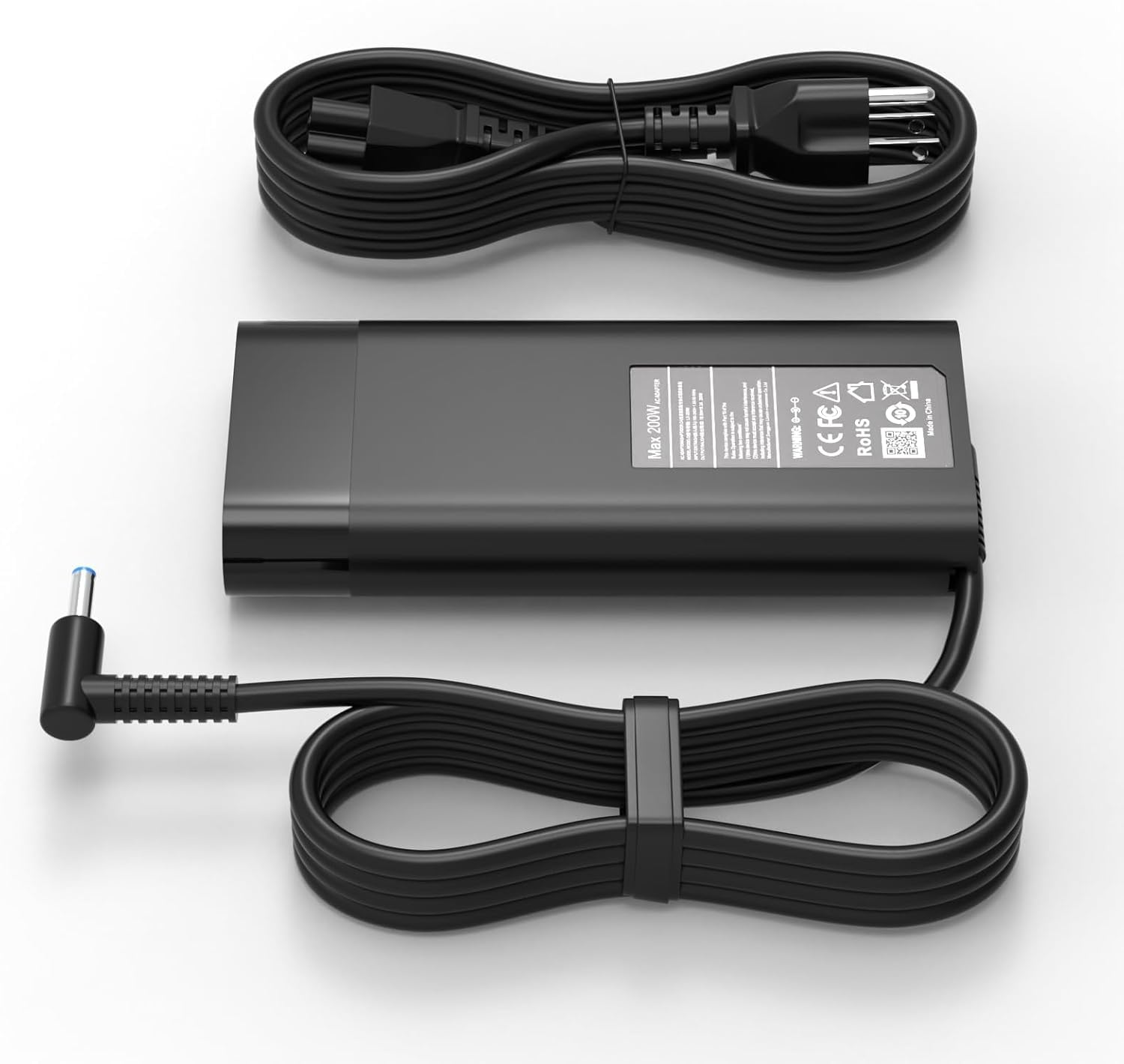
It is a strong, budget-friendly 200W replacement for HP Victus and Omen laptops that works well if the connector fits and power needs match.
Pros
- High 200W output suits demanding gaming laptops.
- Includes a common blue-tip connector for HP models.
- Built-in protections reduce risk of damage.
Cons
- Some users report inconsistent reliability over months.
- Heavier and bulkier than smaller adapters.
- Not a branded HP unit, so warranty issues may arise.
This charger targets gamers who need a high-watt adapter without paying HP prices. It aims to match the power and connector of many Victus, Omen, and ZBook models.
Many buyers praise fast charging and solid fit for compatible models. Others say it stopped working after a few months for some units, so expectations should be cautious.
The adapter includes overheat, overcurrent, and short-circuit protection, which adds safety for heavy use. It comes with the power cord and the blue 4.5 x 3.0mm tip used by several HP laptops.
If a buyer needs a cost-effective 200W spare or replacement and the blue-tip matches their laptop, this looks like a practical option. Confirm compatibility with the exact laptop model before purchase to avoid returns.
AYKLCZUU 200W HP Gaming Laptop Charger

It is a solid, high-power replacement charger that fits many HP gaming and ZBook models and charges quickly.
Pros
- High wattage for powerful gaming laptops
- Broad model compatibility across HP lines
- Fast charging and stable output
Cons
- Barrel connector only (4.5×3.0mm blue tip)
- Not a universal USB-C solution
- Some users reported early failures, though warranty exists
This charger offers up to 200W output, so it works for heavy-duty gaming laptops that need more power than standard adapters. Buyers looking for a like-for-like HP replacement will find the matching size and voltage useful.
It fits many Pavilion Gaming, OMEN, Victus, ZBook, Envy, and Studio models, which cuts down model-matching stress. The high current rating aims to keep performance steady under load.
Some customers noted units lasted months before issues, while many others reported immediate correct function. A one-year warranty and vendor support may help if problems appear.
For someone who needs a direct barrel-style HP replacement with high wattage, this charger makes sense; those who prefer USB-C or want universal use should look elsewhere.
Dongerdi 180W MSI Charger

This charger is a solid budget option for MSI gaming laptops that need a higher-power replacement for faster charging and stable performance.
Pros
- High 180W output gives more power than many stock chargers.
- Comes with extra plug adapters for different laptop tip sizes.
- Certified for safety in key regions (FCC/CE).
Cons
- Cable ends can wear with heavy use.
- Some users report fit issues with certain MSI ports.
- Build quality feels functional, not premium.
The Dongerdi 180W adapter targets gamers who need more power than a typical 120W brick. It promises faster charge and includes an extra connector to increase compatibility with MSI models.
They package the adapter with a power cord and a connector that swaps tip sizes, which helps when users change laptops or need a spare part. Certifications suggest basic safety checks, but the unit looks utilitarian rather than high-end.
Users should note the connector size and test fit before relying on it long term, since a few reports mention tight or slightly off fits. It works well for many MSI Thin and Stealth series models, and it often costs less than brand-name options.
Buy from Amazon: Dongerdi 180W MSI Charger
Ruilezyo 200W HP-Compatible Charger

It can be a good cheaper replacement for HP gaming laptops that accept a 4.5×3.0mm tip and up to 200W, but it will not work for models needing higher wattage or a different connector.
Pros
- High power output for many HP gaming models.
- Built-in safety features to limit overheating and short circuits.
- Often costs less than OEM chargers.
Cons
- Tip size is specific (4.5×3.0mm) and won’t fit larger ports.
- Not enough wattage for laptops that need >200W.
- Third-party unit may differ from original in feel and durability.
The charger lists broad compatibility with many HP Omen, Pavilion Gaming, Victus, ZBook, and Envy models. Buyers should check their laptop’s required wattage and plug size before ordering.
Customers mention fast charging and light weight as positives, but one buyer noted the unit was underpowered for a laptop that needed 330W. The built-in IC and heat dissipation aim to reduce overload risk, which helps for heavy use at the 200W limit.
This is a reasonable budget option when the connector matches and the laptop’s power draw is within 200W; it is not a safe substitute for models that require higher wattage or the 7.4×5.0mm tip.
Anker 100W Compact Charger
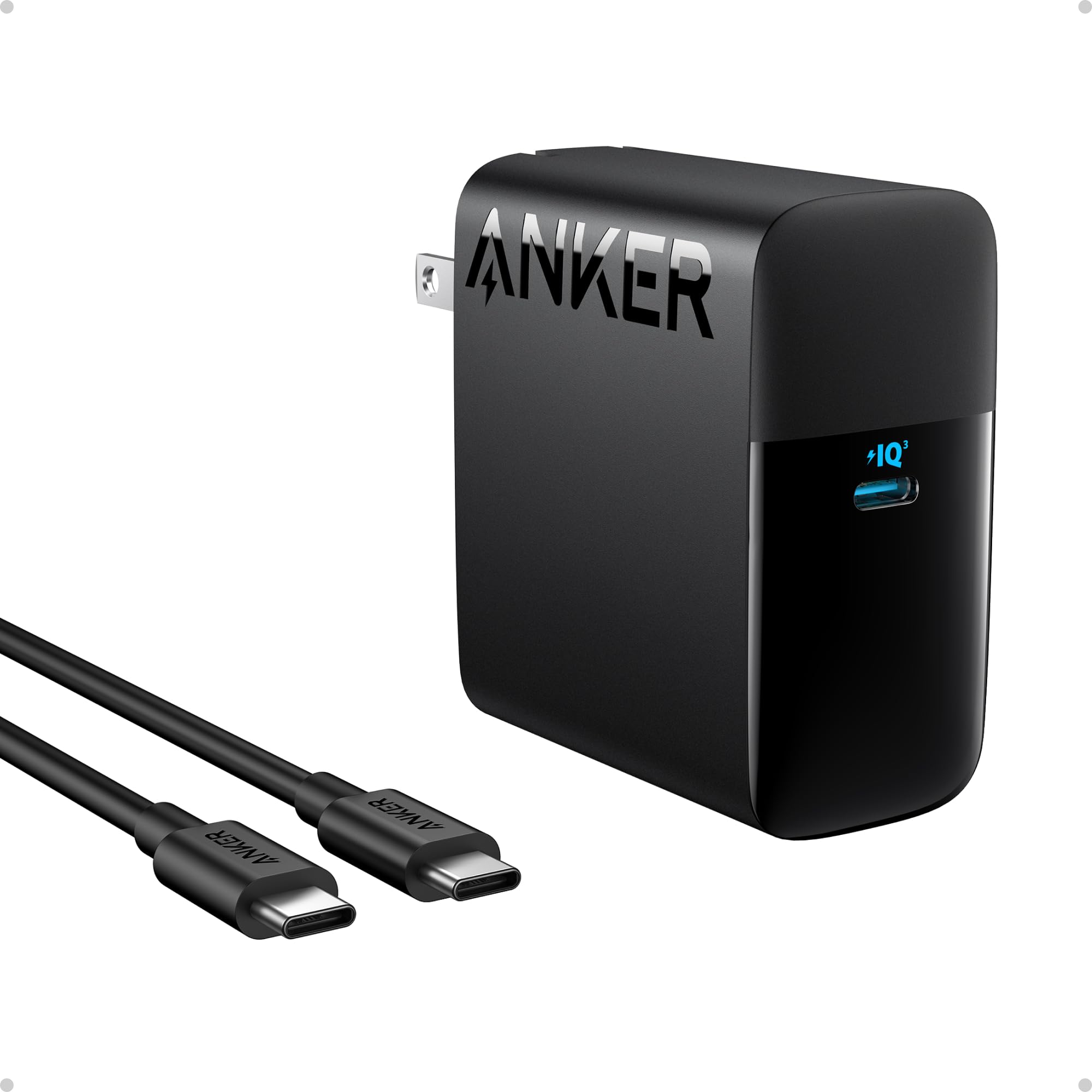
It is a solid choice for gamers who want fast, portable charging for laptops and USB-C devices.
Pros
- Very fast charging from a single 100W USB-C port
- Small, foldable plug that fits into bags easily
- Built-in safety features for temperature control
Cons
- Only one USB-C port limits charging multiple devices at once
- Cable included may not suit all laptop ports or lengths
- Might run warm under heavy, continuous load
This charger delivers high power in a small package, so it works well for users who need quick top-ups between gaming sessions or while traveling. The single-port design keeps things simple but means a user must choose which device to prioritize.
Its foldable plug and compact body make it easy to carry. Safety features aim to protect devices from overheating during long play or charging periods.
Gamers who use multiple devices at once might prefer a hub or multi-port brick instead. For someone who needs a reliable, fast charger that fits in a backpack, this unit checks the most important boxes.
AYKLCZUU 200W HP Gaming Charger

It is a strong, high‑wattage charger worth buying if a user needs broad HP compatibility and fast charging.
Pros
- High 200W output for heavy gaming laptops
- Works with many HP Omen, Victus, Pavilion, Envy, and ZBook models
- Includes extra USB-C connectors for flexibility
Cons
- May make the laptop run warmer under heavy use
- Large power brick and thick cable can be bulky to carry
- Blue-tip connector limits use to specific HP ports
This charger gives a lot of power so gaming laptops can run at full speed and charge quickly. It fits many HP models, which helps buyers avoid confusion about compatibility.
Some users note it keeps batteries charged reliably and arrives quickly. The extra USB-C bits add convenience for other devices or replacement needs.
Buyer should watch for added heat while charging and avoid tucking the laptop away while under heavy load. It pairs well with users who need a cost‑effective, high‑power replacement for HP gaming machines.
Lenovo 140W USB-C Charger
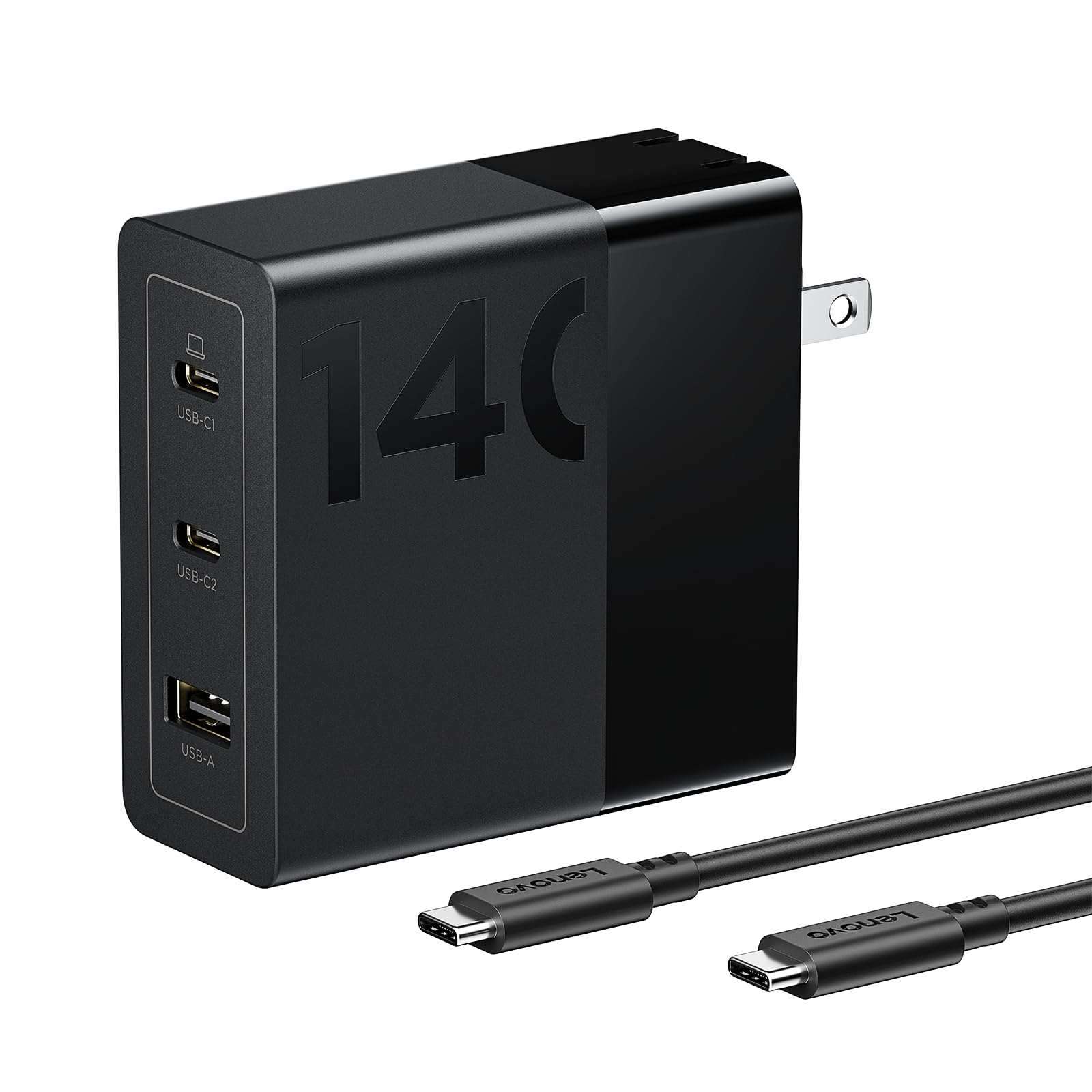
This charger is a strong choice for users who want a compact, multiport USB-C adapter that can fast-charge laptops and phones, but it may reduce peak power under sustained heavy load.
Pros
- High peak output for quick top-up charging.
- Three ports let multiple devices charge at once.
- Smaller and lighter than many laptop bricks.
Cons
- May drop from peak 140W when used continuously.
- Works best with included cable and some Lenovo models.
- A bit larger than a phone charger.
The charger uses GaN tech to shrink size while delivering high power. It targets laptops, phones, and tablets so users can carry one adapter instead of many bricks.
Several buyers say it powers Lenovo and other USB-C laptops well in normal use, and it handles phones and tablets without fuss. Some reviews note it performs best when the included cable is used and when the laptop isn’t pushed to full speed.
People who need full sustained 140W for long gaming sessions might see throttling after short periods. For travel and daily office work, it offers a neat, professional option that simplifies a charging setup.
Lenovo 140W USB C Charger, GaN Power Adapter with 3-Port Fast Charging
Buying Guide
Choosing the right charger for a gaming laptop means matching power needs and safety. He or she should check the laptop’s required wattage first. A charger with lower wattage may not charge while gaming; a much higher wattage can be safe only if the laptop accepts it.
Look at the connector type and compatibility. USB-C PD and proprietary plugs work differently. The user must confirm the plug fits and the laptop supports the charging protocol.
Consider build quality and cooling. Metal housings and good ventilation last longer, and short, thick cables reduce power loss. He or she should prefer chargers with strain relief and durable connectors.
Prioritize safety features: overcurrent, overvoltage, short-circuit, and thermal protection. These reduce risk of damage to the laptop and battery. Certified chargers meet standards and offer more reliable protection.
Think about portability and weight for travel. Smaller chargers may use GaN tech to shrink size without losing power. He or she should balance size with cooling needs for long gaming sessions.
Compare extra features: multiple ports, passthrough power, and LED indicators. Multiple ports can charge a phone while powering the laptop. Passthrough lets the laptop charge a second device from the same source.
Use a simple checklist when buying:
- Confirm wattage match
- Verify connector and protocol
- Check safety certifications
- Assess build quality and cable durability
- Consider size, weight, and extra ports
They should read specs carefully and avoid assumptions about cross-compatibility.
Editor’s Choice
They picked the Anker 737 GaNPrime as the top charger for gaming laptops. It delivers high power in a small package and supports multiple devices at once.
| Feature | Why it matters |
|---|---|
| Power: 140W | Charges most gaming laptops rapidly with USB-C Power Delivery. |
| Ports: 2x USB-C, 1x USB-A | Lets users charge laptop and accessories without extra bricks. |
| Size: Compact GaN design | Saves desk space and travels easily. |
| Safety | Built-in protections for overcurrent, overvoltage, and overheating. |
It pairs well with laptops that accept USB-C charging, but the user should verify laptop compatibility and cable rating. Users with older barrel-style ports will need the correct adapter or a manufacturer charger.
They rated value high because it balances price, output, and build quality. Warranty and brand support also influenced the choice.
Where to Buy – Best Amazon Deals
They can find many reliable chargers on Amazon, often with fast shipping and clear return policies. Amazon lists both brand-name and third-party options, making price comparison easy.
Look for deals with high ratings and verified purchase reviews. Pay attention to wattage, connector type, and compatibility notes in the product title and description.
Use filters to narrow results: select Prime for faster delivery, customer rating 4 stars & up, and price range. Read the Q&A section for real-world fit and performance details from other buyers.
Check product bundles and certified refurbished items for lower prices. Bundles may include extra cables or adapters, while certified refurbished units often come with a limited warranty.
Watch for limited-time discounts and Lightning Deals. Add the charger to the cart or use wishlist alerts to track price drops.
Example quick checklist:
- Wattage match: Same or higher than laptop requirement
- Connector type: USB-C, barrel plug, or proprietary
- Certification: FCC/CE or manufacturer-approved
- Seller: Prefer official brand stores or top-rated sellers
They should save product pages and compare specs side-by-side before buying. This helps avoid chargers that look similar but lack proper power or safety features.
Conclusion
Choosing the right charger keeps a gaming laptop ready for long sessions and peak performance. Readers should match wattage, connector type, and charging protocol to the laptop model.
A branded charger from the laptop maker gives the best compatibility and protection. Third-party chargers can save money but need certified specs and safety features.
Look for PD (Power Delivery) for USB-C setups and 100W+ options for high-end machines. Overcurrent and temperature protections reduce risk during heavy use.
Keep a spare charger if travel or tournaments are common. A compact, well-made spare prevents downtime and fits easily in a backpack.
Buy from reputable sellers and check reviews for real-world reliability. Warranties and return policies add a safety net for buyers.
FAQs
What power rating does a gaming laptop charger need?
It depends on the laptop. Most gaming laptops need 120W–300W chargers. Check the laptop’s spec sheet or the original charger for the exact wattage.
Can USB-C chargers work for gaming laptops?
Some can if the laptop supports USB-C/PD and the charger supplies enough wattage. Many high-end gaming models still require proprietary high-wattage adapters.
Will a higher-wattage charger damage the laptop?
No, laptops draw only the power they need when the charger is compatible. Using a charger with higher voltage or wrong connector can cause damage, so match voltage and connector type.
Is it OK to use third-party chargers?
Yes, reputable third-party chargers that match voltage, wattage, and safety certifications are fine. Look for UL, CE, or FCC marks and buy from trusted brands.
How to spot a low-quality charger?
Watch for very low price, missing safety labels, flimsy cables, and vague specs. Low-quality chargers may overheat, charge slowly, or fail safety tests.
How to extend charger lifespan?
Avoid sharp bends, keep the adapter cool, and unplug from the wall when not in use. Using a surge protector helps protect the charger and laptop.
Quick compatibility checklist:
- Match wattage and voltage.
- Confirm connector type.
- Check safety certifications.
- Prefer trusted brands or OEM replacements.

One Comment