Best Uses of Smart Plugs for Easy Home Automation
Smart plugs are one of the easiest ways to add automation to a home without rewiring anything. The best uses of smart plugs are usually simple: control lamps, small appliances, comfort devices, and entertainment gear on a schedule or from your phone.
- Best everyday use: Automate lamps, fans, humidifiers, and other simple plug-in devices.
- Check first: Match wattage, amperage, outlet fit, and app compatibility before buying.
- Safety matters: Avoid high-heat, high-load, or manufacturer-restricted appliances.
- Biggest benefit: Schedules and remote control without replacing existing devices.
Best Uses of Smart Plugs: The Fast Answer for Easy Home Automation
If you want quick, low-friction home automation, smart plugs are best for devices that already turn on when power is restored. They are especially useful for lighting, fans, humidifiers, coffee makers, speakers, and other plug-in devices that do not need a constant manual setting change.
For a broader lighting setup, smart plugs often work well alongside smart bulbs or switches. If you are building out a room, it can help to compare them with smart lights or smart light switches so you choose the right level of control.
How Smart Plugs Work and What You Need Before Buying
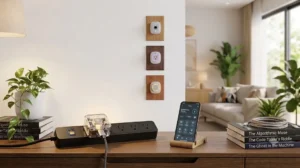
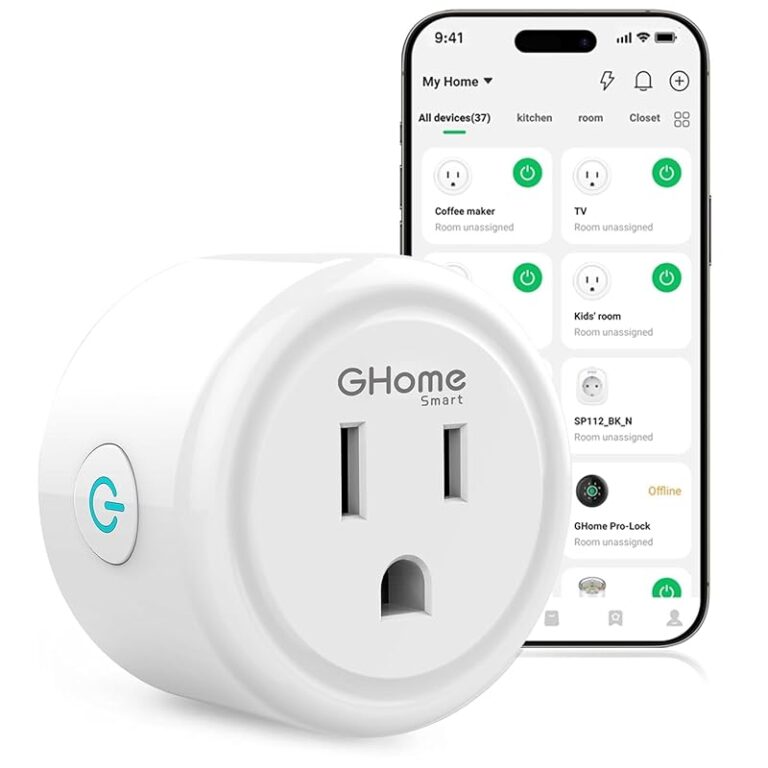
A smart plug sits between the wall outlet and the device you want to control. It usually connects to your home network through an app, then lets you turn power on or off remotely, set schedules, or tie the device into voice assistants and automations.
- Check compatibility, model number, app requirements, dimensions, wattage, and intended use
- Confirm safety guidance, warranty, return policy, privacy settings, and update support
Connectivity, app requirements, and voice assistant compatibility
Most smart plugs depend on Wi‑Fi and a companion app, though the exact setup varies by model. Some support major voice platforms, while others are locked into a single ecosystem, so confirm compatibility before buying if you want hands-free control.
App quality matters as much as hardware. Look for clear scheduling tools, easy naming, update support, and a privacy policy you are comfortable with. If you already use a smart home platform, check whether the plug supports it natively or only through a cloud connection.
Power limits, outlet fit, and device type restrictions
Smart plugs are not universal power adapters. Each model has a maximum wattage and amperage rating, and those limits can differ between indoor, outdoor, and heavy-duty versions. The plug also needs to physically fit your outlet without blocking the second socket.
Some devices are poor candidates for smart plugs, including appliances with high heat output, motors with large startup loads, or equipment that should not lose power abruptly. When in doubt, check the manual for the device you want to automate and the smart plug’s safety documentation.
Best Everyday Uses of Smart Plugs Around the Home
The most practical uses of smart plugs are usually the boring ones: turning everyday devices into scheduled, remote-controlled routines. That is what makes them so useful for renters, families, and anyone who wants automation without replacing existing appliances.
Lighting, lamps, and seasonal décor
Table lamps, floor lamps, and holiday décor are some of the best uses of smart plugs because they respond well to simple on/off control. You can set sunrise or bedtime routines, create a “home” scene, or keep a lamp on a timer while you are away.
This is also a good place to use a plug if you want to automate a room without changing bulbs. For more lighting ideas, see smart lights for home automation and smart light bulbs for Google Home.
Fans, humidifiers, and small comfort appliances
Fans and some humidifiers can be convenient smart plug targets because they often work well with simple power control. That said, you should confirm the appliance can resume safely after power is restored and that the plug’s rating matches the device.
These devices are especially helpful in bedrooms, nurseries, and home offices where comfort changes throughout the day. A schedule can help you avoid running a fan all night or keep a humidifier from operating longer than needed.
Coffee makers, kettles, and kitchen convenience devices
Kitchen automation is appealing, but it needs extra caution. A coffee maker or kettle may work with a smart plug if the device’s controls are compatible with power restoration, but not every model is appropriate for remote switching.
Use this category only when the manufacturer allows it and the plug’s wattage rating is sufficient. Avoid automating anything that could pose a burn, boil-dry, or unattended heating risk if it is left on too long.
TVs, speakers, and entertainment standby control
Smart plugs can help reduce standby power on TVs, streaming boxes, speakers, and game accessories. They can also make it easier to cut power to an entire entertainment zone when you leave the house.
There is a trade-off, though: some devices need standby power for updates, quick wake, or memory functions. If you use a smart plug here, make sure you are comfortable with the device losing power completely when the plug turns off.
- Simple way to automate existing plug-in devices
- Useful for schedules, voice control, and remote shutdown
- Often cheaper than replacing multiple devices
- Not suitable for every appliance or load type
- Depends on app, Wi‑Fi, and firmware support
- Can block adjacent outlets on bulky models
Who Smart Plugs Fit Best in 2026
Smart plugs are still one of the easiest entry points into home automation because they solve real problems without a major setup burden. They are best for people who want practical convenience more than deep customization.
Budget-conscious homeowners and renters
Smart plugs are a strong fit for renters because they usually do not require permanent installation. They are also appealing for homeowners who want to automate a few devices without replacing switches, fixtures, or appliances.
If your goal is to improve one room at a time, smart plugs can be a low-risk starting point. They are especially useful when you want automation that you can move with you later.
Busy families, seniors, and accessibility-focused users
Families often use smart plugs to simplify routines like bedtime lighting, morning coffee prep, or turning off forgotten devices. Seniors and accessibility-focused users may appreciate the ability to control hard-to-reach outlets or reduce the need to bend, reach, or fumble in the dark.
Voice control can be especially helpful here, but only if the setup remains simple. A plug with a confusing app or unreliable pairing can create more frustration than convenience.
Remote workers and people building routines
Remote workers can use smart plugs to create clearer workday boundaries. For example, a desk lamp, fan, or speaker can turn on at the start of the day and shut off automatically after work hours.
They are also useful for people building habits around lighting, sleep, or focus. The best automations are the ones you stop thinking about after setup.
Key Specs and Decision Criteria to Check Before You Buy
The right smart plug is less about brand hype and more about fit, rating, and software support. A good model should match your device, your outlet layout, and your smart home platform.
Wattage rating, amperage, and surge considerations
Always compare the smart plug’s rating with the device you plan to control. The appliance’s label or manual should tell you what it draws, and the smart plug documentation should explain the safe limit.
Surge or startup load can matter for motors and compressors, even if the device seems fine after it is running. When a manufacturer warns against using a plug with a specific device type, follow that guidance.
Size, outlet spacing, and indoor versus outdoor design
Plug size affects everyday usability more than many buyers expect. A bulky smart plug can block the second outlet in a duplex receptacle or interfere with power strips and furniture placement.
Outdoor models are built differently and should be chosen only when you need weather-appropriate protection and the manufacturer specifically lists outdoor use. Indoor plugs should not be treated as all-purpose solutions.
Wi‑Fi band support, Matter compatibility, and app ecosystem
Wi‑Fi support can affect setup and reliability, especially in homes with crowded networks or mesh systems. Some plugs work only on 2.4 GHz Wi‑Fi, while others support newer standards or platform interoperability features like Matter.
Matter support can make it easier to use the same plug across multiple ecosystems, but the exact benefits depend on the model and the app version. If you want to build out a larger lighting or automation setup, it may help to compare your plug choices with smart lights for Alexa or smart lights for HomeKit.
Warranty, build quality, and long-term value
Warranty terms can vary widely, so read the official policy before buying. Build quality matters too: a plug that feels flimsy, runs hot, or has poor app support may cost less up front but be more frustrating over time.
Long-term value usually comes from stable software, clear support, and safe operation rather than the longest feature list. If the app is abandoned or the cloud service changes, the hardware may become less useful.
Setup Guide: Getting Smart Plugs Working Safely
Setup is usually straightforward, but the safest approach is to start with compatibility, then pairing, then automation. A few minutes of careful setup can prevent weeks of annoyance later.
Placement, pairing, and naming devices in the app
Creating schedules, timers, and automation routines
Start with one or two simple automations before building more complex routines. A lamp that turns on at sunset or a fan that shuts off after two hours is easier to manage than a dozen overlapping schedules.
If your app supports scenes or routines, group related devices by room or purpose. That keeps your smart home easier to understand if you ever need to change routers, phones, or voice assistants.
Safe-use limits, heat checks, and common setup mistakes
Check the plug after the first few hours of use, especially with devices that draw steady power. Warmth can be normal, but excessive heat, buzzing, or intermittent power is a sign to stop using it and consult the manufacturer.
A common mistake is automating a device that should not be power-cycled. Another is placing a smart plug behind furniture where it is hard to inspect, unplug, or reset.
Real-Use Benefits, Limitations, and Trade-Offs
Smart plugs are popular because they offer convenience with very little installation effort. Still, their usefulness depends on the device, the app, and the reliability of your home network.
Energy savings, convenience, and remote control benefits
One advantage of smart plugs is that they can help reduce wasted standby power by shutting off devices completely when not needed. They also make it easy to control hard-to-reach outlets, which can be a meaningful quality-of-life improvement.
Remote control is helpful when you are away, but the biggest day-to-day benefit is usually routine automation. Once a schedule works well, you may stop needing to think about the device at all.
What smart plugs cannot automate well
Smart plugs are not ideal for devices that need partial power, variable intensity, or complex state memory. They also cannot turn a basic lamp into a dimmable light unless the lamp itself supports that behavior.
For more advanced lighting behavior, dedicated smart bulbs or switches may be a better fit. That is why many homes use smart plugs for simple on/off control and other products for more nuanced control.
Noise, connectivity issues, and dependence on cloud services
Some plugs click audibly when they switch, which matters in quiet bedrooms or offices. Connectivity can also be inconsistent if your router is overloaded, the plug is too far away, or the app service is having issues.
Cloud dependence is another trade-off to understand. If a model relies heavily on remote servers, app outages or account issues can reduce functionality, so local control and platform support are worth checking before purchase.
Maintenance, Troubleshooting, and Final Buying Recommendation
A smart plug usually does not need much maintenance, but a little care helps it last longer and stay safer. Think of it as a small networked electrical device that benefits from occasional inspection.
Cleaning, inspection, and storage for long-term reliability
Keep the plug dust-free and dry, and inspect the prongs, housing, and outlet area periodically. If you store seasonal plugs, keep them in a cool, dry place with the manual or packaging so you can confirm the model later.
For outdoor or seasonal use, check the manufacturer’s cleaning guidance before wiping the unit. Never spray cleaners directly onto a connected plug or use it if moisture has entered the housing.
What to do when devices disconnect or stop responding
Start with the basics: confirm power is on, check whether the Wi‑Fi network changed, and make sure the app is updated. If the device still disconnects, recheck placement, router band support, and whether the plug needs a firmware update.
When a plug repeatedly stops responding, the safest move is to remove it from service and follow the manufacturer’s support steps. Recurrent overheating, failed pairing, or unstable behavior should not be ignored.
Best-value recommendation based on use case and safety
The best-value smart plug is usually the one that matches your device type, fits your outlet, and supports the ecosystem you already use. For most people, that means a compact indoor model with clear app controls, reliable scheduling, and verified compatibility with the devices you want to automate.
Best For
Choose a smart plug if you want simple, safe, low-cost control for lamps, fans, small appliances, or standby power management. If you need dimming, precise lighting scenes, or advanced HVAC-style control, a smart bulb, switch, or dedicated controller may be the better option.
Frequently Asked Questions
Smart plugs are best for simple on/off control of lamps, fans, humidifiers, coffee makers, speakers, and similar plug-in devices. They are most useful when you want schedules, remote control, or voice control without replacing the device.
No, smart plugs are not suitable for every appliance. Always check the plug’s wattage and amperage rating, and avoid devices that the manufacturer says should not be power-cycled or remotely switched.
Most smart plugs need Wi‑Fi and a companion app, though the exact setup varies by model. Some also support voice assistants or Matter, but compatibility should be verified before buying.
They can be safe when used within the manufacturer’s limits and with compatible devices. Check for heat, unusual noise, or visible damage, and stop using the plug if anything seems wrong.
A smart plug can help reduce standby power by turning devices fully off when they are not needed. Savings vary by device and usage pattern, so the biggest benefit is often convenience rather than major energy reduction.
Verify wattage rating, outlet fit, indoor or outdoor design, Wi‑Fi or Matter compatibility, app support, and warranty terms. It is also smart to confirm the device you want to control is appropriate for power cycling.