Smart Locker Audit Trails for Better Security Tracking
Smart locker audit trails help you track who accessed a locker, when it happened, and what changed. They are most useful in shared spaces where accountability, maintenance records, and dispute resolution matter.
Smart locker audit trails record who accessed a locker, when it happened, and what action was taken. For shared spaces, that history can make security checks faster, disputes easier to resolve, and daily operations more accountable.
- Security value: Audit logs add traceability, which helps review incidents and resolve disputes.
- Best use cases: Shared lockers in apartments, workplaces, schools, gyms, and parcel rooms benefit most.
- Buying focus: Check log retention, export options, app requirements, and backup access methods before buying.
- Setup risk: Weak admin controls, poor time sync, and ignored updates can make logs less reliable.
- Maintenance need: Batteries, sensors, alignment, and connectivity all affect logging accuracy.
Smart Locker Audit Trails: What They Are and Why They Matter
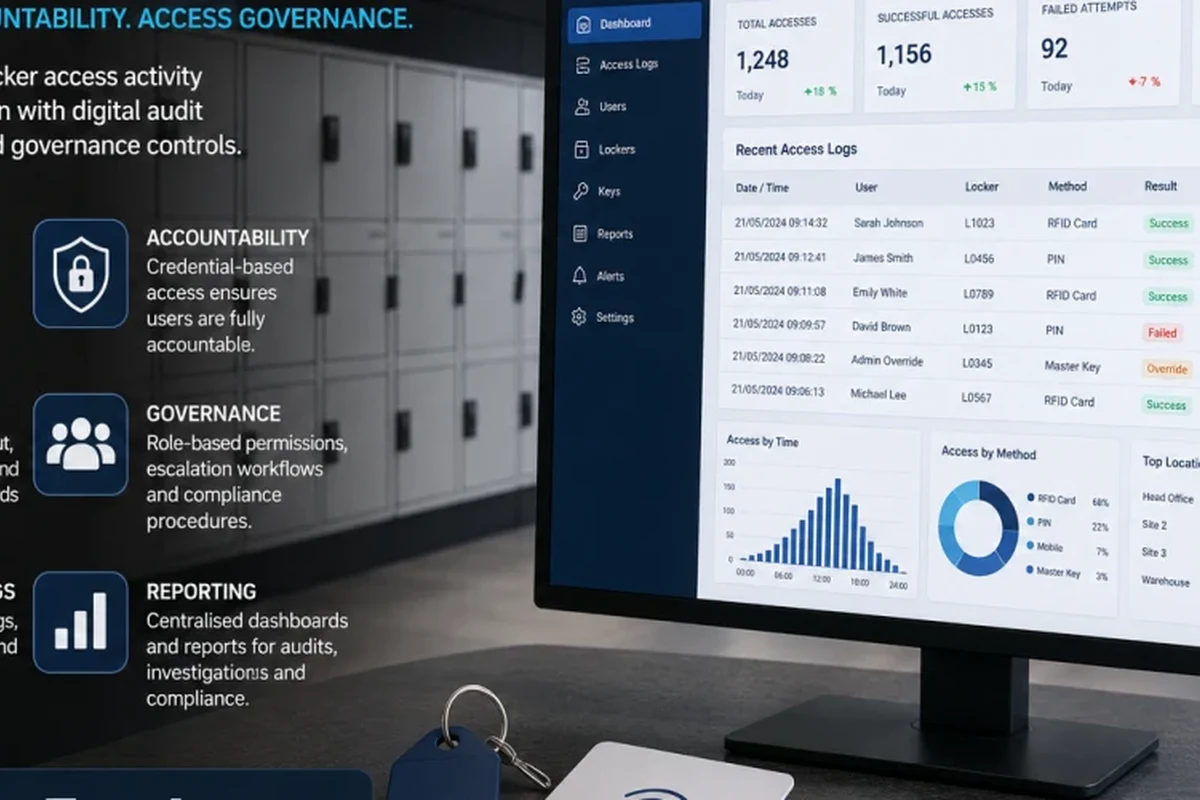
At a basic level, an audit trail is a time-stamped log of locker activity. In a smart locker system, that usually means every unlock attempt, successful access, admin override, and lock status change is stored in the app, dashboard, or cloud portal.
Direct answer: how audit trails improve locker security and accountability
Audit trails improve security by showing exactly what happened instead of leaving staff to guess. If a package goes missing, a gym locker is left open, or an employee says they never accessed a compartment, the log creates a clearer record for review.
That does not make a smart locker invincible. It simply adds traceability, which is often the difference between a quick resolution and a long back-and-forth over responsibility.
Key use cases in apartments, workplaces, schools, gyms, and parcel rooms
In apartments, audit trails help property teams track package-room access and maintenance handoffs. In workplaces, they can support tool lockers, IT equipment storage, and shared employee spaces where access needs to be documented.
Schools and gyms often need a balance between convenience and oversight, especially when lockers are used by many people each day. Parcel rooms and pickup stations benefit too, because logs can help confirm whether a package compartment was opened, re-locked, or overridden by staff.
For readers also comparing smart home ecosystems around shared spaces, it may help to understand how access devices fit into broader automation setups, including smart light switches and smart lights for home automation that often share the same app or network habits.
How Smart Locker Audit Trails Work in 2026
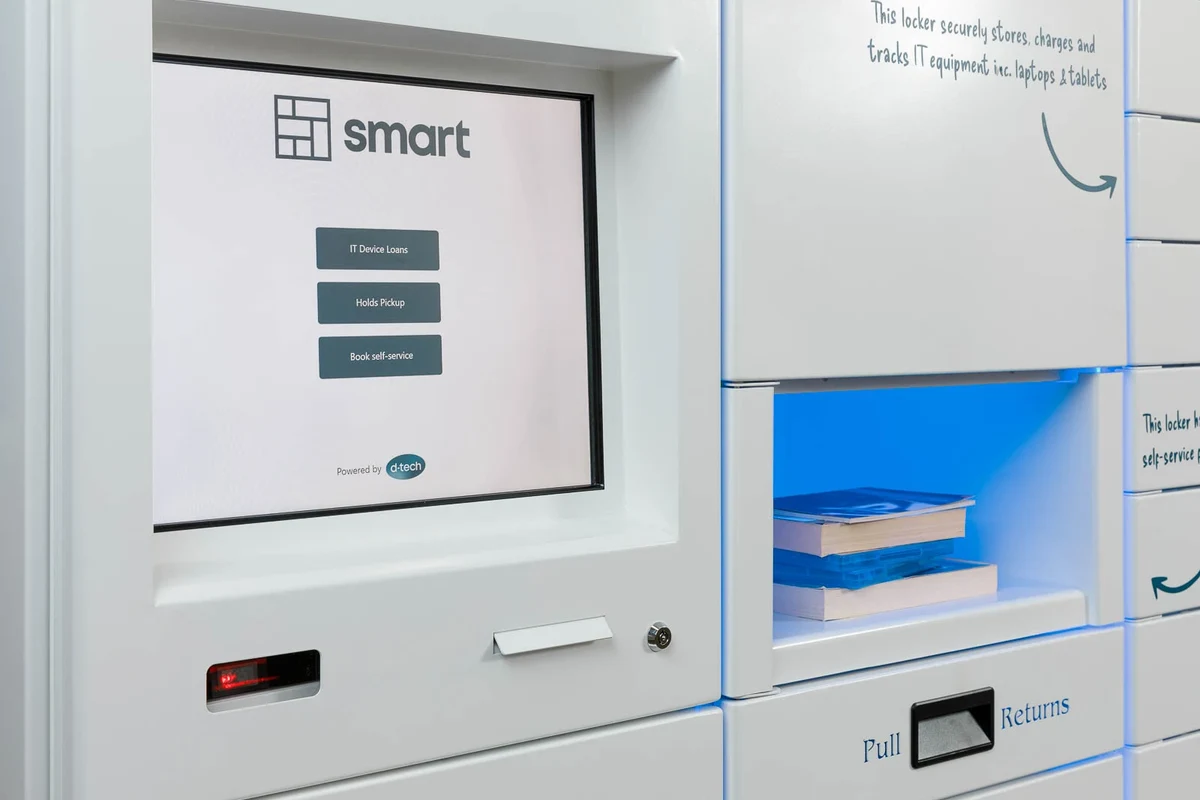
Most smart locker systems follow the same core pattern: a user authenticates, the lock responds, and the system records the event. The exact details vary by model, firmware, and software platform, so buyers should verify the manufacturer’s documentation before assuming a feature is included.
Event logging basics: unlocks, lock status, failed attempts, overrides, and admin access
Common log entries include successful unlocks, failed PIN or credential attempts, lock open/closed status, manual overrides, and administrator actions. Some systems also record battery warnings, tamper alerts, or connectivity problems, which can be useful when troubleshooting repeated access issues.
Many audit logs are only as reliable as the system clock, which is why time sync matters when multiple staff members review the same event history.
Identity methods can include PIN codes, RFID cards, mobile apps, QR codes, or admin credentials. The stronger the identity method, the easier it is to match a log entry to a real person, though shared codes and generic admin accounts reduce that clarity.
Connectivity options: Wi‑Fi, Ethernet, Bluetooth, and cellular backup
Wi‑Fi is common because it is easy to deploy in apartments and offices, but it depends on a stable local network. Ethernet can be more reliable for fixed installations, while Bluetooth is often used for nearby setup, pairing, or local access rather than full-time cloud logging.
Some commercial systems offer cellular backup for critical environments, but that is usually a model-specific or subscription-specific feature. If reliable logging during outages matters, confirm whether events are stored locally and synced later or whether the lock loses visibility when the network drops.
Connectivity behavior varies by model. Some locks keep a local cache of events and upload later, while others need a live connection for full audit visibility.
App, dashboard, and cloud storage requirements to verify before buying
Before buying, check whether the system requires a phone app, web dashboard, paid cloud plan, or all three. Also confirm whether log export is available in CSV, PDF, or another format if you need records for incident review, compliance, or internal reporting.
- Check app requirements, cloud fees, export options, and whether logs are retained locally or online
- Confirm who can view, edit, delete, or export audit records
- Verify whether the system supports offline operation and later sync
Who Should Use Smart Locker Audit Trails
Audit logging is not necessary for every locker. It becomes more valuable when multiple people share access, when assets are expensive, or when you need a record of who handled what and when.
Best-fit users: property managers, IT teams, facilities staff, and shared-space operators
Property managers benefit when lockers are used for packages, keys, or resident amenities. IT teams and facilities staff often need a record for laptops, tools, chargers, spare parts, or restricted items that move between people and shifts.
Shared-space operators such as coworking spaces, schools, gyms, and parcel rooms also tend to gain the most from audit trails because access is distributed across many users. In those settings, a log can reduce confusion and speed up accountability after a problem.
When a basic lock is enough versus when audit logging is worth the upgrade
A basic lock may be enough if only one person uses the locker, the contents are low value, and there is little risk of disputes. In that case, a strong physical lock and good placement may matter more than software features.
Audit logging is worth the upgrade when access changes often, staff rotate shifts, or you need to know who opened the locker and when. If you are comparing broader smart-home value, the same “is it worth it?” question often comes up with connected devices in general, including whether smart light bulbs are worth it and how they fit a home automation budget.
Privacy and compliance considerations for shared and employee-access lockers
Audit trails can create legitimate privacy questions because they collect usage data about identifiable people. For employee or resident lockers, organizations should review retention rules, access permissions, and any local policies that apply to workplace monitoring or shared-space records.
Keep the data collection limited to what you actually need. If a system offers detailed activity history, make sure only authorized staff can view it and that account sharing is avoided.
Key Specifications and Buying Criteria to Compare
Not all audit trails are equally useful. The best systems make logs easy to trust, easy to retrieve, and hard to misuse.
Log depth, timestamp accuracy, user identity methods, and export options
Log depth refers to how much history the system stores before older entries roll off. Timestamp accuracy matters because even a small clock error can make an access timeline confusing, especially if several lockers or staff accounts are involved.
Identity methods should match your workflow. For example, a PIN may be convenient for a gym, while a card or app-based credential may be better for staff access where individual accountability matters more.
Lock hardware dimensions, installation fit, power needs, and backup battery life
Hardware fit is easy to overlook, but it matters just as much as software. Check the lock body dimensions, mounting style, door thickness compatibility, and whether the mechanism works with your locker material and spacing.
Power needs also vary by model. Some systems run on replaceable batteries, others use rechargeable packs or wired power, and many include backup battery support so logs and access continue during outages.
App compatibility, permissions controls, alert settings, and role-based access
App compatibility should be checked against the exact phone operating system and version you plan to use. If a system supports role-based access, that is a strong sign it can separate everyday users from supervisors and administrators more cleanly.
Alert settings are also important. Good systems can notify staff about failed access attempts, low battery warnings, tamper events, or offline status without flooding them with unnecessary alerts.
Build quality, weather resistance, noise level, warranty terms, and support coverage
Build quality matters in both indoor and outdoor installations. If the locker is exposed to moisture, dust, or temperature swings, confirm the enclosure rating and weather resistance directly in the official specs instead of assuming it is suitable for all environments.
Noise level can matter in quiet offices, libraries, or residential hallways where a loud solenoid or motor would be disruptive. Warranty terms and support coverage are worth checking too, especially if the system depends on an app or cloud service that may change over time.
Real-World Benefits, Limitations, and Trade-Offs
Smart locker audit trails can be very helpful, but they are not magic. They improve visibility and process control, yet they still depend on network quality, battery health, and proper administration.
Security gains: traceability, dispute resolution, and faster incident review
The biggest security gain is traceability. When an issue happens, staff can review who accessed the locker, when it happened, and whether the event was a normal unlock, a failed attempt, or an emergency override.
That makes dispute resolution much easier. Instead of relying on memory, teams can compare the log against package scans, shift records, or maintenance schedules to narrow down what likely happened.
- Clearer accountability in shared-access spaces
- Faster incident review and maintenance follow-up
- Better recordkeeping than a basic mechanical lock
- Depends on power, firmware, and connectivity
- Logs can be less useful if accounts are shared
- May add app, cloud, or subscription complexity
Operational gains: reduced manual checks, easier handoffs, and better maintenance records
Audit trails can reduce the need for manual sign-out sheets or handwritten logs. They also make shift handoffs cleaner because the next person can see whether a locker was left open, accessed recently, or flagged for maintenance.
For facilities staff, the log can become a maintenance record as well. Repeated failed attempts, battery warnings, or frequent overrides may point to a mechanical issue before it becomes a bigger outage.
Limitations: false assumptions, network outages, battery dependence, and data retention gaps
One common mistake is assuming that an audit trail proves everything. It usually shows that an account or credential was used, but it may not prove who physically held the credential at the time unless the system uses strong individual authentication.
Other limitations include network outages, battery dependence, and data retention gaps. If logs are stored only for a short time or sync fails during an outage, you may lose the very history you expected to rely on.
Common Mistakes to Avoid During Setup and Use
Many smart locker problems come from setup errors rather than hardware failure. A careful first configuration can prevent most headaches later.
Poor user-role configuration and weak admin password practices
Do not give everyone the same admin-level access just to save time. Separate regular users, supervisors, and full administrators so that only the right people can change settings, export logs, or override locks.
Use strong, unique passwords and enable two-factor authentication if the platform supports it. Shared admin logins are a common way to lose accountability in the very system meant to improve it.
Ignoring firmware updates, time sync, and audit log retention settings
Firmware updates can affect stability, security, and logging behavior, so they should not be ignored. Time sync is equally important because even a good event log becomes hard to trust if the clock drifts.
Retention settings deserve attention too. If logs are deleted too quickly, you may not have the records you need after an incident; if they are kept too long, you may create unnecessary privacy exposure.
Overlooking backup access methods, emergency unlock procedures, and offline behavior
Before deployment, confirm what happens if the battery dies, the app fails, or the network goes down. You should know the backup access method, who is authorized to use it, and how the system records that emergency event.
Do not force a lock, bypass safety mechanisms, or modify wiring to restore access. Follow the manufacturer’s emergency procedure and stop using damaged hardware until it is inspected.
Safe Use, Maintenance, and Troubleshooting
Good maintenance keeps the audit trail useful because the system can only log accurately if the hardware is healthy and the software stays in sync.
Routine inspection checklist: batteries, cabling, mounts, sensors, and lock alignment
Check batteries or power modules on a schedule, especially in high-use locations. Inspect cabling, mounting points, and door alignment so the lock does not bind or misread the closed position.
If the system uses sensors, confirm that they are clean and unobstructed. A small alignment issue can create repeated false alerts or make the log look like the locker was opened when it was not fully latched.
Cleaning and storage guidance for indoor and outdoor smart lockers
Use the cleaning method recommended by the manufacturer, especially around electronics, keypads, and sensors. Avoid excess liquid, harsh solvents, or abrasive cloths that could damage seals or finish materials.
For outdoor units or semi-exposed installations, keep an eye on corrosion, condensation, and debris buildup. If the locker is stored unused for a while, remove or maintain batteries according to the official guidance so they do not leak or degrade in storage.
Fixing common issues: sync failures, missing logs, delayed alerts, and dead batteries
If logs are missing or alerts are delayed, start with the simplest checks: power, network connection, app permissions, and time synchronization. Then review whether the system is actually configured to retain and upload the event type you are trying to see.
Dead batteries can cause more than a lockout; they can also interrupt logging if the system does not have a proper backup path. Replace batteries only with the type recommended by the manufacturer.
Replacement guidance for worn parts, power modules, and damaged access hardware
Replace worn parts before they become failures, especially if the latch feels loose, the keypad is inconsistent, or the lock begins to misreport status. Power modules, connectors, and access hardware should be replaced with approved parts whenever possible.
If a component is cracked, swollen, corroded, or physically damaged, stop using it and consult the manual or support team. That is especially important for battery-related parts and any accessory that affects locking or access control.
Final Recommendation: When Smart Locker Audit Trails Are Worth It
Smart locker audit trails are worth it when accountability matters more than simple access. They are especially useful for shared lockers, package rooms, staff equipment, and any environment where disputes, handoffs, or security reviews happen often.
Best value scenarios, budget considerations, and the types of buyers who benefit most
The best value usually shows up in places with multiple users, high turnover, or expensive contents. Budget-minded buyers should compare not only the lock price but also app requirements, cloud fees, battery replacement costs, installation fit, and support terms.
If you are still comparing broader connected-device ecosystems, it can also help to think about how the locker system fits with other smart-home or facility tools, such as smart lights that work with Google Home or smart lights that work with Alexa when app and account management matter across the whole space.
Transparent verdict on whether to choose a smart locker with audit trails in 2026
Choose a smart locker with audit trails if you need real accountability, not just convenience. If you only need a secure compartment for one user and you will never review access history, a simpler lock may be the better fit.
Before buying, confirm the official specs, app requirements, log retention rules, and emergency access process so the system matches your actual use case.
Frequently Asked Questions
It is a time-stamped record of locker activity such as unlocks, failed attempts, overrides, and admin actions. The exact details vary by model and software platform.
Property managers, IT teams, facilities staff, and operators of shared spaces usually benefit the most. Audit logs are especially useful when many people share access or when contents are valuable.
Some systems can store events locally and sync later, while others need a live connection for full visibility. Check the manufacturer’s documentation for offline behavior before buying.
Check log retention, export options, app compatibility, power needs, backup access methods, and role-based permissions. Also confirm warranty terms and support coverage.
Not always. A log can show which credential was used, but shared codes or shared admin accounts reduce accountability.
Inspect batteries, cabling, mounts, sensors, and alignment on a regular schedule. Follow the manufacturer’s cleaning, storage, and replacement guidance, and stop using damaged hardware until it is inspected.