

How Does Smart Plug Work A Simple Guide for Beginners
If you’re wondering how does smart plug work, the short answer is simple: it sits between a wall outlet and a device, then lets you turn that device on or off through an app, schedule, or voice assistant. It does not make the appliance “smart” in every way; it mainly gives you remote control over power and, on some models, energy tracking.
For beginners, that makes a smart plug one of the easiest smart home upgrades to understand. The useful part is not just convenience, but also how much it can automate lamps, fans, coffee makers, and other compatible devices without replacing the device itself.
- Simple function: A smart plug turns a device’s power on or off remotely.
- Best uses: Lamps, fans, seasonal lights, and other simple appliances are common fits.
- Key checks: Confirm load rating, Wi-Fi support, app requirements, and outlet clearance.
- Limitations: It does not add dimming, speed control, or appliance-specific features.
- Safety first: Avoid overheating, damaged plugs, and unsupported high-power devices.
How Does a Smart Plug Work? The Simple Answer for Beginners
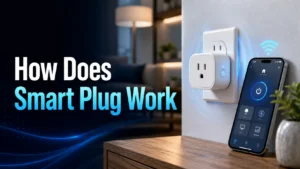
A smart plug works like a controllable power switch. You plug the smart plug into the wall, plug your device into the smart plug, and then the plug’s internal relay opens or closes the circuit based on commands from your phone, voice assistant, or automation rule.
Most smart plugs connect to your home network, usually through Wi-Fi, so your app can send instructions even when you are away from home. Some models also support other smart home ecosystems, but the core idea stays the same: the plug controls electricity flow, not the device’s internal features.
What Is a Smart Plug and What Can It Control?
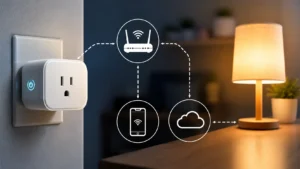
A smart plug is a compact smart home accessory that adds remote switching to a normal device. It is commonly used for simple on/off appliances that return to their previous state when power is restored, such as lamps or certain fans.
Before buying, it helps to think about whether your device is a good fit for outlet-based control. If you need deeper automation for lighting, you may also want to compare it with smart bulbs or smart switches, such as in guides like Do Smart Lights Work With Alexa and What Smart Lights Work With Google Home.
Common devices people plug into smart outlets
People often use smart plugs with table lamps, holiday lights, fans, humidifiers, coffee makers, aquariums, and small chargers. They are also popular in home offices for turning off desk lamps or scheduling accessories.
The best candidates are devices that do not need constant manual adjustment and can safely resume operation after power returns. For example, a lamp is usually a better fit than a microwave or a device with sensitive controls.
What a smart plug cannot do
A smart plug cannot change brightness, speed, temperature, or mode unless the connected device itself has a simple “power on” behavior. It also cannot make an appliance safer, more efficient, or more powerful than its design allows.
It is also not a universal solution for every device. Some appliances should not be controlled this way, especially if the manufacturer warns against cutting power unexpectedly or if the device needs a specific shutdown process.
How Smart Plugs Work: Wi-Fi, Apps, and Automation
Smart plugs usually rely on a small wireless radio and an onboard controller. When you press a button in the app, speak to a voice assistant, or trigger a schedule, the command goes over your network to the plug, which then switches power on or off.
This is why setup quality matters. A smart plug is only as convenient as its connection, app support, and compatibility with the smart home system you already use.
Connecting to your home network
Most smart plugs are paired through a manufacturer app during setup. You typically plug it in, put it into pairing mode, and follow the app’s instructions to connect it to your Wi-Fi network.
Compatibility can vary by model. Some plugs support only 2.4 GHz Wi-Fi, while others may support additional platforms or setup methods. Always confirm the official compatibility list before buying, especially if your router settings are customized.
Using the app, voice assistants, and schedules
Once connected, the app usually lets you turn the outlet on and off, rename the plug, group it with other devices, and create schedules. Many smart plugs also work with voice assistants, which is why buyers often check ecosystem support before choosing one.
If you want to know how a plug fits into a broader smart home setup, it helps to compare platform support with other devices in your home. For example, you may also want to read about What Smart Lights Work With Apple Home or Is Smart Lighting Compatible With Alexa if you are building around a specific assistant.
Schedules and routines are often the biggest practical benefit. You can automate a lamp to turn on in the evening, shut off a fan after bedtime, or cycle holiday lights without touching a switch.
- Give each plug a clear room-based name in the app so voice commands are easier.
- Test on/off behavior before leaving home for the first time.
- Use schedules for repeat tasks instead of relying on memory.
How energy monitoring features work
Some smart plugs include energy monitoring, which estimates how much power a connected device uses over time. The plug measures electrical current and voltage data internally, then shows usage in the app as watts, kilowatt-hours, or similar readings, depending on the model.
That feature can help you spot high-draw devices or identify when something is using power unexpectedly. Still, energy reports are model-dependent and should be treated as convenience data unless the manufacturer provides clearly documented measurement methods.
Key Specifications to Check Before You Buy
Not all smart plugs are built the same, and the right choice depends on your outlet layout, device load, and smart home platform. Checking a few specs first can prevent blocked outlets, weak connections, or unsupported apps later.
- Check compatibility, model number, app requirements, dimensions, wattage, and intended use
- Confirm safety guidance, warranty, return policy, privacy settings, and update support
Size, outlet shape, and space around neighboring plugs
Smart plugs can be bulky, especially if they include side buttons, indicator lights, or energy monitoring hardware. A large body may block the second outlet on a duplex wall plate, which matters in crowded power strips and behind furniture.
Look closely at the plug’s shape, depth, and orientation. If the outlet is in a tight space, a compact design may be more important than extra app features.
Power rating, voltage, and device compatibility
Every smart plug has a maximum electrical load it can safely handle. That rating should match the device you want to control, and the manufacturer’s instructions should always take priority over general advice.
Wi-Fi band support, app requirements, and smart home platforms
Many smart plugs rely on a specific Wi-Fi band, often 2.4 GHz, because it can offer better range through walls than some higher-frequency setups. Others may support broader ecosystem compatibility, but the exact list depends on the model.
It is also worth checking whether the plug requires a cloud account, a local hub, or a specific app version. If you want the plug to work with Alexa, Google Home, or Apple Home, confirm support on the manufacturer’s current compatibility page before you buy.
Warranty, build quality, and safety certifications to verify
Warranty length, return policy, and certifications can differ by brand and region. Look for clear safety documentation and recognizable testing marks where applicable, then verify them against the manufacturer’s listing and the retailer’s current product page.
Build quality matters too, because a smart plug is a power device that may stay in the wall for long periods. A solid fit, clear labeling, and reliable app support often matter more than flashy automation extras.
Who a Smart Plug Is Best For in 2026
Smart plugs are especially useful for people who want simple automation without replacing fixtures or wiring. They are usually the easiest first step into smart home control because setup is straightforward and the use cases are familiar.
Best use cases for beginners, renters, and busy households
Beginners often like smart plugs because they can automate one device at a time. Renters may appreciate them because they do not require permanent installation, and busy households can use them for lights, seasonal décor, or routine shutoff tasks.
They also work well for people who want a low-commitment way to try a smart home platform. If you are building out a room by room setup, smart plugs can complement other devices rather than replacing them.
When a smart plug is not the right solution
A smart plug is not ideal if you need dimming, color control, fan speed control, or appliance-specific settings. It is also a poor choice for devices that should not lose power unexpectedly, such as certain electronics with shutdown procedures or equipment that needs uninterrupted operation.
In those cases, a smart switch, smart bulb, or a different automation method may be a better fit. The right answer depends on what the device does, not just whether it plugs into the wall.
Real-World Benefits and Practical Trade-Offs
The appeal of a smart plug is that it solves a very specific problem: making ordinary devices easier to control. That simplicity is a strength, but it also comes with a few trade-offs that buyers should understand before relying on one everywhere.
Convenience, energy savings, and remote control
The biggest benefit is convenience. You can turn devices on or off from another room, across town, or on a schedule, which is helpful for lamps, holiday lights, and forgotten appliances.
Some users also like the potential for energy savings, especially when they use schedules or shut off standby loads. The actual savings depend on the device, usage pattern, and how consistently the automation is used.
Limitations, latency, and dependence on Wi-Fi
Smart plugs are only as responsive as their connection and app ecosystem. If your Wi-Fi is weak or the cloud service is slow, commands may lag or fail temporarily.
That does not make the device useless, but it does mean a smart plug is not as instant or fail-safe as a manual wall switch. If your internet goes down, some models may still work locally, while others may lose app control until the connection returns.
Privacy and account considerations
Most smart plugs require an app account, and some rely on cloud services for remote access or voice control. That means you should review the app’s permissions, privacy policy, and update history before committing to a brand.
For a more secure setup, use a strong password, enable two-factor authentication if the app offers it, and keep firmware updated through the official app. Those basics are usually more effective than chasing obscure security settings.
Safe Setup, Maintenance, and Common Mistakes
Because smart plugs handle electricity, safe use matters just as much as convenience. The safest setup is the one that respects the plug’s rating, the device’s requirements, and the manufacturer’s instructions.
Safe installation and load limits
Start by plugging the smart plug directly into a wall outlet unless the manual specifically allows something else. Then connect only a compatible device that stays within the plug’s load limit and is appropriate for switched control.
Heat checks, inspection, and replacement guidance
After setup, it is smart to check for warmth during normal operation. Mild warmth can be normal for electronics, but excessive heat, buzzing, discoloration, or a loose outlet fit means you should stop using the plug and inspect it.
If the plug is damaged, cracked, or shows signs of wear, replace it rather than trying to keep using it. For power accessories, conservative replacement is usually the safest choice.
Cleaning, storage, and long-term care
Keep the plug dry and dust-free, and never clean it while it is connected to power. If you store seasonal smart plugs, unplug them, let them cool, and keep them in a dry place with the manual or box so model details are easy to find later.
Long-term care is mostly about avoiding stress on the outlet and the corded device. A tidy cable path, a stable outlet fit, and occasional inspection go a long way.
Common setup errors and troubleshooting tips
One common mistake is trying to pair the plug on the wrong Wi-Fi band or with a router setting the app does not support. Another is forgetting to rename the device clearly, which makes voice commands confusing later.
If the plug will not connect, check the official setup steps first, then confirm app permissions, phone Wi-Fi settings, and router compatibility. If a smart home platform is involved, verify that the plug is supported in the current ecosystem list rather than assuming older compatibility still applies.
Final Recommendation: Is a Smart Plug Worth It?
For most beginners, yes—a smart plug is one of the most practical and affordable-feeling smart home upgrades because it is simple, flexible, and easy to understand. It gives you real automation without requiring new fixtures, new wiring, or a major commitment.
Best overall value for most beginners
The best value usually comes from a smart plug that fits your outlet well, supports the platform you already use, and has clear safety documentation. If you want a first smart home device that can handle lamps, schedules, and basic remote control, a smart plug is often the easiest place to start.
What to prioritize if you want a reliable first smart home upgrade
Prioritize compatibility, load rating, app quality, and safety over flashy features. If you confirm those basics first, you are far more likely to end up with a plug that feels useful every day instead of one that looks smart but causes setup headaches.
- A smart plug controls power to a device through an app, schedule, or voice assistant.
- It works best with simple on/off appliances and is not a substitute for every smart lighting or appliance feature.
- Compatibility, outlet fit, load limits, and safety checks matter more than extra app features.
- Reliable Wi-Fi, clear setup steps, and strong privacy habits improve the experience.
Frequently Asked Questions
A smart plug lets you control power to a connected device from an app, voice assistant, or schedule. It is mainly a remote on/off switch for ordinary appliances.
Most smart plugs rely on Wi-Fi for setup and remote control, but some models use a hub or different platform support. Check the manufacturer’s current requirements before buying.
No. You need to confirm the plug’s load rating and make sure the appliance is safe to control by cutting power.
They can help reduce wasted power by turning devices off on a schedule or remotely. Actual savings depend on the device and how you use it.
Common causes include the wrong Wi-Fi band, router settings, or an incomplete pairing process. The official setup guide is the best place to start troubleshooting.
They can be safe when used within the manufacturer’s limits and kept in good condition. Stop using any plug that shows heat damage, cracking, looseness, or unusual odors.

2 Comments