Can You Change Bulb in Motion Sensor Light
Yes, you can change the bulb in some motion sensor lights, but only if the fixture uses a replaceable bulb. If the unit has integrated LEDs or a sealed housing, you may need to replace the whole fixture instead.
Yes, sometimes you can change the bulb in a motion sensor light—but only if the fixture was designed with a replaceable bulb. If the sensor light uses an integrated LED module or sealed housing, the “bulb” may not be user-replaceable, and the whole fixture or light engine may need service instead.
- Check the fixture type: Standard socket models usually allow bulb replacement; integrated LED units often do not.
- Match the specs: Base type, wattage, and location rating must match the fixture.
- Use safe handling: Turn off power, let the bulb cool, and inspect for moisture or damage first.
- Watch for compatibility issues: Some LEDs, smart bulbs, and dimmable bulbs can behave poorly with motion sensors.
- Replace the fixture when needed: Sealed, damaged, or repeatedly failing units are often better swapped out entirely.
Can You Change the Bulb in a Motion Sensor Light? Quick Answer and What to Check First
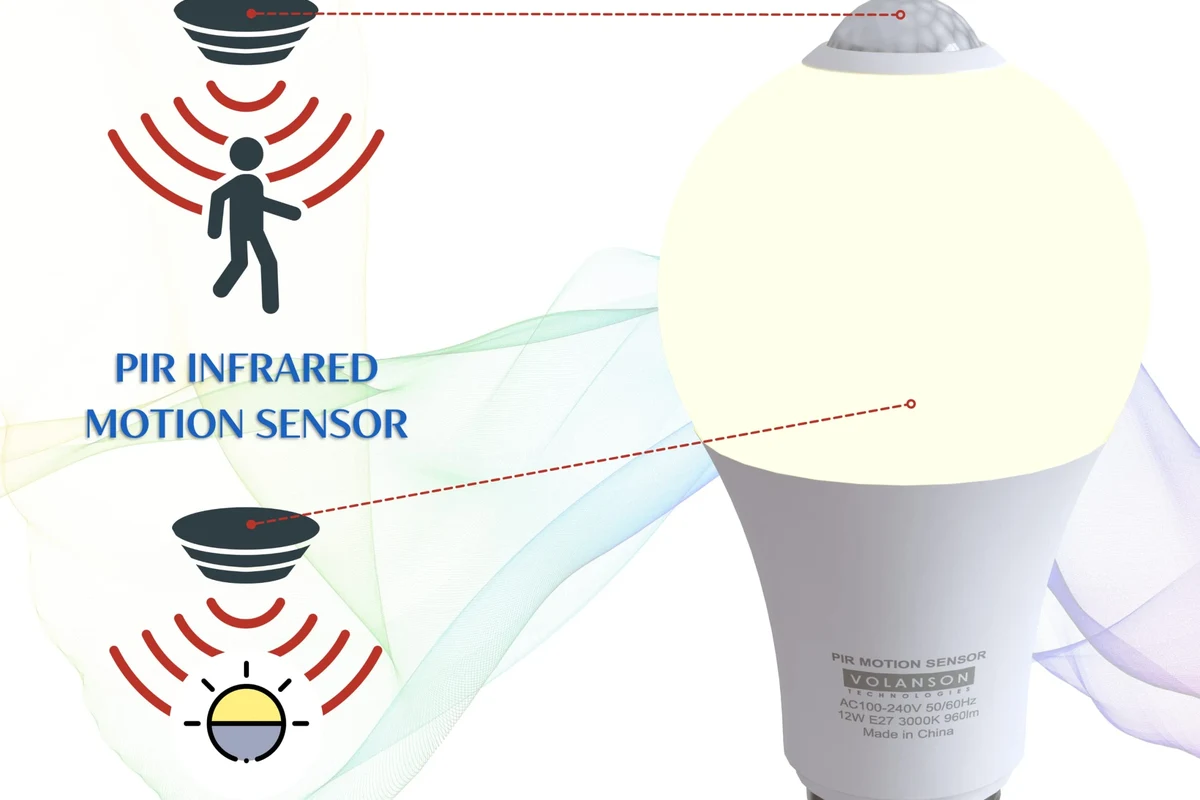
The first thing to check is whether your motion sensor light is a standard socket-based fixture or an all-in-one LED unit. That detail determines whether you are replacing a bulb, replacing a module, or replacing the entire fixture.
- Confirm the model number on the fixture or manual
- Look for replaceable bulb wording, socket type, or LED module notes
- Check whether the sensor is built into the light or mounted separately
- Verify outdoor ratings, wattage limits, and any dimming restrictions
If you are unsure, the safest move is to inspect the manufacturer manual or product page before removing anything. Motion sensor lights vary a lot by design, and forcing the wrong part can damage the sensor, wiring, or weather seal.
How Motion Sensor Lights Work and Why Bulb Replacement Can Be Different
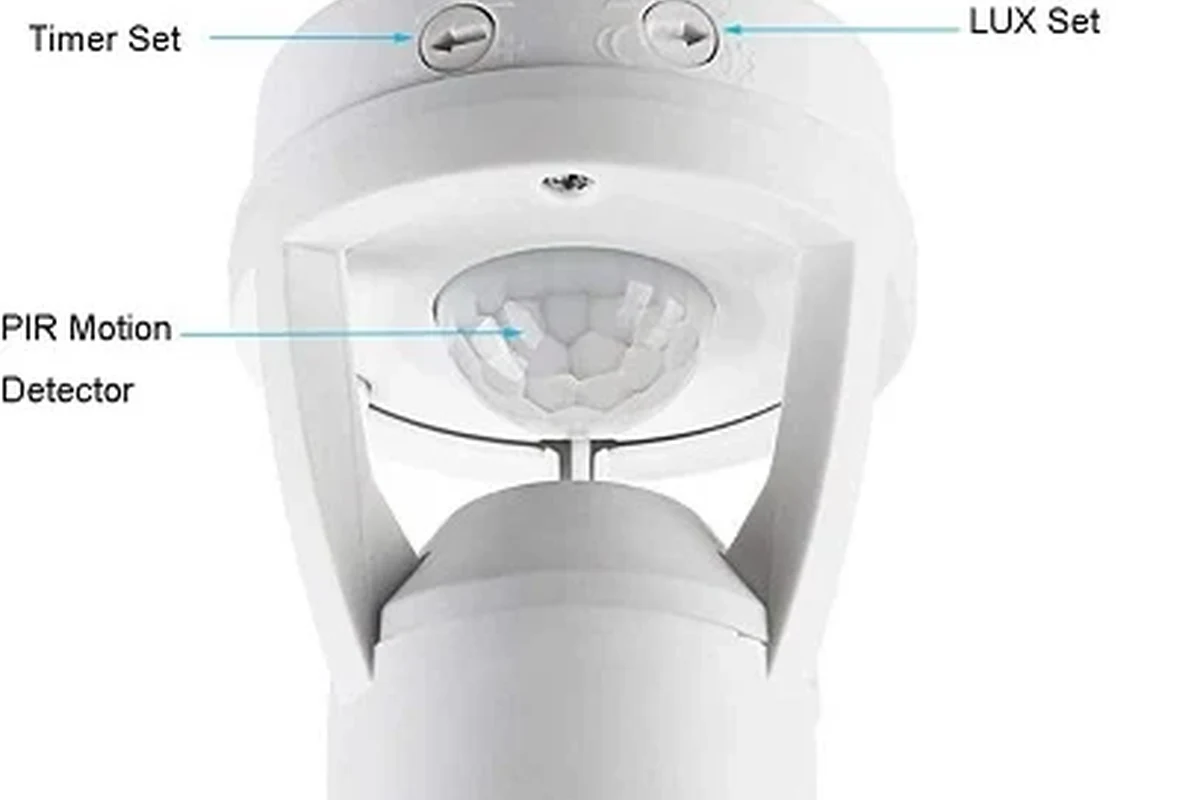
Motion sensor lights combine a light source with a sensor that detects movement, then turns the light on for a set time. Because the sensor, power supply, and light source may be packaged together, replacement rules are not always the same as with a regular lamp.
Integrated Fixtures vs. Standard Bulb-Based Models
Some motion sensor lights use a regular bulb socket, such as a standard porch fixture or floodlight housing. In those cases, you can usually swap the bulb as long as the replacement matches the fixture’s electrical and physical requirements.
Other models use built-in LEDs. In those fixtures, the light source is part of the assembly, so there may be no traditional bulb to replace. If the LEDs fail, the manufacturer may recommend replacing a module, driver, or the entire unit.
“Motion sensor light” can describe both bulb-based fixtures and sealed LED fixtures. The label alone does not tell you whether the light source is replaceable.
Sensor Placement, Power Source, and Access Constraints
Where the sensor sits can affect how easy the fixture is to service. On some lights, the sensor is mounted on the housing and leaves the bulb accessible. On others, the sensor is close to the lens or integrated into a sealed front cover, which makes access tighter.
Power source matters too. Hardwired outdoor lights, battery-powered units, and solar lights all have different maintenance needs. A battery-powered or solar motion light may not use a replaceable bulb at all, while a hardwired fixture may.
How to Tell Whether Your Motion Sensor Light Uses a Replaceable Bulb
You can usually figure this out by checking the fixture body, the manual, and the socket style. If the light has a visible bulb base and a removable cover, it is more likely to be serviceable than a fully sealed LED unit.
Signs the Bulb Is Replaceable
Look for a removable lens, a screw-in socket, or language like “replace with equivalent bulb” in the manual. A standard base such as E26, E27, GU10, or another listed socket type is another strong sign that the bulb can be changed.
You may also see wattage and bulb type markings on the fixture label. Those markings usually indicate that the manufacturer expects the user to replace the bulb within a defined range.
Take a photo of the fixture label before shopping for a replacement. It helps you match the socket type, wattage limit, and any outdoor rating without guessing.
Signs the Unit Is Sealed or LED-Integrated
If the fixture says “integrated LED,” “non-replaceable light source,” or similar wording, the bulb is probably not user-changeable. A sealed housing with no obvious socket access is another clue.
Flickering or dimming in these units does not always mean a bulb has failed. It can also point to driver failure, sensor issues, or wiring problems, which are usually not simple bulb swaps.
Step-by-Step Guide to Changing the Bulb Safely
If your motion sensor light uses a standard bulb, replacement is usually straightforward. The key is to work safely and match the replacement to the fixture’s specifications.
Turn off power before touching a hardwired fixture, and do not handle hot bulbs or wet outdoor housings. If you see cracked glass, corrosion, exposed wiring, or water inside the fixture, stop and follow the manufacturer’s guidance.
Power Off, Cool Down, and Access the Fixture
Switch off the light at the wall switch and, for hardwired fixtures, turn off the breaker if needed. Let the bulb cool completely before touching it, especially if it was recently on.
Remove the cover or lens according to the fixture design. Many motion sensor lights use screws, clips, or a threaded shade, so use gentle pressure and avoid forcing plastic parts that may become brittle outdoors.
Remove the Old Bulb and Install the Correct Replacement
Unscrew the old bulb carefully and compare it with the replacement. Match the base type, bulb shape, voltage requirements, and wattage limit listed on the fixture or manual.
Install the new bulb without overtightening. If the fixture is outdoors, make sure the cover or gasket goes back into place properly so moisture and insects do not enter the housing.
- Choose a bulb that matches the fixture’s maximum wattage or approved LED equivalent
- Use outdoor-rated bulbs for exterior fixtures when the manufacturer recommends them
- Avoid bulbs that are too large for the sensor housing or lens cover
- If the sensor is sensitive, test with one bulb before changing multiple bulbs in a multi-head fixture
Test the Sensor and Restore Normal Operation
After reassembly, restore power and test the motion sensor in normal conditions. Walk through the detection zone and confirm that the light turns on, stays on for the expected time, and shuts off correctly.
If the fixture has adjustable settings, review the sensitivity, time delay, and ambient light controls. A new bulb can change how bright the fixture appears, which may affect how the sensor behaves in low-light conditions.
Bulb Specifications, Compatibility, and Buying Criteria
Choosing the right bulb matters as much as replacing it correctly. The wrong bulb can cause flickering, shorten sensor response time, or fail prematurely in outdoor conditions.
Base Type, Wattage, Brightness, and Color Temperature
The bulb base must match the socket exactly. Beyond that, check the fixture’s wattage limit and choose a bulb that stays within it, even if you are using an LED with lower power draw than an older incandescent bulb.
Brightness and color temperature are usually personal preferences, but they should fit the space. A warm white bulb may suit a porch or hallway, while a brighter neutral white may work better for driveways, garages, or entry points.
Indoor vs. Outdoor Ratings, Motion Sensitivity, and Dimming Limits
For outdoor fixtures, verify that the replacement bulb is suitable for damp or wet locations if the manufacturer requires that rating. Indoor bulbs may work electrically but still be a poor fit for weather exposure.
Also check whether the motion sensor or fixture supports dimming. Some sensor lights do not behave well with dimmable bulbs, smart bulbs, or certain LED replacements, especially if the fixture expects a simpler load.
Common Problems After Replacing the Bulb and How to Fix Them
If the new bulb does not behave as expected, the issue may be compatibility rather than a bad replacement. Motion sensor fixtures can be picky about bulb type, load, and control settings.
Light Stays On, Won’t Turn On, or Flickers
If the light stays on, the sensor may be set too high in sensitivity or too long in delay. It can also happen when the bulb is incompatible with the sensor circuit, especially with some LEDs or smart bulbs.
If the light will not turn on, check the breaker, switch, bulb seating, and any dusk-to-dawn setting. Flickering can point to a loose bulb, a poor connection, a failing bulb, or a fixture that does not play well with that bulb type.
If the fixture shows signs of heat damage, melted plastic, burn marks, or repeated flicker after a correct bulb swap, stop using it and inspect the wiring or have it checked by a qualified professional.
Sensor Range Issues, Wrong Bulb Type, and Wiring Concerns
A bulb that is too bright or too dim can change how noticeable the light is, but it usually does not change the actual motion detection range. If the sensor seems less responsive, the problem may be placement, lens obstruction, weather, or wiring.
Some motion sensor lights are also sensitive to bulb electronics. If an LED replacement causes buzzing, ghosting, or random activation, the fixture may require a different bulb style or a non-smart alternative recommended by the manufacturer.
Safety Tips, Maintenance, and When Replacement Is Not Worth It
Motion sensor lights last longer when you keep the sensor window clean, check the seals, and replace bulbs before they fail completely. Regular inspection matters more for outdoor fixtures exposed to rain, dust, insects, and temperature swings.
Electrical Safety, Weather Exposure, and Regular Inspection
Before replacing any bulb, confirm the fixture is dry and stable. If moisture is inside the housing, the gasket is cracked, or the mounting is loose, address those issues first because they can affect both safety and sensor performance.
For outdoor units, inspect the lens and sensor area a few times a year. Dirt, spider webs, and residue can block motion detection or reduce the light output enough to make the fixture seem faulty.
When to Replace the Whole Fixture Instead of Just the Bulb
Replacing the whole fixture often makes more sense when the unit uses integrated LEDs, the housing is weather-damaged, or the sensor repeatedly fails. It can also be the better choice if the fixture is old, hard to access, or no longer matches the bulb types you want to use.
If you are comparing repair cost to replacement cost, include the fixture’s condition, installation effort, and whether the new model offers better weather sealing, adjustable sensitivity, or a more suitable light output. The best choice is the one that restores reliable operation without creating a safety or compatibility problem.
Final Recommendation: Is Bulb Replacement the Best Move for Your Motion Sensor Light?
If your motion sensor light has a standard socket and a clear bulb access point, changing the bulb is usually the simplest and most cost-effective fix. If the fixture is sealed, integrated, or showing electrical damage, replacing the whole unit is often the safer and more reliable option.
Change the bulb only when the fixture is designed for it and the replacement matches the manual. If compatibility is unclear or the light source is integrated, confirm the model details first so you do not buy the wrong part or damage the sensor assembly.
Frequently Asked Questions
Yes, if the fixture uses a standard replaceable bulb. If it has an integrated LED or sealed housing, the light source may not be user-replaceable.
Check the fixture label, manual, or product listing for socket type and replacement instructions. A visible socket and removable cover usually mean the bulb is replaceable.
Buy a bulb that matches the socket type, wattage limit, and location rating required by the fixture. For outdoor lights, confirm whether the manufacturer recommends damp- or wet-location use.
Flicker can come from a loose bulb, incompatible LED type, dimming mismatch, or a wiring issue. If the fixture is damaged or the flicker continues, stop using it and check the manual or a qualified electrician.
Only if the fixture and sensor are documented as compatible with smart bulbs. Some motion sensors do not work correctly with smart bulbs, especially if the bulb expects app control or constant power.
Replace the whole fixture when the unit uses integrated LEDs, has water damage, or keeps failing after a correct bulb replacement. A new fixture can be safer and more reliable than repeated repairs.