Do Motion Sensors Work in the Dark
Yes, most motion sensors work in the dark because they detect movement or heat, not visible light. Performance depends more on sensor type, placement, and settings than on brightness.
Yes—most motion sensors work in the dark because they detect movement, heat, or sound changes rather than visible light. That makes them useful for night lighting, security alerts, and hands-free automation in places where cameras or light sensors may struggle.
- Darkness is usually not a problem: PIR, microwave, and ultrasonic sensors can detect motion without light.
- Placement matters a lot: Mounting angle, obstructions, and heat sources can affect reliability more than room brightness.
- Different sensor types fit different spaces: Dual-technology models can reduce false triggers in challenging areas.
- Check the specs before buying: Range, field of view, power source, app support, and weather rating all matter.
- Night use is one of the best use cases: Hallways, entryways, garages, and outdoor paths often benefit the most.
Do Motion Sensors Work in the Dark? The Short Answer and Why It Matters

Motion sensors are designed to notice movement, not brightness. In practical terms, darkness usually does not stop a properly installed sensor from triggering a light, alarm, or smart-home routine.
What does matter is the sensor type, placement, and environment. A sensor can still miss motion or trigger too often if it is aimed poorly, blocked by furniture, or used in a space that creates heat, vibration, or reflections.
How Motion Sensors Detect Movement Without Needing Light
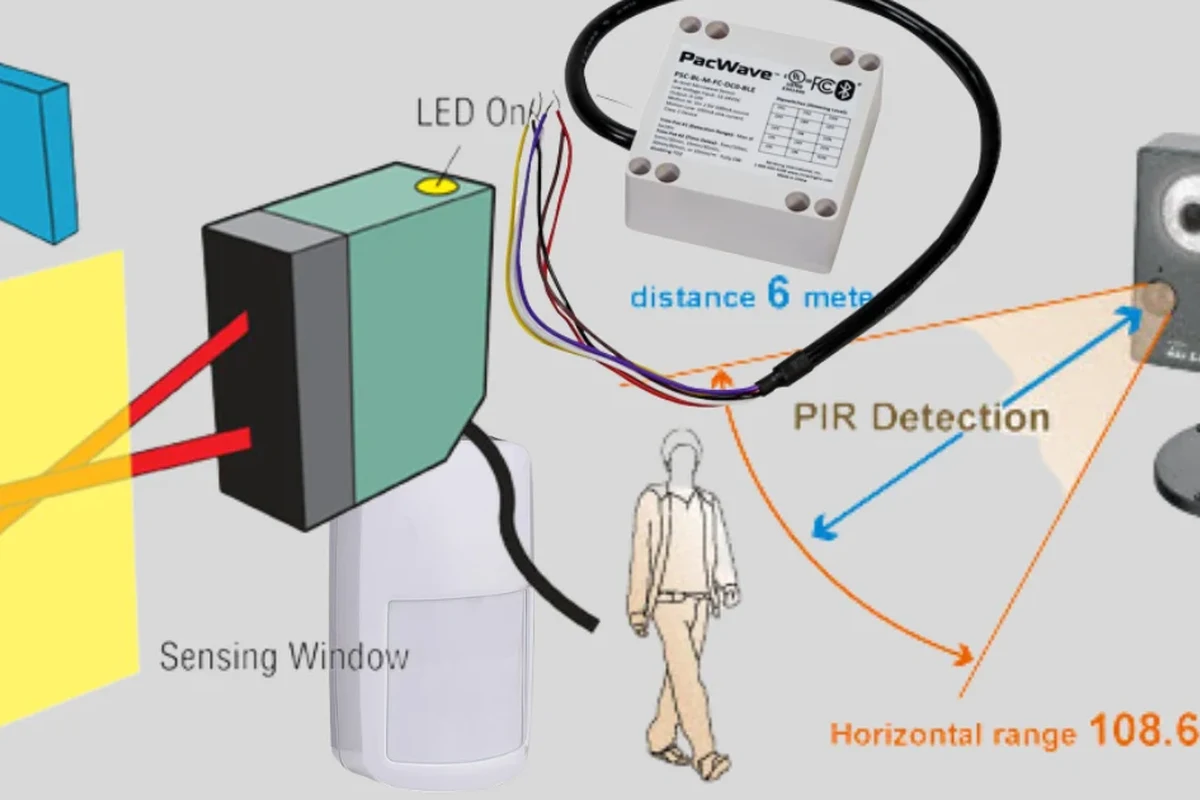
Different sensors use different signals to detect motion. Some look for changes in body heat, while others send out waves and measure how those waves bounce back.
That is why the term “motion sensor” covers more than one technology. Before buying, it helps to know which type is built into the device, because each one behaves differently in the dark and in crowded or reflective spaces.
Passive Infrared (PIR): Detecting Heat Changes
PIR sensors are the most common choice for indoor lights and basic security devices. They detect changes in infrared energy, which usually means they notice the heat signature of a person or pet moving across the sensor’s field of view.
Because PIR sensors respond to heat movement rather than light, they work well in total darkness. However, they can be less reliable if the room is very warm, if the sensor is aimed at HVAC vents, or if the target moves directly toward the sensor instead of across it.
PIR sensors usually detect motion best when a person crosses their view from side to side, because that creates a stronger heat-change signal.
Microwave, Ultrasonic, and Dual-Technology Sensors
Microwave sensors send out radio waves and measure how the reflected waves change when something moves. Ultrasonic sensors do something similar with sound waves that are above human hearing.
These sensor types also work in the dark because they do not depend on ambient light. Dual-technology sensors combine two methods, often PIR plus microwave, to reduce false triggers and improve reliability in tricky spaces like garages, hallways, or large rooms.
Feature names vary by brand and model. Check the manual or spec sheet to confirm whether a device uses PIR, microwave, ultrasonic, or a dual-technology design.
When Motion Sensors Perform Best in Low-Light and Total Darkness
Motion sensors often perform especially well at night because there is less visual distraction and fewer people passing through a space. In many homes, that makes them ideal for automatically turning on lights in stairways, bathrooms, entryways, and exterior paths.
Still, “works in the dark” does not mean “works perfectly everywhere.” The best results usually come from matching the sensor type to the room and the kind of motion you want to detect.
Indoor vs. Outdoor Use Cases
Indoors, motion sensors are commonly used for convenience and energy savings. They can turn on hallway lights, closet lighting, under-cabinet lighting, or smart bulbs when someone enters a room after dark.
Outdoors, motion sensors are often used for security lighting and alerts. In those settings, weather resistance, mounting height, and exposure to wind, trees, heat sources, and passing cars become more important than the darkness itself.
- Useful for automatic night lighting
- Helps improve visibility and convenience
- Can support security routines without needing daylight
- Outdoor placement can increase false triggers
- Heat sources and moving objects may confuse some sensors
- Weather rating and power setup vary by model
Ideal Users: Homeowners, Renters, Security Buyers, and Smart Home Setups
Homeowners often want wired sensors for permanent lighting or security coverage. Renters may prefer battery-powered or plug-in options that install without major changes and can move with them later.
Security buyers usually care most about reliable detection, app alerts, and compatibility with cameras, alarms, or smart hubs. Smart-home users may want motion sensors that work with routines, scenes, and voice assistants, but platform support should always be confirmed before buying because compatibility varies by ecosystem and firmware.
Key Specs and Buying Criteria to Check Before You Choose
If you are shopping for a motion sensor, the important question is not only whether it works in the dark, but how well it works in your specific space. A good spec sheet and manual will tell you more than a product title or marketing claim.
- Check the sensor type, mounting method, power source, and compatibility with your lights or smart hub
- Confirm the detection range, field of view, weather rating, app requirements, and warranty terms
Detection Range, Field of View, and Sensitivity Settings
Detection range tells you how far away motion can be noticed, while field of view describes the area the sensor can “see.” Sensitivity settings matter because a very sensitive sensor may catch small movements, but it may also trigger more often from pets, airflow, or traffic outside.
For bedrooms, hallways, and closets, a shorter range may be enough. For garages, driveways, and larger rooms, look for a wider field of view and adjustable sensitivity so the sensor can be tuned to the space instead of working at one fixed level.
Power Source, Wiring, Smart Compatibility, and Weather Rating
Motion sensors may be battery-powered, hardwired, plug-in, or integrated into a fixture. The right choice depends on where you want to install it and whether you need a simple retrofit or a permanent setup.
If the sensor connects to a smart home system, confirm app requirements, supported platforms, and any hub or bridge needed for operation. For outdoor use, check the weather rating and installation guidance in the official manual so you know whether the device is meant for rain, dust, or sheltered mounting only.
Real-World Benefits, Limitations, and Common Mistakes
The biggest benefit of motion sensors at night is simple: they automate lighting and alerts when your hands are full or visibility is low. That can make entryways safer, reduce wasted energy, and add convenience for kids, guests, or anyone moving through the home after dark.
But motion sensors are only as good as their setup. Many complaints about “not working in the dark” are really placement, calibration, or interference problems.
Why Darkness Does Not Usually Affect Sensor Triggering
Darkness does not block infrared heat changes, radio waves, or sound reflections in the way it blocks visible light. That is why a sensor can still detect a person in a blacked-out room, a dim hallway, or an unlit yard.
In fact, some sensors work more predictably at night because they are not competing with sunlight, glare, or shifting daylight patterns. The main exceptions are devices that combine motion detection with light sensing, since those models may use ambient light to decide whether to turn a lamp on after motion is detected.
False Triggers, Blind Spots, and Placement Errors
False triggers often come from pets, fans, heaters, sunlight on a moving surface, reflective glass, or nearby road traffic. Blind spots happen when the sensor is pointed too high, too low, or behind an obstacle like a shelf, curtain, or door frame.
Placement errors are one of the most common reasons a sensor seems unreliable. A well-chosen model can still disappoint if it is mounted where motion is too subtle, too direct, or too cluttered for the sensor style.
Stop using damaged electronics, swollen batteries, frayed cables, overheating chargers, or unstable appliances and follow the manufacturer’s guidance.
Safe Use, Setup Tips, and Maintenance for Reliable Night Performance
Reliable night performance usually comes down to careful setup and basic maintenance. A sensor that is clean, properly aimed, and powered correctly is far more likely to behave well in darkness than one that is installed and forgotten.
Mounting Height, Angle, and Obstruction Checks
Follow the manufacturer’s recommended mounting height and angle, because those details are often tuned to the sensor’s actual coverage pattern. If the sensor is too high, it may miss people close to the wall; if it is too low, it may trigger on pets or furniture movement.
Before finalizing the installation, check for obstructions such as doors, cabinets, plants, curtains, or HVAC vents. If the sensor supports adjustment, start with a moderate sensitivity setting and refine it after observing how the space behaves over time.
- Point PIR sensors across likely walking paths instead of straight at them when possible
- Avoid aiming sensors at heaters, vents, windows, or moving reflections
- Use the official app or manual to fine-tune timeout and sensitivity settings
Cleaning, Battery Replacement, and Periodic Inspection
Dust and grime can reduce performance, especially on sensor covers, lenses, and outdoor housings. Clean only as the manufacturer recommends, using gentle methods that will not scratch the lens or push moisture into the device.
If the sensor uses batteries, replace them before they are fully depleted so you do not end up with inconsistent nighttime behavior. It is also smart to periodically check firmware updates, app permissions, and any warning lights or status indicators the device provides.
For wired or outdoor sensors, follow the official installation instructions and local electrical safety rules. If the unit shows overheating, corrosion, water intrusion, or repeated failure, stop using it and replace or service it according to the manufacturer’s guidance.
Value, Alternatives, and Final Recommendation for 2026 Buyers
For most buyers, a motion sensor is still one of the simplest and most practical ways to automate lighting or improve awareness after dark. The value comes from dependable detection, easy setup, and a model that fits the room instead of forcing the room to fit the sensor.
In 2026, the best choice is usually the one that matches your ecosystem, installation style, and tolerance for false triggers. That matters more than any single feature on the box.
Motion Sensors vs. Cameras, Light Sensors, and Smart Lighting Controls
Motion sensors are best when you want automatic action based on movement alone. Cameras add visual verification, but they usually involve more privacy considerations, app management, and network dependence.
Light sensors respond to brightness instead of motion, so they are useful for dusk-to-dawn lighting but not for detecting someone walking into a dark room. Smart lighting controls can combine motion, ambient light, schedules, and app routines, which is helpful if you want more customization than a standalone sensor can provide.
| Option | Best For | Key Consideration |
|---|---|---|
| Motion sensor | Automatic night lighting and simple alerts | Check sensor type, placement, and compatibility |
| Camera | Visual monitoring and verification | Privacy, storage, and app setup matter more |
| Light sensor | Dusk-to-dawn control | Does not detect movement |
| Smart lighting control | Custom routines and automation | May require hub, app, or ecosystem support |
Transparent Verdict: Who Should Buy One and Who Should Look Elsewhere
Buy a motion sensor if you want dependable night automation for hallways, entryways, closets, garages, or outdoor paths and you are willing to verify compatibility and placement. It is especially practical for homeowners, renters, and smart-home users who want a low-effort upgrade that works without daylight.
Look elsewhere if you need visual identification, advanced analytics, or a single device that handles motion, recording, and storage all at once. For those needs, a camera-based system or a more complete smart-security setup may be a better fit than a basic motion sensor alone.
Motion sensors generally work very well in the dark, but only when the sensor type, placement, and settings match the space. If you confirm compatibility and install it carefully, a good motion sensor is one of the most useful low-light automation tools for everyday homes.
Frequently Asked Questions
Yes. Most motion sensors detect heat, sound, or wave reflections rather than visible light, so darkness usually does not stop them from triggering.
PIR sensors are common and work well in darkness for many indoor uses. Dual-technology models can be better in tricky spaces because they combine two detection methods.
The issue is often placement, sensitivity, or obstruction rather than darkness. Check the mounting angle, field of view, and any nearby heat sources or barriers.
Yes, many outdoor motion sensors are designed for nighttime use. Make sure the model has the right weather rating and is mounted according to the manual.
Not always. Standalone sensors can work without Wi-Fi, but smart motion sensors may need an app, hub, or network connection for alerts and automation.
Check the sensor type, detection range, field of view, power source, compatibility, and weather rating if needed. Also review the official manual and warranty terms before purchase.