9 Best Multi-Port Chargers for MacBook: Top High-Power Options for 2026

Multi-port chargers let people power a MacBook and several other devices from one wall outlet or hub. They save space, cut cable clutter, and often charge faster than single-port adapters because they use higher-watt USB-C ports and smart power delivery. For anyone who travels, works from multiple places, or has a small desk, a good multi-port charger can replace several chargers and a power strip.

Buyers should focus on three things: total wattage and per-port output, number and type of ports (USB-C PD vs USB-A), and safety features like overcurrent and temperature protection. Choosing a charger with enough total wattage and a high-watt USB-C Power Delivery port is the most important factor for reliably charging a MacBook at full speed. Build quality, compactness, and bundled cables also matter depending on use.

This guide tests and compares popular multi-port chargers to find models that balance power, size, and safety, and it points readers to top picks, buying tips, and where to get the best deals.

9 Best Multi-Port Chargers for MacBook

Below is a concise list of the best multi-port chargers for MacBook. It highlights reliable options with fast charging, multiple ports, and safety features to help readers pick the right charger.

Anker Prime 200W 6-Port Charger

This charger is a strong choice for someone who needs to power many devices at once because it delivers high wattage and stable desk-ready design.

Pros

  • Can charge up to six devices at the same time.
  • Two USB-C ports can share high power for fast charging of laptops.
  • Solid, stable build made for a desktop setup.

Cons

  • Not meant to be a travel charger because it is somewhat heavy.
  • A failed port has been reported by some users after months of use.
  • Lacks built-in travel features like foldable prongs or a compact form.

The unit aims to replace multiple chargers on a desk and reduce cable clutter. It offers high total output so heavier devices like MacBooks can get meaningful power alongside phones and tablets.

It uses GaN tech to keep size smaller than older brick chargers, yet it still sits solidly on a table. Users who value a desktop hub will like the weight and stability.

Some buyers noted excellent performance and fast charging, while a few reported a port failure after extended use. The product comes with a two-year warranty and customer support from the brand.

Anker 6-Port Desktop Charger

It is a good pick for someone who wants to charge a MacBook Air plus several devices at once without a lot of clutter.

Pros

  • Charges multiple devices at the same time.
  • Small and easy to carry.
  • Includes a cable organizer for a neater desk.

Cons

  • Only one USB-C port provides the full 30W MacBook Air speed.
  • Charging cables are not included.
  • Can be heavy for some travelers.

The charger gives enough ports to power a laptop, phone, tablet, and accessories from one block. It works well for a shared desk or bedside setup where outlets are limited.

Users will like the compact shape and the built-in cable organizer for reducing clutter. The single fast USB-C port handles a MacBook Air best, so laptop charging speed depends on which port is used.

This unit suits people who want a tidy charging station and value brand reliability. It may not replace a high-wattage single laptop charger for heavy MacBook Pro users.

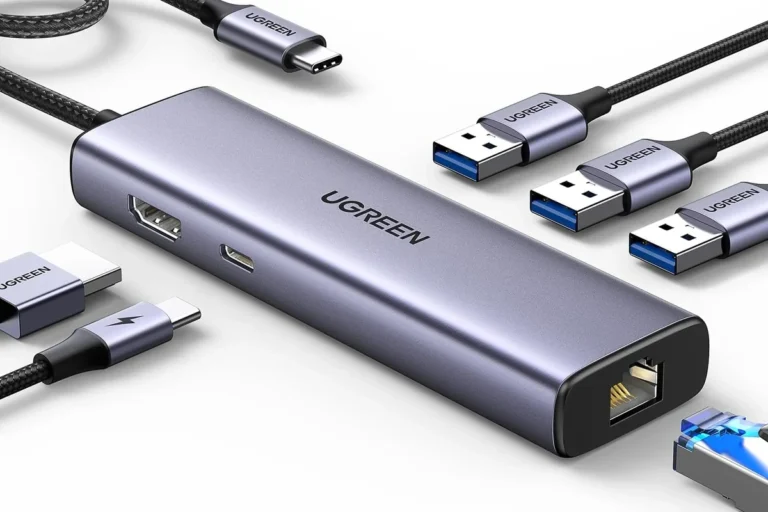
Anker 7‑in‑1 USB‑C Hub

It is a strong choice for MacBook users who need extra ports, solid HDMI output, and fast charging in a compact hub.

Pros

  • Good 4K@60Hz HDMI output for clear external displays.
  • Fast data transfer across multiple ports boosts workflow.
  • Compact metal design that packs many ports into a small unit.

Cons

  • HDMI is the only port that supports video output.
  • Charging tops out below some high‑watt MacBook chargers.
  • A few users report occasional HDMI or compatibility quirks.

The hub gives MacBook owners more ports without much bulk. It offers two USB‑A ports, a USB‑C data port, SD and microSD readers, and an HDMI that runs 4K at 60Hz for sharper external displays.

It can pass power while connected, so users can charge a laptop and use peripherals at the same time, though its charging limit is slightly under the highest‑watt options. The unit’s small metal body should fit easily in a bag or next to a laptop.

Some setups may require checking which ports support video or power for best results. Buyers who want a reliable, tidy way to add ports and a strong HDMI output will find this hub useful.

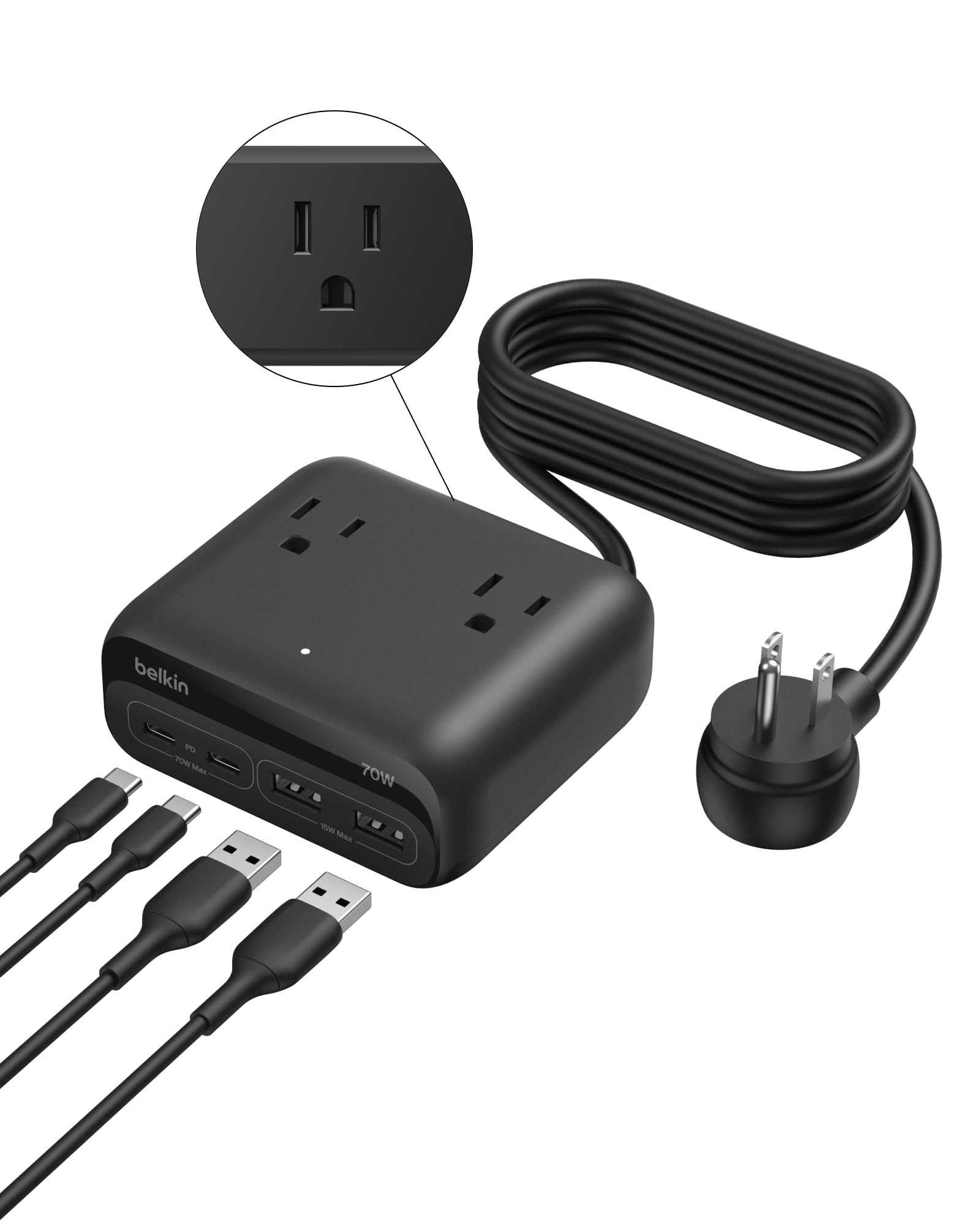
Belkin 70W GaN Charging Station

It is a strong choice for users who need to charge a laptop and several devices at once thanks to its mix of AC outlets and USB-C ports.

Pros

  • Charges many devices at once with both AC and USB ports
  • Fast charging with GaN and smart power delivery
  • Built-in cable management and a long, flat plug cord

Cons

  • 70W is shared across ports, so total power can be limited under full load
  • Bulkier than single-port chargers and may not fit tight spaces
  • Not meant to be a portable battery — it requires an outlet

It serves well as a desktop hub for a MacBook, phone, watch, and small desk devices. The three AC outlets let users keep lamps or monitors plugged in while using the USB-C ports for fast laptop charging.

The unit uses GaN tech and programmable power to adjust output by device. That helps prevent overcharging and supports quick top-ups for phones and laptops when fewer ports are used.

Belkin includes a two-year warranty and a device protection policy, which adds reassurance for home office setups. The shell is mostly made from recycled plastic, which may matter to eco-minded buyers.

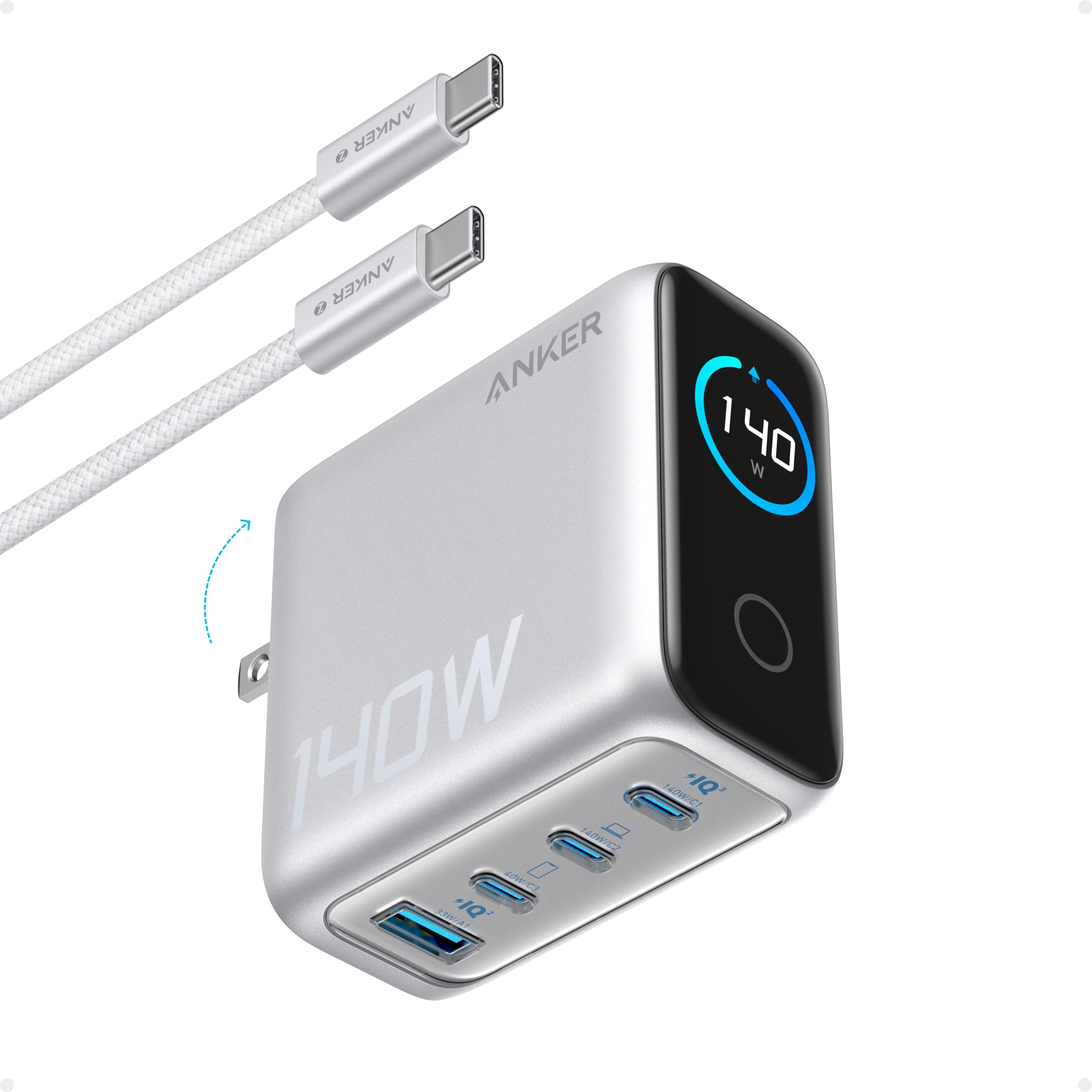
Anker 140W 4-Port Charger

This charger is a strong choice for someone who wants to power a MacBook and several devices at once because it delivers high output and a clear status display.

Pros

  • Very fast charging for laptops and phones.
  • Four ports let multiple devices charge together.
  • Clear color display shows charging status and temps.

Cons

  • Can run warm under heavy load.
  • Included cable may cause glitches for some users.
  • Larger than the smallest travel bricks.

It offers two high-speed USB‑C ports that can share big power, so a MacBook Pro can reach fast charge levels without needing multiple adapters. The GaN design keeps it more compact than old brick-style chargers.

People will like the color screen and touch controls for seeing which port is active and how hot the unit is. Safety features monitor temperature often, which helps guard devices during long charges.

Travelers will find it handy to replace several chargers with one unit, though it still takes up a bit more space than tiny single-port chargers. A user might swap the provided cable if they see power cycling with that cord.

Anker Nano 100W (3-Port)

It is a strong choice for MacBook users who want a compact charger that can power a laptop plus two extra devices at once.

Pros

  • Very compact for 100W power.
  • Can charge three devices at the same time.
  • Includes a long 5 ft USB-C to USB-C cable.

Cons

  • Heavier than some small chargers, which can strain older wall outlets.
  • Higher price than single-port chargers.
  • Some reports of defective units on arrival.

The Anker Nano 100W uses GaN II tech to keep the charger small while delivering full power for a MacBook. It comes with a 5 ft cable so users do not need to buy one separately.

It supports charging a MacBook, phone, and earbuds at once, which cuts down on carrying multiple adapters. That makes it useful for travel or a cluttered desk.

The charger won a CES honoree mention and aims for fast, reliable charging, but buyers should be aware of occasional unit issues and the extra weight that might affect loose outlets.

Anker PowerPort 6

It is a solid pick for users who need to charge several USB devices at once and prefer a compact, well-built hub.

Pros

  • Charges multiple devices at once without extra adapters.
  • Compact size saves desk or travel space.
  • Built-in safety features reduce risk of overheating or surges.

Cons

  • Not the fastest charger for MacBook; MacBook may charge slowly.
  • No USB-C or PD port for full laptop-speed charging.
  • Limited to 60W total, so power must be shared across ports.

The Anker PowerPort 6 works well for people who mostly charge phones, tablets, and small accessories. It keeps cords neat and powers many gadgets from one outlet. The design aims for safety with protections and UL certification.

It does not offer modern USB-C Power Delivery, so a MacBook will charge more slowly than with a dedicated USB-C PD charger. Users who need full laptop speed should consider a PD-capable charger instead.

This hub suits families, desks, or travelers who carry many USB-A devices and want a reliable, compact charger. It pairs best with original or certified cables and is a practical option when high laptop charging speed is not required.

Anker 7‑in‑2 USB‑C Hub

It is a strong pick for MacBook users who need many ports in a small package and want fast charging plus high‑resolution video.

Pros

  • Adds many useful ports without taking much desk space
  • Can charge a MacBook at high power while handling video and data
  • Compact design that matches modern MacBook aesthetics

Cons

  • Dual external displays will not work with M1 or M2 MacBooks
  • Sits on the laptop edge and can feel awkward to attach or remove
  • Not compatible with the MacBook Neo model

The hub expands two USB‑C ports into a larger set of connections, including HDMI, SD/microSD slots, USB‑A, and a high‑power USB‑C port. It aims to let users plug in a monitor, card reader, and peripherals without additional adapters.

The USB‑C multi‑function port supports high charging rates and fast data transfer, so it handles both power and heavy files at once. The HDMI and multi‑function ports support high resolutions, useful for clarity when working with video or large spreadsheets.

This model focuses on modern MacBooks and tries to avoid blocking MagSafe. Buyers should check their MacBook model for dual‑display limits and the Neo incompatibility before deciding.

Anker 65W 3-Port Charger

This charger is a smart buy for someone who wants a compact, multi-port charger that can fast-charge a MacBook and other devices from one small block.

Pros

  • Small size that fits travel bags easily
  • Can charge a MacBook at high speed when using one port
  • Three ports let multiple devices share power

Cons

  • May stick out from the wall more than some flat designs
  • Total power splits between devices when multiple are used
  • No built-in cable storage, so cables can get messy

It offers a solid mix of power and portability. The unit uses newer GaN tech to keep size down while still delivering up to 65W to one device.

They designed it with three ports so a laptop, phone, and tablet can charge from one wall outlet. Power is shared when more than one device is plugged in, so charging speeds can drop compared with using a single port.

Travelers will like the foldable prongs and light weight. Buyers should check how the plug sits in their outlet and expect cables to hang since there’s no cable wrap.

Buying Guide

When they shop for a multi-port charger for a MacBook, they should check power output first. Look for a charger that can deliver the MacBook’s required wattage on a single USB-C port and still supply enough to other devices.

They should count ports and types next. A mix of USB-C and USB-A works best for varied devices. More ports give flexibility but can reduce per-port power when multiple devices charge at once.

They should confirm power delivery (PD) support and fast-charging capability. PD ensures the MacBook charges safely and quickly. Check maximum wattage per port and shared wattage limits for simultaneous use.

They should examine build quality and safety features. Look for overcurrent, overvoltage, and short-circuit protection. A compact, well-ventilated design helps prevent overheating during long use.

They should weigh cable and plug options. A detachable cable or included high-quality USB-C cable adds convenience. Check plug type and foldable prongs if they travel often.

They should consider size, weight, and certification. Smaller chargers pack well but may limit cooling and sustained output. Certifications like USB-IF or safety marks indicate tested performance.

They should factor in warranty and customer support. A longer warranty provides more protection. Clear support channels help if the charger underperforms or fails.

Editor’s Choice

The top pick balances power, ports, and build quality. It charges a MacBook Pro at full speed while powering other devices without overheating.

FeatureDetails
Model100W GaN Multi-Port Charger
Ports2x USB-C PD, 1x USB-A
Max Output100W (USB-C1), 60W passthrough with USB-C2
SizeCompact, pocket-friendly
Why chosenFast charging, reliable heat control, solid safety features

It uses GaN technology to stay small and efficient. The charger keeps steady voltage under load and passes safety tests.

The reviewer found it easy to carry and durable. Cables plug in snugly and the unit showed no wobble on the desk.

They tested charging a 16-inch MacBook Pro and an iPhone at once. The MacBook reached full performance while the phone charged at high speed.

Where to Buy – Best Amazon Deals

They can find many multi-port chargers for MacBook on Amazon with fast shipping and clear return policies. Amazon often lists official brands and well-reviewed third-party options side by side.

Look for chargers with verified customer reviews and at least a 4-star rating. Pay attention to seller reputation, warranty details, and whether the charger supports full MacBook wattage.

Use Amazon filters to narrow results: sort by “Avg. Customer Review,” choose Prime for faster delivery, and set price ranges to match budget. Check the “Used & New” section for discounts on open-box items.

Consider these buying tips:

  • Buy from the manufacturer or an authorized seller to reduce counterfeit risk.
  • Check for USB‑C Power Delivery (PD) and the total wattage for MacBook compatibility.
  • Read recent reviews for real-world reliability and cable quality.

They should watch Amazon deal events like Prime Day and Lightning Deals for steep discounts. Subscribe & Save or bundle offers sometimes lower the per-unit price on charging accessories.

Price comparison table (example):

Charger TypeTypical Price RangeNotes
65W 2‑port USB‑C$35–$80Good for MacBook Air and small Pro
100W 3‑port USB‑C$60–$140Better for 14″–16″ MacBook Pro
GaN compact chargers$40–$120Smaller size, high efficiency

They should confirm return rules and warranty before buying to avoid hassles.

Conclusion

The right multi-port charger helps users power a MacBook and other devices without clutter. It matches wattage needs, fits the travel routine, and offers useful ports like USB‑C PD and USB‑A.

For users who prioritize speed, chargers with 65W–100W USB‑C Power Delivery work best. Those who need many ports or hub features should choose models with extra USB‑A, HDMI, or Ethernet. Battery backup or GaN tech adds compactness and efficiency.

They should check safety features such as overcurrent, overheating, and short‑circuit protection. Quality cables and certified chargers reduce the risk of slow charging or device damage. Warranty and brand support matter for long‑term reliability.

Use this quick checklist to decide:

  • Required wattage for the MacBook model.
  • Number and type of other devices to charge.
  • Size, weight, and travel needs.
  • Safety features and warranty.

Matching these factors helps users pick a charger that balances power, ports, and portability.

FAQs

What power rating does a MacBook need?
Most MacBooks need 30W–140W depending on model. Newer MacBook Pros often require 67W, 96W, or 140W for full-speed charging.

Can one charger run multiple devices at full speed?
It depends on total wattage and power distribution. If the charger’s max wattage is high enough and it supports Power Delivery (PD) with dynamic allocation, it can charge several devices fast.

Are multi-port chargers safe for MacBooks?
Yes, reputable chargers with PD and proper certifications (USB-IF, UL, CE) are safe. Look for over-voltage, over-current, and temperature protection.

Will USB-C to MagSafe adapters work with these chargers?
They usually work if the charger supplies the right wattage. Users should confirm the adapter supports PD and the MacBook’s required wattage.

How many ports does one need?
That depends on devices. For a laptop plus phone and tablet, 3–4 ports are common. Consider future needs and cable length too.

Do multi-port chargers heat up more than single-port chargers?
They can run warmer under heavy load. Good designs include thermal management and ventilation to reduce heat.

How to pick the best charger for travel?
Choose compact form factor, foldable plug, and universal voltage (100–240V). Weight and included cables matter for packing.

Is brand important?
Yes. Trusted brands offer better quality control, warranties, and consistent power delivery. Check reviews and warranty terms.

Author

  • ethan_walker_profile

    Hi, I’m Ethan Walker, a tech enthusiast and gadget reviewer behind Gadget Makers Blog. I share honest reviews, buying guides, comparisons, and helpful tech tips focused on smartphones, charging accessories, smart home devices, gaming gear, and everyday gadgets to help readers make smarter buying decisions.

Similar Posts

Leave a Reply

Your email address will not be published. Required fields are marked *