Recommend a Wireless Smart Locker Solution for Retail Chains
For most retail chains, the best wireless smart locker is a cloud-managed, modular system with backup connectivity, audit logs, and role-based access. Verify dimensions, power, service terms, and offline behavior before rolling it out chain-wide.
If you need a wireless smart locker solution for a multi-site retail chain, the best fit is usually a cloud-managed system with Wi‑Fi primary connectivity, LTE/5G backup, role-based admin controls, audit logs, and a modular locker layout that can scale from curbside pickup to returns and employee access. For most chains, the smartest choice is not the cheapest cabinet—it is the platform that is easiest to deploy consistently across stores, secure to administer remotely, and serviceable when a location has network or hardware issues.
- Best overall fit: Cloud-managed, modular lockers with Wi‑Fi and backup connectivity.
- Most important checks: Size, power, durability, admin controls, and service support.
- Top use cases: Curbside pickup, returns, and employee asset sharing.
- Main risk: Choosing a system that is hard to service or too dependent on perfect network.
Recommend a Wireless Smart Locker Solution for Retail Chains: Best Fit, Key Features, and Buying Criteria
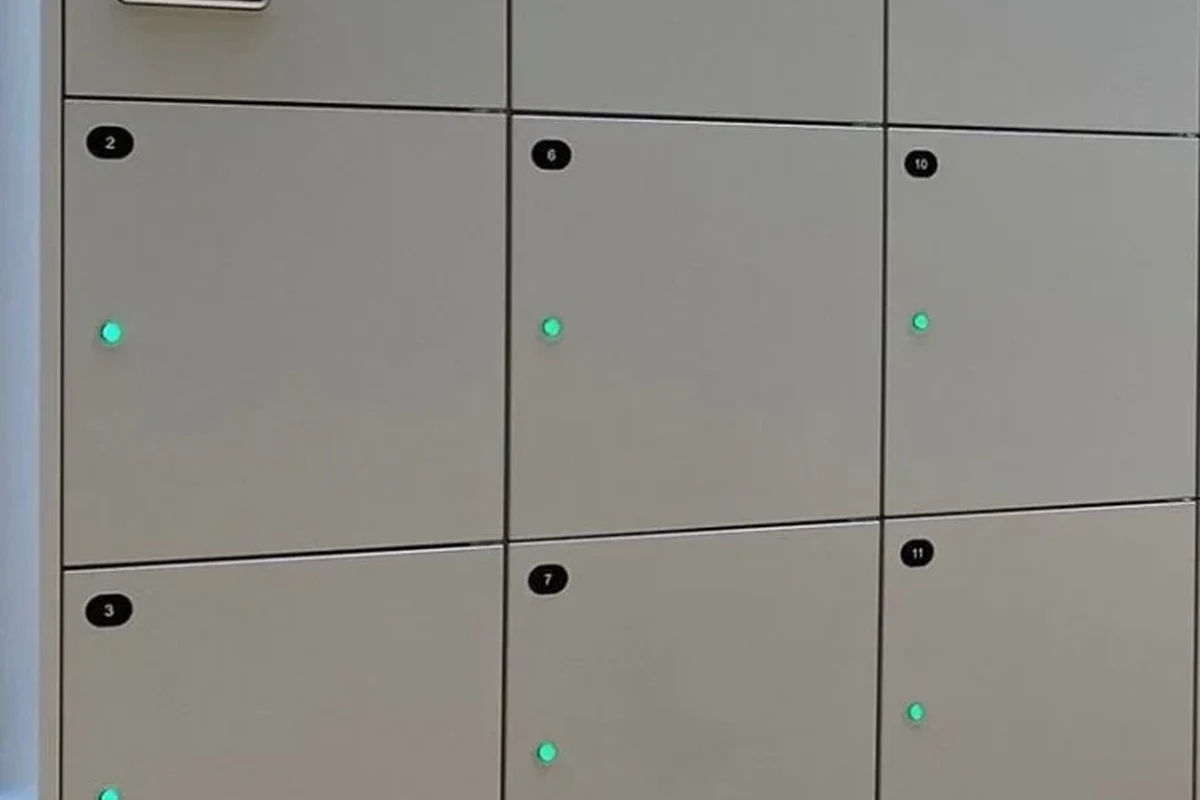
Retail chains should treat smart lockers as operational infrastructure, not just storage. The right system should reduce handoff friction, support multiple workflows, and stay manageable across different store formats, staff teams, and network environments.
Direct recommendation: what retail chains should choose in 2026
For most multi-site retailers, the best overall choice is a wireless smart locker platform that supports cloud administration, per-location user permissions, remote unlock controls, and offline fallback if the internet drops. Look for a system that can handle curbside pickup, customer returns, and internal asset storage in one platform, because that usually simplifies training, support, and software management.
Retail chains that need one standardized locker platform across many stores, with remote visibility, scalable compartment options, and strong audit trails. The main limitation is that setup and software administration can be more involved than a basic manual locker bank.
Who this guide is for: multi-site retail, curbside pickup, returns, and employee access
This guide is for store operators, IT teams, facilities managers, and operations leaders who need a practical way to compare locker systems for multiple locations. It is especially relevant for retailers that want contactless pickup, faster returns processing, secure after-hours access, or controlled sharing of keys, tablets, and other store assets.
- Check compatibility, model number, app requirements, dimensions, ports, wattage, and intended use
- Confirm safety guidance, warranty, return policy, privacy settings, and update support
How Wireless Smart Locker Systems Work Across Multiple Store Locations
Wireless smart lockers combine physical storage with networked access control. In a retail chain, that means each store can be managed locally while still reporting to a central dashboard for permissions, activity logs, and maintenance oversight.
Core components: locker cabinet, wireless controller, cloud dashboard, and user authentication
The cabinet is the physical locker unit, usually built with multiple compartments and electronic locks. A wireless controller inside the system handles lock commands, door status, and event reporting, while the cloud dashboard gives administrators a way to manage users, assign access windows, and review logs.
User authentication may rely on QR codes, PINs, staff credentials, app-based access, or a combination of methods. The exact method varies by model, and buyers should confirm whether the platform supports guest pickup codes, employee badges, or integrations with existing retail systems.
Connectivity options: Wi‑Fi, LTE/5G backup, Bluetooth provisioning, and offline failover
Most wireless locker systems use Wi‑Fi as the main connection because it is widely available in stores and supports remote management. Some platforms also offer LTE/5G backup for locations where store Wi‑Fi is unreliable or where business continuity is critical.
Bluetooth provisioning can make initial setup easier during installation, especially when a technician is pairing the device for the first time. Offline failover matters because a locker should still open for authorized users or follow a defined fallback process if cloud access is interrupted. Exact behavior depends on the model and firmware.
Connectivity features vary by vendor and firmware version. Before deployment, confirm whether the locker can cache credentials locally, how long offline mode lasts, and what happens if both network and power are interrupted.
Typical workflow for pickup, returns, and internal asset access
For pickup, staff place the order in a compartment, the system sends a code or notification, and the customer retrieves the item at the store. For returns, the customer or associate can place an item into a designated compartment, which creates a time-stamped handoff record.
For internal asset access, managers can assign lockers to store keys, handheld scanners, tablets, or seasonal equipment. That is useful when multiple shifts share the same gear and the chain wants a clear record of who accessed what and when.
Key Specifications Retail Buyers Should Verify Before Purchasing
Smart locker specs can look similar on paper, but small differences matter a lot in real deployments. The most important step is to verify the details that affect footprint, installation, reliability, and software control.
Locker dimensions, compartment mix, and installation footprint
Retailers should confirm the overall cabinet size, door swing or clearance needs, and how many compartments are included in each configuration. A mixed layout can be useful if a chain needs both small pickup slots and larger compartments for returns or employee gear.
Also check whether the system is wall-mounted, floor-mounted, or freestanding, because that affects installation planning and store traffic flow. In tight retail spaces, a slightly smaller cabinet with better compartment mix may be more useful than a larger unit with wasted volume.
Power requirements, backup battery options, and rated consumption
Do not assume all wireless lockers have the same electrical needs. Buyers should verify input power, whether the unit needs a standard outlet or dedicated circuit, and whether the system supports battery backup for short outages.
Backup battery options, if available, should be reviewed carefully in the manual and warranty terms. Battery runtime, charging behavior, and replacement schedules vary by model and usage pattern.
Follow the manufacturer’s electrical guidance and stop using any unit with damaged cords, overheating components, or battery swelling. If the locker is hardwired or requires installation changes, use a qualified professional and local code-compliant practices.
Materials, lock durability, weather resistance, and security ratings
Retail chains should verify cabinet material, finish quality, and lock type because these affect both durability and appearance over time. If a locker will be placed near entrances, pickup lanes, or semi-exposed areas, check whether the enclosure is rated for the environment it will face.
Weather resistance, dust protection, and corrosion resistance are especially important for stores with outdoor pickup points. If the vendor provides security ratings or tamper resistance claims, confirm the exact standard and the scope of the rating rather than assuming all models are equivalent.
App requirements, admin controls, audit logs, and role-based access
Retail buyers should inspect the management app or web portal before purchase. The most useful features are role-based access, location-level permissions, time-based access rules, remote unlock options, and searchable audit logs.
Also verify whether the app supports multi-site administration without creating duplicate workflows for each store. For chains, a central dashboard is often more valuable than a polished consumer-facing app.
Warranty terms, service response times, and replacement-part availability
Warranty support matters more in a chain deployment than in a single-store pilot. Confirm what is covered, how long coverage lasts, whether onsite service is included, and how quickly replacement parts can be shipped.
Replacement-part availability is especially important for locks, controllers, hinges, sensors, and power components. If a platform is difficult to service, one failed part can affect a whole location’s pickup flow.
Best Use Cases and Which Retail Chains Benefit Most
Wireless smart lockers are most valuable when a store needs a controlled handoff point that can serve customers and staff without adding constant front-desk labor. They are not for every retailer, but they fit well in operations that repeat the same handoff process many times a day.
Curbside pickup and contactless order handoff
Curbside pickup is one of the strongest use cases because lockers reduce line congestion and keep orders organized. Customers can retrieve packages quickly, and staff can stage orders in advance instead of waiting for a live handoff.
For chains with high volume, lockers can also help standardize pickup across stores, which makes training easier. The key is to make sure the locker workflow matches the retailer’s order management process.
Returns, exchanges, and after-hours package storage
Returns can be messy at busy stores, especially when customers arrive at different times or staff are short-handed. A smart locker can create a cleaner intake process by separating returned items from the sales floor and logging the drop-off time.
After-hours package storage is another practical use, particularly for stores that need secure temporary holding before a shipment is processed. That said, the retailer should confirm how temperature, moisture, and item sensitivity are handled if the locker sits in a non-climate-controlled area.
Employee gear, keys, tablets, and store-to-store asset sharing
Many chains also use smart lockers internally for shared equipment. This can reduce lost keys, simplify shift changeovers, and give managers a better record of who checked out a device or access item.
If your chain already uses smart lighting or other connected systems in stores, a centralized operations approach can help. For example, teams that are already familiar with cloud-managed devices from guides like smart lighting automation often adapt more quickly to another dashboard-based system.
When a wireless smart locker is not the right fit
A wireless smart locker may not be the best option if a store has unstable power, poor cellular coverage, or no reliable Wi‑Fi and no realistic backup plan. It can also be a poor fit if the retailer only needs occasional storage and does not want to manage software, permissions, and hardware maintenance.
Very small stores may do better with a simpler secure cabinet or a limited-compartment unit. On the other hand, larger chains that need broad device compatibility may benefit from reviewing broader smart-home integration habits, similar to what buyers look for in connected home automation setups.
Benefits, Trade-Offs, and Real-World Value for Multi-Site Operations
The value of a wireless smart locker is not just convenience. For a chain, the real benefit is repeatable process control across many locations, with enough visibility to standardize pickup, returns, and asset handling.
Operational gains: speed, reduced labor friction, and better customer flow
When lockers are set up well, staff spend less time searching for items, handling repetitive handoffs, or interrupting the register line. Customers also move through pickup faster, which can improve traffic flow during busy periods.
That operational gain can be especially helpful for stores that already rely on connected devices and remote admin tools. Teams that manage multiple endpoints may find the workflow similar to other cloud-managed gear, including systems discussed in articles like multi-device charging and access planning.
Loss-prevention and chain-of-custody advantages
Audit logs can improve accountability because they record when a compartment was opened, who accessed it, and whether an item was removed or returned. That does not eliminate loss, but it can make investigations and process reviews much easier.
For high-value items, the ability to separate access by role and location is often more important than the locker itself. A strong chain-of-custody record can be a major reason to choose a wireless platform over a manual one.
Common limitations: network dependence, setup complexity, and ongoing software costs
Wireless lockers depend on a stable digital environment. Even with offline fallback, the system is usually easier to manage when the network, app, and cloud portal are all working properly.
There is also setup complexity to consider. Multi-site rollouts often require coordination between store operations, IT, and facilities, and some vendors charge ongoing software or support fees that affect total cost of ownership. Those costs vary by contract and should be confirmed before purchase.
Evidence limits: what can be inferred from vendor specs versus what needs pilot validation
Manufacturer specifications can tell you a lot about dimensions, access methods, and supported connectivity. They cannot fully predict how a locker will behave in a busy store with real customers, variable Wi‑Fi, and different staff habits.
That is why a pilot in one or two stores is valuable before a chain-wide rollout. Validate usability, support response, network reliability, and staff adoption before committing to a larger deployment.
Setup, Deployment, and Safe Use Guidelines for Store Teams
Successful deployment depends on planning, not just installation. A smart locker should fit the store layout, support the network environment, and be easy for staff to use without creating new risks.
Site planning: power access, wall anchoring, ADA clearance, and traffic placement
Choose a location with stable power, enough clearance for opening doors, and a path that does not block regular customer traffic. If the locker will be used by customers, placement should also consider accessibility and visibility.
Wall anchoring or floor anchoring may be required depending on the model and local safety rules. Confirm the manufacturer’s installation instructions before mounting or moving the cabinet.
Network setup: secure credentials, guest access separation, and remote monitoring
Use secure network credentials and keep locker traffic separated from guest Wi‑Fi when possible. Retail IT teams should verify whether the system needs a dedicated VLAN, specific ports, or outbound cloud access rules.
Remote monitoring is useful for identifying offline units, repeated failed access attempts, or doors that are not closing properly. The best time to set up alerts is before the first store goes live.
Create a simple rollout checklist for every location so installation, account setup, permissions, and test unlocks happen the same way in each store. Consistency matters more than custom tweaks.
Safe use policies: access permissions, emergency override, and tamper response
Define who can assign access, who can override a lock, and what happens if a customer or employee reports a jammed compartment. Emergency procedures should be documented and limited to authorized staff only.
Tamper response should be handled through the vendor’s supported process. Avoid improvised repairs or bypassing security features, since that can create safety and liability issues.
Staff training checklist for opening, servicing, and closing procedures
Confirm the cabinet powers on, the dashboard shows the unit online, and the doors respond correctly before the store opens.
Place items in the correct compartment type and verify that the system records the handoff properly.
Check for open doors, warning lights, or app alerts before closing the store or handing off to the next shift.
Maintenance, Cleaning, and Troubleshooting for Long-Term Reliability
Locker systems last longer when they are inspected regularly and cleaned with approved materials. In a chain environment, small maintenance issues can become big workflow problems if they are ignored at one location.
Routine inspection: hinges, seals, locks, sensors, and cable condition
Check hinges, latches, seals, and lock alignment on a schedule. Look for loose cables, damaged connectors, or sensors that are not reading door status correctly.
Stop using damaged electronics, swollen batteries, frayed cables, overheating chargers, or unstable appliances and follow the manufacturer’s guidance.
Cleaning and care: approved materials, finish protection, and contamination control
Use only cleaning products approved by the manufacturer, especially on touch surfaces, sensors, and coated metal finishes. Harsh chemicals can damage labels, screens, seals, or painted surfaces over time.
If lockers are used for returns or shared gear, cleaning procedures should also address contamination control. Follow store hygiene policies and the vendor’s recommendations for safe surface care.
Common issues: connectivity drops, stuck doors, app sync errors, and power interruptions
Connectivity drops are often caused by weak Wi‑Fi, router changes, or blocked network access rather than a defective locker. If the app is not syncing, check whether the system is online, whether the admin account has the right permissions, and whether the vendor has issued a software update.
Stuck doors and power interruptions should be handled according to the manual. If a door will not open normally or the unit shows signs of electrical trouble, contact service instead of forcing it open.
Replacement guidance for batteries, controllers, and worn hardware
Replacement parts should come from the manufacturer or an authorized service source whenever possible. Batteries, controllers, and lock hardware are especially important because compatibility and safety can vary by model.
Before ordering parts, confirm the exact revision, firmware compatibility, and warranty impact. For chain buyers, part availability can matter as much as the original purchase price.
Final Verdict: The Best Wireless Smart Locker Solution for Retail Chains in 2026
For most multi-site retail chains, the best wireless smart locker solution is a cloud-managed, modular platform with strong audit logging, role-based access, Wi‑Fi plus backup connectivity, and clear service support. That combination offers the best balance of scalability, security, and operational flexibility without locking the chain into a fragile one-off setup.
Transparent recommendation based on scalability, security, serviceability, and total value
Choose the platform that is easiest to standardize across stores, not just the one with the most features. If two systems look similar, favor the one with better offline behavior, easier admin controls, and stronger replacement-part support.
Best alternatives by budget, store size, and deployment complexity
Smaller stores may prefer a simpler locker bank with fewer compartments and lighter software requirements. Larger or higher-volume chains should prioritize centralized management, cellular backup, and service plans that reduce downtime.
Bottom line for buyers comparing wireless smart locker platforms
If your chain needs reliable pickup, returns, and internal access in multiple locations, a wireless smart locker is worth serious consideration. Just make the decision on verified specs, support terms, and pilot results rather than marketing claims alone.
- Best overall fit: cloud-managed wireless lockers with backup connectivity and remote admin tools.
- Most important checks: dimensions, power, durability, audit logs, and service support.
- Best use cases: curbside pickup, returns, and controlled employee asset access.
- Biggest risk: choosing a system that is hard to service or depends too heavily on perfect network conditions.
Frequently Asked Questions
The best choice is usually a cloud-managed, modular locker platform with role-based access, audit logs, and backup connectivity. It should be easy to standardize across stores and simple to service.
Prioritize dimensions, power needs, weather resistance, access controls, and remote monitoring. Also confirm warranty terms and replacement-part availability before rollout.
Yes, they are a strong fit for both workflows when the software supports pickup codes, time-stamped logging, and compartment assignment. The exact process depends on the vendor platform.
Most use Wi‑Fi for normal operation, but some also support LTE or offline fallback. Confirm how the system behaves if the network or cloud service goes down.
Inspect hinges, locks, sensors, cables, and power components regularly, and clean only with approved materials. Follow the manufacturer’s service schedule and replace worn parts with compatible components.
Common drawbacks include network dependence, setup complexity, and ongoing software or support costs. A pilot deployment is the safest way to verify fit before a chain-wide rollout.