Do Usb-c Cables Affect Charging Speed
Yes, USB-C cables can affect charging speed when their wattage rating or build quality is lower than what the charger and device support. The cable matters most for high-power devices like laptops, tablets, and gaming handhelds.
Yes—USB-C cables can affect charging speed, but only within the limits of the charger, the device, and the charging standard they all support. In practice, the right cable helps your device receive the fastest safe wattage it was designed to accept, while the wrong cable can force a slower charge or trigger a warning.
- Wattage matters: A cable must support the power your device and charger are trying to use.
- Device limits still apply: A better cable cannot make a device charge faster than its own maximum.
- Length and quality count: Longer or poorly made cables can add resistance and reduce performance.
- High-power devices need better cables: Laptops and gaming handhelds are more sensitive to cable limits than phones.
- Inspect regularly: Fraying, looseness, heat, and discoloration are signs to replace the cable.
Do USB-C Cables Affect Charging Speed? The Short Answer
The cable is part of the power path, not just a connector. If it is rated for the wattage your charger and device want to negotiate, it can support fast charging; if it is under-rated, damaged, or poorly made, it may limit speed or stability.
Why the cable can matter as much as the charger
Many people focus on the charger brick, but the cable is what carries the power to the device. A charger may be capable of high output, yet the cable still has to safely handle that load without excessive resistance, heat, or voltage drop.
When the charger, device, or battery is the real bottleneck
Sometimes the cable is not the limiting factor at all. Older phones, tablets, laptops, and handheld gaming devices may simply top out at a lower wattage, and some batteries slow charging automatically as they get fuller or warmer.
How USB-C Charging Works in 2026
USB-C is a connector shape, not a single charging speed. Actual performance depends on the USB Power Delivery profile, the cable’s power rating, and the device’s own charging rules.
USB Power Delivery, voltage, and amperage basics
USB Power Delivery, often called USB PD, lets devices and chargers negotiate voltage and current before charging begins. That negotiation matters because a cable must be able to carry the requested current safely, especially at higher wattages.
How devices negotiate wattage before charging starts
When you plug in, the device and charger communicate to decide how much power to use. If the cable does not support the needed profile, the setup may fall back to a lower charging mode instead of delivering the charger’s full output.
Why cable resistance and certification affect performance
Longer cables, thinner wires, and worn connectors can increase resistance. That does not always stop charging, but it can reduce efficiency, create extra heat, and in some cases cause the device to charge more slowly than expected.
Charging behavior can vary by phone, laptop, tablet, battery health, firmware, and even temperature. Manufacturer specifications are the best reference for the exact wattage your device supports.
Which USB-C Cable Specs Actually Change Charging Speed
Not every USB-C cable is built for the same job. The specs that matter most are power rating, wire quality, length, and whether the cable includes the right identification features for high-watt charging.
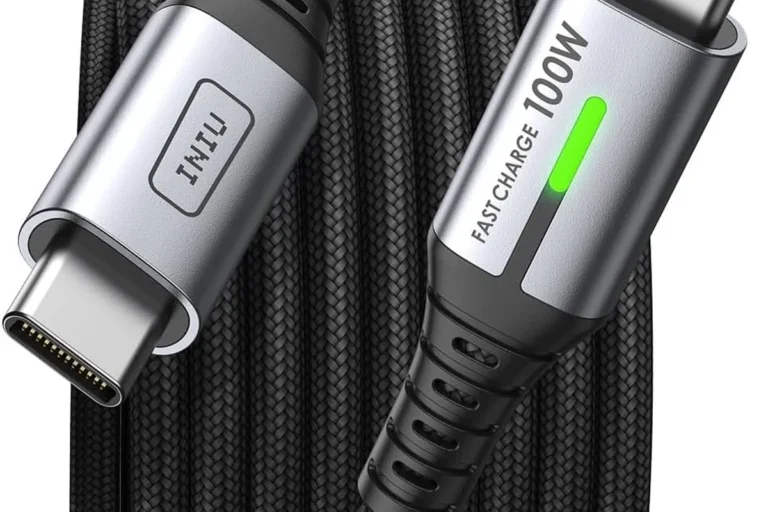
Power rating and wattage support: 60W, 100W, 240W, and beyond
A cable rated for a lower wattage may still charge a phone well, but it can become the bottleneck for larger devices. For example, laptops and some gaming handhelds often need a cable that supports higher power delivery, while the newest high-power setups may require cables designed for up to 240W.
Wire gauge, length, and build quality
Thicker conductors generally handle power better than thin ones, and shorter cables usually waste less energy than very long ones. Build quality also matters because loose plugs, weak strain relief, and poor shielding can cause inconsistent charging over time.
E-marker chips, USB-IF certification, and compatibility markers
Some higher-power USB-C cables include an e-marker chip that identifies the cable’s capabilities to the charger and device. USB-IF certification, when present, can help buyers verify that the cable was built to meet the relevant standard, though you should still confirm the exact power rating printed by the manufacturer.
USB-C cables can look identical on the outside while supporting very different power levels inside.
Who Needs a Better USB-C Cable Most
Some users can get by with almost any decent USB-C cable, while others benefit from choosing carefully. The bigger the device and the more demanding the charging setup, the more the cable choice matters.
Phone users versus laptop, tablet, and handheld gaming device owners
Most phone users mainly need a reliable cable that supports their device’s fast-charge standard. Laptop, tablet, and handheld gaming device owners should pay closer attention to wattage support, because those devices are more likely to hit the cable’s limits.
| Device type | What matters most | Common mistake |
|---|---|---|
| Phone | Reliable fast-charge support | Buying a cable with no clear power rating |
| Tablet | Stable wattage and decent length | Using a worn or very thin cable |
| Laptop | High-watt support and good build quality | Assuming any USB-C cable can charge it at full speed |
| Handheld gaming device | Power delivery and heat control | Using a low-rated cable during play and charging |
Users charging at a desk, in a car, or while traveling
Desk setups usually benefit from a durable cable that can stay plugged in for long periods. Car chargers and travel kits often need a shorter, more portable cable that is easy to store, but it still has to match the device’s wattage needs.
People who should prioritize durability, flexibility, or portability
If you pack and unpack your cable often, durability may matter more than maximum flexibility. If you use it in tight spaces or while holding a phone, a softer cable may be easier to manage, while frequent travelers may prefer compact storage and reinforced connectors.
Choose a higher-rated USB-C cable if you charge a laptop, tablet, or gaming device and want fewer slow-charge surprises. For basic phone charging, a well-made mid-rated cable is often enough as long as it matches the device’s supported standard.
Real-World Benefits and Limits of Upgrading Your Cable
Upgrading a cable can make charging more reliable, but it is not a magic speed boost. The improvement only appears when the charger and device already support more power than the old cable could safely carry.
Faster charging only when the rest of the setup supports it
If your phone only accepts a modest charging rate, a premium cable will not make it charge dramatically faster. The same is true if the charger is too weak or the device is already limiting intake because the battery is nearly full.
Less heat, fewer slow-charge warnings, and more stable power delivery
A properly rated cable can help reduce wasted energy and may make charging feel more consistent. That can mean fewer slow-charge messages, less connector warmth, and better behavior in demanding setups like laptops or multi-device travel kits.
- Use the shortest cable that still fits your setup comfortably.
- Keep high-watt cables reserved for devices that actually need them.
- Check your device manual before assuming a cable upgrade will raise charging speed.
Where cable upgrades will not make a noticeable difference
If your device already charges at its maximum supported rate, a new cable may only improve convenience or durability. It also will not fix battery wear, a weak charging port, or a charger that cannot deliver enough power.
Common Mistakes That Slow Charging or Create Risk
Many charging problems come from mismatched accessories rather than a bad device. A careful cable choice can prevent both frustration and avoidable wear on your gear.
Using a low-rated cable with a high-watt charger
This is one of the most common mistakes. The charger may advertise high output, but the cable can force the system to step down to a safer, slower level.
Mixing old USB-C cables with fast-charge devices
Older or generic USB-C cables may work for basic charging but fail to support newer power levels. If a device suddenly stops fast-charging after a cable swap, the cable is one of the first things to verify against the manufacturer’s compatibility list.
Damaged connectors, bent plugs, and hidden internal wear
A cable can look fine outside while having internal damage from repeated bending, tight storage, or yanking by the cord. Loose plugs, discoloration, or intermittent charging are signs that replacement is safer than trying to keep using it.
Stop using any cable or charger that gets unusually hot, smells burnt, shows frayed insulation, or has a loose, damaged connector. Follow the manufacturer’s guidance and replace questionable accessories instead of trying to “push through” the problem.
How to Choose the Right USB-C Cable for Safe, Fast Charging
The best cable is the one that matches your actual devices, not just the highest number on the package. Start with wattage, then consider length, flexibility, and the way you plan to use and store it.
Match cable wattage to your charger and device
Check the charger’s output and the device’s supported charging rate, then choose a cable rated to handle that level. If you use multiple devices, it is often smarter to buy one cable that comfortably covers your highest-power device rather than a cable that only works for phones.
Check length, flexibility, braided vs. rubberized design, and storage needs
Longer cables are convenient, but they can be less efficient and harder to manage. Braided cables may feel tougher and better for daily use, while rubberized cables can be lighter or more flexible depending on the design; the right choice depends on your desk, bag, car, or bedside setup.
Look for safety labels, warranty coverage, and replacement guidance
When possible, prefer cables with clear wattage labeling and support information from the manufacturer. Also review the warranty terms and replacement policy, because a cable that is easy to replace is often a better long-term value than one with vague specs and no support.
- Check your device manual for supported wattage and charging standard.
- Confirm the cable’s power rating and any e-marker or certification details.
- Make sure the length fits your setup without unnecessary slack.
- Inspect the cable regularly for heat, fraying, looseness, and discoloration.
Care, Inspection, and Final Recommendation
USB-C cables are consumables, not forever accessories. A little inspection and careful storage can extend their useful life and help you keep charging speed consistent.
How to inspect cables for heat, fraying, looseness, and discoloration
Look closely at both ends of the cable, the strain relief, and the length of the cord. If the plug wiggles too much, the insulation is cracked, or the cable becomes warm in normal use, it is time to stop and evaluate replacement.
Do not keep using cables or chargers that overheat, spark, smell unusual, or charge only when held at a certain angle. Replace damaged accessories and confirm compatibility in the official manual or product page.
Safe use, storage habits, and when to replace a cable
Avoid sharp bends near the connector, tight wraps around the charger, and pulling the cable out by the cord. Replace it if charging becomes inconsistent, if the sheath is worn through, or if the cable no longer supports the speed your device should get.
Bottom-line recommendation for most GadgetMakersBlog readers
For most people, the best USB-C cable is the one that clearly matches the charger and device, is rated for enough wattage, and is built well enough to handle everyday use. If you charge only a phone, a dependable mid-range cable is usually enough; if you charge a laptop, tablet, or handheld gaming device, choose a higher-rated cable with verified compatibility and solid build quality.
Frequently Asked Questions
Yes. A cable can limit charging speed if it is under-rated, damaged, or not compatible with the charger and device’s charging standard.
It depends on your device and charger. Phones often need less power than tablets or laptops, so check the manufacturer’s charging specification before buying.
Not always. Some laptops need higher-watt USB-C cables, and a low-rated cable may charge slowly or not support full-speed charging.
They can. Longer cables may have more resistance, which can reduce efficiency or make high-watt charging less stable.
Check the printed wattage rating, look for clear compatibility details, and prefer cables from manufacturers that provide support or certification information.
Replace it if it is frayed, loose, discolored, overheating, or charging inconsistently. Damaged cables should not be kept in regular use.