

9 USB-C Power Strips: 100W Options and Alternatives
Choose the right USB-C power strip
Start with the output your laptop actually needs. Compare the Anker 9-in-1 100W option at both stores, then explore the desktop and lower-power alternatives below.
Affiliate disclosure: As an Amazon Associate I earn from qualifying purchases. We may also earn a commission from qualifying Walmart purchases through our links, at no extra cost to you.
Check single-port output, not just the total.
Adding devices can reduce laptop power.
Check the exact model and rating.
Include delivery, tax and seller terms.
Amazon vs Walmart: compare the same model
Anker 9-in-1 100W charging station
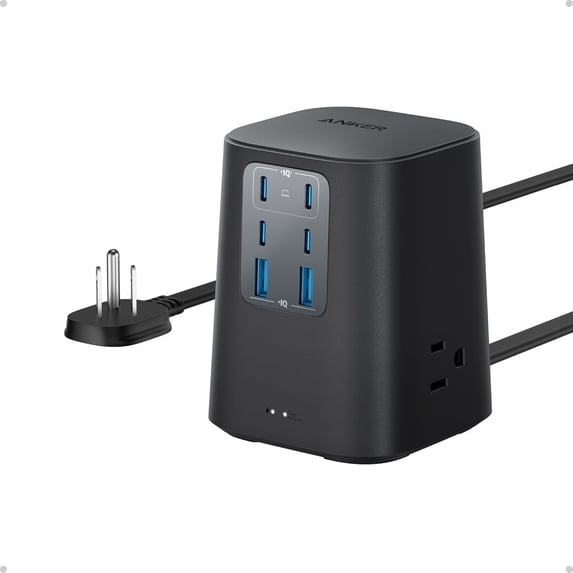
For a straightforward cross-store comparison, use the Anker 9-in-1 model with three AC outlets, four USB-C ports and two USB-A ports. Its listings specify 300J surge protection. Check the chosen color and model details at each store before comparing offers.
| Store | Price information | Buying option |
|---|---|---|
| Amazon | Current price could not be verified. Open the listing for seller offers. | Check Amazon price |
| Walmart | $39.99 USD Black variant; observed October 22, 2026 (Bangladesh time). Sold and shipped by AnkerDirect at the time checked. | Check Walmart price |
Walmart price is a dated snapshot, not a live feed. Price, availability, delivery and seller may change. Confirm the final amount at checkout. No lowest-price winner is declared because a comparable current Amazon price was unavailable.
Which store should you choose?
Choose Amazon if the matching new model has a lower delivered total from a seller you trust. Choose Walmart if its final price, delivery date and return terms work better for you. Check whether a coupon needs activation and whether it requires a membership. Compare new with new; a refurbished offer is a separate buying choice.
For the other products below, the Walmart buttons open searches for that product or a comparable category. Those searches are clearly labeled alternatives: matching stock and an identical model have not been verified. A lower-priced result with 20W or 65W USB-C is not equivalent to a charger that supplies 100W through one port.
Finding a USB-C power strip for 100W charging is mostly about balancing fast charging, outlet count, and the kind of desk or travel setup you actually use. Some shoppers want a compact strip for a laptop and phone, while others need a larger charging hub for a home office, dorm, or shared workspace.
This guide compares nine listing options for consumer electronics and productivity tech, focusing on listing details that matter most: USB-C output, AC outlet layout, surge protection, cord style, and space-saving design. If you want a practical shortlist without sorting through dozens of similar-looking power strips, this roundup is built for that job.
For a laptop needing up to 100W through one USB-C port, start with the Anker comparison above or investigate the MOKiN listing. Kakyanill and Olcorife options below list up to 65W per USB-C port despite larger total-output headlines. The 70W and 65W alternatives are labeled separately. These are listing-based comparisons, not hands-on test results.
Quick Product Comparison
What to Look for in a USB-C power strip for 100W charging
USB-C power behavior and device compatibility
Look for whether the listing says 100W total USB output or 100W from a single USB-C port, because those are very different use cases. If you plan to charge a laptop, verify that your device supports USB-C charging and check the required wattage on the current Amazon listing or the manufacturer page.
AC outlet count and plug spacing
If you use bulky adapters, wide outlet spacing matters as much as raw port count. A strip with more outlets can still feel cramped if large chargers block neighboring sockets, so spacing is worth checking before buying.
Surge protection level and safety features
For electronics like laptops, monitors, routers, and tablets, surge protection helps add a layer of defense against voltage spikes. Also look for overload protection, power switches, and safety shutter details when those are listed, since they affect everyday use and shutdown behavior.
Cord length, plug shape, and placement
Flat plugs and longer cords are useful behind desks, beds, and media furniture. If you need wall mounting or a hidden setup, confirm the mounting slots and cord length before you rely on the strip for a fixed location.
Desk layout, tower shape, and travel fit
Horizontal strips suit low-profile setups, while tower-style designs can save space on crowded desks. For travel, weight and cord storage matter more than outlet count, so read the product details carefully if you plan to pack it often.
Device mix and charging priorities
Choose a model based on what you actually charge together: laptops, phones, earbuds, watches, tablets, printers, or small office gear. The right mix of USB-C, USB-A, and AC outlets usually matters more than one headline number.
- Match the strip’s USB-C output wording to your laptop’s charging needs, and use a cable rated for the power level you expect.
- If you plan to plug in multiple high-draw devices, leave ventilation space around the strip and avoid covering it with papers or fabric.
- When a listing mentions a total USB wattage, check how that power is shared across ports before counting on all ports at full output at once.
Our Top 9 USB-C Power Strips and 100W Charging Picks and Reviews
1. Kakyanill 100W Charging Station Power Strip with 6 AC Outlets and 8 USB Ports
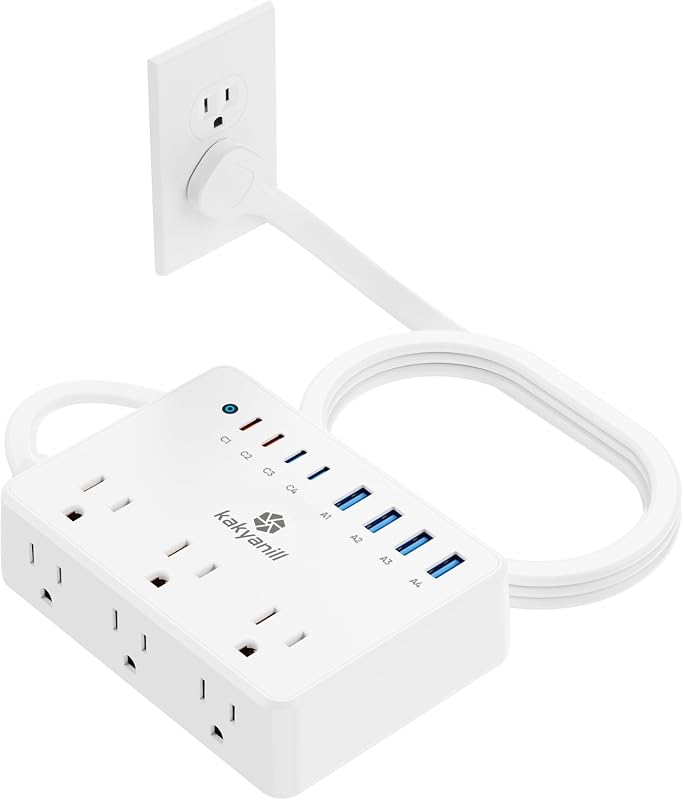
This Kakyanill charging station is a practical all-rounder for desks, dorm rooms, and shared charging spots. It combines 6 AC outlets, 4 USB-C ports, and 4 USB-A ports with 100W total USB charging and 1080J surge protection.
Key Features That Stand Out
- 14-in-1 layout with 6 AC outlets, 4 USB-C ports, and 4 USB-A ports for multi-device setups.
- 100W total USB charging with USB-C1/C2 up to 65W and USB-C3/C4 up to 20W.
- Flat plug and 5ft extension cord for easier placement behind furniture.
- 1080J surge protection plus an overload protection switch.
- Wall-mountable design with a compact three-side layout.
Why It Stands Out
It offers one of the most balanced mixes of AC and USB ports in this group, which makes it useful when you need to charge a laptop, phone, tablet, and smaller accessories at the same time. The mix of port types also helps if your setup changes often.
Best For
Pros and Cons
- Strong port mix for mixed-device charging.
- Flat plug and wall-mountable design help with placement.
- Surge and overload protection are clearly listed.
- Total USB wattage is shared, so verify how it splits across ports.
- Shoppers needing a single 100W USB-C port should confirm the current listing details.
2. MOKiN 100W Max Charging Station with Retractable Cord and 8-in-1 Power Strip
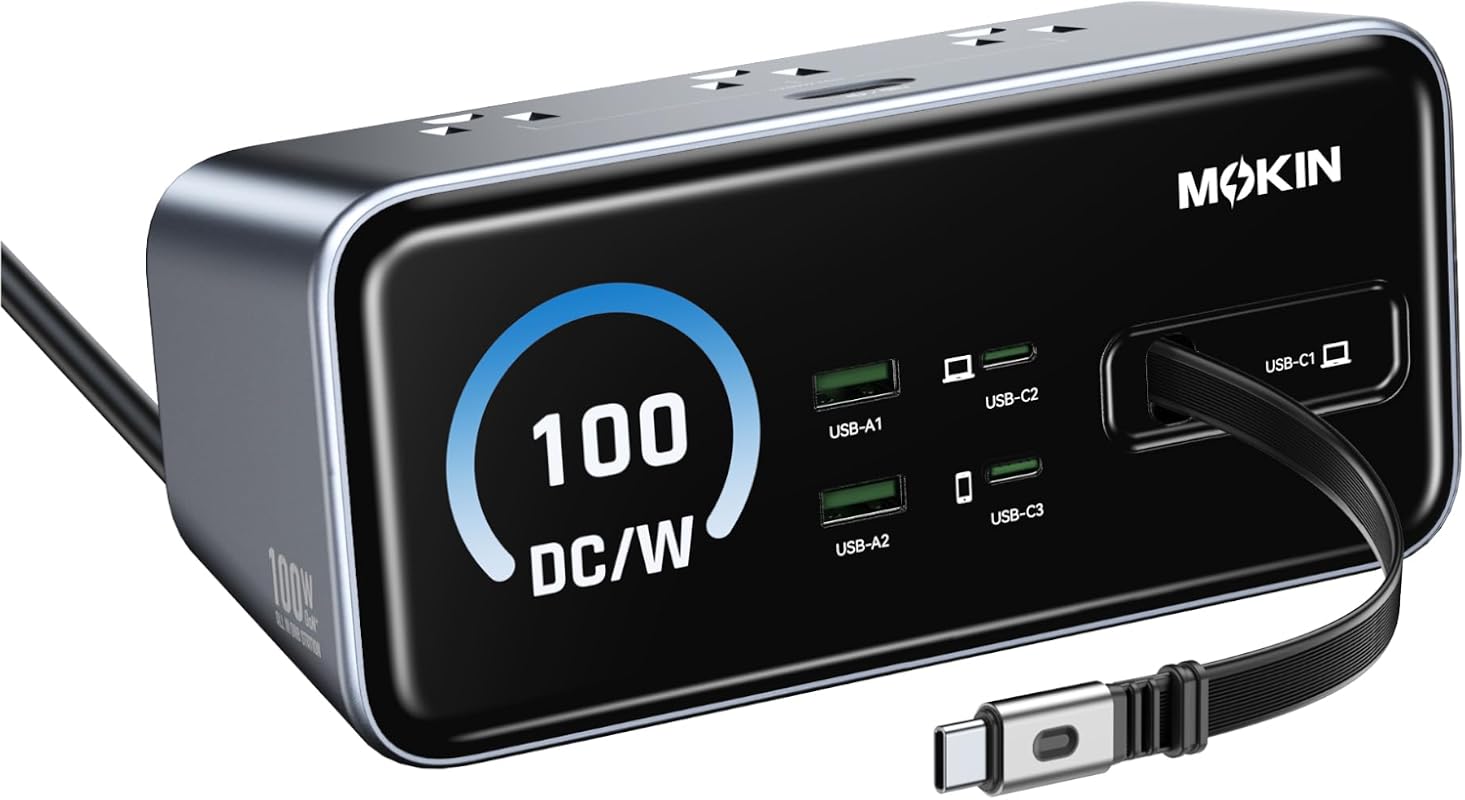
This MOKiN model is aimed at users who want a cleaner desktop and a clearer view of charging status. It combines 3 USB-C ports, 2 USB-A ports, 3 AC outlets, a retractable cable, and a digital display.
Key Features That Stand Out
- 8-in-1 charging station with 3 USB-C, 2 USB-A, and 3 AC outlets.
- 100W GaN charging with a listed 100W single-port USB-C output.
- Smart digital display shows power output for each port.
- Retractable 3ft built-in cable and anti-slip strip for desk use.
- 18-month warranty is mentioned in the supplied details.
Why It Stands Out
The display and retractable cord make this a strong pick for organized workspaces where cable clutter is a problem. It also stands out because the listing specifically emphasizes a 100W single-port USB-C output, which is important for laptop users who need more than shared charging.
Best For
Pros and Cons
- Single-port 100W USB-C output is clearly stated.
- Digital display adds useful charging visibility.
- Retractable cord helps reduce desktop clutter.
- Fewer AC outlets than some larger options.
- Buyers should confirm laptop compatibility and charging cable rating.
3. 100W Max Travel Power Strip with 5ft Extension Cord and USB-C Charging Station

This compact travel-friendly strip is designed for people who need a lightweight charger for trips, temporary workspaces, or hotel stays. It offers 2 USB-C ports, 2 USB-A ports, 2 AC outlets, a flat plug, and a 5ft cord.
Key Features That Stand Out
- 6-device charging station with 2 USB-C, 2 USB-A, and 2 AC outlets.
- 100W GaN USB-C power is listed for fast laptop charging.
- Surge protection and anti-slip base for added stability.
- Flat plug plus 5ft cord for easier packing and placement.
- Under 15oz weight is called out in the supplied details.
Why It Stands Out
This is the easiest model to justify if portability matters more than raw outlet count. The lighter build and compact layout make it a sensible choice for people who travel with a laptop, phone, and a small set of accessories.
Best For
Pros and Cons
- Lightweight and travel-oriented.
- Flat plug and 5ft cord improve placement in tight spaces.
- Surge protection is included.
- Only 2 AC outlets, so it is not for heavy desk loads.
- Compatibility for private charging protocols should be checked on the listing.
4. Anker 9-in-1 100W charging station — cross-store option
This is the option to compare first when you want both Amazon and Walmart shopping choices. The listings describe a desktop unit with three AC outlets and six USB charging ports, with a five-foot flat cord.
What matters for laptop charging
The Walmart listing specifies up to 100W when USB-C1 or USB-C2 is used individually. That is different from a 100W headline split across many lower-power ports. Check the current power-allocation chart before connecting a laptop and several accessories together.
Best for
A desk that needs one higher-power USB-C connection, room for smaller USB devices and a few AC adapters. Buyers who need more AC outlets should compare the tower layouts below instead.
Pros and tradeoffs
- Both stores have listings for a comparable 9-in-1 100W configuration.
- Flat cord can help route power behind furniture.
- The listed 300J surge rating is distinct from charging wattage.
- Only three AC outlets; confirm bulky-adapter clearance.
- Do not assume each connected device can receive 100W at once.
For value, use the dated Walmart price above as a starting point and check the Amazon offer when you buy. Include delivery and any applicable fees before making the final choice.
5. Kakyanill 100W Charging Station Power Strip with 6 AC Outlets and 8 USB Ports
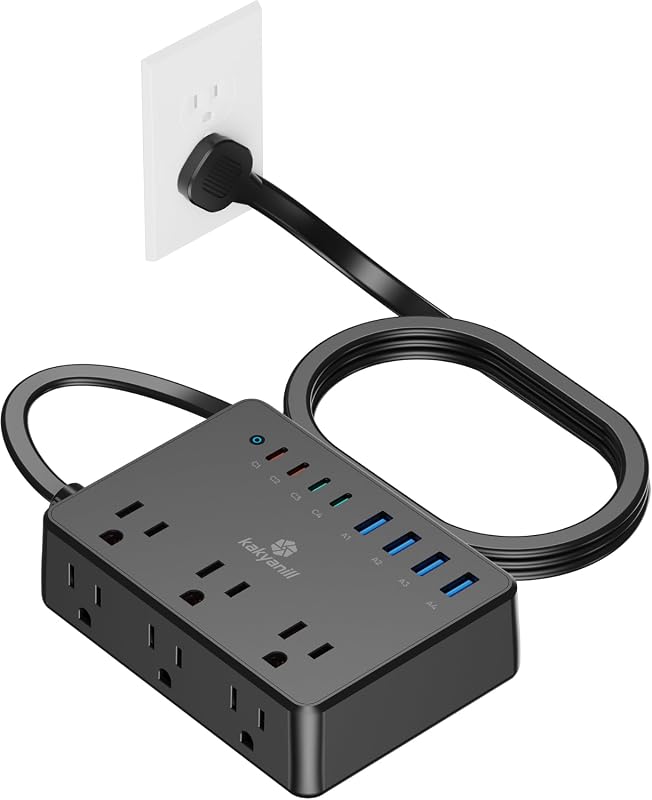
This is the same feature set as the first Kakyanill model, but as a separate color listing. It still offers 6 AC outlets, 4 USB-C ports, 4 USB-A ports, 100W total USB charging, and 1080J surge protection.
Key Features That Stand Out
- 14-in-1 power strip with 6 AC outlets, 4 USB-C ports, and 4 USB-A ports.
- 100W total USB charging with up to 65W on USB-C1/C2.
- Flat plug and 5ft extension cord for flexible placement.
- 1080J surge protection and overload switch.
- Wall-mountable, compact design for small spaces.
Why It Stands Out
Because the listed features closely mirror product #1, this version mainly makes sense if the pricing or color/availability on the current listing works better for your setup. It remains a versatile option for everyday charging, but the better value depends on the current offers.
Best For
Pros and Cons
- Broad port mix for multiple device types.
- Wall-mountable and space-saving.
- Surge protection and overload switch are included.
- Do not assume this color costs more or less than the other listing.
- Buyers should compare current listing details before choosing between the two versions.
6. Olcorife 230W USB Power Strip with 4 Outlets, 8 USB Ports, and 3-Sided Design
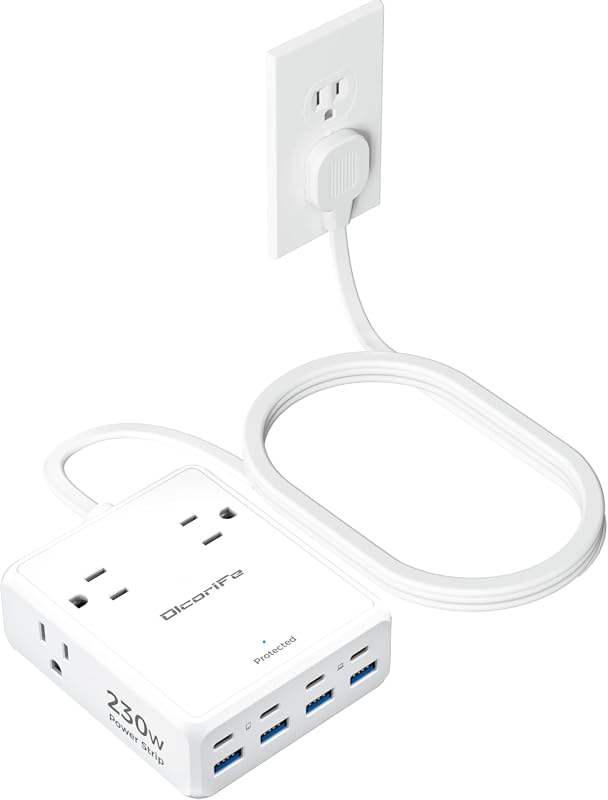
This compact Olcorife strip is built for people who want a lot of USB charging in a small body. It offers 4 AC outlets, 8 USB ports, a 0.31-inch flat plug, and overload protection.
Key Features That Stand Out
- 12-in-1 charging layout with 4 AC outlets and 8 USB ports.
- USB-C1/2 ports are listed at 65W, with USB-C3/4 at 20W and USB-A at 15W.
- 0.31-inch flat plug and 5ft cord for tight spaces.
- Compact 3.58 x 4.25 x 1.53 inch body.
- Short-circuit and overload protection are included.
Why It Stands Out
The compact size makes this a strong fit for people who want to keep a nightstand, dorm desk, or small work area uncluttered. It is also one of the more portable options here, which helps if you move between locations often.
Best For
Pros and Cons
- Very compact body for tight spaces.
- Multiple USB-C and USB-A ports support mixed accessories.
- Flat plug helps fit behind furniture.
- Only 4 AC outlets, so it is not ideal for appliance-heavy setups.
- Shoppers should confirm whether 230W refers to shared output and how it is allocated.
7. ThunderGo Power Strip Tower with 100W Charging Station, 9 AC Outlets, and 8 USB Ports
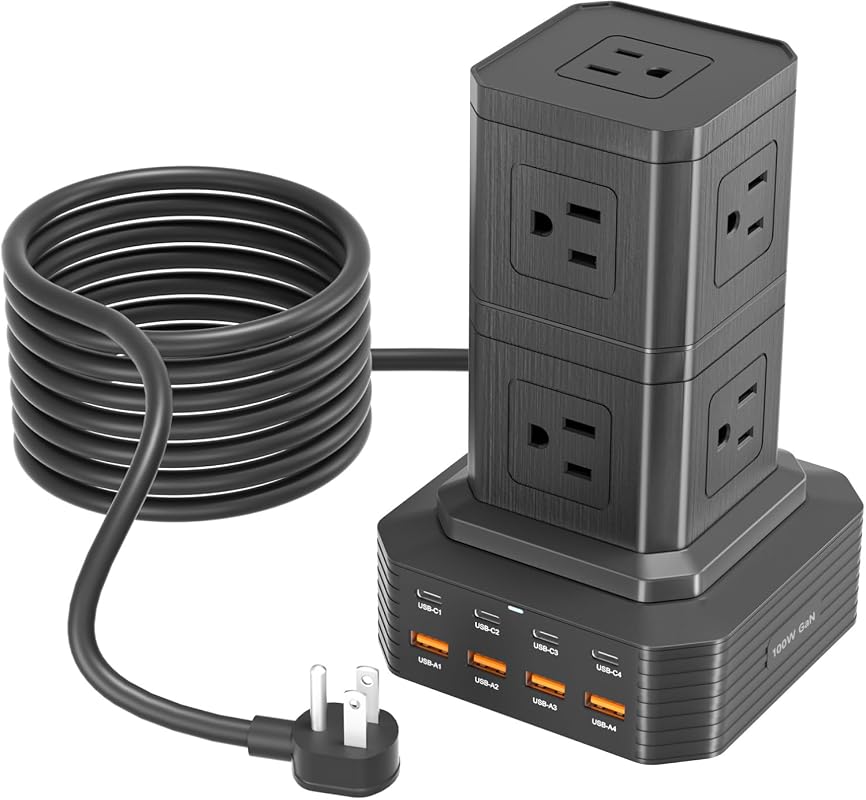
This ThunderGo tower is aimed at larger charging needs, especially when several people or devices share one area. It includes 9 AC outlets, 4 USB-C ports, 4 USB-A ports, a 6ft cord, and multiple safety protections.
Key Features That Stand Out
- 17-in-1 tower design with 9 AC outlets and 8 USB ports.
- Any single USB-C port is listed as a 100W output.
- Built-in over-voltage, over-current, short-circuit protection, and temperature control.
- 6ft extension cord is included.
- Vertical footprint helps reduce cord clutter.
Why It Stands Out
If your setup includes several AC-powered devices alongside USB charging, this is one of the roomier choices in the roundup. The tower format also keeps the footprint small relative to the number of outlets, which is useful for shared desks or family spaces.
Best For
Pros and Cons
- Large outlet count for mixed-device setups.
- 100W single USB-C output is clearly noted.
- Multiple safety protections are listed.
- Bulkier than a flat strip for packing or moving.
- Users should check whether the tower shape fits their desk height and cable routing.
8. 18-in-1 2100J Surge Protector Power Strip with 70W GaN Retractable USB-C Cables
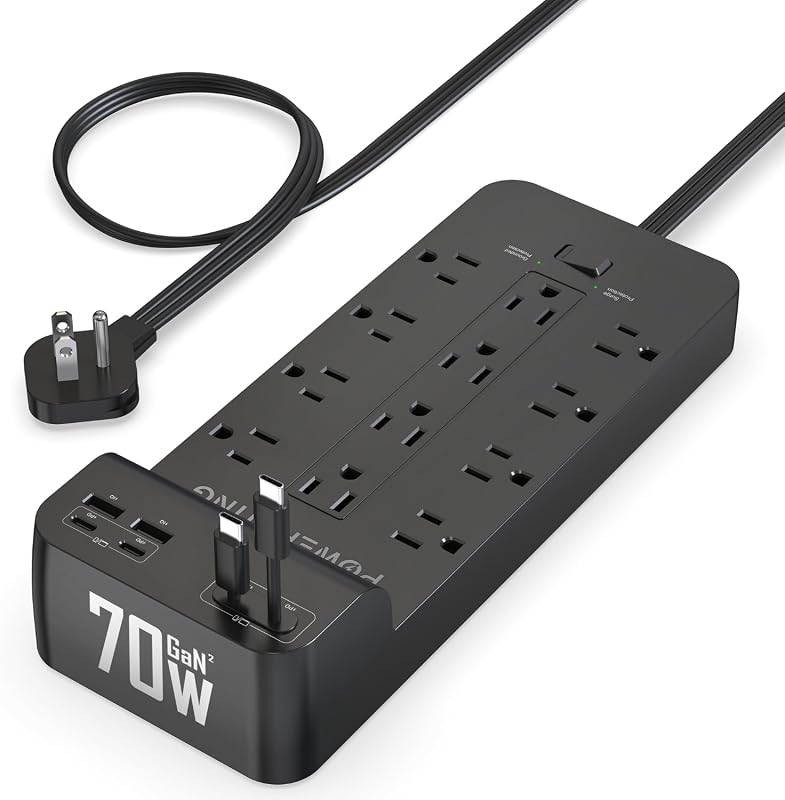
This model focuses on cable management and high surge protection rather than a 100W USB-C headline. It includes 2 USB-A ports, 2 USB-C ports, 2 retractable USB-C cables, 2100J surge protection, and wide-spaced AC outlets.
Key Features That Stand Out
- 18-in-1 charging layout with built-in retractable USB-C cables.
- 70W charging is listed rather than 100W.
- 2100J surge protection for device safety.
- 0.3-inch flat plug and 45-degree angled design.
- 1.5-inch outlet spacing for bulkier adapters.
Why It Stands Out
This is the most cable-management-friendly option in the group, especially if you want a ready-to-use USB-C connection without hunting for a cord. It is also a strong fit for users who prioritize surge protection and outlet spacing over maximum USB-C wattage.
Best For
Pros and Cons
- Retractable USB-C cables reduce desk clutter.
- 2100J surge protection is one of the stronger ratings here.
- Wide outlet spacing helps with large adapters.
- USB-C power is 70W, not 100W.
- Best for cable management, not for the highest-wattage laptop charging needs.
9. UGREEN 65W 20-in-1 GaN Surge Protector Power Strip with 5ft Extension Cord
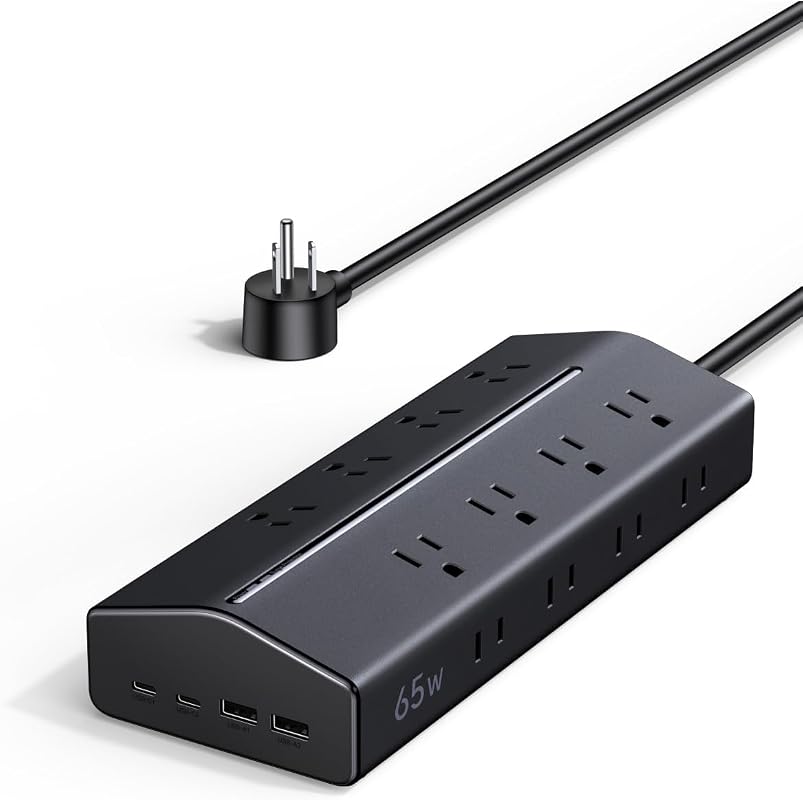
This UGREEN model is a high-outlet-count option for people who need a lot of AC access more than a high-wattage USB-C focus. It offers 16 AC outlets, 2 USB-C ports, 2 USB-A ports, a 15-degree angled design, and wall-mount slots.
Key Features That Stand Out
- 20-in-1 layout with 16 AC outlets, 2 USB-C ports, and 2 USB-A ports.
- USB-C1 delivers up to 65W, not 100W.
- 15-degree angled design for easier access.
- Wall-mountable with a 5ft heavy-duty cord.
- Multiple safety protections and UL 94 V-0 flame-retardant housing are listed.
Why It Stands Out
This is the right kind of product for users who need a lot of AC outlets in one compact unit and do not mind that its USB-C output tops out below the 100W target. It is more of a power-distribution solution than a pure fast-charging station.
Best For
Pros and Cons
- Very high AC outlet count.
- Wall-mountable with a durable-feeling cord setup in the listing.
- Multiple safety protections are clearly stated.
- USB-C charging is 65W, so it is not a 100W USB-C pick.
- USB-C ports do not support PPS, which matters for some devices.
Before buying, confirm whether your laptop or tablet needs a single high-wattage USB-C port or can work from shared USB output. Also verify cable rating, outlet spacing, and any device-specific charging protocol on the current listing or manual.
Complete Roundup for USB-C Power Strips and 100W Charging
Best for lighter desk or travel use, usually with fewer AC outlets, shared USB output, and basic surge protection features.
Best for most home offices, combining stronger port mixes, better cord design, and more useful layout choices.
Best for larger setups that need more outlets, higher surge protection, or advanced features like displays and retractable cables.
Compatibility and intended use
These products are best matched to USB-C laptops, tablets, phones, earbuds, and watches when the power profile fits the device. If you rely on MagSafe, Qi, or a proprietary fast-charge system, verify the charger or cable requirements separately because the listing here may not cover wireless charging.
For desktop use, look for wall-mount slots, flat plugs, and cord lengths that suit your furniture layout. For travel, smaller footprints and lighter builds are easier to pack, while tower designs make more sense for permanent desks or shared rooms.
Dos and Don’ts
- Check whether the USB-C output is single-port or shared across multiple ports.
- Use certified or properly rated charging cables for your laptop and phone.
- Match outlet spacing to the size of your adapters and bricks.
- Do not assume every USB-C port delivers 100W at the same time.
- Do not overload a strip with high-draw appliances unless the listing explicitly supports that use.
- Do not hide the unit in a way that traps heat or blocks access to the switch.
Practical tips
- If you use a laptop daily, prioritize a model that clearly states how USB-C wattage is delivered.
- For shared spaces, tower strips can reduce crowding and make ports easier to reach.
- If you need a fixed setup, wall-mountable models may keep cables neater than flat desk strips.
Confirm your device’s charging standard, the required wattage, and whether the strip’s USB-C port supports the charging profile your laptop, tablet, or phone expects.
- Kakyanill #1 is a mixed-device option for setups that need no more than 65W from one USB-C port.
- MOKiN adds a display and a clearer single-port 100W USB-C claim.
- The travel strip is the easiest option to pack for trips and temporary workspaces.
- The Anker 9-in-1 provides a direct Amazon and Walmart buying comparison.
- Kakyanill #5 is another color listing; compare its current offer with #1.
- Olcorife is the compact choice for small spaces and portable use.
- ThunderGo suits bigger shared setups with more AC outlets.
- The 18-in-1 model is better for cable management than for 100W USB-C charging.
- UGREEN is best for outlet-heavy setups that do not need a 100W USB-C output.
- Always verify wattage, outlet spacing, and device compatibility before checkout.
Frequently Asked Questions About USB-C Power Strips and 100W Charging
What does 100W USB C mean on a surge protector?
It usually means the USB-C side can deliver up to 100W under the listing’s stated conditions. That may be a single port or a shared total, so read the product details carefully.
Can I charge a laptop and phone at the same time?
Yes, if the strip has enough total output and the ports are arranged for your devices. Check how power is shared across USB ports so the laptop still gets enough wattage.
Do I need a special cable for 100W charging?
Often, yes. Use a cable rated for the wattage you need and follow the charger or device manual so the setup can negotiate power correctly.
Is surge protection important for USB-C charging stations?
It can be helpful for laptops, monitors, routers, and other electronics. A surge protector does not make a setup indestructible, but it can add a useful layer of protection.
Are tower power strips better than flat ones?
Neither is universally better. Towers save desk space and often improve access, while flat strips are easier to hide behind furniture or pack for travel.
Should I choose more outlets or higher USB-C wattage?
Pick based on your devices. If you charge a laptop, USB-C wattage matters most; if you run printers, lamps, and adapters too, outlet count becomes more important.
If your laptop needs up to 100W from one USB-C port, begin with the Anker cross-store comparison. For mixed accessories and laptops needing no more than 65W, the Kakyanill layout is another option. If your setup is more specific, the MOKiN, travel strip, or tower-style options may fit better depending on whether you value visibility, portability, or a cleaner desk.
Whichever model you choose, verify the current listing details for USB-C wattage, surge protection, and compatibility with your devices before ordering. That small check helps make sure the strip fits your charging habits instead of just looking good on paper.
This guide started from product listing records and was updated with an Amazon listing review and a direct Walmart check for the Anker cross-store comparison. Prices are not tracked live. The remaining specifications describe seller claims and should be checked against the model documentation. Because no verified first-hand testing evidence is available, the recommendations use evidence-based editorial language and avoid claims about personal use, measured performance, or installation experience. We compared the products by listed USB-C output, AC outlet count, surge protection details, cord design, portability, and the fit for common consumer electronics and productivity setups. Where technical details were incomplete or potentially ambiguous, readers should verify the current Amazon listing, manufacturer page, or product manual before buying.

One Comment