

6 Under-Desk Power Strips with USB-C Compared
Choose a power strip that fits your desk
Compare screw-mounted and clamp-mounted options, check the USB-C output, and keep the switch within reach.
Affiliate disclosure: As an Amazon Associate I earn from qualifying purchases. We may also earn a commission from qualifying Walmart purchases through our links, at no extra cost to you.
Check desk thickness, clearance and cord route.
Verify the output and shared-power limits.
Choose a clamp or supported mounting hardware.
Include hardware, cables, shipping and returns.
Amazon vs Walmart: compare the mounting choice
These are different products. The Amazon mountable option and Walmart HdcTek alternative have different outlet counts and features. Use the comparison to decide what your desk needs; it is not a same-model lowest-price claim.
| Option | What to compare | Price information | Buying choice |
|---|---|---|---|
| Amazon mountable strip ASIN B0FWRKZBGC | Listing describes six AC outlets, USB-C PD 20W and mounting brackets. | Current price not verified; open the offer. | Check Amazon price |
| Walmart HdcTek mountable alternative | Listing describes two AC outlets, a 20W USB-C port and mounting holes. Verify protection features separately. | $16.99 USD Observed October 22, 2026 (Bangladesh time). Sold by HdcTek; fulfilled by Walmart when checked. | Check Walmart alternative |
The Walmart price is a dated snapshot, not a live feed. Price, stock, seller, delivery and checkout totals may change. No current Amazon price was verified. Other Walmart buttons below open alternative searches; matching stock has not been confirmed.
Which option is the better value?
If you need several AC connections, a two-outlet strip may not replace the six-outlet model even when its price is attractive. If you only need one monitor and a laptop adapter plus phone charging, the smaller layout may be enough after checking each device and the product rating. Match the mounting method, cord reach, USB-C output and protection details before comparing cost.
Open both stores and check the final delivered total. A low item price may exclude shipping, and a bundle may contain different screws or cables. Compare new with new and inspect the seller’s return conditions. Do not treat a search result, a coupon you cannot redeem or a different port configuration as the same offer.
When you want a cleaner desk, the right under-desk power strip can do a lot of the heavy lifting. It keeps outlets off the floor, reduces cable clutter, and gives your USB-C devices a more convenient place to charge.
This guide compares six options for shoppers looking for the best under desk power strip with USB C, with a focus on mountable designs, desk-clamp models, surge protection, and everyday home office use. Because no first-hand testing evidence is available here, the recommendations below are based on product listing details, with current retailer checks where available.
For a flexible mounting setup, start by comparing the 360° Mountable Surge Protector Power Strip with 4 USB Ports, 2 USB-C, 6FT Flat Plug Cord for its listed mounting options, six AC outlets and two USB-C ports. Choose the QBA-style layout for fewer AC connections, or a compatible clamp model when removable desk-edge access matters more.
Quick Product Comparison
| Product | Image | Best For | Check Price |
|---|---|---|---|
| 1. 360° Mountable Surge Protector | 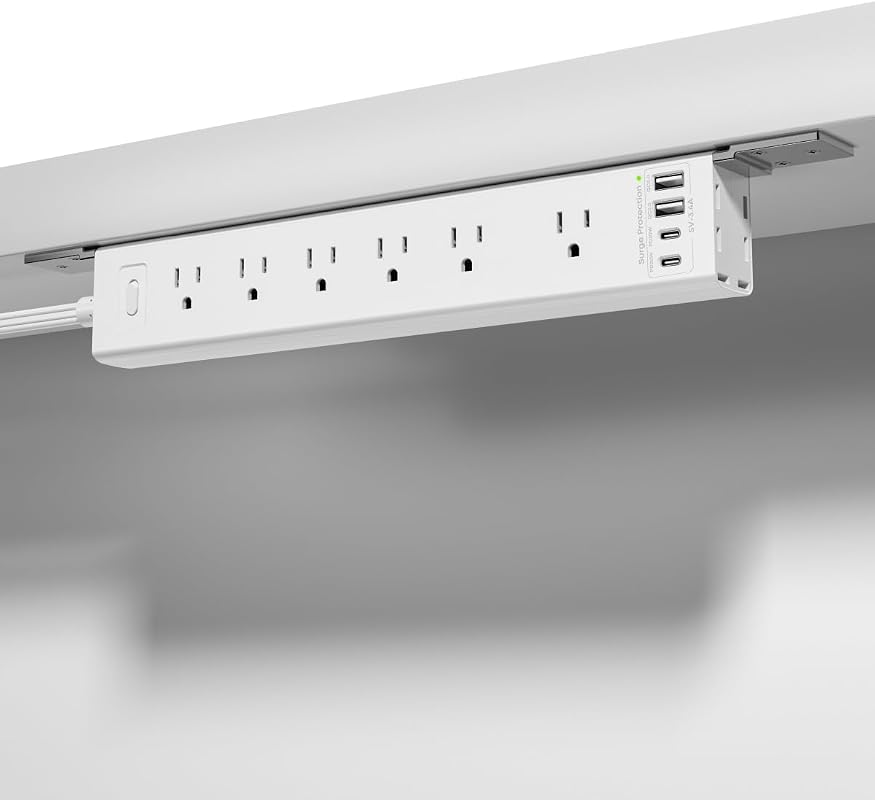 | Flexible under-desk mounting with multiple USB-C ports | Check Amazon priceSearch Walmart alternatives |
| 2. Mountable Power Strip | 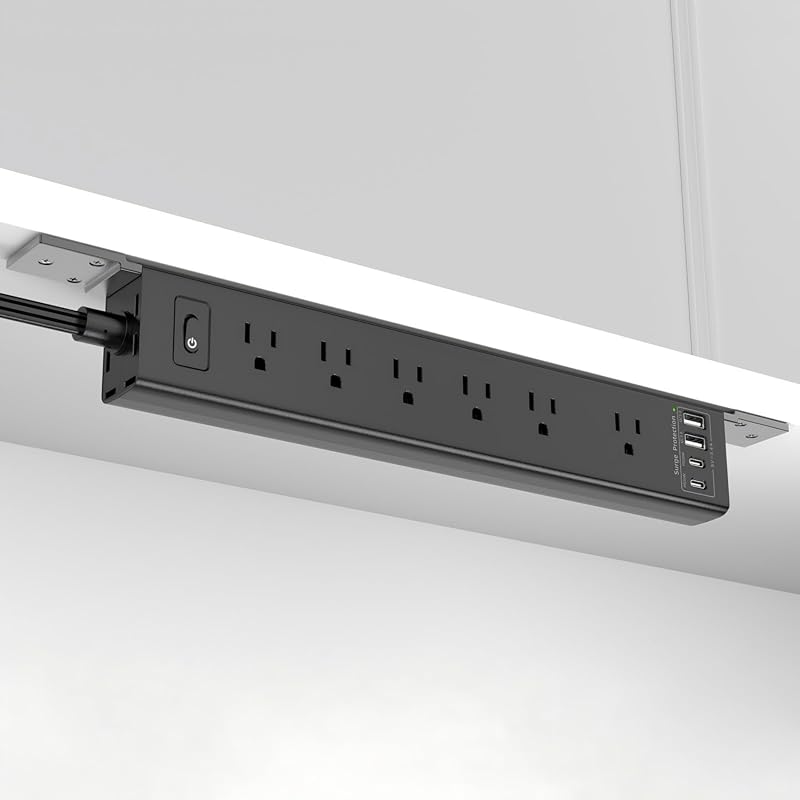 | Fast USB-C charging and adjustable mounting brackets | Check Amazon priceSearch Walmart alternatives |
| 3. HOPOW Desk Clamp Power Strip | 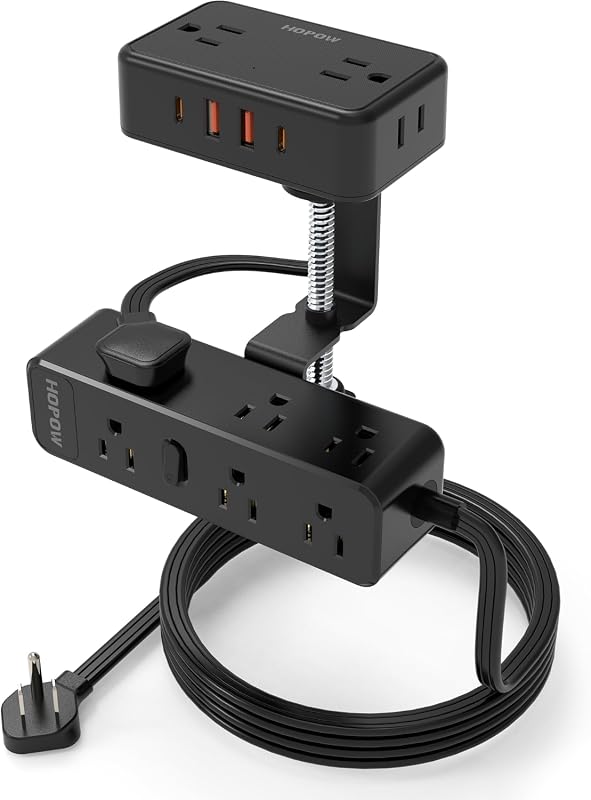 | High-outlet desk clamp setup for bigger workstations | Check Amazon priceSearch Walmart alternatives |
| 4. QBA Desk Outlet Station | 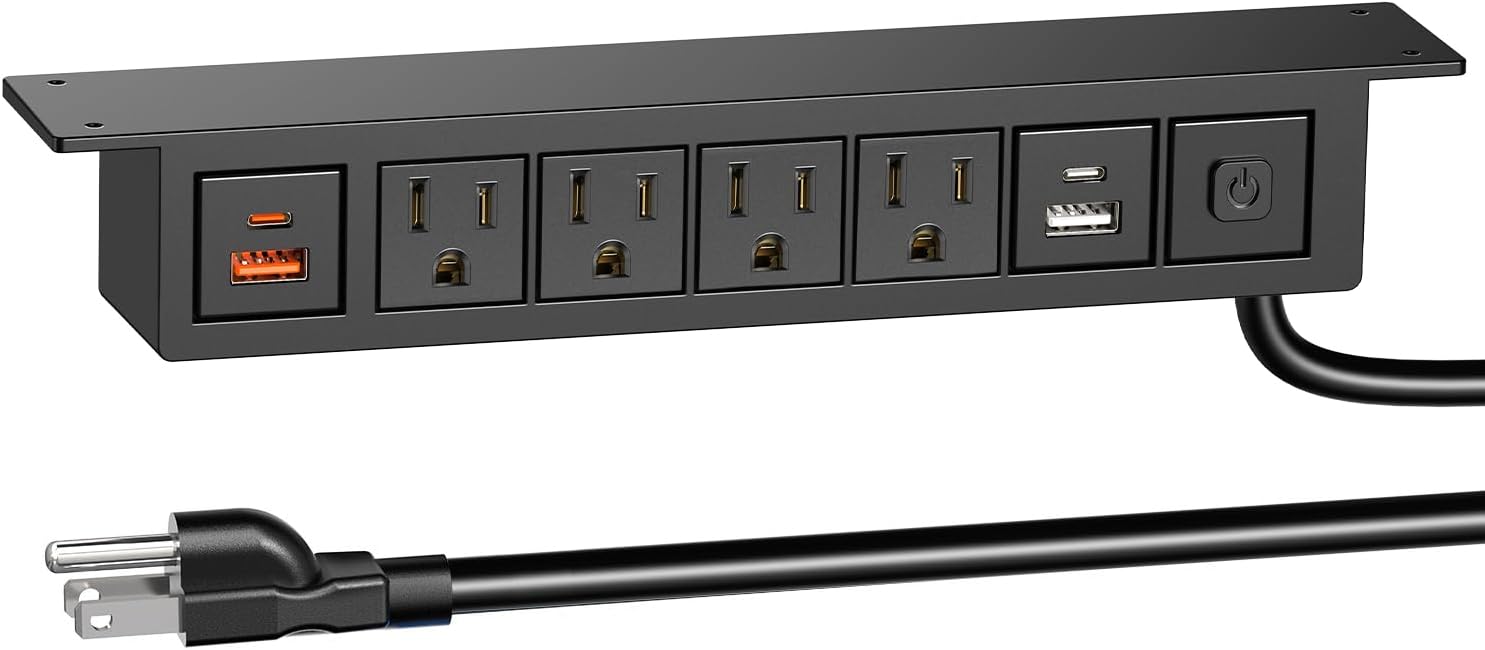 | Compact under-desk charging with a dedicated PD USB-C port | Check Amazon priceSearch Walmart alternatives |
| 5. 360° Mountable Surge Protector | 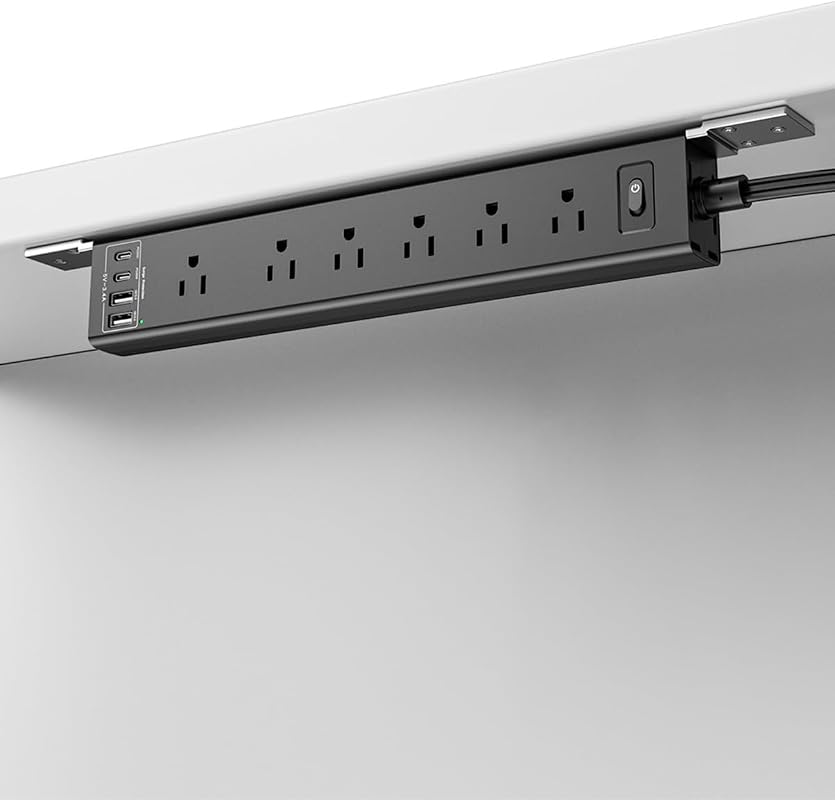 | Similar mountable variant; compare selected options | Check Amazon priceSearch Walmart alternatives |
| 6. HOPOW Desk Clamp Power Strip | 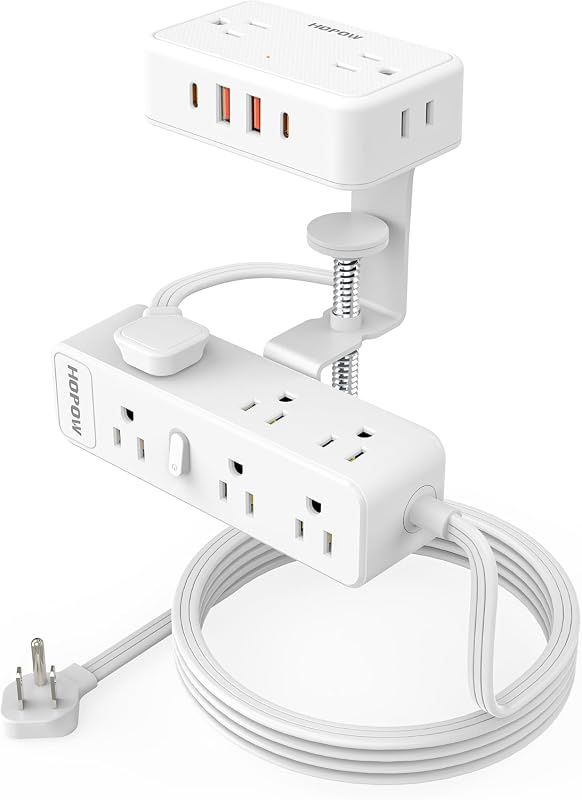 | Clamp-mounted power access for larger desk setups | Check Amazon priceSearch Walmart alternatives |
What to Look for in an Under-Desk Power Strip with USB-C
Mounting style and desk fit
Look for a design that matches your workspace: under-desk screws, wall-mount brackets, or a clamp style. A good fit matters more than extra outlets if you need clean cable routing and easy access.
USB-C charging layout
Check whether the USB-C port is a basic charging port or a dedicated PD port. If you plan to charge phones, tablets, or newer accessories, verify the current listing for the exact USB-C output details.
Outlet count and device mix
Count the devices you actually use at the desk, including monitor power, laptop charging, lamps, and peripherals. More AC outlets help if your setup still depends on standard plugs instead of USB charging.
Surge protection and overload safety
For office gear and smart devices, surge protection is worth prioritizing. Also check the overload cutoff details and follow the product’s rated load guidance so the strip is not asked to handle more than it should.
Cord length and plug profile
A flat plug and low-profile cord can make a big difference behind furniture. If your outlet is far from the desk, make sure the cord length is enough before you buy.
Build quality and installation convenience
Reinforced USB ports, stable mounting hardware, and a simple install can make the setup feel much cleaner. If you move your desk often, a clamp or bracket system may be easier to reconfigure.
- Measure your desk edge, outlet location, and cable path before ordering so the strip, cord, and mounting method all fit your layout.
- Check the current Amazon listing or manual for USB-C output details if you need fast charging for a specific phone or tablet.
- Use certified charging cables and avoid stacking high-draw devices on a strip that is already near its rated capacity.
Six Under-Desk Power Strip Listings and Their Tradeoffs
1. 360° Mountable Surge Protector Power Strip with 4 USB Ports, 2 USB-C, 6FT Flat Plug Cord
This mountable strip is built for shoppers who want a cleaner desk without giving up outlet count. It combines six AC outlets, four USB ports, and a flexible install design that can work vertically, horizontally, or around table legs.
Key Features That Stand Out
- 6 AC outlets and 4 USB ports, including 2 USB-C ports, for up to 10 connected devices.
- 360° flexible installation for walls, under desks, or wrapped around table legs.
- 45° flat plug helps keep furniture flush against the wall.
- Upgraded reinforced USB ports and pure copper wire core are highlighted in the listing.
- Mounting hardware is included for setup.
Why It Stands Out
Among the supplied options, this one offers a strong mix of mounting flexibility, USB-C support, and a compact footprint. Check the selected listing for its exact USB-C power profiles and mounting instructions. A physical USB-C port does not establish laptop charging support, and supplied brackets need to suit your desk material.
Best For
Pros and Cons
- Flexible mounting options make it easier to match different desk layouts.
- Two USB-C ports reduce the need for extra adapters.
- Flat plug helps with tight spaces behind furniture.
- The listing does not provide detailed USB-C output specs here, so shoppers should verify charging speed on Amazon.
- May be more outlet capacity than needed for minimal setups.
2. Wall Mount Surge Protector Power Strip with USB Ports, 6FT Flat Plug Extension Cord
This model is a good pick if you want USB-C support with a more installation-friendly mounting approach. It includes adjustable brackets, a flat plug, and a stated 20W PD USB-C charging feature.
Key Features That Stand Out
- 6 AC outlets and 4 USB ports, including 2 USB-C ports with 20W PD fast charging.
- Detachable, adjustable mounting brackets support wall, under-desk, and tight-space installs.
- 0.35-inch ultra-thin flat plug helps furniture sit closer to the wall.
- 1800 joules of surge protection and overload safety cut-off are listed.
- Reinforced USB ports and pure copper wire core are highlighted.
Why It Stands Out
The stated 20W PD USB-C support makes this a practical choice for shoppers who care about faster phone charging. Compare its mounting bracket dimensions, included hardware and USB power allocation with your planned installation. A 20W headline should not be read as a laptop-level output or as full power on every port simultaneously.
Best For
Pros and Cons
- Includes a stated 20W PD USB-C port.
- Adjustable mounting brackets add placement flexibility.
- Low-profile plug helps with tight wall clearance.
- The listing still needs a compatibility check for your specific USB-C device and cable.
- Shoppers needing more AC outlets can compare the HOPOW format below.
3. HOPOW Dual Layer Desk Clamp Power Strip, 13 Outlets, 4 USB, 10FT Cord
If your desk setup needs a lot of outlets, this clamp-style power strip brings the largest outlet count in the roundup. It also offers removable sections, a long cord, and a design that works for both desk use and wall-mounted use.
Key Features That Stand Out
- 13 AC outlets and 4 USB ports, including 2 USB-C ports, for up to 17 devices.
- Clamp fits tables up to 2.75 inches thick and includes non-slip pads.
- 1700-joule surge protection and 15A overload protection switch are listed.
- 10-foot flat cable and very slim plug help with routing behind furniture.
- Top section can be removed for travel, and the bottom section can be used wall-mounted.
Why It Stands Out
This is one of the larger outlet layouts in the group. Its usefulness depends on adapter spacing and clamp fit, rather than a customer-rating count. It makes the most sense for users with multiple monitors, accessories, or a shared workstation that needs more connections.
Best For
Pros and Cons
- Highest outlet count in the roundup.
- Clamp design can work well for desks with usable edge space.
- Long cord helps with farther wall outlets.
- Clamp fit depends on your desk thickness, so measure first.
- Bulkier than simpler under-desk strips if you only need a few ports.
4. QBA Under Desk Power Strip with 20W USB-C, 8-in-1 Outlet Station, 6FT Cable
This compact outlet station is a good fit for smaller desks or users who want a simple under-desk hub with a dedicated USB-C charging port. It also includes a physical power switch, which can be handy for quick control.
Key Features That Stand Out
- 4 AC outlets, 1 PD20W USB-C port, 1 QC3.0 18W port, and 2 standard USB ports.
- 6-foot 14AWG power cord for reaching distant sockets.
- Includes 4 screws for under-desk or furniture mounting.
- On/off power switch adds easy control of connected devices.
- Fire-resistant ABS material and 1200 joules of surge protection are listed.
Why It Stands Out
The QBA keeps the feature set focused and practical rather than oversized. It is worth comparing when you need a compact screw-mounted station rather than a large desk-edge clamp. Check its physical dimensions and the supported mounting surface before you order.
Best For
Pros and Cons
- Compact layout is easier to fit under a desk.
- Dedicated PD20W USB-C port is clearly listed.
- Power switch can simplify daily use.
- Only four AC outlets, so it may be too small for heavier setups.
- USB ports share limited total output, so verify your charging needs.
5. 360° Mountable Surge Protector Power Strip with 4 USB Ports, 2 USB-C, 6FT Flat Plug Cord
This separate VIPWELL listing has a similar mounting concept to product #1. Treat it as a variant to compare for the exact color, hardware, dimensions and current offer, rather than an independently tested design.
Key Features That Stand Out
- 6 AC outlets and 4 USB ports, including 2 USB-C ports.
- Flexible clip design supports vertical, horizontal, and table-leg mounting.
- 45° flat plug helps save space behind furniture.
- Reinforced USB ports and pure copper wire core are highlighted.
- Mounting hardware is included for quick setup.
Why It Stands Out
The feature description overlaps product #1. Compare the selected options and included mounting parts, then choose the listing that actually fits the desk. Review totals and prices can change and are not used here to claim that one variant is better.
Best For
Pros and Cons
- Flexible installation options for different desk layouts.
- Another listing to compare for variant and hardware availability.
- Flat plug helps keep the setup tidy.
- Very similar to product #1, so it may feel redundant if you only need one mountable strip.
- USB-C output details still need verification on the current listing.
6. HOPOW Dual Layer Desk Clamp Power Strip, 13 Outlets, 4 USB, 10FT Cord
This second HOPOW listing has a similar dual-layer clamp format to product #3. Compare the exact model, selected option, dimensions and mounting instructions; current prices have not been verified. It is an alternative buying listing, not proof of a separate product design.
Key Features That Stand Out
- 13 AC outlets and 4 USB ports, including 2 USB-C ports.
- Adjustable clamp fits desks up to 2.75 inches thick.
- 1700-joule surge protection and 15A overload protection switch are listed.
- 10-foot flat cable and slim plug support easier routing.
- No assembly is required.
Why It Stands Out
This option is functionally very close to product #3, so it mainly serves shoppers comparing price, listing details, or availability. Do not assume it costs more or less than product #3. Pick between the listings only after checking whether the selected models, condition, included hardware and delivered totals are comparable.
Best For
Pros and Cons
- Large outlet count for busy desks.
- Clamp design can keep the strip off the floor.
- Long cord helps with cable routing.
- Current price and exact variant must be compared with the other HOPOW listing.
- Likely overkill for simple laptop-and-phone charging setups.
Before mounting any strip under a desk, confirm that screws, brackets, or clamps will not interfere with drawer slides, cable trays, or the desk’s structural parts. Also make sure the strip’s rated load and USB-C output match your actual devices, and avoid covering it in a way that traps heat.
How to Choose an Under-Desk Power Strip with USB-C
Best for smaller desks needing basic AC access, simple mounting, and one or two USB-C ports without extra outlet capacity.
Best for home offices that want more outlets, clearer surge protection details, and a better mix of USB-C and AC ports.
Best for busier workstations that need clamp mounting, long cords, and the most outlets for monitors, chargers, and accessories.
Compatibility and intended use
If you are charging a phone, tablet, earbuds case, or other USB-C accessory, verify the port output on the current listing before buying. For Apple, Android, and laptop accessories, the right cable matters just as much as the strip itself.
Clamp-style models are a better fit for desks with a usable edge and enough thickness clearance. Mountable flat-strip styles work better when you want a low-profile install under a desk, behind a monitor, or on a wall.
- Match the strip’s mounting style to your desk, wall space, or cable route.
- Check the USB-C output details if you want faster charging for newer devices.
- Use certified cables and keep the strip within its listed power limits.
- Do not assume every USB-C port delivers the same charging speed.
- Do not overload the strip with high-draw devices and multiple adapters at once.
- Do not mount it where cords, drawers, or airflow will be blocked.
- For a minimalist desk, choose a model with fewer AC outlets but clearer USB-C support.
- For a shared workspace, prioritize outlet count and cord length over compact size alone.
- Keep the power strip accessible enough that you can reach the switch or unplug it without crawling under the desk.
Before ordering, confirm the strip’s mounting method fits your desk thickness or wall space, and verify the USB-C port output on the current Amazon listing or manual for your specific phone, tablet, or accessory.
- Product #1 is a flexible mountable listing with two USB-C ports; verify its charging output.
- Product #2 is the best alternative if you want stated 20W USB-C fast charging and adjustable brackets.
- Product #3 offers a larger clamp layout for desks that fit its mounting requirements.
- Product #4 is the compact pick for smaller setups that still want a dedicated USB-C charging port.
- Product #5 is another VIPWELL listing to compare for the exact mounting variant and current offer.
- Product #6 is the clamp-style option to compare if you want the HOPOW format and a long cord.
- Always verify USB-C output and total load before plugging in valuable electronics.
- Measure your desk or wall space first so the mounting style matches your setup.
Measure the installation before you order
Map the desk, not just the outlet count
Start by listing the devices that will remain connected: monitors, a laptop adapter, desk lighting and small accessories. Separate AC plugs from devices you intend to connect directly by USB. A strip with many sockets may still leave neighboring outlets blocked by bulky adapters, so compare the photographed spacing and dimensions with the adapters you actually own.
Next, measure the usable mounting space under the desk. Account for drawer rails, support beams, cable trays and the room needed to insert or remove plugs. A strip that fits the empty surface may become awkward once power bricks and cables are attached. Leave the switch reachable and use only mounting methods supported by the product instructions.
Check a clamp against the actual edge
Measure desk thickness at the location where the clamp will sit. Inspect both the top and underside for an apron, sloping edge, cable channel or frame that might prevent proper contact. A quoted maximum thickness does not prove the clamp will fit every desk with that measurement. Follow the desk manufacturer’s restrictions, particularly for delicate surfaces.
A clamp can be convenient when you expect to move or rearrange the workstation. A screw-mounted strip can be less visible, but the mounting hardware must suit the furniture material. Before choosing either, decide whether the ports need to face your chair, the back of the desk or a side edge. A tidy installation should still be practical to use.
Plan cord travel for a standing desk
Check the route from the wall outlet to the strip at both the lowest and highest desk positions. Include the route around the desk frame rather than measuring only a straight line. Check the device cables as well: a monitor or adapter cable should not become tight when the desk moves. Follow the furniture and power-strip instructions for routing.
Do not buy a short cord with the intention of improvising an unsupported installation later. Choose a product whose specified cord and mounting method fit the planned location. If you need different reach, compare the actual length variant rather than assuming every listing of the same design includes the same cord.
Check USB-C charging separately from AC power
The AC outlets and built-in USB charging serve different purposes. A strip may accommodate a laptop’s original AC adapter while its own USB-C port is designed for a phone. Do not assume that a 20W USB-C specification can replace your laptop charger. Compare the laptop’s requirements with the USB-C output before relying on a direct connection.
If the listing mentions multiple USB ports, inspect the shared-output information. A per-port maximum does not guarantee that every port maintains that maximum with all devices connected. Use an appropriate cable for the intended device and confirm that the chosen charging standard is supported. For high-power notebook charging, see our charger guide for two laptops rather than choosing by the number of USB sockets.
During the return period, compare the delivered model and included mounting parts with the offer you ordered. Confirm that plugs fit without blocking the intended connections, the switch remains accessible and cables reach comfortably. These practical fit checks do not establish electrical performance, but they can show whether the product is suitable for the workspace you planned.
Frequently Asked Questions About Under-Desk USB-C Power Strips
What makes an under desk power strip better than a standard power strip?
Under-desk models help keep cables off the floor and make outlets easier to reach from your workstation. They also tend to look cleaner when mounted in a fixed spot.
Do all USB-C ports on these strips charge the same way?
No, USB-C ports can vary a lot in output and charging behavior. Check the current listing or manual if you need fast charging for a specific phone or tablet.
Should I choose a clamp model or a mountable flat strip?
Clamp models are useful when you want a removable setup and have a desk edge that fits the clamp. Mountable flat strips are better when you want a lower-profile install under the desk or on a wall.
How many outlets do I really need for a desk setup?
Count every device you plan to plug in, including monitors, chargers, lamps, and peripherals. If you use several AC adapters, a higher outlet count can save space and reduce adapter crowding.
Is surge protection important for home office gear?
It is worth having if you plug in electronics you care about, such as a computer, monitor, or network gear. Still, you should verify the listed surge rating and follow the product’s load guidance.
What should I check before mounting a power strip under my desk?
Make sure the strip will not block drawers, cable trays, or moving parts. Also confirm that the cord can reach the outlet without tension and that the mounting hardware suits the desk material.
If your setup is small and you mainly want a tidy charging point, the QBA and the two mountable VIPWELL-style strips are the easiest places to start. They keep the footprint modest while still giving you USB-C support and a cleaner cable layout.
If you need more outlets or a clamp-mounted solution for a busier desk, the HOPOW models are the stronger fit. Either way, the best choice is the one that matches your desk layout, charging needs, and power limits rather than just the highest outlet count.
This roundup began with product listing records and was updated with Amazon product-page checks and a direct Walmart check for the separately labeled HdcTek alternative. Current prices and customer-rating counts are not used to rank the six listings. Because no verified first-hand testing evidence is available, the recommendations use evidence-based editorial judgment, with emphasis on mounting style, outlet count, USB-C availability, surge protection claims, cord design and fit for common desk setups. Technical details not present in the supplied facts should be verified on the current Amazon listing, manufacturer page, or product manual.

One Comment