Does iPhone 11 Pro Have Wireless Charging and How It Works
The iPhone 11 Pro does have wireless charging, and it works with any Qi-compatible charger. It is a simple, cable-free way to top up your phone at home, at work, or on a nightstand. This guide explains how wireless charging works, what speed you can expect, and what charger choices make the most sense for the iPhone 11 Pro.
- Point 1: The iPhone 11 Pro supports wireless charging through the Qi standard.
- Point 2: You can charge it with most wireless pads, stands, and MagSafe-style accessories, but it does not have full MagSafe support like newer iPhones.
- Point 3: Wireless charging is easy and convenient, but it is usually slower than wired charging.
- Point 4: A good charger case setup matters, since thick cases can reduce charging speed or stop charging.
- Point 5: For the best results, place the phone flat and centered on the charging pad.
- Point 6: If you want the fastest top-up, wired charging still wins for the iPhone 11 Pro.
📑 Table of Contents
- Does iPhone 11 Pro Have Wireless Charging?
- How Wireless Charging Works on the iPhone 11 Pro
- What You Need to Wirelessly Charge an iPhone 11 Pro
- Wireless Charging Features and Real-World Use
- iPhone 11 Pro Wireless Charging vs Wired Charging
- Buying Tips for the Best iPhone 11 Pro Wireless Charger
- Common Problems and Simple Fixes
- Final Verdict: Is Wireless Charging Worth It on the iPhone 11 Pro?
Does iPhone 11 Pro Have Wireless Charging?
If you own an iPhone 11 Pro, you may be asking a very simple question: does iPhone 11 Pro have wireless charging? The short answer is yes. Apple built wireless charging into the iPhone 11 Pro, so you can charge it without plugging in a cable every time.
That sounds small, but it makes daily life easier. You can set the phone down on a pad at your desk, on your nightstand, or in your car and let it charge while you do other things. No cable hunt. No worn-out port. No mess.
Still, wireless charging is not magic. It has limits. It is slower than a cable, and the charger you buy matters a lot. If you want to understand what the iPhone 11 Pro can do, how it works, and whether it is worth using, this guide breaks it down in plain language.
How Wireless Charging Works on the iPhone 11 Pro
Qi wireless charging explained
The iPhone 11 Pro uses Qi wireless charging. Qi is the common wireless charging standard used by many phones and accessories. It works by sending power through coils in the charger and the phone. When the phone sits in the right spot, energy moves across the small gap and starts charging the battery.
This is why placement matters so much. If the coils do not line up well, charging can slow down or stop. That is also why some wireless chargers feel better than others. A stable stand or pad with good coil alignment usually works more reliably.
What speed should you expect?
The iPhone 11 Pro can charge wirelessly, but it does not charge as fast as a wired USB-C setup. In real use, wireless charging is best for steady, everyday charging, not for a quick emergency boost.
For example, if you place the phone on a pad overnight, wireless charging is great. If you need a fast charge before leaving the house, a cable is usually the better choice. If you want to learn more about charging habits that protect battery health, see best charging habits for iPhone.
What You Need to Wirelessly Charge an iPhone 11 Pro
A Qi-certified charger
The biggest thing you need is a Qi-certified wireless charger. That can be a flat pad, a stand, or a multi-device dock. The charger does not need to be made by Apple. It just needs to support Qi and be built well enough to deliver stable power.
Cheap no-name chargers can work, but they may run hot, charge slowly, or disconnect often. A better-made charger usually gives a smoother experience and less frustration.
A case that does not block the signal
Most thin cases work fine. But very thick cases, cases with metal parts, pop grips, or wallet attachments can cause trouble. If the phone feels warm but does not charge well, the case may be the issue.
Apple-style silicone and thin plastic cases are usually safe choices. If you use a rugged case, test it with your charger before depending on it every day.
A good power source
The charger itself also needs enough power. Some wireless pads come with a wall adapter, while others do not. If the adapter is weak, the charger may not perform as expected. This is one reason it helps to buy a complete setup from a trusted brand.
Wireless Charging Features and Real-World Use
Why people like it
The main benefit of wireless charging is convenience. You do not have to plug and unplug a cable all day. That is useful at a desk, on a bedside table, or in a shared family charging area.
It also reduces wear on the Lightning port. Less cable use can mean less physical stress on the connector over time. That does not make the phone indestructible, but it can help keep things neat and simple.
Where it works best
Wireless charging is best in places where the phone can stay still. A nightstand is a perfect example. You put the phone down before bed, and it charges until morning. A desk is another good spot, especially if you check messages often and want to pick up the phone quickly.
In a car, wireless charging can be useful too, but only if the mount holds the phone firmly. If the phone shifts around too much, charging may cut in and out.
When it is not ideal
Wireless charging is not the best choice if you are in a hurry. It also creates a little more heat than many wired setups. Heat is not great for battery comfort, so it is smart to avoid leaving the phone in direct sun or under pillows while charging.
If your iPhone feels unusually warm while charging, check the charger and the case. Heat can slow charging and make the experience worse. For more help with that, read does a charger overheat while charging.
iPhone 11 Pro Wireless Charging vs Wired Charging
Speed comparison
Wired charging is still faster. If speed is your top goal, a cable wins. That matters when your battery is low and you need power quickly.
Wireless charging is more about ease. It is the charging method you use when you want less hassle, not maximum speed. Many iPhone 11 Pro owners use both. They keep a cable for urgent moments and a wireless pad for everyday charging.
Convenience comparison
Wireless charging feels better for routine use. You do not have to line up a cable, and you can grab the phone in seconds. That is why many people like it on a desk or nightstand.
Wired charging is better for travel, fast top-ups, and situations where you need the phone ready as soon as possible. If you often charge on the go, a good portable option may still be helpful. You can also compare accessory choices in what fast charging power banks work with iPhone.
Battery health thoughts
Both methods are safe when used properly. The key is heat and quality. A well-made charger, good airflow, and normal charging habits matter more than the charging method alone.
Do not worry too much about using wireless charging every day. Just avoid cheap chargers that get very hot or behave inconsistently.
Buying Tips for the Best iPhone 11 Pro Wireless Charger
Pick the right style
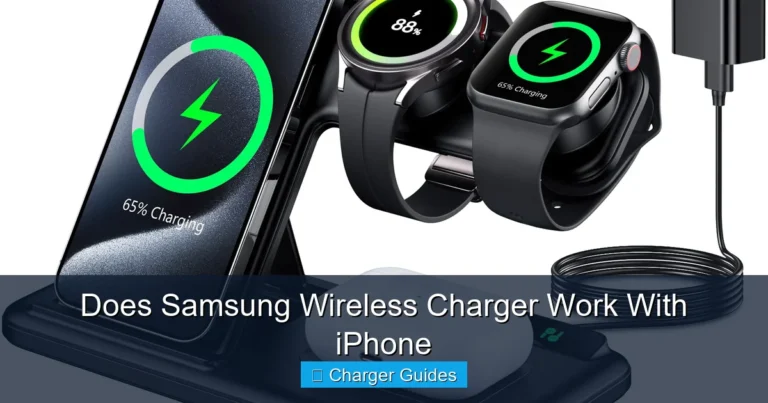
Wireless chargers come in different shapes. A flat pad is simple and compact. A stand is easier if you want to see notifications while the phone charges. A multi-device charger is useful if you also charge AirPods or an Apple Watch.
If you want the easiest desk setup, a stand is often the best pick. If you want something small for a nightstand, a pad may be enough.
Check for Qi certification
Always look for Qi certification when possible. It is a good sign that the charger follows the common standard and is more likely to work well with the iPhone 11 Pro.
That does not mean every certified charger is perfect, but it is a smart starting point. It lowers the chance of weird charging issues.
Think about your daily routine
Choose the charger that fits how you use your phone. If you spend hours at a desk, a stand makes sense. If you charge overnight, a pad may be enough. If you travel a lot, you may want something compact and easy to pack.
If you are shopping on a budget, it helps to compare options carefully. Our guide on what budget chargers work with iPhone can help you narrow things down.
Do not ignore cable length and adapter quality
Even with wireless charging, the base charger still needs power. Some products include a wall adapter, but some do not. Make sure you know what is in the box before you buy.
A poor adapter can make a good charger feel slow. It is a small detail, but it matters in real life.
Common Problems and Simple Fixes
The phone is not charging
If your iPhone 11 Pro is not charging wirelessly, first check the alignment. Move the phone slightly and wait a few seconds. Make sure the charger is plugged in and the outlet works.
Next, remove the case and try again. A thick or metal-heavy case can block charging. Also check for dust, coins, or other objects on the pad.
Charging is slow
Slow charging usually comes from weak power, poor alignment, heat, or a low-quality charger. Start by testing another outlet or another charger if you have one.
If the phone is hot, let it cool for a bit. Wireless charging often slows down when temperatures rise. That is normal, but it can be annoying.
The charger disconnects often
If charging keeps stopping, the phone may be moving too much. This happens a lot with car mounts and soft surfaces like beds or couches. A stable charging surface helps a lot.
Also, check the charger cable and adapter. Sometimes the problem is not the phone at all. It is the power source.
Final Verdict: Is Wireless Charging Worth It on the iPhone 11 Pro?
So, does iPhone 11 Pro have wireless charging? Yes, it does, and it works well for everyday use. It is one of those features that feels small at first, but becomes very handy once you start using it daily.
If you want convenience, a cleaner setup, and less cable plugging, wireless charging is worth using. If you want the fastest possible charge, wired charging is still better. For most people, the best answer is to use both.
My recommendation is simple: get a good Qi-certified wireless charger for home or desk use, and keep a cable nearby for quick top-ups. That gives you the best of both worlds. The iPhone 11 Pro wireless charging feature is not the fastest, but it is very useful, easy to live with, and still a smart part of the phone experience.
Frequently Asked Questions
Yes, the iPhone 11 Pro has wireless charging built in. It supports the Qi wireless charging standard, so you can use many different wireless pads and stands.
Any Qi-certified wireless charger should work with the iPhone 11 Pro. A pad, stand, or dock can all be good options as long as the charger is made well and gets enough power.
Yes, wireless charging is usually slower than wired charging. It is better for convenience and everyday use, while a cable is better when you need power fast.
Yes, a thick case or one with metal parts can block wireless charging or make it less reliable. Thin plastic or silicone cases usually work much better.
Not by itself. The bigger issue is heat, so a good charger and normal charging habits are important. If the phone stays cool and the charger is reliable, wireless charging is generally fine.
This often happens because the phone is not lined up properly, the case is too thick, or the charger is weak. Try adjusting the position, removing the case, and checking the power adapter.

Tech & Gadget Reviewer
Ethan Walker is a tech enthusiast and gadget reviewer with over 8 years of hands-on experience testing consumer electronics, smart home devices, and cutting-edge accessories. He helps readers make smarter buying decisions through honest, in-depth reviews.