Best Jeep Wrangler Backup Camera Options for Easy Parking
The best Jeep Wrangler backup camera is the one that matches your Wrangler year, trim, and display setup. For most buyers, a well-fitted universal kit offers the best balance of value, ease, and everyday visibility.
A good Jeep Wrangler backup camera makes parking, hitching, and tight-space maneuvering much easier, but the best option depends on your Wrangler year, trim, and how clean you want the install to look. For most buyers, the right choice comes down to whether you want OEM-style integration, a mirror or dash display, or a simple aftermarket kit that solves visibility without major modification.
- Fit first: Wrangler year, trim, and head unit compatibility matter more than flashy specs.
- Choose by use: Daily driving, off-road use, and tight-parking needs call for different camera types.
- Check the display: A good camera is only useful if the screen placement is easy to see.
- Protect reliability: Weather resistance, secure mounting, and clean wiring matter on a Jeep.
Best Jeep Wrangler Backup Camera Options for Easy Parking: What Actually Matters in 2026
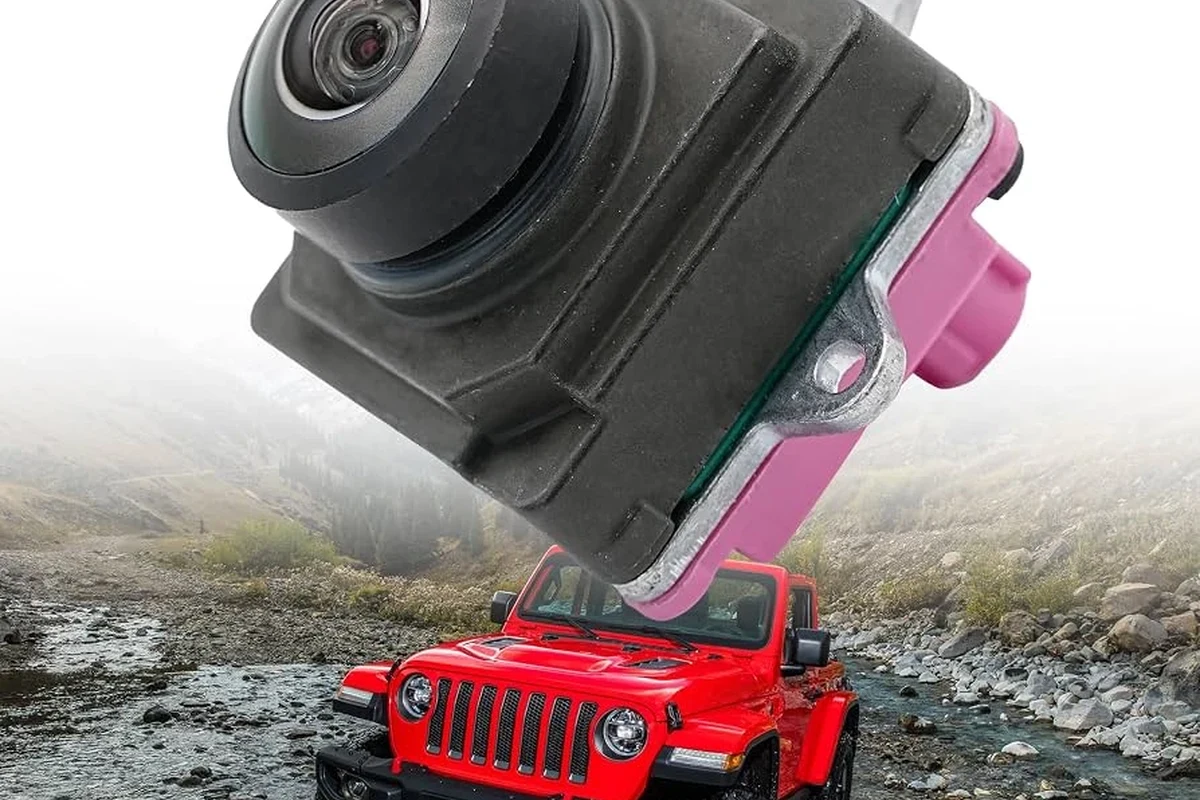
Quick answer: the best choice depends on your Wrangler year, trim, and whether you want a factory-style screen, mirror display, or aftermarket wireless kit
If you want the simplest path, choose a camera system that matches your Wrangler’s existing display or head unit. If your Jeep already has a compatible screen, an OEM-style integration usually looks the cleanest; if not, a mirror display or wireless kit can be easier to add.
The best option is the one that fits your vehicle’s wiring, mounting location, and daily use. A camera that looks great on paper can still be frustrating if it does not match your Wrangler generation or if the display is too small to help in real parking situations.
How a backup camera improves parking, visibility, and low-speed maneuvering
A rear camera helps reduce blind spots behind the Jeep, especially when the spare tire blocks part of the view. That matters in parking lots, narrow driveways, trailheads, and anywhere you need to back up slowly and accurately.
It also helps with trailer hitch alignment and checking whether a curb, post, or low obstacle is behind you. For newer drivers or anyone moving a taller vehicle in tight spaces, the camera is often more useful than mirrors alone.
How Jeep Wrangler Backup Cameras Work and Which Wrangler Models They Fit
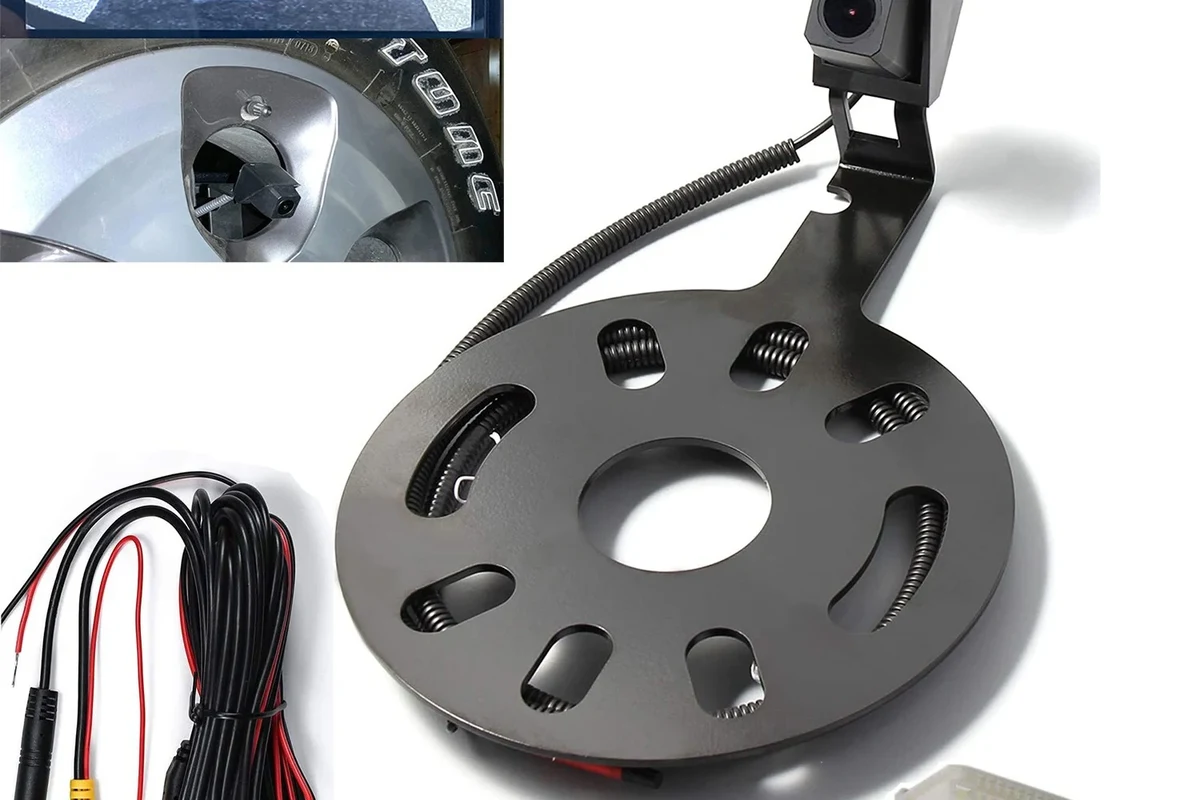
Compatibility by Wrangler generation: JK, JL, and 2026-ready aftermarket setups
Wrangler compatibility is not one-size-fits-all. JK and JL models often use different factory wiring, tailgate layouts, and display integration, so the same camera kit may fit one generation and not the other without adapters or extra parts.
For 2026-ready aftermarket setups, the key question is whether the camera connects to a factory head unit, an aftermarket radio, a mirror monitor, or a standalone screen. Always confirm the exact year range and trim compatibility on the manufacturer’s fitment chart before buying.
Wrangler trims, special editions, and infotainment packages can change camera compatibility even within the same model year. Check the official vehicle manual and the camera maker’s compatibility list before ordering.
Factory integration vs. universal kits: what changes in installation and daily use
Factory-style systems usually offer the cleanest look and the most seamless operation, but they can be more dependent on specific trim packages or head unit support. Universal kits are more flexible, but they may require extra wiring, a separate display, or more careful placement.
In daily use, factory integration tends to feel more natural because the image appears where you expect it. Universal kits can still work very well, especially if you value easier replacement or want to avoid replacing the entire infotainment system.
Who benefits most: daily drivers, off-road owners, new drivers, and tight-parking city use
Daily drivers benefit because the camera reduces stress in parking garages and crowded lots. Off-road owners benefit when they need to reverse around rocks, ruts, or trailers at low speed.
New drivers and city drivers often benefit the most because the Wrangler’s rear visibility is limited compared with smaller vehicles. If you regularly park in tight spaces, a backup camera is less of a luxury and more of a practical visibility upgrade.
Key Specs to Compare Before Buying a Jeep Wrangler Backup Camera
Resolution, field of view, low-light performance, and parking guidelines
Resolution affects how clearly you can see edges, obstacles, and curb lines. Field of view matters too: a wider view helps with awareness, while a narrower view can make distance judgment easier for some drivers.
Low-light performance is important if you park in dim garages or drive at night. Parking guidelines can also help, but they are only useful if the camera and display are properly calibrated for your Jeep’s mounting angle.
If you rely on parking lines, choose a system that lets you adjust or disable them. Misaligned guidelines can be more confusing than helpful when the camera sits high on the spare tire or tailgate.
Wired, wireless, and OEM-style connection types: reliability vs. convenience
Wired systems are usually preferred for reliability because they are less dependent on signal quality. Wireless systems can be easier to install, but they may be more sensitive to interference, distance, and vehicle layout.
OEM-style connections are often the most polished when supported, though they usually require the correct vehicle trim or compatible head unit. The best choice depends on whether you value long-term stability, installation simplicity, or a factory-like result.
Screen size, display placement, and whether you need a separate monitor or head unit compatibility
Some kits use the existing infotainment screen, while others include a mirror display or a dash-mounted monitor. Bigger is not always better; a display that is too large or poorly placed can distract you instead of helping.
If your Wrangler’s head unit does not support camera input, a separate monitor may be the most practical route. Mirror displays are often popular because they keep the camera view near your line of sight without taking over the dashboard.
Weather resistance, dust protection, and vibration tolerance for Jeep use
Wranglers are exposed to more dust, mud, rain, and vibration than many road-focused vehicles. That means the camera housing, connectors, and mount matter just as much as image quality.
Look for weather-resistant construction and secure mounting hardware, then verify that the cable routing will stay protected from pinch points and trail debris. A camera that works well in a clean garage may not hold up if the mount loosens after rough roads or repeated tailgate movement.
- Confirm Wrangler year, trim, and head unit compatibility
- Check whether the kit is wired, wireless, or OEM-style
- Verify display placement, cable length, and mount location
- Review weather resistance, return policy, and installation requirements
Best Jeep Wrangler Backup Camera Types: Comparison of Common Options
License plate-mounted cameras
License plate-mounted cameras are often the simplest universal option. They are usually easy to position and can work well if you want a straightforward upgrade without replacing major parts.
Spare tire-mounted and rear-mount cameras
These are especially relevant for Wranglers because the spare tire can block part of the rear view. A spare tire-mounted camera can provide a more centered perspective, but the mount must be secure enough to handle vibration and movement.
Mirror display kits and dash-mounted monitor kits
Mirror displays are attractive for drivers who want a camera view close to normal sight lines. Dash-mounted monitors are more flexible and can be easier to add to vehicles without compatible factory screens.
Factory-style OEM replacement solutions
OEM-style solutions are best for buyers who want the cleanest appearance and the most integrated feel. They may cost more or require more careful compatibility checking, but they often deliver the least cluttered result.
Transparent verdict: which type offers the best value, easiest install, and cleanest look
| Option | Best For | Key Consideration |
|---|---|---|
| License plate-mounted | Simple universal installs | May look less integrated |
| Spare tire-mounted | Wrangler rear visibility | Mount stability matters |
| Mirror or dash monitor | Easy viewing without head unit changes | Display placement affects convenience |
| OEM-style replacement | Factory-like appearance | Compatibility can be limited |
For most Wrangler owners, the best value is usually a system that balances compatibility and practical visibility rather than chasing the highest spec sheet number. The easiest install is often a universal mirror or dash kit, while the cleanest look usually comes from OEM-style integration.
Installation and Setup Guide for a Jeep Wrangler Backup Camera
What tools and parts you may need before starting
Common installation needs may include basic hand tools, trim tools, mounting hardware, cable clips, and possibly a compatible display or head unit adapter. The exact parts vary by kit, so review the box contents and installation guide before you start.
- Camera and mount
- Power and video cables or wireless transmitter components
- Display, mirror monitor, or adapter if included
- Installation manual and vehicle-specific hardware, if provided
Typical wiring path, power source choices, and reversing signal setup
Most wired systems need a power source, a video path, and a reverse trigger or signal so the display knows when to turn on. The exact wiring path depends on the camera location and whether the system is tied to the tailgate, rear lighting, or infotainment unit.
Keep wiring protected from moving parts, sharp edges, and moisture exposure. If you are unsure about the reverse signal or vehicle-specific wiring, consult the official manual or a qualified installer rather than guessing.
Wireless pairing steps, app or head-unit requirements, and common compatibility checks
Wireless kits usually require pairing between the camera transmitter and the display or receiver. Some systems rely on a dedicated monitor, while others may need a compatible app or head unit input.
Before installation, confirm the supported phone, operating system, or receiver version if the kit uses software. Compatibility can vary by firmware, app version, and vehicle electronics, so it is worth checking the latest manufacturer notes.
When professional installation is worth the cost
Professional installation can be worth it if you want a factory-like result, if your Wrangler requires more complex wiring, or if you are not comfortable routing cables through a tailgate or interior trim. It can also reduce the chance of loose mounts and electrical mistakes.
If your kit depends on infotainment integration or custom adapters, a professional may save time and frustration. That said, a simple universal kit is often manageable for careful DIY buyers who follow the instructions closely.
Take photos of the wiring path before closing trim panels. That makes future troubleshooting much easier if you ever need to inspect a connector or replace a cable.
Real-World Benefits, Limitations, and Common Mistakes to Avoid
Parking confidence, trailer hitch alignment, and safer backing in crowded areas
The biggest benefit is confidence. A camera can make backing into a space, aligning a hitch, or checking clearance behind the Jeep much less stressful.
It also helps in crowded neighborhoods, school pickup areas, and trail parking lots where pedestrians, pets, and low obstacles may be harder to spot from the driver’s seat.
Limitations in rain, mud, glare, night driving, and extreme off-road conditions
Backup cameras are useful, but they are not perfect. Rain, mud, glare, and bright sun can all reduce clarity, and night performance depends on the camera’s sensor and lighting conditions.
Off-road use adds more challenges because vibration, dust, and trail grime can obscure the lens or loosen mounts. A camera should support your driving, not replace careful mirror checks and situational awareness.
Common mistakes: poor camera angle, loose mounting, ignoring calibration, and choosing the wrong Jeep year fit
A badly angled camera can make objects look farther away or too close. Loose mounting can cause shaking, while poor calibration can make parking guidelines inaccurate.
The most avoidable mistake is buying the wrong fit for your Wrangler year or trim. Always verify the compatibility chart, especially if your Jeep has a different factory screen, tailgate setup, or special package.
Stop using damaged cameras, frayed cables, loose mounts, or overheating display hardware. Follow the manufacturer’s instructions and replace any part that no longer stays secure or shows a stable image.
Evidence limits: why product claims should be verified against specs, reviews, and vehicle compatibility charts
Camera listings often emphasize wide viewing angles, night vision, or easy installation, but real usefulness depends on your Jeep and your setup. Those claims should be checked against the actual specs, compatibility chart, and current user feedback.
When a detail is not clearly stated, treat it as unverified until you confirm it with the manufacturer or retailer. That is especially important for model-year fitment, display support, and weather resistance claims.
Maintenance, Care, and Safe Use for Long-Term Reliability
Cleaning the lens, checking mounts, and inspecting cables or connectors for wear
Clean the lens gently with a soft, non-abrasive cloth so dust and road film do not reduce visibility. Check the mount regularly, especially after off-road driving or repeated tailgate use.
Inspect cables and connectors for wear, pinching, or corrosion. Small problems can turn into signal dropouts later, so it is better to catch them early.
Heat, moisture, and UV exposure: what to watch for over time
Jeep accessories live in a harsh environment. Heat, moisture, and UV exposure can age plastics, weaken adhesives, and affect seals over time.
If the camera housing starts to fog, crack, or lose alignment, that is a sign to inspect the system more closely. Long-term reliability usually depends more on installation quality and protection from the elements than on the camera alone.
How to troubleshoot blurry video, signal dropouts, and reversed image issues
Blurry video is often caused by a dirty lens, misalignment, or moisture on the housing. Signal dropouts may point to a loose connector, weak wireless pairing, or cable damage.
If the image is reversed or the guidelines do not match the vehicle’s movement, check the display settings and installation orientation first. If the problem remains, consult the manual rather than trying unsafe electrical changes.
Replacement guidance: when to repair, rewire, or upgrade to a newer system
If only the mount or cable is failing, repair or replacement of that part may be enough. If the display is outdated, the fitment is wrong, or the camera no longer holds a stable signal, a full upgrade can be the better long-term choice.
When you upgrade, prioritize compatibility and durability over flashy features. A dependable system that fits your Wrangler well is usually more valuable than a higher-resolution option that is hard to install or maintain.
Final Buying Recommendation: Best Jeep Wrangler Backup Camera for Different Needs
Best overall value for most Jeep Wrangler owners
A reliable universal kit with a clear display and solid weather resistance is the best value for most Wrangler owners because it balances price, flexibility, and practical visibility. The main tradeoff is that it may not look as integrated as an OEM-style setup.
Best for easy DIY installation
Mirror display kits and simple universal wireless systems are often the easiest for DIY buyers because they avoid the complexity of full infotainment integration. They are a strong choice if you want a quick visibility upgrade and do not want to replace major vehicle components.
Best for off-road durability and weather resistance
For off-road use, prioritize a camera with secure mounting, protected wiring, and a housing designed to handle dust, vibration, and moisture. Spare tire-mounted or rear-mounted solutions can work well if the installation is stable and the lens remains easy to clean.
Best premium pick for a clean, factory-style setup
If appearance and seamless operation matter most, an OEM-style solution is the premium route worth considering. It usually offers the cleanest look, but only if your Wrangler trim and head unit are fully compatible.
The best Jeep Wrangler backup camera is the one that matches your model year, display setup, and driving routine. For most buyers, a well-reviewed universal kit offers the best mix of value and usability, while OEM-style integration is the right choice for drivers who want the most polished finish.
Frequently Asked Questions
For most owners, the best choice is a camera that matches the Wrangler year, trim, and display setup. A universal kit often gives the best value, while OEM-style integration is best for a factory-like look.
No, fitment varies by Wrangler generation, trim, and infotainment package. Always check the manufacturer’s compatibility chart and your vehicle manual before buying.
Wired systems are usually more reliable, while wireless systems are often easier to install. The better choice depends on whether you value signal stability or installation convenience.
Many universal kits are manageable for careful DIY installation, especially mirror or dash monitor setups. If the system needs complex wiring or infotainment integration, professional installation may be worth it.
Check year and trim compatibility, display support, mounting location, weather resistance, and whether the kit is wired or wireless. Also confirm return policy and installation requirements.
Clean the lens regularly, inspect mounts and cables, and watch for moisture, heat, or vibration damage. If the image becomes blurry or unstable, check the manual and replace worn parts promptly.