Eyeball Camera Guide for Better Security and Coverage
An eyeball camera is a smart security camera with an adjustable rounded mount that makes aiming easier. It is best for buyers who want flexible coverage in entryways, garages, hallways, and other tight spaces.
An eyeball camera is a security camera with a rounded, adjustable housing that lets you aim the lens more freely than many fixed designs. For homeowners and smart-home users, that flexibility can make it easier to cover doors, corners, driveways, and other awkward spaces without needing a full camera redesign.
- Flexible aim: The rounded mount helps you point the lens where coverage matters most.
- Check before buying: Compare resolution, lens angle, app requirements, storage, and power method.
- Placement matters: Height, glare, weather exposure, and motion zones can make or break performance.
- Maintenance counts: Clean the lens, inspect cables and mounts, and keep firmware updated.
Eyeball Camera Explained: What It Is and Why It’s Used for Better Home Security
An eyeball camera usually refers to a compact security camera with a ball-and-socket style mount. The lens sits inside a rounded housing, so you can tilt and rotate it to point where you want coverage, then lock it into place. That simple design is why it shows up in many indoor and outdoor security setups.
In smart homes, eyeball cameras are often used as part of a broader monitoring system. They may connect to a mobile app, a recorder, or a cloud service, depending on the model. The main appeal is practical: instead of relying on a camera that only faces one direction, you can fine-tune the viewing angle to match the room or exterior layout.
How an eyeball camera works in a smart home setup
The camera captures video through a lens mounted inside a rounded shell. You adjust the shell by hand during installation, then the camera stays aimed at the chosen area. Many models also support motion detection, infrared night vision, two-way audio, or app-based alerts, but those features vary widely by brand and firmware.
In a smart home, the camera may send clips to an app, a local microSD card, a network video recorder, or a cloud subscription. Before buying, it is worth checking the official compatibility list, supported storage methods, and whether the camera needs a specific app or account to function fully.
Who this type of camera fits best in 2026
An eyeball camera fits buyers who want adjustable coverage without moving to a more complex pan-tilt system. It is especially useful for people securing entryways, side yards, garages, apartment doors, or indoor spaces with unusual angles.
It also suits users who prefer a relatively simple setup and do not need the camera to constantly pan around on its own. If you want a set-and-hold angle that can be aimed precisely, this style is often easier to plan around than a fixed-lens dome or bullet camera.
Key Features to Compare Before You Buy
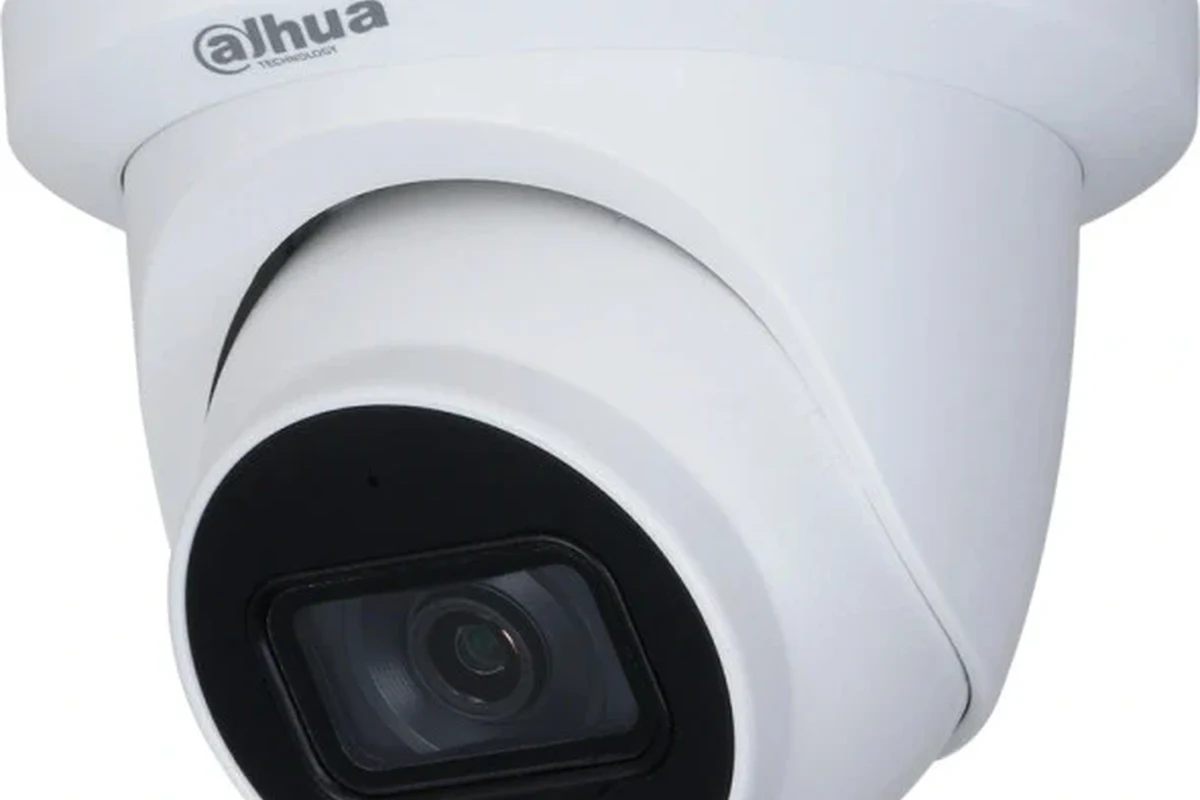
Not every eyeball camera is built the same, so the best choice depends on how and where you plan to use it. The most important comparison points are image quality, mounting flexibility, app support, storage, and power requirements.
- Check the exact model number, app requirement, and storage options
- Confirm indoor or outdoor rating, mounting style, and cable length
- Review warranty terms, privacy settings, and firmware update support
Resolution, lens angle, and low-light performance
Resolution affects how much detail the camera can capture, but it is only one part of image quality. Lens angle matters just as much, because a wider view can cover more space while a narrower view may show faces or license plates more clearly at a distance. Low-light performance is also important if the camera will be used at dusk, overnight, or in dim hallways.
When comparing models, check whether the manufacturer provides a field-of-view range, night-vision description, or sensor details in the official spec sheet. If those numbers are missing or vague, treat the camera as a layout-dependent product and rely on the return policy as part of your decision.
Dimensions, mounting style, and indoor vs. outdoor use
The rounded body may look compact, but the actual footprint can vary a lot by model. Measure the intended mounting spot before buying, especially if the camera will sit under an eave, on a narrow wall section, or near a doorway where clearance matters.
Indoor and outdoor versions are not interchangeable unless the manufacturer says they are. Outdoor models usually need weather resistance, secure cable routing, and materials that can tolerate temperature swings and moisture. Indoor models may be smaller and easier to install, but they are not designed for exposed areas.
Connectivity, app requirements, and storage options
Some eyeball cameras work with Wi-Fi and a phone app, while others may integrate with a hub, recorder, or smart-home platform. Before purchase, confirm whether the app is required for setup, whether the camera supports local recording, and whether cloud storage is optional or mandatory for alerts and playback.
If you rely on a specific ecosystem, verify compatibility with your router band, phone operating system, and smart-home platform. App store listings, manufacturer compatibility pages, and current firmware notes are the safest places to confirm this information.
Power needs, rated wattage, cable quality, and heat limits
Eyeball cameras may be powered by a plug-in adapter, low-voltage wiring, PoE, or a battery system depending on the design. Check the rated input, included adapter type, and cable length before installation so you do not end up stretching a cable or using the wrong power source.
Cable quality matters because damaged insulation, loose connectors, or poor routing can create reliability and safety problems. If the manual specifies heat limits, outdoor operating ranges, or approved adapters, follow those instructions closely and stop using any damaged cable or overheating power accessory.
Use only the power adapter, cable type, and mounting method listed by the manufacturer. If you notice frayed wiring, cracked insulation, heat buildup, or water intrusion, stop using the camera and follow the official support guidance.
Real-World Benefits and Coverage Advantages
The main reason people choose an eyeball camera is coverage control. The adjustable housing gives you more freedom to aim the lens exactly where the risk or activity is most likely to happen.
How the rounded “eyeball” design improves aim and flexibility
The rounded mount makes it easier to fine-tune the camera after installation. That is useful when a wall stud, soffit, or corner does not line up perfectly with the area you want to watch. Instead of accepting a slightly off-center view, you can usually make small aiming changes and lock the camera in place.
This flexibility is especially helpful in homes with uneven layouts, tight corners, or mixed indoor-outdoor transitions. It can also reduce the need for extra brackets or awkward repositioning later.
Where it adds value over fixed-lens security cameras
Compared with a fixed-lens camera, an eyeball camera is easier to aim at a specific target. That can be a better choice when you want to watch a doorway, a stair landing, a driveway edge, or a side gate rather than monitor a broad open area.
Fixed-lens cameras can still be excellent when the location is simple and the angle is already ideal. But when the mounting point and the area you need to monitor do not line up neatly, the adjustable design often saves time and frustration.
If you are deciding between camera styles, sketch the space first. Mark the mounting point, the target area, and any glare sources so you can see whether an adjustable eyeball design gives you a real advantage.
Best use cases for entryways, hallways, garages, and side yards
Entryways benefit from the ability to aim at faces and package drop zones. Hallways often need a slightly angled view to avoid dead space near corners. Garages can be tricky because shelves, vehicles, and open doors create changing sight lines, so adjustability helps.
Side yards and narrow exterior passages are also strong use cases, especially when the camera needs to look down a long path rather than straight out from the wall. In each case, the goal is the same: place the lens where it can see the most important activity with the fewest blind spots.
Limitations, Trade-Offs, and Common Mistakes
Eyeball cameras are flexible, but they are not perfect. Coverage can still be limited by placement, lighting, weather, or user setup.
Blind spots, glare, and weather exposure concerns
Even an adjustable camera can leave blind spots if it is mounted too high, pointed too steeply, or blocked by trim, railings, or plants. Glare from windows, porch lights, or reflective surfaces can also reduce image clarity, especially at night.
For outdoor use, check the camera’s environmental rating and the manufacturer’s guidance for exposure. A camera that is technically outdoors-capable may still perform poorly if it is placed where rain, direct sun, or condensation regularly hits the lens.
Privacy risks and overreliance on motion alerts
Motion alerts are convenient, but they are not a complete security plan. Pets, shadows, headlights, and passing traffic can trigger unnecessary notifications, which makes it easier to miss important activity later.
Privacy is the other side of the equation. A camera that sees too much of a neighbor’s property, shared hallway, or interior living space can create avoidable concerns. It is better to aim carefully and limit detection zones than to depend on constant alerts.
Installation errors that reduce coverage or image quality
Common mistakes include mounting too high, aiming straight into a light source, ignoring cable strain, and skipping app-based motion zone setup. Another frequent issue is assuming the live view matches the recorded view without checking the actual playback settings.
Small errors can have a big effect. A slight angle change can improve face capture, reduce glare, or keep the camera from watching empty pavement instead of the area that matters.
App features, motion detection behavior, and recording options can change with firmware updates. Always confirm the current manual and app settings for your exact model before relying on a feature for home security.
Setup Guide: Installing and Positioning an Eyeball Camera Safely
Good installation matters as much as the camera itself. A well-placed unit can outperform a higher-spec model that is aimed poorly or connected incorrectly.
Choosing the right height, angle, and field of view
Start by deciding what you want the camera to see: faces, deliveries, vehicles, or general movement. Then choose a height that balances visibility with tamper resistance. If the camera is too high, it may miss details; if it is too low, it may be easier to block or disturb.
Angle the lens so the primary subject enters the frame naturally. For example, a front door camera should usually capture the approach path, not just the doormat. Test the view from the app before tightening the mount fully.
Use the app preview or a temporary mount position to confirm what the lens can see before final installation.
Make small adjustments until the main subject area is centered and glare is minimized.
Powering the unit, checking cable condition, and verifying safe operation
Use only the approved power method listed in the manual. Before plugging in, inspect the cable, connector, and adapter for damage, and make sure the route will not pinch the wire or expose it to water where it should not be.
If the camera is hardwired or PoE-based, follow the official installation instructions or a qualified installer’s guidance. Do not modify connectors or power equipment beyond what the manufacturer allows.
App setup, Wi-Fi pairing, and connectivity checks
During setup, confirm that your phone is on the supported operating system version and that the camera is connecting to the correct Wi-Fi band if the model requires one. A weak signal can cause delays, dropped clips, or unreliable notifications.
After pairing, verify login protection, notification permissions, and account recovery options. If the camera supports shared access, review who can view live video and who can change settings.
- Rename the camera by location so alerts are easier to identify.
- Test the live view at day and night before finishing installation.
- Keep the app updated so compatibility and security fixes are current.
Testing night vision, motion zones, and recording settings
Night vision can look very different from daytime footage, so test it after dark if possible. Check whether the camera switches to infrared automatically and whether the image still shows useful detail at the distance you need.
Motion zones should be adjusted to ignore sidewalks, roads, fans, or busy background areas when possible. That can reduce unnecessary alerts and make the camera more useful over time.
Maintenance, Cleaning, and Long-Term Care
Like any smart-home device, an eyeball camera works best when it is checked periodically. Regular maintenance helps preserve image quality and catches problems before they become failures.
How to clean the lens, housing, and mounting points
Use the cleaning method listed in the manual. In general, a soft microfiber cloth is safer than rough fabric, and a gentle wipe is better than heavy pressure. Avoid harsh chemicals unless the manufacturer explicitly approves them.
Also clean the housing and mounting area so dust, pollen, or spider webs do not interfere with the view. Outdoor cameras often need more frequent attention because weather and debris can build up faster.
What to inspect regularly for wear, moisture, or loose fittings
Check the lens window, cable entry point, mount screws, and bracket for looseness or visible wear. Moisture inside the housing, repeated fogging, or corrosion around connectors are signs to review the installation and contact support if needed.
If the camera shifts over time, the view may drift away from the intended target. A quick physical check every so often can prevent coverage loss without requiring a full reinstall.
Stop using damaged electronics, swollen batteries, frayed cables, overheating chargers, or unstable mounts and follow the manufacturer’s guidance.
Storage guidance, firmware updates, and replacement timing
If your camera uses local storage, follow the card or recorder guidance in the manual and replace worn media when the manufacturer recommends it. If it uses cloud storage, review retention settings and subscription terms so you know how long clips are kept.
Firmware updates can improve stability or security, but they should be installed from the official app or vendor site only. If the camera becomes unreliable, loses support, or shows persistent hardware issues, replacement may be more practical than repeated troubleshooting.
Safety, Privacy, and Warranty Details to Verify
Security cameras should make your home safer, not create avoidable risk. That means checking placement, data handling, and support terms before you commit to a model.
Safe placement around doors, windows, and shared spaces
Be careful not to point the camera directly into private indoor spaces, neighboring windows, or shared areas where expectations of privacy are higher. A narrow, intentional view is usually better than a broad, indiscriminate one.
For outdoor placement, make sure the camera does not interfere with door operation, lighting fixtures, or emergency access. If you share walls or common areas, review building rules before mounting anything permanent.
Data security, app permissions, and account protection
Use a strong password and enable two-factor authentication if the vendor supports it. Review app permissions so the camera only accesses what it needs, and keep the account tied to an email address you can still reach.
Also check whether the manufacturer publishes update notes, privacy documentation, and account recovery steps. Those details matter if you ever need to move the camera to a new phone or recover access after a device reset.
Warranty terms, support coverage, and what to confirm before purchase
Before buying, read the warranty length, what it covers, and whether the company requires registration or original proof of purchase. Support quality can matter as much as features if the camera depends on an app or cloud service.
Confirm whether replacement parts, mounting accessories, and software support are available for the exact model. If the vendor does not clearly document these details, factor that uncertainty into your buying decision.
Final Verdict: Is an Eyeball Camera Worth It in 2026?
For many smart-home buyers, yes—an eyeball camera is worth considering if you want adjustable coverage in a compact form. Its strength is not flashy automation; it is the ability to aim the lens precisely where your home needs it most.
Best buyer profile and ideal scenarios
This style is a strong fit for homeowners, renters, and small-business users who need a practical camera for entryways, garages, hallways, or side yards. It is also a good choice if you want a camera that is easier to position than a fixed model but less complicated than a motorized pan-tilt unit.
Most important decision pointChoose an eyeball camera when aim and placement matter more than automatic movement.
When to choose an alternative camera style instead
Choose a different style if you need very wide-area coverage, automatic tracking, or a camera that will be mounted in a location where the view is already straightforward. A fixed-lens model may be simpler, and a pan-tilt camera may be better if you want remote directional control.
If you are still undecided, compare the official specs, app requirements, mounting options, and warranty terms before buying. The right camera is the one that fits your layout, your privacy expectations, and your long-term maintenance comfort.
An eyeball camera is a smart pick for buyers who want flexible aiming and dependable coverage in tight or awkward spaces. If your installation area needs broad movement or advanced automation, another camera style may be the better match.
Frequently Asked Questions
An eyeball camera is used to monitor specific areas with adjustable aiming. It is a strong fit for entryways, garages, hallways, and other spaces where precise coverage matters.
It can be better when you need flexible aiming after installation. A fixed camera may still be the better choice if your mounting point already lines up with the area you want to watch.
Check resolution, lens angle, low-light performance, mounting style, app requirements, storage options, and power method. Also confirm the model’s indoor or outdoor rating and warranty terms.
Aim it at the main path of activity, not just the nearest wall or floor area. Test the live view in the app, then adjust height and angle to reduce glare and blind spots.
Clean the lens and housing with the manufacturer’s approved method, and check the mount, cable, and connector for wear. Keep firmware updated through the official app or vendor instructions.
Review where the camera points, who can access the app, and whether two-factor authentication is available. Also confirm warranty coverage, support options, and any official safety or recall notices before buying.