How to Wear a Neck Fan for Cool Comfort Anywhere
Wear a neck fan centered and snug enough to stay put, with the airflow aimed toward your face and neck. Choose a model that fits your neck, stays comfortable, and matches your noise and battery-life needs.
If you want to know how to wear a neck fan, the basic idea is simple: place it so the air outlets sit just below or beside your jawline, then adjust the fit until the unit feels balanced and the airflow reaches your face and neck without bouncing around. A good neck fan should feel secure, not tight, and it should cool you without getting in the way of walking, working, or commuting.
This guide explains what a neck fan does, how to wear one correctly, and what to check before buying so you can get comfortable cooling without common mistakes. Because fit and performance vary by model, always confirm the manufacturer’s manual and specs for your exact device.
- Fit first: A neck fan should stay balanced without pressing into your skin or slipping forward.
- Angle matters: Aim the vents upward toward your cheeks and neck for better personal cooling.
- Use the lowest useful speed: Start low, then increase only if you need more airflow.
- Check charging details: Confirm the port, cable type, and power-bank compatibility before relying on it.
- Maintain it regularly: Wipe dust, inspect the port, and stop using the fan if it overheats or.
How to Wear a Neck Fan: The Quick Answer for Instant Comfort
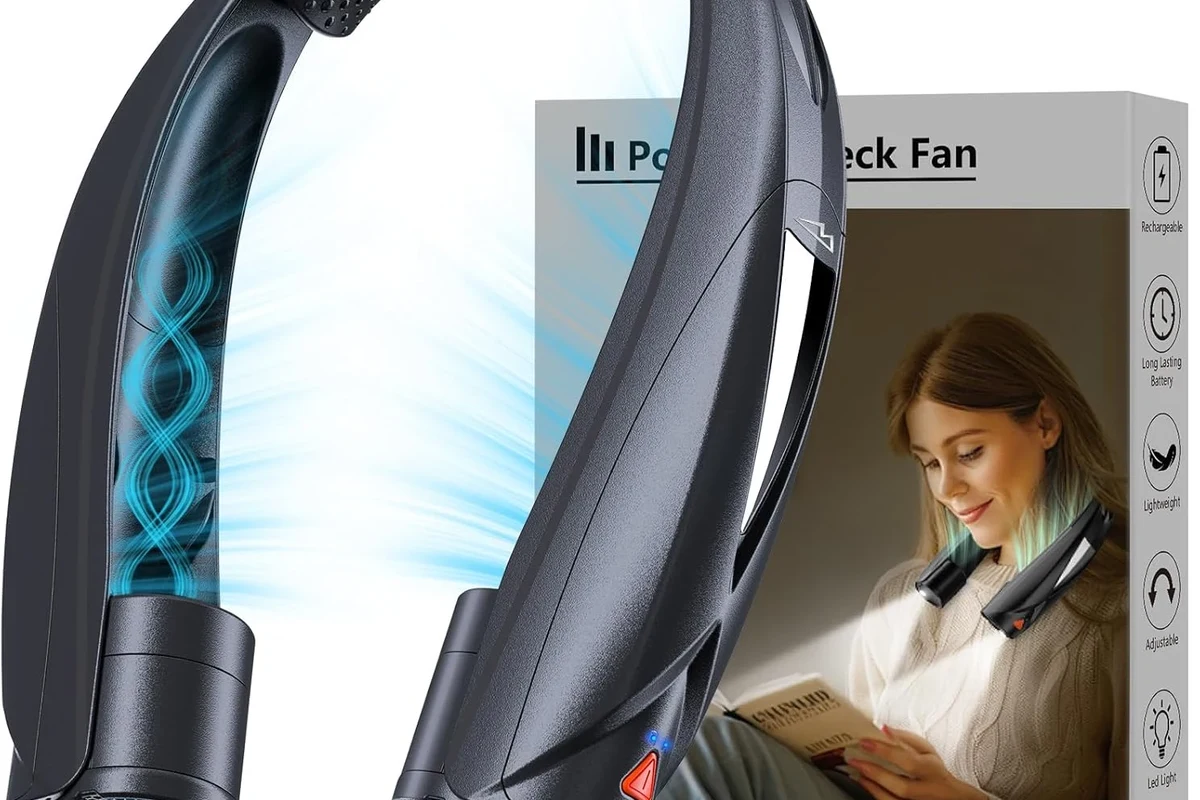
Wear a neck fan like a lightweight collar with the air outlets aimed toward your cheeks, jaw, or the sides of your neck. Start on a low speed, center the device so it rests evenly, and adjust the arms or strap until it stays in place when you move.
The best setup is usually close enough to feel the airflow but not so tight that the housing presses into your skin or clothing. If your model has multiple modes, use the lowest setting that still gives you useful cooling, especially indoors or in light activity.
What a Neck Fan Is and How It Actually Works
A neck fan is a wearable personal fan designed to sit around the neck and blow air upward toward the face and upper body. It does not cool the room; it creates a small pocket of moving air around you, which can make heat feel more manageable.
Airflow Design, Motor Placement, and Hands-Free Cooling
Most neck fans use two fan heads or air outlets that point upward from either side of the neck. The motor, battery, and controls are usually built into the body of the unit, so you can use it hands-free while keeping your arms free for errands, chores, or travel.
Airflow design matters because some models focus on strong directional cooling while others spread air more gently. The right choice depends on whether you want a stronger breeze for outdoor use or quieter, softer airflow for desk work or indoor comfort.
Personal fans can improve comfort by moving air across your skin, but they do not lower the actual room temperature the way air conditioning does.
Battery Power, Charging Basics, and Safe Runtime Expectations
Most neck fans run on rechargeable batteries and charge through a USB cable, though the exact port and charging behavior vary by model. Runtime depends on fan speed, battery size, age, and whether you use one side or both sides of the fan at full power.
Before relying on a neck fan for a long outing, check the manual for typical runtime guidance and charging time. If you plan to use a power bank, confirm that the fan supports the cable type and input requirements listed by the manufacturer.
Use only the charger, cable, and power source recommended for your model when possible. Stop using the device if the battery swells, the unit overheats, the cable frays, or charging becomes inconsistent.
Choosing the Right Neck Fan for Your Body and Routine
The best neck fan is the one that fits your neck comfortably, stays stable during movement, and gives enough airflow without becoming noisy or heavy. Buying based only on appearance can lead to a fan that slips, rubs, or feels awkward after a short time.
Neck Size, Weight, Fit, and Comfort Considerations
Fit is the first thing to check because a fan that is too loose may shift out of position, while one that is too tight can feel distracting or press on the skin. Look for adjustable arms, flexible hinges, or a shape that matches your neck and shoulder width.
Weight also matters more than many shoppers expect. A lighter fan may be easier for all-day wear, but it still needs enough structure to stay balanced and direct airflow where you want it.
- Check compatibility, model number, app requirements, dimensions, ports, wattage, and intended use
- Confirm safety guidance, warranty, return policy, privacy settings, and update support
Blade Style, Noise Level, Adjustable Speeds, and Portability
Some neck fans use exposed blades behind protective grilles, while others use bladeless or enclosed designs. The main practical difference for most buyers is not just safety perception, but how the fan feels, how much noise it makes, and how easily it fits in a bag.
If you’ll wear it in an office, library, classroom, or shared space, prioritize quieter operation and lower-speed settings. If you expect outdoor use, adjustable speeds and stronger airflow may matter more than ultra-compact size.
Noise, airflow strength, and battery life can change significantly by model and firmware version, so manufacturer claims should be treated as model-specific rather than universal.
Battery Life, Cable Quality, Wattage, and Power Bank Compatibility
Battery life is only useful if the charging setup is reliable. Check whether the fan uses USB-C, Micro-USB, or another connector, and make sure the cable feels sturdy enough for regular travel and daily charging.
Wattage and power-bank compatibility are worth verifying because some portable chargers may not work well with every device. If the fan is picky about input power or cable type, follow the manual rather than assuming any USB source will do.
For broader charging safety context, it can also help to review whether budget chargers are safe to use and whether multi-port chargers are safe to use before choosing a charging setup for travel or home use.
Step-by-Step: How to Put On and Adjust a Neck Fan Correctly
Putting on a neck fan correctly is mostly about balance, airflow direction, and comfort. The goal is to keep the fan centered and stable so it cools you evenly without slipping forward, rubbing your collarbone, or brushing against your hair.
Positioning the Fan for Stable, Even Airflow
Set the unit gently on your neck so the main body sits centered and the air outlets point upward on both sides.
Make sure it does not tilt forward, hang too low, or press into the front of your throat or collarbone.
Turn your head slightly and see whether the fan stays stable and keeps the airflow aimed where you need it.
Getting the Angle, Speed, and Strap Fit Right
Once the fan is in place, adjust the angle of each side so the airflow reaches your face and neck instead of blowing downward into your shirt. If your model has a strap or flexible arms, tighten or loosen them just enough to prevent slipping without creating pressure points.
Start with the lowest speed and increase only if you need more airflow. A lower setting often feels better for indoor wear, while a stronger setting may help more in direct sun, warm kitchens, or during light activity.
If the fan feels uneven, try repositioning it slightly higher on the neck rather than tightening it more. Small placement changes often improve comfort more than adding pressure.
Best Ways to Wear a Neck Fan in Daily Life and Outdoor Activities
Neck fans are most useful when you want personal cooling without holding a device in your hand. They work best as a comfort accessory during warm conditions, not as a replacement for shade, hydration, or proper heat safety.
Commuting, Walking, Travel, Yard Work, and Light Exercise
For commuting and walking, a neck fan can help reduce that sticky, overheated feeling when air is still. For travel, it can be useful in airports, train stations, and long lines where you may not control the temperature.
For yard work and light exercise, choose a model that stays secure as you move and does not become annoying when you bend, reach, or turn your head. If you sweat heavily, wipe the unit down after use and avoid letting moisture collect near the vents or charging port.
Indoor Use for Home Office, Cooking, and Warm Rooms
Indoors, neck fans are often most helpful in home offices, kitchens, dorm rooms, or warm bedrooms where you want personal airflow without turning up the AC. They are especially useful when you need to cool one person rather than the entire room.
If you wear one while cooking, keep it away from steam, grease splatter, and open flames. For desk work, quieter models tend to be more comfortable during long sessions and less distracting in calls or meetings.
For related home and office gadget planning, you may also find this guide to smart lights as an investment useful if you are trying to improve comfort in a warm room without relying only on portable cooling.
Safety Tips, Common Mistakes, and When Not to Use One
Most neck fan problems come from poor fit, ignored battery warnings, or using the device in situations it was not designed for. A little caution goes a long way, especially with wearable electronics that sit close to your skin and hair.
Heat, Skin Contact, Hair Entanglement, and Sweat Management
A neck fan should feel comfortable against the skin, not hot or abrasive. If the housing gets warm during use, take a break and check the manual’s guidance on normal operating temperature.
Long hair, scarves, lanyards, and loose clothing can interfere with the fan or get caught near moving parts on some designs. Keep hair tied back when needed, and avoid wearing accessories that can drift into the airflow path.
Stop using damaged electronics, swollen batteries, frayed cables, overheating chargers, or unstable appliances and follow the manufacturer’s guidance.
Charging Safety, Overheating Checks, and Replacement Guidance
Charge the fan on a stable surface and keep it away from water, bedding, and direct sunlight while charging. If the battery area, cable, or charging port feels unusually hot, unplug it and inspect the device according to the manual.
Replacement guidance varies, but a fan that no longer holds a charge, shuts off unexpectedly, or develops physical damage may be due for replacement rather than continued use. When in doubt, check the warranty terms, support documentation, and any current safety notices from the manufacturer.
If you are dealing with moisture near electronics, our guide on how to get water out of an iPhone charging port is a useful reminder of why drying and inspection matter before plugging anything in.
Maintenance, Cleaning, and Storage for Longer Lifespan
Regular care helps a neck fan stay quieter, cleaner, and more reliable. You do not need complicated maintenance, but you do need to keep dust, sweat, and charging wear from building up over time.
Wiping Dust, Inspecting Ports, and Caring for the Battery
Use a soft, dry cloth or the cleaning method recommended in the manual to remove dust from the vents, exterior, and contact points. Avoid soaking the device unless the manufacturer explicitly says it is water-resistant and safe to clean that way.
Inspect the charging port and cable periodically for grime, looseness, or visible wear. For battery care, follow the brand’s guidance on storage charge, charging intervals, and whether the device should be left plugged in after it reaches full charge.
Storage Habits, Travel Packing, and Signs It Needs Replacement
Store the fan in a cool, dry place and avoid crushing it under heavy items in a bag. If you travel with it often, a small protective pouch can help prevent scratches, bent arms, or debris getting into the vents.
Signs that a neck fan may need replacement include reduced battery life, inconsistent speed, unusual noise, cracked housing, or charging problems that return after cleaning and cable checks. If the model has firmware or app features, confirm whether the manufacturer offers updates or support before deciding it is failing.
Is a Neck Fan Worth It in 2026? Final Buying Advice
A neck fan is worth considering if you want personal cooling that is hands-free, portable, and easy to use in situations where a desk fan or room fan is impractical. It is less compelling if you need strong whole-room cooling, very long runtime, or a device that will replace proper heat management.
Who Benefits Most, Key Trade-Offs, and Transparent Recommendation
Neck fans tend to make the most sense for commuters, travelers, remote workers, students, pet owners, gardeners, and anyone who wants a lightweight way to feel cooler in warm spaces. They are especially useful when you need a quick comfort boost without carrying a larger gadget.
The trade-offs are worth keeping in mind: fit can be awkward for some neck shapes, noise may be noticeable at higher speeds, and battery life varies a lot by model and setting. If you buy one, choose based on comfort, verified charging details, noise tolerance, and your real routine rather than marketing claims alone.
- Wear the fan centered and balanced, with airflow aimed toward your face and neck.
- Choose a model that matches your neck size, noise tolerance, and daily use case.
- Follow the manual for charging, cleaning, and battery care, especially if the device gets warm or shows wear.
Before you buy, confirm the exact model’s dimensions, charging port, runtime claims, and warranty support so you know it fits your routine. If those details line up with your needs, a neck fan can be a simple and useful comfort gadget.
Frequently Asked Questions
It should sit centered and balanced, with the air outlets aimed upward toward your face and neck. It should feel secure without pressing into your throat, collarbone, or jaw.
It should be snug enough to stay in place but not so tight that it causes pressure points. If the fan shifts a lot, adjust the angle or fit before tightening it further.
Yes, many people wear them while walking, commuting, or doing light activity. Choose a stable model and avoid using it in situations where it could catch on hair, clothing, or gear.
They are generally meant for personal cooling, but long wear time depends on fit, heat, and battery condition. Stop using the device if it becomes unusually hot, uncomfortable, or damaged.
Wipe it with a soft, dry cloth or follow the manufacturer’s cleaning instructions. Avoid getting moisture into the vents or charging port unless the manual says the device is water-resistant.
Check neck fit, weight, noise, battery life, charging port type, and whether the fan is comfortable for your routine. Also confirm the warranty, return policy, and any model-specific safety guidance.