

Best Gate Camera for Home Security and Smart Monitoring
The best gate camera is the one that fits your gate layout, power source, Wi‑Fi strength, and storage preference. For most homes, reliability and app quality matter more than flashy extras.
A good gate camera gives you more than a view of who is at the entrance. It should fit your gate layout, connect reliably to your home network, and provide the kind of alerts and recording that actually help you respond faster.
- Fit first: Match the camera to your gate distance, mounting surface, and power access.
- Check connectivity: Strong Wi‑Fi and a stable app are essential for alerts and live view.
- Compare storage: Decide whether cloud, microSD, or hub-based recording fits your needs.
- Mind placement: Height, angle, and lighting affect identification quality more than specs alone.
- Verify support: Confirm firmware updates, warranty terms, and compatibility before buying.
Best Gate Camera for Home Security and Smart Monitoring: What to Buy in 2026
Quick answer: the best gate camera depends on your gate layout, power source, Wi‑Fi strength, and whether you need live alerts, two-way talk, or local recording
The right choice is usually the model that matches your installation constraints first and your feature wish list second. A strong gate camera for most homes is one that can see the approach clearly, send dependable notifications, and keep working through weather, weak light, and routine network hiccups.
Who this guide is for: homeowners, renters, and small property owners comparing smart gate security options
This guide is for anyone comparing a gate camera for a front entrance, driveway, side gate, apartment entry, or shared access point. It is also useful if you want to understand which features matter before you buy, rather than paying extra for smart-home extras you may never use.
How a Gate Camera Works and Why It Matters for Home Security
A gate camera is a security camera positioned to monitor the entry point of a property. In practice, it helps you identify visitors, deliveries, vehicles, and unexpected movement before someone reaches the door or enters the yard.
Core functions: motion detection, live view, night vision, two-way audio, and app notifications
Most gate cameras combine motion detection with a live video feed and push alerts to a phone app. Many also include night vision, two-way audio, and event clips so you can see what happened without scrolling through hours of footage.
Camera placement often matters more than resolution alone. A well-angled 2K camera can be more useful than a poorly placed higher-resolution model.
Common installation styles: wired, battery-powered, solar-assisted, and hardwired doorbell-style setups
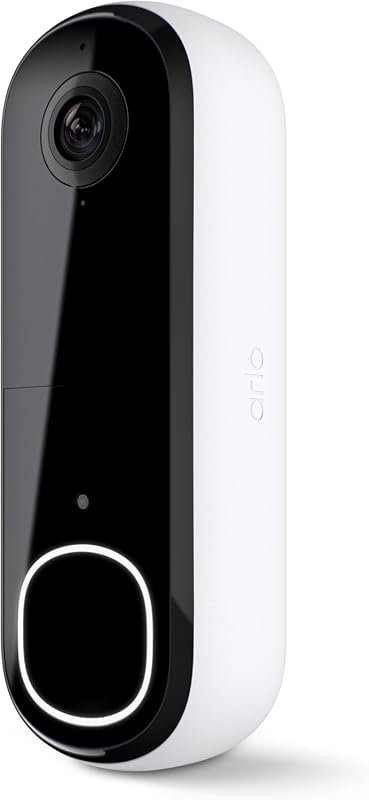
Wired models usually offer steadier power and can be better for high-traffic entrances. Battery-powered and solar-assisted options are often easier to install, while doorbell-style systems can work well when the gate is close enough to the home or a compatible chime location.
Battery life, charging time, and solar performance vary widely by model, motion frequency, temperature, and how often the live view is used. Always confirm the manufacturer’s estimate for your specific setup.
Where gate cameras fit in a layered security setup with lights, locks, and video doorbells
A gate camera works best as part of a larger system, not as the only protection. Pairing it with good lighting, strong locks, and a video doorbell can improve visibility and make it easier to identify whether someone is approaching, lingering, or leaving a package behind.
Key Buying Criteria: Specifications That Actually Affect Performance
When comparing models, focus on the details that affect everyday use rather than marketing language. The most important questions are whether the camera can see the right area, stay connected, and store footage in a way that fits your habits and privacy preferences.
Video quality: resolution, field of view, HDR, and low-light performance
Resolution helps with detail, but it is only one part of image quality. A wider field of view can cover more of the gate approach, HDR can help balance bright sunlight and shadows, and strong low-light performance matters if your entrance is dim or backlit at night.
Connectivity and app requirements: Wi‑Fi band support, Bluetooth setup, cloud plans, and local storage compatibility
Connectivity is often the difference between a reliable camera and a frustrating one. Check whether the camera supports 2.4 GHz Wi‑Fi, 5 GHz Wi‑Fi, or both, whether Bluetooth is used for setup, and whether the app requires a subscription for event history, person detection, or advanced alerts.
Power and installation needs: battery life, rated wattage for wired models, cable quality, weatherproofing, and mounting flexibility
Power planning should be part of the buying decision, not an afterthought. For wired or hardwired models, confirm the required voltage or wattage range in the manual; for battery models, confirm charging method and access; and for any outdoor unit, check weather resistance, mounting options, and whether the included hardware fits your wall, post, or gate material.
Use only manufacturer-approved power accessories and inspect cables, connectors, and mounts regularly. Stop using any camera or charger that shows frayed wiring, overheating, swelling, or water intrusion.
Smart features to verify: person detection, vehicle detection, package alerts, geofencing, and voice assistant support
Smart detection can reduce false alerts, but only if the feature is accurate enough for your environment. Person, vehicle, and package detection may vary by firmware and subscription tier, while geofencing and voice assistant support depend on the app ecosystem and your phone settings.
Best Use Cases: Which Type of Gate Camera Fits Your Property
The best gate camera for one property may be a poor fit for another. Layout, distance, lighting, and access to power all shape which design is the most practical choice.
For front gates and driveways: wide-angle coverage and fast push alerts
Front gates and driveways usually benefit from cameras with a broad view and dependable motion alerts. If vehicles and visitors enter from several angles, look for a model that can cover the full approach without forcing you to install multiple units.
Front entrances with active foot and vehicle traffic, where a wide field of view and quick app notifications matter most.
For apartment entrances and shared spaces: compact designs, privacy controls, and easy removal
Shared environments call for more careful placement and stronger privacy controls. A compact, removable camera with adjustable activity zones may be better than a larger system that records areas beyond your own entry point.
For long driveways, side gates, and rural homes: stronger night vision, better range, and local backup recording
Longer distances usually expose weak night vision, unstable Wi‑Fi, and motion detection that triggers too late. In these setups, local backup recording and a stronger network plan can matter as much as image quality.
If the camera is far from your router, check whether your home network needs a mesh node, outdoor access point, or wired backhaul before blaming the camera itself.
For renters and temporary setups: no-drill mounting, battery operation, and portability trade-offs
Renters often need a camera that can be removed without damage. Battery power and no-drill mounts simplify installation, but those conveniences may come with shorter runtime, more frequent charging, or reduced mounting stability compared with permanent setups.
Top Features That Improve Real-World Security and Convenience
Feature lists can look similar across brands, but a few functions have outsized impact in daily use. The goal is to choose the features that help you react faster and review events more easily.
Two-way audio, sirens, and spotlight deterrence
Two-way talk lets you greet visitors or warn off unwanted activity without opening the gate. Built-in sirens and spotlights can also discourage lingering, though their effectiveness depends on visibility, placement, and whether neighbors are likely to be affected by the alert.
Smart automation: routines with lights, locks, and alarm systems
Automation can make a gate camera more useful than a standalone device. For example, a motion event can trigger exterior lights, send a notification, or activate a compatible alarm routine, but exact integrations vary by platform and app version.
Storage options: cloud subscriptions versus microSD or hub-based local recording
Cloud storage is convenient for remote access and off-site backup, but it may require a paid plan. Local storage through microSD cards or a hub can reduce recurring costs, though it usually depends on camera compatibility, card quality, and your willingness to manage files and backups.
- Cloud storage is easier to access remotely, while local storage can reduce subscription dependence.
- Check whether local recording continues during Wi‑Fi outages or only when the network is available.
- Confirm storage limits, overwrite behavior, and export options before relying on the system.
Privacy and security controls: encryption, user permissions, and activity zones
Privacy controls matter because a gate camera often faces public or semi-public space. Look for account protection features such as strong passwords, two-factor authentication, user permissions, and activity zones that limit alerts to the areas you actually want to monitor.
Limitations, Common Mistakes, and Safety Considerations
Even a well-reviewed camera can underperform if it is installed poorly or used with unrealistic expectations. A careful buyer checks the environment, the app, and the support policies before committing.
Common buying mistakes: weak Wi‑Fi assumptions, poor mounting height, and ignoring weather ratings
Many setup problems come from assuming the camera will work anywhere the router reaches. Mounting too high can make faces hard to identify, mounting too low can create tampering risk, and ignoring weather ratings can shorten the life of the device in rain, dust, or temperature extremes.
Safety and legal use: avoiding blind spots, respecting neighbor privacy, and checking local recording rules
A gate camera should cover your property without unnecessarily capturing neighboring windows, yards, or shared walkways. Before mounting, review local rules and building policies that may affect recording, audio capture, or placement in common areas.
Limits of safe use for powered models: inspecting cables, connectors, battery swelling, heat buildup, and replacing damaged power accessories promptly
Outdoor electronics need routine inspection. If a battery swells, a cable frays, or a power adapter runs unusually hot, stop using the device and follow the manufacturer’s guidance for replacement or disposal rather than trying to keep it in service.
Do not continue using damaged electronics, swollen batteries, frayed cables, or overheating chargers. Replace compromised parts promptly and use only approved accessories for the model.
Evidence limits: why app ratings, specs, and manufacturer claims should be weighed against independent reviews
Official specifications are useful, but they do not always predict real-world performance in every home. App reviews, firmware notes, warranty terms, and independent evaluations can reveal issues such as notification delays, unstable pairing, or subscription limits that are not obvious from the product page alone.
Setup, Maintenance, and Long-Term Care
A gate camera is easiest to live with when setup is deliberate and maintenance is simple. A few minutes spent on placement, network checks, and app settings can prevent many common frustrations later.
Basic setup checklist: app installation, account creation, network pairing, and motion-zone calibration
Use the manufacturer’s app listing and confirm it matches your camera model and region.
Use a strong password and enable two-factor authentication if the app supports it.
Follow the manual for Wi‑Fi setup and verify whether the model prefers 2.4 GHz or supports both bands.
Limit alerts to the gate approach so you reduce false notifications from roads, trees, or passing neighbors.
Mounting and placement tips: height, angle, sun exposure, and signal strength
Mount the camera high enough to reduce tampering but low enough to preserve facial detail. Avoid direct glare when possible, aim for stable Wi‑Fi signal strength, and check how the camera behaves at different times of day before finalizing the position.
- Test the live view from your phone before drilling permanent holes.
- Check night footage after dark, not just daytime preview images.
- Leave enough room to remove the battery or access the charging port if needed.
Routine maintenance: lens cleaning, firmware updates, battery charging cycles, seal inspection, and storage checks
Outdoor cameras need occasional care to stay dependable. Clean the lens gently, keep firmware up to date through the official app, inspect seals after storms, and check whether local storage cards or hubs are still recording correctly.
When to replace parts or upgrade: aging batteries, worn mounts, unstable connectivity, and discontinued app support
It may be time to upgrade when batteries no longer hold a useful charge, mounts loosen, or the app becomes unreliable on newer phones. Discontinued software support is especially important because a camera that no longer receives updates may lose features or become harder to secure over time.
Final Recommendation: How to Choose the Best Gate Camera for Your Home
The best gate camera is the one that fits your property, power access, and app expectations with the fewest compromises. Reliability, image placement, and software support matter more than flashy extras that look good in a product listing but do little in daily use.
Best overall choice for most homes
For most households, the best overall gate camera is a well-supported model with dependable Wi‑Fi, clear night footage, two-way audio, and either flexible local storage or a reasonably priced cloud plan. That combination usually offers the best balance of security, convenience, and long-term usability.
Best value pick for budget-conscious buyers
Budget-conscious buyers should prioritize a camera with solid motion alerts, decent low-light performance, and simple installation over premium automation features. A lower-cost model can be a smart buy if it fits the gate layout and avoids expensive subscription dependence.
Best premium option for advanced smart monitoring
For advanced smart monitoring, look for a premium gate camera with stronger detection options, better app controls, richer automation support, and more flexible storage choices. The best premium option is the one that integrates cleanly with your existing smart-home setup and still feels easy to manage.
Transparent verdict: prioritize reliability, app quality, and installation fit over marketing extras
If you are choosing between several similar models, start with compatibility, then compare app quality, then compare image quality and storage. A gate camera that installs cleanly, stays connected, and gives you trustworthy alerts will usually deliver more real security than a feature-heavy model that is awkward to mount or inconsistent in daily use.
Frequently Asked Questions
The best gate camera for most homes is one that matches your power source, Wi-Fi strength, and gate layout. Prioritize reliable alerts, clear night vision, and an app you are comfortable using.
Not always. Some cameras support local storage through a microSD card or hub, while others work best with a cloud plan for easy remote access and event history.
Very important, especially if the gate is far from the router. Weak signal can cause delayed alerts, dropped live view, or unreliable recordings.
Look for good low-light performance, infrared or color night vision, and a mounting angle that avoids glare from lights or reflective surfaces. Night results vary by model and placement.
Yes, if they choose battery-powered or no-drill mounting options. Renters should also confirm lease rules and plan for easier removal when moving out.
Check compatibility, Wi-Fi band support, power requirements, weather rating, storage options, app requirements, and warranty terms. Also review the official manual and current software support notes.


One Comment