Does Qi2 Work Through a Phone Case Explained
Yes, Qi2 can work through many phone cases, especially slim magnetic ones. Thick, metal-heavy, or poorly aligned cases can reduce speed, increase heat, or cause charging to stop.
Yes—Qi2 usually works through a phone case, as long as the case is thin enough, properly aligned, and made from materials that do not interfere with magnetic wireless charging. The catch is that not every case is equally friendly to Qi2, so the best results depend on case design, magnet placement, and the charger you use.
If you are shopping for a new case or trying to fix inconsistent charging, the details below will help you understand what works, what causes trouble, and what to verify before you buy.
- Best fit: Slim magnetic cases usually give the most reliable Qi2 charging.
- Main limitation: Thick or metal-heavy cases can weaken alignment and increase heat.
- What to verify: Check your exact phone model, case support, and charger power requirements.
- Good habit: Test charging with and without the case to isolate the problem.
- Safer choice: Stop using damaged cables, overheating chargers, or loose accessories.
Does Qi2 Work Through a Phone Case? Quick Answer and What It Means for You
Qi2 is designed to charge through many phone cases, but “works through a case” does not mean “works through any case.” In practice, a case needs to let the phone sit close enough to the charger and keep the charging coils lined up well enough for the connection to stay stable.
That matters because wireless charging is sensitive to distance and alignment. A slim case with a clean magnetic ring can charge very differently from a thick rugged case, a case with metal parts, or a case that shifts the phone slightly off-center.
- Qi2 can charge through many cases, but thickness and alignment matter.
- Magnetic cases are usually the most reliable choice for stable charging.
- Bulky, metal-heavy, or poorly aligned cases can reduce speed or cause heat.
How Qi2 Wireless Charging Works Through Cases
Qi2 uses magnetic alignment to help place the phone in the right position on the charger. That alignment is the big improvement for case users, because it reduces the small placement errors that often make wireless charging inconsistent.
Magnetic alignment, coil positioning, and why case thickness matters
Wireless charging works when the charger coil and phone coil are close and centered. A case adds distance between those coils, and even a small increase can reduce efficiency or make the charger work harder.
Magnetic alignment helps because it pulls the phone into the correct position more consistently. If the case has a built-in magnetic ring or is designed to match the charger’s magnetic layout, the phone is less likely to slide out of place on a desk, nightstand, or car mount.
If charging feels inconsistent, remove the case once and compare behavior. If the phone charges normally without the case, the case is likely the source of the issue.
Qi2 vs. standard Qi: what changed for case compatibility
Standard Qi charging can work through cases too, but it often depends more on exact placement. Qi2 improves the experience by using magnetic alignment features that make positioning easier and more repeatable.
For case compatibility, that usually means fewer “dead spots,” fewer shifts during charging, and less need to nudge the phone into place. It does not eliminate all limitations, though. A thick or poorly designed case can still interfere with charging speed and heat management.
What Phone Cases Are Compatible with Qi2 Charging?
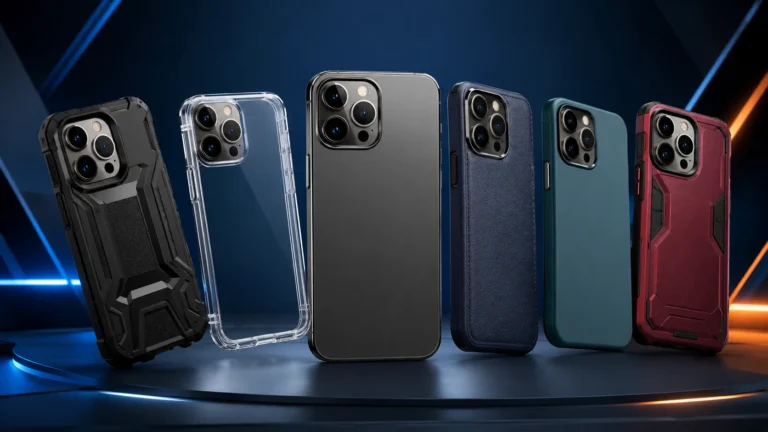
The safest answer is that cases designed for magnetic wireless charging are the most compatible. That includes cases marketed for Qi2, MagSafe-style cases, and some magnetic ring cases made to keep the phone centered on the charger.
MagSafe-style cases, Qi2-certified cases, and magnetic ring cases
MagSafe-style cases are often a good fit for Qi2 because they use the same basic idea: a magnetic ring that helps the phone align with the charger. Qi2-certified cases should be checked against the manufacturer’s compatibility details, since certification and support can vary by phone model and region.
Magnetic ring cases can also work well if the ring is correctly positioned and the materials are wireless-charge friendly. The important part is not the label alone, but whether the case is actually designed to support magnetic alignment without adding too much thickness.
Materials that can reduce charging performance or create heat
Some materials are more likely to cause trouble. Thick leather, dense rugged plastics, metal plates, built-in kickstands with metal parts, and accessories that add extra layers between the phone and charger can all reduce efficiency.
Heat is another concern. If a case traps heat or makes the charger work harder, charging may slow down or stop temporarily. That is usually not a sign that Qi2 is broken; it is often the phone protecting itself from excess temperature.
If a phone, charger, or case becomes unusually hot, stop charging and let everything cool down. Do not keep using damaged cables, swollen batteries, or chargers that overheat.
Best Use Cases: Who Benefits Most from Qi2 Through a Case?
Qi2 through a case is most useful for people who want quick, easy placement and fewer charging mistakes. It is less about raw speed and more about making wireless charging more dependable in daily life.
Everyday users, commuters, and desk chargers
Everyday users tend to benefit the most because they usually want a simple “drop and charge” setup. If you charge on a desk, nightstand, or kitchen counter, magnetic alignment can save time and reduce the annoyance of repositioning the phone.
Commuters also benefit if they use car mounts or portable charging stands that rely on magnets. A case that supports Qi2-style alignment can make those setups feel more secure and less fiddly.
Heavy phone users, gamers, and people with thicker protective cases
Heavy phone users may appreciate Qi2 because it reduces wear on the charging port compared with constant cable use. That said, if the phone is in active use while charging, heat can build faster and charging may slow down.
Gamers and people with thick protective cases should be more selective. A rugged case may protect the phone better, but it can also make wireless charging less efficient. In those setups, a wired charger may still be the better choice for long, high-demand sessions.
Key Buying Criteria: How to Choose a Case and Charger That Actually Work Well
If you want Qi2 to work well through a case, the case and charger need to match in more than just branding. Focus on thickness, magnet strength, official support, and the power source behind the charger.
- Check compatibility, model number, app requirements, dimensions, ports, wattage, and intended use
- Confirm safety guidance, warranty, return policy, privacy settings, and update support
Case thickness, magnet strength, and official Qi2 certification
Thinner cases generally make wireless charging easier, but thin alone is not enough. The case should also hold the phone in the correct position without slipping, and the magnets should be strong enough for your daily use.
Official Qi2 certification, when available, is worth verifying because it gives you a clearer compatibility signal than vague marketing language. If certification is not listed, check the manufacturer’s compatibility notes for your exact phone model, since support can vary.
Charger wattage, cable quality, and power adapter requirements
Qi2 charging performance depends on the charger, the cable, and the power adapter feeding the charger. A weak adapter or poor-quality cable can cause slower charging, unstable power delivery, or intermittent behavior.
Do not assume every USB-C cable or wall adapter will deliver the same result. Follow the charger’s instructions for the recommended adapter and cable type, and confirm whether the charger needs a specific wattage range to perform as intended.
Phone model compatibility and accessories to avoid
Not every phone supports Qi2 in the same way, and some accessories can interfere with the magnetic connection. Wallet attachments, metal rings, plate-style grips, thick pop-out stands, and certain battery cases can all reduce reliability.
Compatibility can vary by phone model, case design, and firmware version. Check the phone maker’s accessory compatibility page and the charger manufacturer’s current support list before buying.
Real-World Benefits and Limitations of Charging Through a Case
Qi2 through a case is appealing because it combines convenience with a cleaner charging experience. But the real-world trade-offs are important, especially if you care about speed, heat, and long-term accessory durability.
Convenience, alignment accuracy, and reduced wear on ports
The main benefit is convenience. Magnetic alignment makes it easier to place the phone correctly, which is useful in low light, on a crowded desk, or when you are charging while multitasking.
It can also reduce wear on the charging port because you may plug in a cable less often. That is helpful for people who charge frequently and want a lower-friction daily routine.
Wireless charging efficiency drops when the coils are not aligned well, which is why magnetic positioning can make such a noticeable difference.
Common trade-offs: slower speeds, heat buildup, and interrupted charging
Wireless charging through a case can be slower than wired charging, and that gap becomes more noticeable when the case is thick or the phone is under load. Heat buildup is another common trade-off, especially during gaming, navigation, video calls, or hot-weather use.
Interrupted charging can happen if the phone shifts, the magnets are weak, or the charger is placed on a soft surface that changes the angle. If you notice frequent dropouts, the case or charger is often the first thing to review.
- Easier alignment than standard wireless charging
- Less cable wear over time
- Convenient for desks, nightstands, and mounts
- Thick cases can reduce performance
- Heat may increase under heavy use
- Some accessories interfere with magnetic alignment
Safety, Care, and Troubleshooting Tips for Reliable Qi2 Charging
Reliable charging is not just about compatibility. It also depends on keeping the case, charger, and cable in good condition and using them within their intended limits.
How to inspect cases, chargers, and cables for damage or wear
Look for cracks, bent connectors, frayed cables, loose magnets, and warping around the charging area. If a case has a raised edge that has shifted or a magnetic ring that is coming loose, it may no longer align properly.
Chargers should sit flat and remain stable during use. If the charging pad or stand moves easily, the phone may drift out of alignment and stop charging correctly.
Safe use limits, heat management, and when to replace accessories
Keep chargers on hard, ventilated surfaces whenever possible. Soft bedding, blankets, and cluttered surfaces can trap heat and make it harder for the charger and phone to stay within safe operating temperatures.
Replace accessories if they show visible wear, if charging becomes inconsistent after a known-good setup change, or if the manufacturer warns against continued use. Warranty terms and safety notices are worth checking when a charger or case starts acting differently than expected.
Stop using damaged electronics, swollen batteries, frayed cables, overheating chargers, or unstable accessories and follow the manufacturer’s guidance.
Fixing weak charging, misalignment, and connection drops
Start with the simplest checks: remove the case, re-seat the phone, and make sure the charger is connected to the recommended adapter and cable. If charging improves without the case, the case is likely too thick, poorly aligned, or made from an interfering material.
Confirm whether the phone charges normally when case thickness is removed from the equation.
Place the charger on a flat, stable, ventilated surface and center the phone carefully.
Use the adapter and cable recommended by the charger maker, since weak power can mimic a compatibility problem.
Final Verdict: Is Qi2 Worth It Through a Phone Case in 2026?
Qi2 is worth it through a phone case if you want easier alignment, fewer charging mistakes, and a more convenient everyday setup. It is especially appealing for people who use magnetic stands, desk chargers, or car mounts and want a cleaner wireless routine.
Best overall recommendation by user type and case setup
For most people, the best setup is a slim or moderate-thickness case that is explicitly designed for Qi2 or MagSafe-style magnetic charging, paired with a charger that lists clear compatibility for your phone model. That combination gives you the best chance of stable charging without unnecessary heat or dropouts.
When to choose Qi2, when to skip it, and practical alternatives
Choose Qi2 if convenience and alignment matter more than maximum speed. Skip it if you use a very thick rugged case, need the fastest possible top-ups, or frequently charge in situations where heat and movement are hard to control.
If Qi2 is not a good fit, a wired USB-C charger is still the simplest alternative for speed and consistency. For many users, the smartest approach is to keep Qi2 for desks and nightstands while relying on wired charging when battery recovery needs to happen quickly.
Qi2 can work very well through a phone case, but only when the case supports magnetic alignment and does not add too much thickness or heat. If your case is bulky, metal-heavy, or poorly aligned, a wired charger or a different case is usually the better choice.
Frequently Asked Questions
No. Qi2 usually works best through slim, magnetic-compatible cases, while thick or metal-heavy cases can reduce performance or cause heat.
Qi2-certified, MagSafe-style, or magnetic ring cases are usually the most reliable choices. Always verify support for your exact phone model.
Yes. Extra thickness increases the distance between the charger and phone coils, which can reduce efficiency and make charging less stable.
Heat can build up if the phone is misaligned, the case traps heat, or the charger is underpowered. Stop charging if the device becomes unusually hot.
Check the case fit, charger placement, cable, and power adapter first. If charging improves without the case, the case is likely interfering.
Use Qi2 for convenience and easy placement, especially on desks or nightstands. Use wired charging when you need the fastest and most consistent top-up.