Camera Anatomy Explained for Beginners and Creators
Camera anatomy is the map of how a camera captures light and turns it into photos or video. If you understand the main parts, it becomes much easier to choose the right camera and use it well.
Camera anatomy is the simplest way to understand what makes a camera work and which features actually matter for your photos or video. If you know the main parts, you can choose more confidently, set up faster, and avoid paying for specs that do not help your style of shooting.
- Core parts: Lens, sensor, shutter, aperture, screen, battery, and memory card shape how a camera performs.
- Type differences: DSLR, mirrorless, compact, and smartphone cameras trade off control, size, and flexibility.
- Best specs to compare: Autofocus, stabilization, low-light performance, video features, and connectivity often matter most.
- Buying smarter: Check compatibility, battery support, card format, and app requirements before you choose.
- Long-term care: Gentle cleaning, proper storage, and safe battery handling help protect performance.
Camera Anatomy Explained: What Each Part Does and Why It Matters
At a basic level, every camera does the same job: it lets light in, captures that light, and turns it into an image. The difference between camera types is mostly about how those parts are arranged, how much control you get, and how easy the camera is to carry, power, and use in real life.
That is why camera anatomy matters for beginners and creators. Once you understand the lens, sensor, shutter, aperture, screen, battery, and storage system, the spec sheet becomes much easier to read. You can also spot the trade-offs between size, image quality, autofocus speed, and video features before you buy.
How a Camera Works: From Light Entry to Final Image
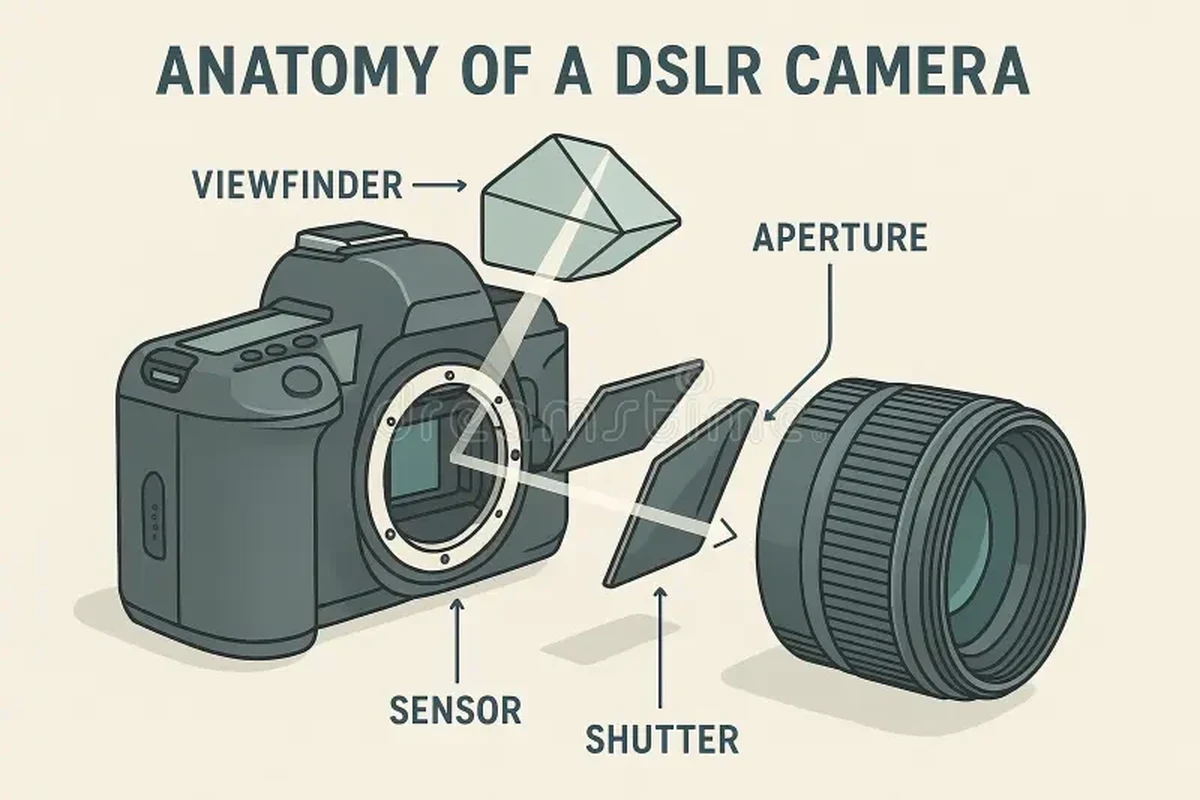
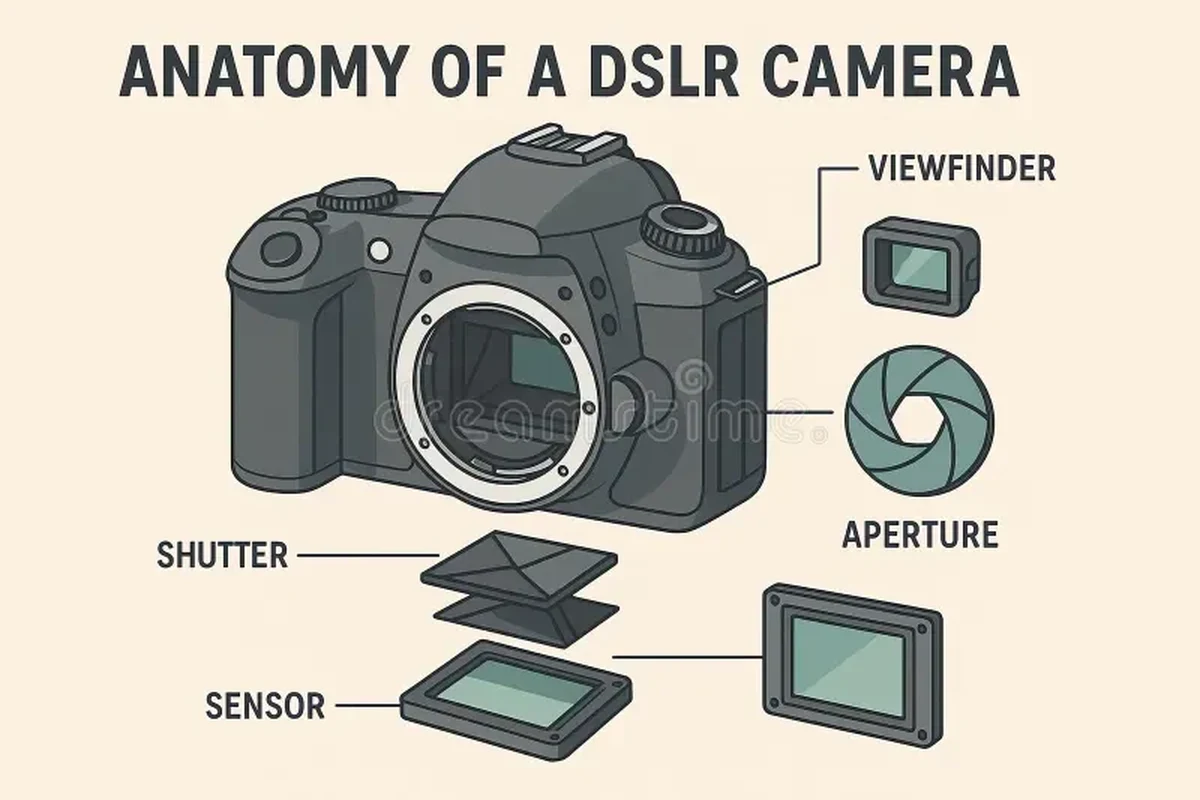
Light enters through the lens, which focuses the scene onto the sensor. The aperture controls how wide that opening is, while the shutter controls how long the sensor is exposed to light. Together, they determine brightness and influence motion blur, depth of field, and image look.
The sensor converts light into digital data, and the camera processor turns that data into a photo or video file. In many cameras, autofocus systems, stabilization, and metering help the camera decide where to focus, how to reduce shake, and how to expose the image. The exact behavior varies by model and firmware, so the official manual is still the best place to confirm how a specific camera handles these features.
Two cameras can have the same megapixel count and still produce very different results because sensor size, lens quality, and processing affect image quality too.
Core Camera Parts Every Beginner Should Know
Before comparing camera styles, it helps to know the parts you will interact with most often. These are the components that shape image quality, handling, battery life, and day-to-day convenience.
Lens, Sensor, Shutter, and Aperture
The lens is the camera’s eye. It gathers light and determines how much of the scene you can capture, how close subjects appear, and how sharp the image can be at different distances. Some cameras have fixed lenses, while others let you swap lenses for wider views, tighter framing, or better low-light performance.
The sensor is the surface that captures the image. Larger sensors often handle low light better and can give more control over background blur, though results still depend on the lens and processing. The shutter works with the aperture to control exposure, and in many cameras the shutter speed also affects how motion looks in stills and video.
If you are learning camera basics, start by understanding aperture, shutter speed, and ISO together. Those three settings explain most exposure changes and help you avoid guessing when light conditions change.
Viewfinder, Screen, and Controls
The viewfinder lets you frame shots by looking through the camera rather than at the rear screen. Optical viewfinders are common on DSLRs, while electronic viewfinders show a digital preview that can reflect exposure and color settings more closely. Rear screens are useful for vlogging, low-angle shots, and menu navigation, but their size, brightness, and articulation vary by model.
Buttons, dials, and touch controls affect how quickly you can change settings. A camera with a simple layout can be easier for beginners, while a more customizable body may suit creators who switch between stills and video. If you plan to use the camera often, handling matters as much as sensor specs.
Battery, Memory Card, and Ports
The battery powers the camera, but real battery life depends on screen use, autofocus activity, video recording, temperature, and wireless features. Memory cards store your photos and clips, and different cameras support different card types and speed classes. For video, especially higher-resolution recording, the card’s write speed can matter a lot.
Ports connect the camera to chargers, microphones, external displays, computers, and sometimes power banks or accessories. USB-C is increasingly common, but not every USB-C port supports the same charging or data behavior. Check the manufacturer’s specifications before buying accessories, because compatibility can vary by model, region, and firmware.
Use only manufacturer-approved charging and power accessories when required, and stop using damaged batteries, swollen batteries, or frayed cables. Heat, moisture, and physical damage can create safety risks and should be handled according to the official manual.
Camera Anatomy by Type: DSLR, Mirrorless, Compact, and Smartphone Cameras
Different camera types use the same basic anatomy, but the layout and priorities change. That is why a camera that feels perfect for one creator may feel awkward or unnecessary for another.
What Changes Between Camera Styles
DSLRs use a mirror and optical viewfinder system, which many photographers still like for the familiar shooting feel and broad lens ecosystems. Mirrorless cameras remove the mirror mechanism, usually making the body smaller and the viewfinder digital. Compact cameras typically have fixed lenses and simpler controls, which can be convenient for travel or casual use.
Smartphone cameras compress all of this into a tiny body with heavy software processing. They are excellent for convenience, quick sharing, and always-available shooting, but they have less physical control and less room for large sensors or interchangeable lenses. The “best” anatomy depends on whether you value portability, flexibility, or manual control most.
- DSLRs and mirrorless cameras usually offer stronger control and lens options.
- Compact cameras are easier to carry and quick to use.
- Smartphones are always ready and highly convenient for everyday moments.
- Interchangeable-lens cameras can require more gear and maintenance.
- Compact cameras may limit creative control.
- Smartphones usually offer less optical flexibility and smaller sensors.
Which Type Fits Different Creators and Skill Levels
Beginners who want a straightforward learning path often do well with a camera that has clear controls, dependable autofocus, and a good automatic mode. Travel creators may prefer a lighter body with strong battery performance and a versatile zoom lens. Gamers, streamers, and remote workers often care more about webcam or video output options, clean HDMI support, and reliable autofocus than about advanced still-photo features.
If you plan to grow into the system, check the lens ecosystem, accessory support, and availability of batteries, grips, microphones, and chargers. A camera body is only part of the long-term setup.
Key Specs and Buying Criteria to Check Before You Choose a Camera
When you compare cameras, do not stop at megapixels. The most useful buying criteria are the ones that affect how the camera performs in your actual environment, such as indoor light, handheld shooting, travel, streaming, or video recording.
Sensor Size, Megapixels, and Low-Light Performance
Sensor size often matters more than megapixel count for everyday image quality. A larger sensor can help with dynamic range and low-light performance, though the lens and image processing still play a major role. Megapixels matter more if you crop heavily, print large, or need extra detail for editing.
For low-light use, look at the whole imaging system: sensor size, lens aperture, noise handling, and stabilization. Manufacturer claims can be helpful, but real-world results vary by scene, subject motion, and camera settings.
Autofocus, Stabilization, Video Features, and Connectivity
Autofocus is one of the biggest quality-of-life features for beginners and creators. Eye detection, subject tracking, and face detection can help with portraits, pets, products, and talking-head video, but performance varies by model and lighting. Stabilization also matters, especially if you shoot handheld or walk while recording video.
Video features to check include resolution, frame rates, microphone input, headphone monitoring, recording limits, overheating behavior, and whether the camera supports external power. Connectivity features such as Wi-Fi, Bluetooth, and app control can make file transfer and remote shooting easier, but app quality and compatibility can differ across phones, operating systems, and firmware versions.
- Check sensor size, lens mount, and autofocus features for your intended use.
- Confirm battery type, charging method, memory card format, and port compatibility.
- Review app requirements, update support, warranty terms, and return policy.
Battery Life, Weight, and Portability Trade-Offs
Battery life is affected by screen brightness, burst shooting, video recording, wireless features, and temperature. A camera that looks strong on paper may drain faster in real use if you rely on live view or long video sessions. Weight and grip shape matter too, especially if you carry the camera all day or use larger lenses.
Portability is not just about the body size. Once you add batteries, memory cards, a charger, and lenses, the total kit can change a lot. That is why many buyers should think in terms of a complete system instead of a single body.
Real-World Benefits and Limitations of Understanding Camera Anatomy
Knowing camera anatomy helps you make better decisions before and after purchase. It also reduces frustration because you can tell whether a problem is caused by the lens, the settings, the battery, the card, or the camera body itself.
How Anatomy Knowledge Improves Shooting Results
When you understand how light enters the camera and how exposure works, you can adjust settings more confidently in changing conditions. You will also know when a lens upgrade is more useful than a body upgrade, or when a tripod, better lighting, or a faster memory card will solve the real issue.
For creators, anatomy knowledge also improves workflow. You can plan for microphone input, external power, battery swaps, storage needs, and file transfer speed before a shoot instead of dealing with surprises later.
If your photos look soft or dark, check the lens cleanliness, focus mode, shutter speed, and ISO before assuming the camera body is the problem. Many beginner issues come from settings or accessories rather than a defective camera.
Common Mistakes Beginners Make When Choosing or Using a Camera
One common mistake is buying based on megapixels alone. Another is choosing a camera that is too complicated for the way it will actually be used. Beginners also sometimes overlook lens costs, memory card requirements, and battery replacements, which can affect the total budget more than the body price.
On the usage side, people often forget to clean the lens, format cards properly in the camera, or keep firmware updated when the manufacturer recommends it. They may also ignore compatibility details for microphones, chargers, or phone apps. Those small oversights can create avoidable frustration.
Safe Use, Care, and Storage for Long-Term Camera Performance
A camera lasts longer when it is stored, cleaned, and powered the right way. Good care also protects image quality, because dust, battery wear, and moisture can affect both performance and reliability.
Cleaning the Lens and Body Without Damaging Components
Use gentle cleaning methods recommended by the manufacturer. A soft brush, blower, microfiber cloth, and proper lens cleaning solution are common tools, but you should avoid harsh chemicals and aggressive wiping. Never spray liquid directly onto the camera or lens.
Pay attention to the sensor only if your camera’s manual explains safe cleaning procedures. Some users are comfortable with in-camera sensor cleaning functions, while others should rely on an authorized service center or professional cleaning, especially if the camera is under warranty.
Battery Handling, Memory Card Care, and Environmental Protection
Store batteries in a cool, dry place and keep contacts clean. If a battery is swollen, damaged, overheating, or behaving unusually, stop using it and follow the manufacturer’s guidance. For memory cards, eject them properly and back up important files regularly so a single card problem does not erase your work.
Protect the camera from rain, sand, dust, and extreme temperatures unless the official specifications say otherwise. Weather resistance is model-specific, not universal, and it usually depends on the whole system, including the lens and ports. If you shoot outdoors often, a protective case, lens hood, and careful storage plan can make a big difference.
Stop using damaged electronics, swollen batteries, frayed cables, overheating chargers, or unstable accessories and follow the manufacturer’s guidance. If you are unsure about a component’s condition, check the manual or contact the brand’s support team before continuing to use it.
Final Recommendation: How to Pick the Right Camera for Your Needs in 2026
The best way to choose a camera is to match the anatomy to your real use case. If you want the simplest path, prioritize a comfortable body, dependable autofocus, and easy controls. If you want to grow creatively, look closely at sensor size, lens options, video tools, and the long-term cost of accessories.
For most beginners, the smartest choice is not the most advanced camera, but the one that makes it easy to shoot often and learn quickly. Before buying, confirm the official specs, lens compatibility, battery and charging details, app support, and warranty terms so you know exactly what you are getting.
- Camera anatomy explains how the lens, sensor, shutter, and controls work together.
- Different camera types trade off portability, flexibility, and ease of use.
- Specs like autofocus, stabilization, battery life, and connectivity often matter more than megapixels alone.
- Care, storage, and compatibility checks help the camera stay reliable over time.
Frequently Asked Questions
The main parts are the lens, sensor, shutter, aperture, viewfinder or screen, battery, memory card, and controls. Each one affects image quality, handling, or workflow in a different way.
Not always, but larger sensors often handle low light and background blur better. Lens quality, autofocus, and processing still matter a lot.
Many beginners prefer mirrorless cameras because they are often smaller and easier to preview through the electronic viewfinder. DSLR systems can still be a good choice if you want optical viewing and a used lens ecosystem.
Look at autofocus, stabilization, microphone input, recording limits, battery support, and connectivity. Resolution matters too, but workflow features often affect real use more.
Clean the lens gently, keep batteries and cards in good condition, and store the camera away from heat, dust, and moisture. Follow the manufacturer’s instructions for sensor cleaning and charging.
Confirm lens compatibility, battery type, charging method, memory card support, app requirements, and warranty terms. Also check the official manual and current specs for model-specific details.