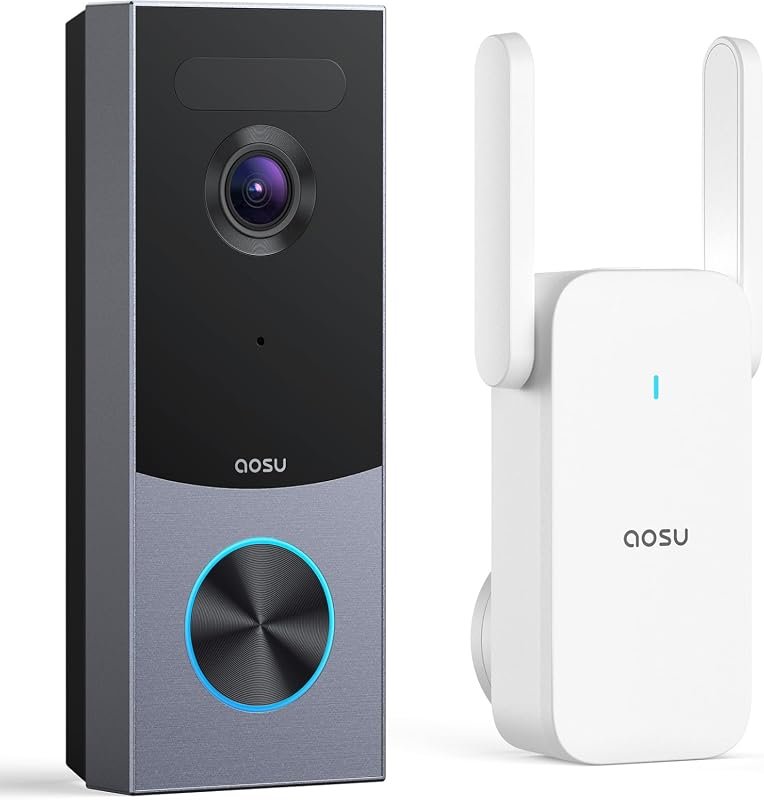
What Video Doorbell Works With iPhone Best Picks Today
The best video doorbell for iPhone is one with a reliable iOS app, strong notifications, and the right power setup for your home. If you want Apple Home integration, confirm HomeKit or HomeKit Secure Video support before buying.
If you want a video doorbell that works with iPhone, the safest answer is to look for a model with an official iOS app, reliable push notifications, and support for Apple Home if you want deeper smart-home control. The best choice depends on whether you care most about easy installation, Apple Home integration, local or cloud storage, or subscription-free use.
- iPhone support: Look for a current iOS app, live view, and dependable push alerts.
- Apple ecosystem: HomeKit support matters only if you want the doorbell in the Home app or.
- Power choice: Wired is best for permanence; battery is best for easy installation.
- Storage and privacy: Compare cloud plans, local storage, and account security before you buy.
- Verification: Always confirm the exact model, app listing, and manual because features can vary.
What Video Doorbell Works With iPhone: Best Picks Today
Most major video doorbells work with iPhone as long as the brand offers an iOS app in the App Store. If you also want Apple Home compatibility, look for models that support HomeKit or HomeKit Secure Video, because that changes how the doorbell appears in the Home app and how video clips are stored.
In practical terms, the best iPhone-friendly doorbells are usually from brands with strong app support, stable Wi-Fi performance, and clear privacy settings. If you are comparing options, also read our guide on what smart lights work with Apple Home if you are building a broader Apple-based setup, because that same ecosystem thinking helps with doorbells too.
Quick Answer: The Best iPhone-Compatible Video Doorbells in 2026

The best video doorbell for iPhone is the one that gives you dependable live view, fast notifications, and an app that stays current with iOS updates. For Apple-focused homes, a HomeKit or HomeKit Secure Video model is usually the cleanest fit, while battery-powered models are often the easiest for renters and DIY installs.
As a general buying rule, choose wired if you want fewer charging interruptions and battery if you want easier installation. If you are still deciding how much phone-charging flexibility matters in your home setup, you may also find our article on what iPhone charger do I need useful for understanding power basics and compatibility habits.
- iPhone compatibility usually means a working iOS app plus stable notifications and live view.
- Apple Home support matters if you want Siri, Home automations, or HomeKit Secure Video.
- Wired models suit permanent installs; battery models suit renters and easy setup.
- Always verify the exact model, app support, and subscription terms before buying.
How iPhone Compatibility Works With Video Doorbells
“Works with iPhone” can mean several different things. At minimum, the doorbell should have an iOS app that lets you view video, receive alerts, talk through two-way audio, and manage settings. Better compatibility adds Apple Home integration, widget support, Apple Watch alerts, or HomeKit Secure Video features, depending on the model.
Apple Home App, HomeKit, and HomeKit Secure Video
Apple Home is the central app for accessories that support Apple’s smart-home ecosystem. A doorbell with HomeKit support can appear in the Home app, which makes it easier to use Siri, automate scenes, and keep smart-home control in one place.
HomeKit Secure Video is a separate feature set that stores and analyzes video through Apple’s ecosystem, but it is not available on every iPhone-compatible doorbell. Availability can vary by model, region, and Apple service requirements, so always confirm the manufacturer’s current compatibility page and Apple’s support documentation before buying.
Some brands support the iPhone app without supporting Apple Home. That is still “compatible,” but it is not the same as full HomeKit integration.
iOS App Support, Notifications, and Live View
For most buyers, the app matters more than the label on the box. A good iPhone app should load live video quickly, send motion and ring alerts reliably, and allow you to review clips without forcing you through too many menus.
Notification quality depends on your iPhone settings, background app permissions, Wi-Fi strength, and the doorbell’s own motion detection logic. If alerts seem delayed, the cause may be the router, the app version, battery-saving settings, or the model’s cloud service rather than the phone itself.
Before buying, check the App Store listing and recent app update notes. That is often the fastest way to see whether the brand still supports current iPhone software well.
Wi-Fi, Power, and Internet Requirements
Video doorbells rely on stable Wi-Fi, and weak signal is one of the most common reasons people think a model is “not compatible” with iPhone. In reality, the phone may be fine while the doorbell is struggling with range, router congestion, or a poor mounting location.
Wired models usually draw power from existing doorbell wiring, while battery-powered models need periodic charging. Some models also require a chime module or a compatible transformer, so check the installation guide before you buy instead of assuming your current setup will work.
Do not guess on electrical compatibility. If the manual calls for specific voltage, transformer support, or wiring conditions, follow the manufacturer’s instructions or use a qualified installer.
Best Video Doorbell Types for iPhone Users
The right type depends on your home, not just your phone. iPhone users can do well with wired, battery-powered, or Apple-centered smart doorbells, but each category has tradeoffs in installation, maintenance, and storage.
Wired Video Doorbells for Reliable Power and Continuous Recording
Wired doorbells are often the best fit for homeowners who want a more permanent setup and less battery maintenance. They can be a strong choice for front doors that get frequent traffic, especially if you want more consistent power for features like quick wake-up times or longer recording windows, depending on the brand.
The downside is installation complexity. You may need existing doorbell wiring and a compatible power supply, and some homes may need a transformer check or chime adapter. If your wiring is old or uncertain, confirm compatibility in the manual before installation.
Battery-Powered Video Doorbells for Easy Installation
Battery-powered models are usually the easiest for renters, apartment residents, and first-time smart-home buyers. They avoid many wiring issues and are often easier to reposition if your door frame, porch depth, or Wi-Fi coverage changes.
The tradeoff is maintenance. Battery life varies widely by motion frequency, temperature, Wi-Fi strength, live-view usage, and how often you receive alerts. If you pick battery power, plan for routine charging and keep the app’s battery status notifications turned on.
Smart Doorbells That Work Best With Apple Home Ecosystems
If you already use Apple devices throughout the house, a HomeKit-compatible doorbell can feel more seamless than a brand-only app. It may let you see the camera feed in the Home app, use Siri voice control, and group the doorbell with other accessories.
That said, Apple Home support is not automatically better for every household. Some users prefer a brand app because it offers richer motion zones, package alerts, or event history, even if it is less integrated with the Home app. The best choice is the one that matches how you actually check alerts every day.
Many video doorbells can work with iPhone even when they are not Apple Home compatible, because the iPhone app itself is the main connection point.
Top Features to Compare Before Buying
When comparing iPhone-compatible video doorbells, focus on the features you will use daily. A long spec sheet looks impressive, but live view speed, alert quality, and storage rules usually matter more than marketing terms.
Video Quality, Field of View, and Night Vision
Video quality is about more than resolution. A sharp image is useful only if the field of view captures faces, packages, and the area where visitors actually stand. Night vision matters too, especially if your porch lighting is weak or your entryway is shaded.
Check whether the camera view is vertical enough to see packages near the threshold and whether the app makes it easy to zoom or review clips. If the manufacturer lists resolution, field of view, or HDR support, verify the exact model because these details can differ within the same product family.
Motion Detection, Package Alerts, and Two-Way Audio
Motion detection is one of the biggest reasons people buy a smart doorbell, but it can also be the source of false alerts. Look for adjustable motion zones, person detection, and sensitivity controls if your porch faces a sidewalk, street, or busy walkway.
Package alerts can be useful for families and small businesses, but they are not equally reliable across all models. Two-way audio is also worth checking because some apps handle voice delay better than others, especially on slower networks.
- Choose motion zones that ignore sidewalks and passing cars when possible.
- Turn on only the alerts you will actually check, or you may start ignoring all notifications.
- Test two-way audio near your router before relying on it for deliveries or visitors.
Storage Options: Cloud, Local, and HomeKit Secure Video
Storage affects both privacy and long-term value. Some doorbells rely heavily on cloud subscriptions, while others offer local storage, optional cloud plans, or Apple’s HomeKit Secure Video path for iPhone users in the Apple ecosystem.
Cloud storage can be convenient, but the subscription terms matter. Local storage may reduce ongoing fees, but it can also limit remote access or require you to manage clips yourself. HomeKit Secure Video may be appealing for privacy-minded buyers, but you should confirm device compatibility and Apple service requirements before assuming it fits your setup.
Subscription Costs, App Limits, and Privacy Controls
Many doorbells work with iPhone without a subscription, but some useful features may be locked behind a plan. That can include longer clip history, advanced person detection, package recognition, or richer event summaries, depending on the brand.
Privacy controls also deserve attention. Review whether the app supports two-factor authentication, shared user roles, activity logs, and camera privacy zones. For iPhone users, a strong app experience is not just about convenience; it is also about account security and control.
- Check the exact model number and confirm iOS app support, Apple Home support, or HomeKit Secure Video if needed
- Review power requirements, Wi-Fi band support, mounting needs, and whether a chime module is required
- Confirm storage rules, subscription terms, warranty coverage, and privacy settings in the current manual or app listing
Who Each Option Fits Best
The best iPhone-compatible doorbell depends on the person using it. A renter, a family with package deliveries, and a privacy-focused Apple user will not necessarily want the same features.
Best for Renters and Easy DIY Setup
Battery-powered doorbells are usually the easiest choice for renters and people who want to avoid wiring work. They are also helpful if you may move later, since the doorbell can often come down without affecting the home’s electrical setup.
Renters and quick DIY installs: choose a battery-powered model with a dependable iPhone app, simple mounting, and clear battery status alerts. The main limitation is that you will need to recharge it on a schedule.
Best for Apple Home Users and Privacy-Focused Buyers
If you already rely on the Apple Home app, a HomeKit-compatible doorbell is the cleanest fit. It keeps more of your smart home in one place and may reduce the need to jump between separate apps.
Privacy-focused buyers should still compare the fine print. Apple Home support is helpful, but you should also review the manufacturer’s data practices, account security options, and whether key features require cloud storage or a subscription.
Best for Busy Families, Small Businesses, and Front-Door Monitoring
Busy households and small businesses often benefit from wired models with stronger uptime and fewer charging chores. Those users typically care most about dependable alerts, quick live view, and the ability to review frequent events without missing important arrivals.
If your entryway gets constant traffic, prioritize app stability, motion filtering, and storage history over flashy extras. A simpler model that stays dependable is often a better fit than a feature-heavy one that floods your phone with alerts.
Setup, Safety, and Everyday Use on iPhone
Good setup makes a bigger difference than many buyers expect. Even a strong doorbell can feel disappointing if the mounting angle is wrong, the Wi-Fi signal is weak, or the app permissions are incomplete.
Installation Basics, Mounting, and Doorbell Power Checks
Start by confirming whether your chosen model is wired or battery-powered, then check the manual for mounting height, power requirements, and any chime or transformer notes. The right angle matters because it affects face recognition, package visibility, and motion detection accuracy.
Confirm doorbell wiring, battery status, and signal strength before attaching the unit permanently.
Follow the manufacturer’s placement guide so the camera can see visitors and packages clearly.
Connect the doorbell to the iPhone app, update firmware if prompted, and test live view and notifications.
App Setup, Notifications, and Shared Access
After installation, review notification permissions on your iPhone so the doorbell can actually alert you. If the app supports shared access, set it up carefully so family members or coworkers can respond without using your primary account login.
It is also smart to update firmware and app versions when available, because compatibility and security improvements often arrive through software. If your household uses multiple phones, test alerts on each device to make sure everyone receives the right notifications.
Safe Use, Maintenance, Battery Care, and Troubleshooting
Keep the camera lens clean, check for loose mounting hardware, and inspect battery condition if your model uses removable power. Weather, dust, and direct sun can all affect performance over time, so occasional maintenance is part of normal ownership.
Stop using damaged electronics, swollen batteries, frayed cables, overheating chargers, or unstable mounts and follow the manufacturer’s guidance.
If alerts fail, start with the basics: confirm Wi-Fi, app permissions, battery charge, and firmware status. For deeper issues, consult the official manual or support pages rather than trying unsafe repairs or electrical modifications.
Final Verdict: What Video Doorbell Works With iPhone Best in 2026
The best iPhone-compatible video doorbell is usually the one with a reliable iOS app, strong notification performance, and the right power type for your home. If you want the most seamless Apple experience, prioritize HomeKit or HomeKit Secure Video; if you want the easiest setup, battery-powered models are often the simplest path.
Best Overall Value, Best Apple Integration, and Best Budget Choice
Best overall value: a well-supported wired or battery model with a solid iPhone app, adjustable motion zones, and clear storage terms. This is the safest choice for most buyers because it balances convenience and day-to-day reliability.
Best Apple integration: a doorbell with verified HomeKit support or HomeKit Secure Video support. This is the best fit if you already live in the Apple ecosystem and want Siri and the Home app to be central.
Best budget choice: a battery-powered model with basic live view, motion alerts, and no required subscription for core features. Just confirm that the app support is current and that the battery and mounting setup fit your home.
Common Mistakes to Avoid Before You Buy
Do not assume every “works with iPhone” listing means Apple Home support. Also avoid buying based only on resolution or brand name; app quality, power requirements, and storage rules matter just as much.
Finally, verify the exact model number, current app support, and any subscription or compatibility changes before checkout. That small step prevents most of the disappointment buyers run into with smart doorbells.
Frequently Asked Questions
It usually needs an iOS app, push notifications, and live view support. Apple Home compatibility is optional unless you want HomeKit features.
No, many work with iPhone through their own app but do not support Apple Home. Check the exact model’s compatibility page before buying.
Wired models are better for permanent installs and less maintenance, while battery models are easier for renters and DIY setups. The best choice depends on your home and how often you want to recharge.
Compare app quality, notification speed, motion detection, video quality, storage options, and subscription terms. Also check whether it supports Apple Home or HomeKit Secure Video if that matters to you.
Not always, but some brands lock advanced features or clip history behind a plan. Confirm what is included before you buy so you know the real long-term cost.
Check power requirements, Wi-Fi strength, mounting height, and whether a chime module or transformer is needed. Follow the manufacturer’s manual and stop if the wiring or battery setup looks damaged or uncertain.