

What Is the Best Battery Operated Video Doorbell for You
The best battery operated video doorbell is the one that fits your Wi-Fi, entryway, and charging habits, not just the one with the biggest feature list. For most buyers, the safest choice is a model with reliable motion alerts, clear app support, and easy battery maintenance.
If you want the best battery operated video doorbell, the right choice depends on your home layout, Wi-Fi strength, alert preferences, and whether you want to avoid wiring entirely. For most buyers, the best model is the one that balances reliable motion alerts, clear video, easy charging, and reasonable app costs—not just the longest battery claim.
- Best fit first: Match the doorbell to your home layout, Wi-Fi strength, and installation needs.
- Battery matters: Real runtime depends on motion, weather, and app usage, not just the spec sheet.
- Check the app: Confirm subscription limits, storage options, and smart home compatibility before buying.
- Look beyond video: Motion zones, two-way audio, and mounting flexibility often matter more than resolution alone.
What Is the Best Battery Operated Video Doorbell for You? Start Here
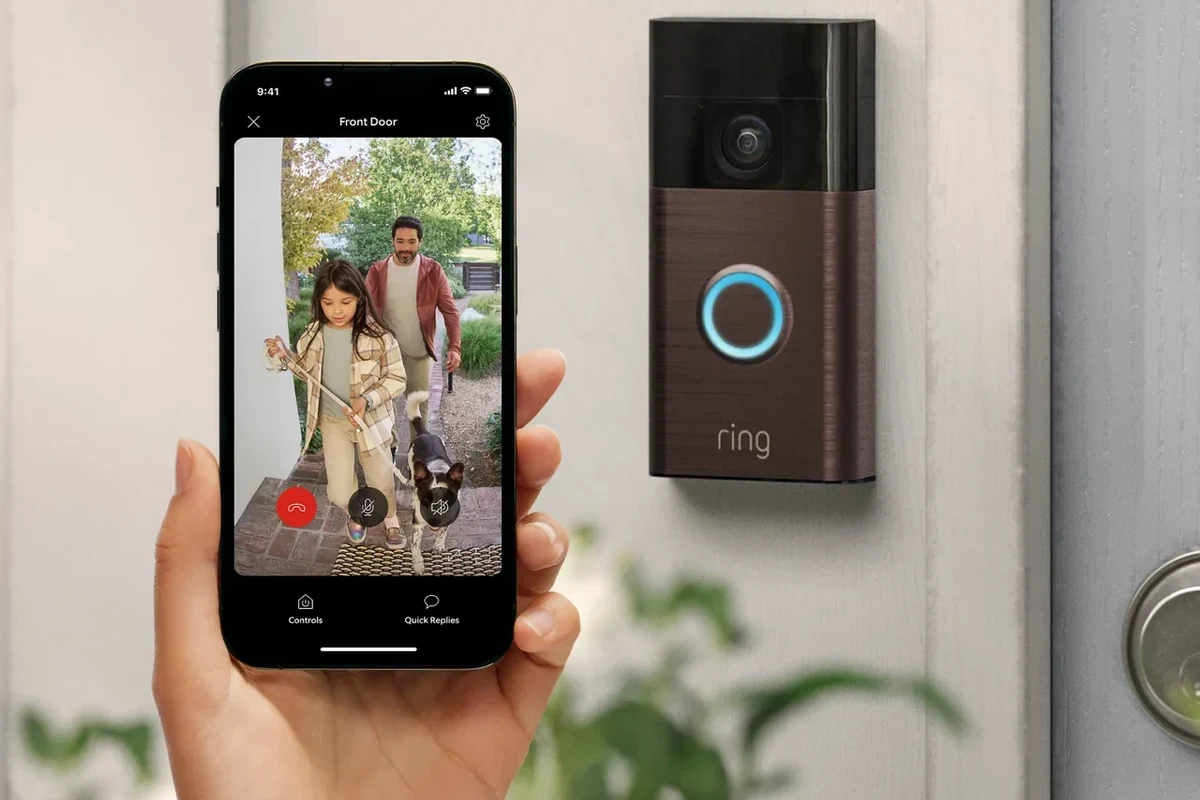
A battery powered video doorbell is the best fit when you need flexible installation, want to monitor your front door from an app, or live in a place where running new wiring is inconvenient. The “best” model is not universal: a renter may value easy removal, a family may want package alerts and broader motion zones, and a homeowner may care more about battery runtime and smart home integration.
Because battery doorbells vary by brand, firmware, and subscription plan, it helps to think in terms of priorities. If you want fewer charges, look for a larger battery or a power-saving motion system. If you want better visitor screening, focus on video quality, field of view, and two-way audio. If you want the simplest setup, check whether the app, mounting hardware, and charging method match your space.
How Battery Operated Video Doorbells Work in 2026
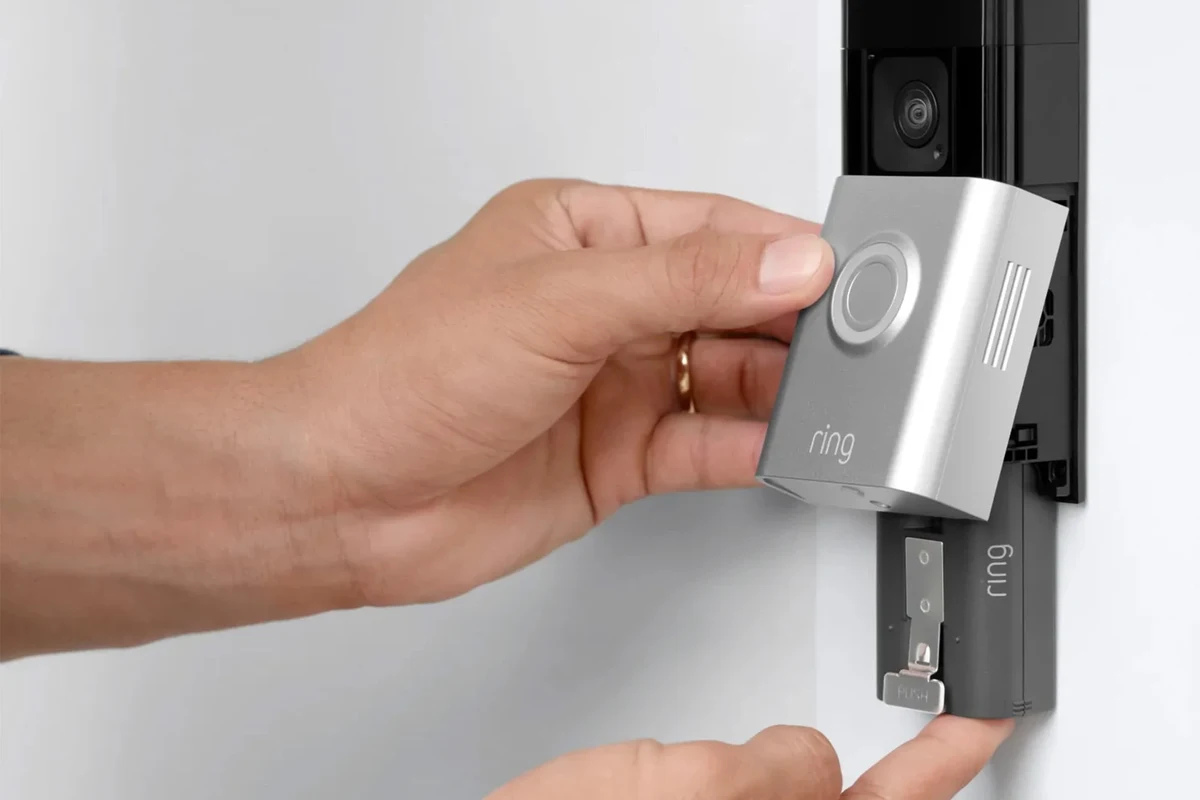
Battery operated video doorbells use an internal rechargeable battery to power the camera, motion sensor, microphone, speaker, and wireless radio. When someone approaches, the device wakes up, records or streams video, and sends a notification through the companion app. Some models also support optional hardwiring, but battery-only operation is still the main appeal for many buyers.
Battery life, charging method, and typical power needs
Battery life depends heavily on motion frequency, temperature, Wi-Fi quality, video settings, and how often live view is used. Manufacturer claims can look impressive, but real-world runtime varies a lot from one home to another. A busy street, a porch with frequent motion, or a weak signal can drain the battery faster than a quiet entryway.
Charging methods also vary. Some models use a removable battery pack, while others require you to bring the whole unit indoors to recharge. Before buying, confirm whether the charger is included, how long a full charge typically takes, and whether the battery is user-replaceable. If you want a broader look at battery-minded gear, our guide to fast charging power banks shows how charging habits and capacity can affect convenience in everyday devices.
Battery runtime is usually a manufacturer estimate, not a promise. Motion sensitivity, weather, app settings, and video quality can change the result significantly.
Wi-Fi connectivity, app setup, and smart home compatibility
Most battery doorbells connect over 2.4 GHz Wi-Fi, though some newer models may support dual-band or have stronger network requirements. App setup usually involves scanning a QR code, naming the device, connecting it to your home network, and adjusting motion zones and notification preferences. The exact process depends on the brand and app version.
Smart home compatibility is another major factor. Some models work with Alexa, Google Home, or Apple Home features in limited ways, while others keep more functions inside the brand’s own app. Before you buy, verify compatibility on the manufacturer’s site and in the app store listing, since platform support can change with firmware updates.
Check your router’s signal strength at the front door before you buy. A strong battery doorbell still needs a stable connection to send alerts quickly and load live video reliably.
Who a Battery Powered Video Doorbell Fits Best
Battery powered models are especially useful for people who want a doorbell camera without dealing with existing chimes, transformers, or wall wiring. They also make sense when you need a temporary or semi-permanent security setup, or when the door location is awkward for running cable.
Renters, homeowners, and homes without existing doorbell wiring
Renters often like battery doorbells because they can usually be mounted with minimal changes and removed later, though you should always confirm lease rules and mounting method. Homeowners without doorbell wiring can also benefit, since installation is usually simpler than adding new electrical hardware. In older homes, a battery model may avoid compatibility problems with outdated transformers or chime systems.
Best use cases: entry monitoring, package alerts, and visitor screening
Battery video doorbells are best when you want to see who is at the door, check for package drop-offs, or screen visitors before answering. They are also useful for parents, remote workers, pet owners, and frequent travelers who want simple front-door awareness. For homes with heavy package traffic, motion zones and package detection features can matter more than raw video resolution.
Many doorbell cameras rely on motion-triggered wake-up rather than constant recording, which helps save battery but can also affect how quickly they capture activity.
Key Specs That Decide Which Model Is Best
When people ask what is the best battery operated video doorbell, the answer usually comes down to a few practical specs. The best model is the one that gives you enough detail, enough battery life, and enough app control for your home—not the one with the longest spec sheet.
Video quality, field of view, night vision, and motion detection
Video quality affects how well you can identify visitors, read package labels, or review motion events. Field of view matters just as much, because a wider view can show a person from head to toe and capture parcels near the door. Night vision helps after dark, but the exact performance depends on porch lighting, camera placement, and whether the model uses infrared or another method.
Motion detection is one of the most important features to compare. Look for adjustable motion zones, person detection, and alert sensitivity controls if you want fewer false alerts from cars, trees, or passing pedestrians. A model with smart detection can be more useful than one with slightly sharper video but poor alert filtering.
Battery capacity, recharge time, and expected runtime
Battery capacity can help, but it is only one piece of the runtime puzzle. A larger battery may last longer between charges, yet heavy use can still shorten the interval. Recharge time also matters if you do not want the doorbell offline for long periods.
Before buying, confirm whether the battery is built in or removable, whether a spare battery is available, and whether charging requires a special cable or dock. If you value long-lasting portable power in other gadgets too, our guide to power banks with the longest battery life is a helpful reference for understanding the trade-off between capacity and convenience.
Dimensions, mounting options, weather resistance, and finish
Doorbell size affects how it fits beside a doorframe, screen door, or existing trim. A larger unit may offer a bigger battery or more features, but it can look bulky on narrow trim. Mounting options matter as well: some models include angled brackets for better viewing, while others depend on flat-wall placement.
Weather resistance should be checked in the official specs, especially if the device will face rain, heat, dust, or direct sun. Finish can matter more than people expect because glossy surfaces may show wear or glare differently than matte ones. Always confirm the model’s environmental rating and installation guidance in the manual.
App requirements, storage options, and subscription costs
App requirements can decide whether a doorbell is easy or frustrating to use. Some brands require a current phone OS, a specific account setup, or a paid plan for video history. Storage options may include local storage, cloud storage, or both, but those features vary widely by model and region.
Subscription costs are important because they can change the long-term value of the product. A cheaper doorbell with a recurring plan may cost more over time than a slightly pricier model with more included features. Review the current plan details, retention period, and feature limits before making a decision.
Top Benefits and Real-World Trade-Offs
Battery doorbells are popular because they reduce installation friction, but they also introduce a few compromises. Knowing both sides makes it easier to choose a model that fits your routine instead of creating one more device to manage.
Convenience, flexible installation, and wireless placement
The biggest benefit is flexibility. You can place the doorbell where the view is best, rather than where old wiring happens to exist. That makes battery models appealing for apartments, rentals, side entrances, garages, and front doors with awkward trim.
They are also easier to move if you rearrange your entryway or relocate. For people who want wireless convenience across multiple gadgets, our article on battery operated desk fan options is another example of how portable power changes everyday setup decisions.
Limitations: battery swaps, missed alerts, and cloud dependency
The main drawback is maintenance. Even a good battery doorbell needs charging, and if you forget, it may go offline at the wrong time. Some users also experience missed alerts when Wi-Fi is weak, motion settings are too conservative, or the camera wakes too slowly.
Cloud dependency is another consideration. If core features like event history or person detection require a subscription, the doorbell may be less useful without it. Read the plan details carefully so you know what still works if you decline the paid tier.
Use only the charger, cable, and battery accessories approved by the manufacturer. Stop using the device if the battery swells, the unit overheats, or the cable is damaged.
Common mistakes buyers make before choosing a model
One common mistake is focusing only on resolution while ignoring battery life and motion tuning. Another is assuming all smart home platforms will support every feature equally. People also forget to check whether the mount works with their wall material, whether the app requires a subscription for basic history, and whether the Wi-Fi signal is strong enough at the door.
- Simple installation without existing wiring
- Flexible placement for better viewing angles
- Useful for alerts, package monitoring, and visitor screening
- Battery charging adds ongoing maintenance
- Performance can drop with weak Wi-Fi or heavy motion
- Some useful features may depend on subscriptions
How to Choose the Right Battery Operated Video Doorbell
The right choice depends on how your home is built, how you use the front door, and how much maintenance you are willing to accept. A good buying decision starts with your entryway, not the product page.
Match the doorbell to your home layout and internet strength
If your front door is far from the router, consider whether you can improve coverage before buying a camera with more advanced features. Thick walls, long driveways, and detached entryways can all affect performance. If the camera will face direct afternoon sun or heavy rain, check the environmental guidance carefully.
- Check compatibility, model number, app requirements, dimensions, and battery type
- Confirm Wi-Fi band support, mount style, and smart home platform support
- Review warranty terms, return policy, privacy settings, and update support
Compare motion zones, two-way audio, and smart assistant support
Motion zones help reduce false alerts, which matters in busy neighborhoods or homes near sidewalks. Two-way audio is useful for delivery drivers, guests, and quick instructions, but sound quality varies by model and outdoor noise levels. Smart assistant support can be convenient, but verify exactly what is supported before you rely on it for daily use.
Check warranty details, replacement battery support, and durability claims
Warranty terms matter more than many buyers realize, especially for outdoor electronics. Look for clear coverage periods, battery replacement support, and what counts as normal wear versus a defect. Durability claims should be backed by the manufacturer’s official documentation, not just marketing language.
If you expect frequent battery charging, choose a model with a simple removal process and easy access to replacement parts. That small detail can save time over the life of the device.
Safe Setup, Maintenance, and Battery Care
Battery doorbells are generally straightforward, but safe setup still matters. Good placement, careful charging, and regular inspections help the device last longer and reduce avoidable problems.
Installation basics, charging routine, and inspection checks
Start by following the official manual for mounting height, angle, and app setup. After installation, test notifications, live view, and audio before you finish. Build a charging routine that fits your home, such as checking battery status every few weeks or after periods of heavy motion.
Choose a spot with clear sightlines and a stable Wi-Fi signal.
Use the manufacturer-approved charger and let the battery reach a full charge if instructed.
Adjust settings so the camera covers the approach path without over-alerting.
Safe use limits: heat exposure, weather conditions, and battery handling
Do not leave a battery device in extreme heat or direct sun longer than the manufacturer allows, since heat can shorten battery life and affect safety. Avoid charging with damaged cables or adapters, and do not use the unit if the battery compartment is swollen, cracked, or leaking. If the device is exposed to severe weather, inspect it before continuing normal use.
Stop using damaged electronics, swollen batteries, frayed cables, overheating chargers, or unstable devices and follow the manufacturer’s guidance.
Cleaning, storage, and when to replace the battery or unit
Clean the exterior with a soft, dry cloth unless the manual allows a lightly damp one. Keep the lens free of dust, pollen, and cobwebs so motion detection and video clarity stay useful. If battery life drops sharply, charging becomes unreliable, or the app reports repeated battery errors, check the manufacturer’s support guidance to decide whether the battery or the whole unit should be replaced.
Best Overall Verdict: What to Buy and Why
The best battery operated video doorbell is the one that matches your home, your Wi-Fi, and your tolerance for charging and app management. If you want the most balanced choice, prioritize reliable motion detection, a clear app experience, and a battery system that is easy to maintain over time.
Best value pick, best premium pick, and best choice for renters
Best value: Buyers who want dependable alerts and simple setup without paying for every extra feature. Best premium: Users who want stronger video, smarter detection, and deeper ecosystem support. Best for renters: Anyone who needs easy installation, removable mounting, and low-commitment hardware.
Transparent verdict based on features, value, and long-term usability
If you are still deciding what is the best battery operated video doorbell, start with the model that gives you the clearest front-door coverage and the least annoying upkeep. A doorbell that charges easily, connects reliably, and fits your home’s layout will usually be the best buy—even if it is not the most feature-packed option on paper.
Choose a battery powered video doorbell for flexibility, easy installation, and front-door monitoring without wiring. The smartest purchase is the one with verified compatibility, manageable battery life, and app features you will actually use.
Frequently Asked Questions
Focus on video quality, motion detection, battery runtime, Wi-Fi reliability, and app usability. Subscription terms and smart home compatibility also matter if you want long-term value.
Yes, many are designed for no-wiring installation. Always confirm the mounting method, app setup, and whether your wall surface supports the included hardware.
Battery life varies by model and by how often the camera is triggered. Motion frequency, temperature, Wi-Fi strength, and live-view use can all change runtime.
Not always, but many brands limit video history or advanced detection without a plan. Check the current app and plan details before buying.
Renters should look for easy removal, minimal wall damage, and flexible mounting options. It also helps to confirm lease rules before installation.
Use the manufacturer-approved charger, keep the lens clean, and inspect the battery and cable regularly. Stop using the device if you notice swelling, overheating, or physical damage.



One Comment