Top Nema 14 50 Smart Plug Picks for Easy EV Charging
If you want to control EV charging from an app, schedule off-peak sessions, and keep an eye on energy use, a nema 14 50 smart plug can be a practical upgrade. The best choice is the one that matches your charger’s electrical rating, your Wi‑Fi/app setup, and the safety certifications you can verify.
- Compatibility first: Match the plug to your charger, outlet, and breaker limits before comparing app features.
- Safety matters: Verify recognized certifications, overheat protection, and clear load guidance.
- Wi‑Fi reliability counts: A weak garage signal can make scheduling and remote control frustrating.
- Best use case: Home EV drivers who want scheduling, monitoring, and easier off-peak charging.
Top Nema 14 50 Smart Plug Picks for Easy EV Charging: What to Know Before You Buy
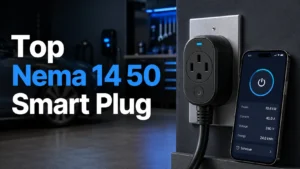
Quick answer: the best nema 14 50 smart plug is the one that matches your EV charger’s amperage, Wi‑Fi/app ecosystem, and safety certifications while staying within the outlet’s continuous-load limits.
That means the “best” pick is not just the one with the most features. It is the one that fits your charger, your garage signal, and your comfort level with app control and automation.
How a Nema 14 50 Smart Plug Works for EV Charging
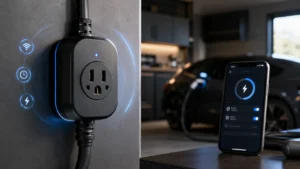
What the smart plug controls: remote on/off, scheduling, energy monitoring, and automation
A nema 14 50 smart plug typically adds app-based control to a 240V charging setup. Depending on the model, it may let you turn charging on or off remotely, create schedules, monitor energy use, and trigger automations with a smart-home platform.
For EV owners, the most useful features are usually scheduling and tracking. Scheduling helps shift charging to lower-rate hours when your utility offers time-of-use pricing, while energy monitoring can help you understand how much charging is happening over time.
How it connects: 240V outlet compatibility, Wi‑Fi setup, and app requirements
These devices are designed around a NEMA 14-50 receptacle, which is common for higher-power home charging. The smart plug itself usually connects to your home network through Wi‑Fi and then pairs with a manufacturer app.
App requirements vary by brand. Some models work only through their own app, while others also integrate with voice assistants or home automation systems. Before buying, confirm the app supports your phone’s operating system and that the device works on the Wi‑Fi band your garage can actually reach.
Why this matters for EV owners: convenience, off-peak charging, and usage tracking
The biggest benefit is convenience. Instead of plugging in and forgetting about it, you can automate charging around your routine, weather, or utility pricing.
Usage tracking is also helpful for households that want a clearer picture of electricity consumption. If you already use other smart-home gear, such as smart lights for home automation or a smart switch setup, the EV charger can fit into the same broader routine of timed, app-managed devices.
Who a Nema 14 50 Smart Plug Is Best For in 2026
Ideal users: home EV drivers, renters with approved 14-50 outlets, and energy-conscious households
This category makes the most sense for people who already have a properly installed 14-50 outlet and want smarter control without replacing the entire charging setup. It is also appealing for renters or homeowners who need a more flexible option than a hardwired installation, provided the outlet and circuit are approved for the load.
Energy-conscious households may like the scheduling and monitoring features even if they charge only a few times a week. The smart plug becomes more valuable when you regularly want to line up charging with a routine, a utility plan, or a shared garage schedule.
Who should skip it: unsupported chargers, weak electrical panels, or users needing hardwired solutions
If your charger is not compatible with smart control, the outlet is worn, or the electrical panel is already near capacity, this is not the right upgrade. In those cases, the safer move may be a charger-specific solution or a professional assessment of the circuit.
People who need a permanent, high-duty charging installation may be better served by a hardwired EVSE rather than a plug-in smart accessory. The smart plug should never be treated as a workaround for electrical limitations.
Real-world fit factors: garage layout, charger location, signal strength, and daily charging habits
Practical fit matters more than most buyers expect. A garage with weak Wi‑Fi, a charger mounted far from the router, or a receptacle in a damp location can make setup and daily use less reliable.
Your charging habits matter too. If you plug in every night, a dependable app and stable connection are more important than extra automation features. If you charge only occasionally, simpler controls may be enough.
- Check whether your router reaches the garage before buying a Wi‑Fi-based model.
- Confirm that the charger and smart plug are both rated for the same intended load pattern.
- Choose a model with clear manual controls in case the app is unavailable.
Key Specs and Buying Criteria to Compare
Rated wattage and amperage: matching the plug to the charger and circuit
Start with the electrical rating. The smart plug, the EV charger, the outlet, and the breaker all need to be aligned for safe operation. A 14-50 outlet does not automatically mean every attached device can draw the maximum possible load continuously.
For EV charging, continuous-load rules matter because charging can run for hours. Check the charger’s amperage setting, the receptacle rating, and the manufacturer guidance for the smart plug itself before deciding it is a fit.
Cable quality and build: plug housing, strain relief, cord thickness, and weather resistance
Build quality affects both safety and longevity. Look for sturdy housing, solid strain relief, and a cord that feels appropriate for the intended current and environment.
If the unit may sit in a garage with temperature swings, dust, or occasional moisture, weather resistance and overall durability become more important. A loose or flimsy connection is a red flag for long-term EV use.
Connectivity and app quality: Wi‑Fi bands, scheduling reliability, and voice assistant support
App quality can make or break the experience. Reliable scheduling, clear status updates, and simple controls are more valuable than a long list of rarely used features.
Also verify whether the device supports 2.4 GHz Wi‑Fi only or includes broader connectivity options. Garage placement can make signal strength a real issue, and some smart plugs are much less forgiving than others when the network is weak.
Safety features to verify: UL/ETL listing, overheat protection, load limits, and manual override
Safety should be non-negotiable. Look for recognized safety certification such as UL or ETL listing where applicable, plus built-in protection features like overheat monitoring and clear load limits.
A manual override is also useful if the app fails or the network drops. Still, the presence of a smart feature does not replace the need to follow the outlet and charger’s rated limits.
Warranty details to check: coverage length, replacement terms, and support reputation
Warranty matters more than many buyers expect because EV charging can place repeated stress on the connection. Read the replacement terms carefully, including whether the warranty covers the plug body, cord, electronics, or only certain failures.
Support reputation also counts. A responsive support team can save time if you run into pairing issues, app bugs, or compatibility questions after installation.
Top Nema 14 50 Smart Plug Picks: Comparison Framework
Because model availability, firmware behavior, and certification details can change, the smartest way to shop is by use case rather than by hype. Use the framework below to compare current options and confirm the latest specs on the manufacturer page or retail listing before you buy.
| Option | Best For | Key Consideration |
|---|---|---|
| Best overall | Balanced buyers who want safety, app control, and dependable daily use | Look for the strongest mix of certification, app stability, and clear load guidance |
| Best budget option | Users who mainly want scheduling and basic remote control | Make sure lower cost does not mean weaker support or unclear safety documentation |
| Best premium pick | Users who want better app polish, stronger materials, and more automation | Premium pricing only makes sense if the app and build quality are meaningfully better |
| Best simple setup | People who want a straightforward daily routine with minimal configuration | Choose clear manual controls and an app that pairs reliably on first setup |
| Best energy monitoring | Households tracking charging costs or comparing usage patterns | Confirm the app reports data in a way that is useful to you, not just decorative graphs |
Best overall for balanced features and safety
The best overall choice is usually the model that combines verified safety documentation, stable app control, and a build that appears suited to repeated charging cycles. This is the most sensible pick for most EV owners because it balances convenience with caution.
Best budget option for basic scheduling and app control
A budget pick can work well if you only need on/off control and a simple schedule. The trade-off is that lower-cost models may have less polished apps, fewer automation options, or less robust hardware.
Best premium pick for stronger app controls and better build quality
Premium models are worth considering when you value app reliability, easier automation, or a sturdier enclosure. Just make sure the premium features are real benefits for your routine and not just marketing extras.
Best for simple setup and dependable daily use
If you do not want to spend time tuning settings, choose a model with a straightforward pairing process and simple controls. This is often the best fit for households that want to “set it and forget it.”
Best for energy monitoring and usage insights
Energy-monitoring models are useful when you want a clearer picture of charging behavior over time. They are especially helpful if you compare charging costs across schedules, vehicles, or seasons.
Setup Guide: Installing and Configuring a Nema 14 50 Smart Plug
Before you begin: outlet inspection, charger compatibility, and breaker verification
Before setup, inspect the outlet for looseness, discoloration, or damage. Confirm that your charger is compatible with the smart plug’s electrical limits and that the breaker and wiring are appropriate for the intended load.
If anything looks questionable, stop and consult a licensed electrician or the manufacturer’s installation guidance. A smart plug should not be used to compensate for a questionable receptacle or circuit.
App setup steps: pairing, permissions, naming, and automation rules
Use the official app, not a third-party workaround. During setup, give the device a clear name such as “Garage EV Charger” so it is easy to identify in automations and voice commands.
Limit permissions to what the app actually needs, and review any automation rules carefully. A simple schedule is often more reliable than multiple overlapping routines.
Placement and signal tips: reducing Wi‑Fi dropouts in garages and outdoor areas
Wi‑Fi stability matters because dropped connections can interrupt status updates or scheduled control. If the garage signal is weak, consider moving the router, adding a mesh node, or choosing a model with better connectivity tolerance.
Keep the unit away from unnecessary heat and moisture, and avoid routing the charging cable in a way that creates tension at the receptacle.
Common setup mistakes: loose fit, wrong voltage assumptions, and overloaded circuits
A common mistake is assuming every 14-50 outlet automatically supports the same usage pattern. Another is ignoring how much the rest of the circuit is already doing, especially in garages with other high-draw tools or appliances.
Loose connections, poor signal, and overloaded circuits are the kinds of issues that can turn a smart convenience into a reliability problem.
Safety Guide: Limits of Safe Use and Common Mistakes to Avoid
Continuous-load rules for EV charging and why headroom matters
EV charging is typically a long-duration load, so it deserves extra margin. Even if a plug or outlet appears to support a certain rating, safe use depends on continuous-load guidance, temperature, and the condition of the wiring.
Headroom matters because heat builds over time. Staying below the maximum rating is usually wiser than running everything at the edge.
Heat, wear, and inspection: what to check on the plug, outlet, and cable
Inspect the plug and receptacle regularly for warmth that feels excessive, discoloration, looseness, cracked plastic, or a burnt odor. Also check the cable jacket for cuts, kinks, or abrasion.
Even a well-designed smart plug can become a weak point if the outlet is worn or the connection is not secure.
When to stop using it: signs of melting, discoloration, arcing, or app/device failures
Stop using the device if you see any sign of melting, sparking, arcing, or repeated app/device failures that prevent normal control. Electrical safety comes first, even if the device still seems to function intermittently.
Replacement guidance: when to replace the smart plug, cord, or receptacle
Replace the smart plug if the electronics fail, the housing is damaged, or the app no longer supports the device in a way you need. Replace the cord or receptacle if wear, looseness, or heat damage appears.
If the problem keeps returning, the issue may be the circuit or outlet rather than the accessory itself.
Maintenance, Care, and Troubleshooting for Long-Term Reliability
Routine care: cleaning, dust control, and keeping the unit dry
Basic care goes a long way. Keep dust from building up around the receptacle and plug body, and avoid exposing the unit to water or damp storage conditions unless the model is specifically designed for that environment.
Storage tips: seasonal use, unplugging safely, and cable management
If you only use the charging setup seasonally, unplug according to the manufacturer’s instructions and store the cable without sharp bends or heavy pressure on the connector. Good cable management reduces strain on the plug and outlet.
Troubleshooting common issues: pairing failures, app disconnects, and charging interruptions
When pairing fails, check whether the app is current, whether the device needs a reset, and whether your phone is on the correct Wi‑Fi band. If the app disconnects later, weak signal or router changes are often the cause.
Charging interruptions can also happen because of charger settings, a breaker issue, or an internal protection feature. Start with the official manual before assuming the plug is defective.
When the problem is not the plug: charger settings, breaker trips, or weak home Wi‑Fi
Many “smart plug” problems are actually system problems. The EVSE may be limiting current, the breaker may be tripping, or the network may be too weak for reliable control.
If you also use other connected devices at home, such as one of the best smart lights under $50 or a smart light switch, a broader Wi‑Fi issue may be affecting multiple devices at once.
Final Recommendation: Which Nema 14 50 Smart Plug Delivers the Best Value?
Transparent verdict based on safety, app reliability, build quality, and price
The best value is the model that gives you verified safety documentation, dependable app control, and enough build quality to handle routine EV charging without unnecessary complexity. For most people, that means choosing the most trustworthy option rather than the most feature-packed one.
Best-value pick for most EV owners and the trade-offs to accept
The best-value pick for most EV owners is a balanced model that prioritizes certification, stable scheduling, and clear load guidance. The trade-off is that you may give up some premium app polish or advanced automation, but that is usually a fair exchange for better reliability.
Final buying advice: prioritize certified hardware, proper load matching, and dependable support
Before you buy, confirm the current manual, safety listing, app compatibility, and warranty terms. If any of those pieces are unclear, keep shopping until you find a model that fits your charger and your home safely.
- Match the smart plug to the charger, circuit, and outlet rating before anything else.
- Choose reliable app control and strong Wi‑Fi performance over flashy extras.
- Inspect for heat, wear, and loose connections regularly to reduce risk.
- When in doubt, verify the manual, certification, and warranty before purchase.
How do I know if my EV charger is compatible with a nema 14 50 smart plug?
Check the charger’s manual and the smart plug’s official compatibility list. The electrical rating, connector fit, and control method all need to line up before you rely on it daily.
Do I need Wi‑Fi for a nema 14 50 smart plug to work?
Most smart features require Wi‑Fi and the manufacturer’s app. Some units may still allow basic manual operation, but remote control and scheduling usually depend on a network connection.
What safety certifications should I look for?
Look for recognized safety certification such as UL or ETL listing where applicable, plus clear load limits and overheat protection. Always verify the exact model, because certification can vary by version or region.
Can I use one for outdoor charging?
Only if the model is specifically rated for the environment and installed according to the manufacturer’s instructions. Moisture, temperature swings, and exposure to weather can change the safety profile.
What should I do if the plug feels warm?
Slight warmth can happen with heavy loads, but excessive heat is a warning sign. Stop using it if you notice strong heat, discoloration, or any burnt smell, and inspect the outlet and cable.
Is a smart plug better than a hardwired EV charger?
Not always. A smart plug is best for flexible control on a compatible outlet, while hardwired charging may be better for permanent installations or higher-duty use.
Frequently Asked Questions
Check the charger’s manual and the smart plug’s official compatibility list. The electrical rating, connector fit, and control method all need to line up before you rely on it daily.
Most smart features require Wi‑Fi and the manufacturer’s app. Some units may still allow basic manual operation, but remote control and scheduling usually depend on a network connection.
Look for recognized safety certification such as UL or ETL listing where applicable, plus clear load limits and overheat protection. Always verify the exact model, because certification can vary by version or region.
Only if the model is specifically rated for the environment and installed according to the manufacturer’s instructions. Moisture, temperature swings, and exposure to weather can change the safety profile.
Slight warmth can happen with heavy loads, but excessive heat is a warning sign. Stop using it if you notice strong heat, discoloration, or any burnt smell, and inspect the outlet and cable.
Not always. A smart plug is best for flexible control on a compatible outlet, while hardwired charging may be better for permanent installations or higher-duty use.