5 Best Smart Locks for Airbnb: Top Smart Home Security Picks
Affiliate disclosure: As an Amazon Associate, Gadget Makers Blog may earn from qualifying purchases. This does not change the price you pay.
If you manage an Airbnb or a similar short-term rental, the right smart lock can make guest check-ins easier while reducing key handoffs and late-night lockout messages. The challenge is finding a lock that fits your door, supports flexible guest access, and matches the level of control you want without overpaying for features you may not use.
This guide compares five current smart locks for rental-style use, with a focus on keypad access, app-based management, auto-lock options, and the compatibility details shoppers should verify before buying. If you want a broader smart-home setup around the entryway, you may also find our guides to smart lights for home automation and smart light bulbs for Alexa useful for coordinating the rest of the space.
The best smart lock for Airbnb for most hosts is the Yale Security Assure Lock 2 Wi-Fi Smart Deadbolt because it offers multiple access methods, app-based control, and auto-lock features. If you want a lower-cost alternative with strong guest-code tools, the TEEHO TE001 is a practical budget pick.
Quick Product Comparison
| Product | Image | Best For | Check Price |
|---|---|---|---|
| 1. Yale Security YRD410-WF1-BSP Assure Lock 2 | 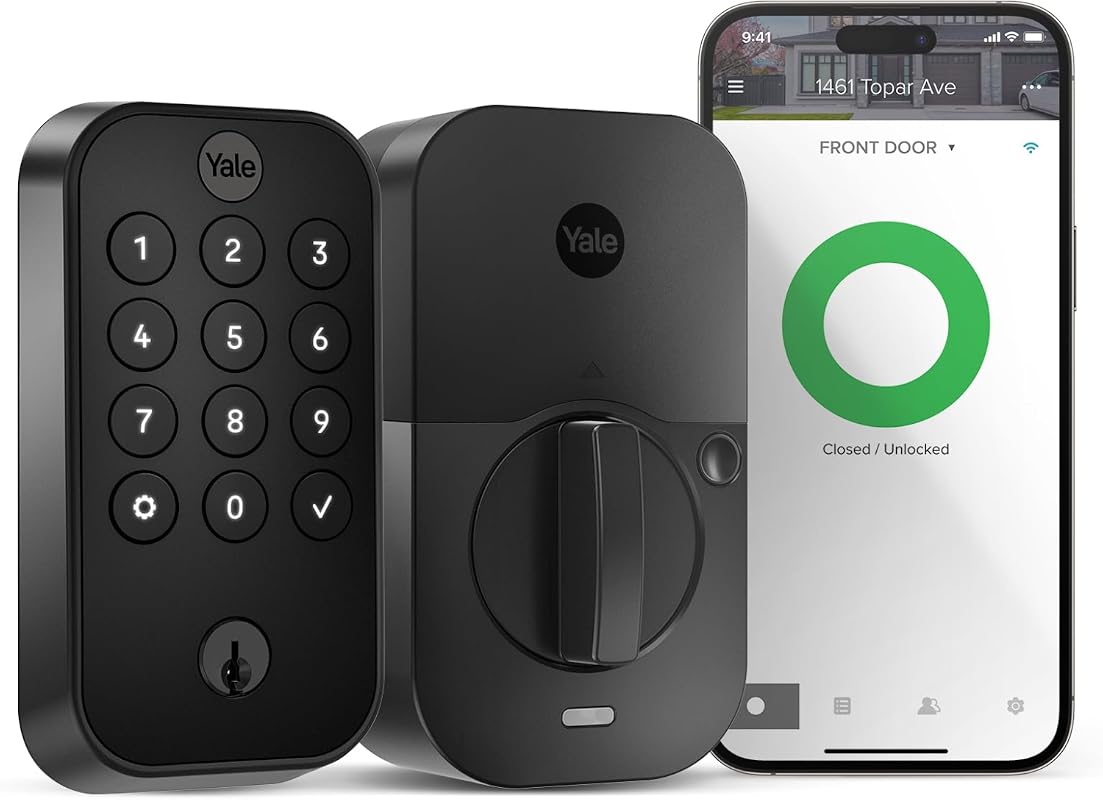 | Hosts who want a full-featured Wi-Fi deadbolt with app control | Check Price |
| 2. GHome Smart Fingerprint Door Lock | 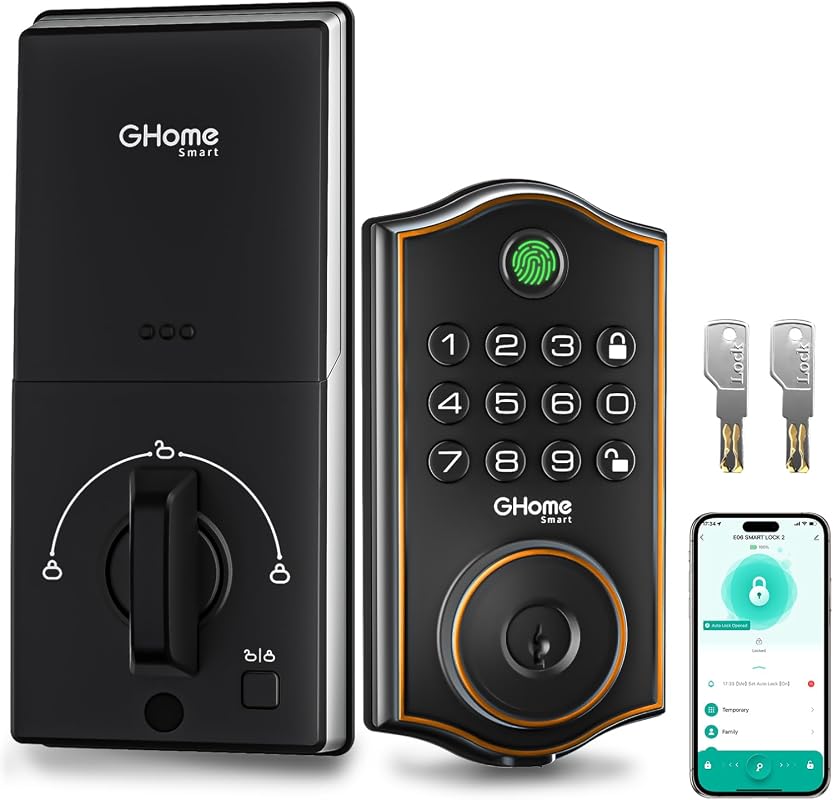 | Budget-minded hosts who want fingerprint and guest passcode options | Check Price |
| 3. Schlage Encode BE489WB CEN 622 | 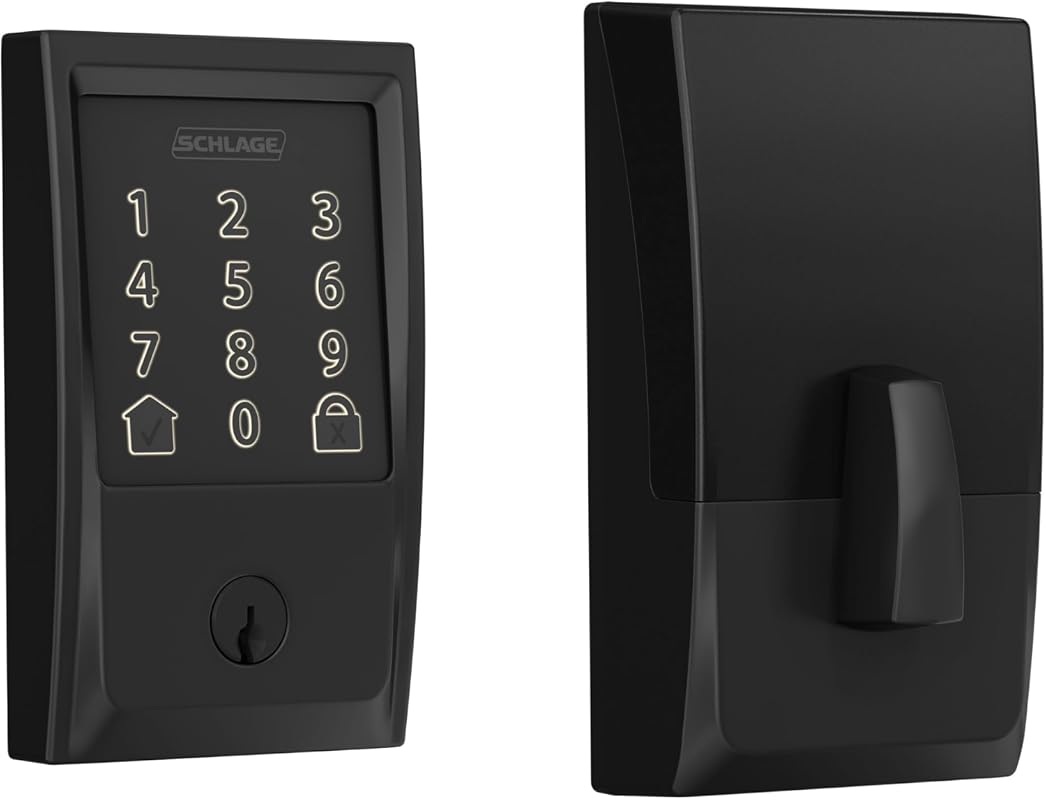 | Hosts who want wide access-code capacity and built-in Wi-Fi | Check Price |
| 4. TEEHO TE001 Keyless Entry Door Lock | 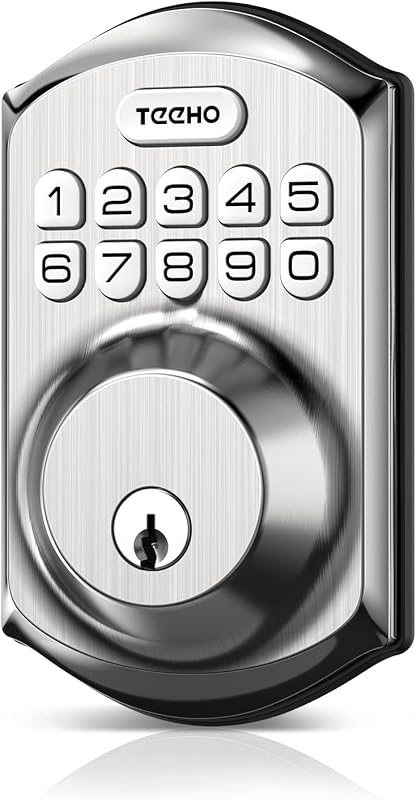 | Simple rental access with one-time codes and low upfront cost | Check Price |
| 5. Veise VE017 Fingerprint Smart Door Lock | 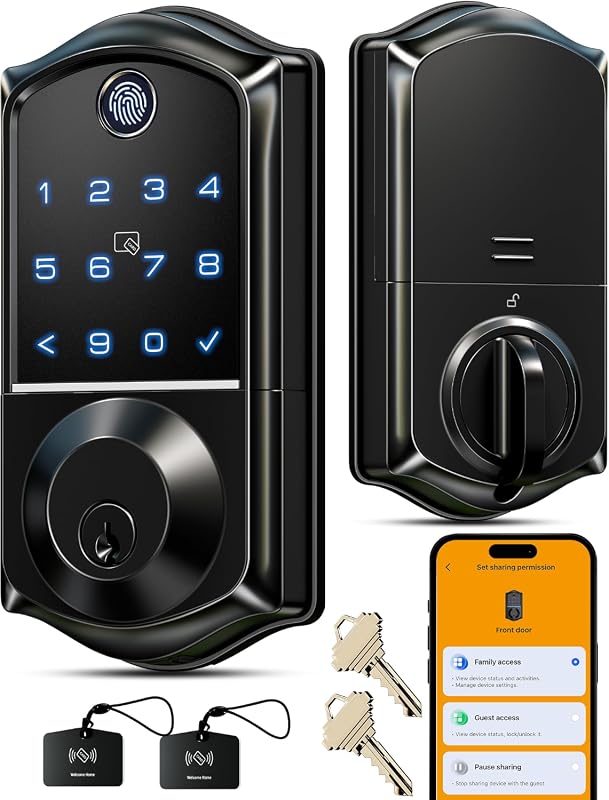 | Multi-tenant properties that need detailed access management | Check Price |
What to Look for in best smart lock for airbnb
Guest access flexibility
For short-term rentals, a lock should make it easy to create temporary, one-time, scheduled, or recurring codes. That keeps check-in smooth without handing out physical keys.
Remote management
App control matters when you need to update access, lock the door, or review entry activity from away. Check whether the lock uses a dedicated app and what permissions or account setup it requires.
Auto-lock and backup access
Auto-lock can help reduce accidental unlocked doors, while backup entry methods like a physical key, USB emergency power, or multiple unlock options can help if batteries run low.
Door and Wi-Fi compatibility
Before buying, verify that the lock fits your door thickness, backset, and deadbolt setup. If the model depends on Wi-Fi or a gateway, confirm the band, network requirements, and whether your rental has reliable coverage.
Privacy and access logs
For rental properties, entry logs and local or cloud-based credential handling may matter as much as the lock itself. Review what the app stores, what it shares, and how access can be paused or removed.
Installation and turnover speed
Hosts often need a lock that can be installed with basic tools and updated quickly between guests. A straightforward setup can save time when cleaning crews, co-hosts, or maintenance workers need access.
- Create a simple guest workflow before check-in day: code creation, code delivery, and code removal after checkout.
- Verify the listing, app, and manual for door fit, power requirements, and any Wi-Fi or gateway dependencies.
- Keep a backup entry plan in place for battery warnings, app issues, or temporary internet outages.
Our Top 5 Best Smart Lock For Airbnb Picks and Reviews
1. Yale Security Assure Lock 2 Wi-Fi Smart Deadbolt with Keypad, Remote Access, Black Suede
The Yale Security Assure Lock 2 is a strong all-around choice for hosts who want multiple ways to unlock the door and app-based control from afar. Its feature set leans into convenience and rental-friendly access management.
Key Features That Stand Out
- Keypad, voice assistant, Auto-Unlock, and Yale Access App support give guests and hosts multiple unlock paths.
- Auto-Lock with DoorSense helps the door lock after it closes.
- Remote access through the app supports locking, unlocking, notifications, and access sharing.
- Installs with a screwdriver on most standard US entry doors.
- Requires 2.4 GHz Wi-Fi and is listed for use in the U.S. and Canada.
Why It Stands Out
This model combines remote control, automatic locking, and flexible entry methods in a way that fits many Airbnb-style workflows. The lower review score compared with some rivals suggests shoppers should read the current listing details carefully before buying.
Best For
Pros and Cons
- Multiple access methods can suit different guest preferences.
- Auto-lock and remote notifications are useful for rental turnover.
- Simple installation may work for many standard entry doors.
- It only works on 2.4 GHz Wi-Fi in the U.S. and Canada, so buyers should verify fit and network setup.
- The rating is lower than some alternatives in this roundup.
2. GHome Smart Fingerprint Deadbolt with App Control, Keypad, Auto Lock, Keyless Entry
This GHome lock stands out for hosts who want fingerprint entry alongside app control and guest-code management at a relatively low price. It is aimed at busy homes and rental properties that need simple, flexible access.
Key Features That Stand Out
- Fingerprint, passcode, app control, and physical key access cover multiple entry needs.
- AI self-learning fingerprint sensor is designed to improve recognition over time.
- Custom auto-lock timer can be set from 1 to 1800 seconds.
- App tools support one-time, temporary, scheduled, and permanent passcodes.
- USB emergency charging is available if battery power runs low.
Why It Stands Out
For hosts trying to keep costs down, this lock offers a broad set of access controls without moving into a higher price tier. The fingerprint feature may be especially appealing for owners who also use the lock for personal or family access.
Best For
Pros and Cons
- Low price compared with other locks in this roundup.
- Guest-code options are useful for short-term rentals.
- USB emergency charging adds a backup path when batteries run low.
- Batteries are not included, so buyers should plan for setup costs.
- Shoppers should verify door compatibility and app requirements on the current listing.
3. Schlage Encode Wi-Fi Smart Deadbolt with Touchscreen Keypad, Alexa and Google Home Compatible
The Schlage Encode is a good fit for hosts who want built-in Wi-Fi, broad access-code capacity, and a more established smart-lock option. It sits at a higher price, but the feature set is substantial.
Key Features That Stand Out
- Built-in Wi-Fi lets you control and monitor the lock through the Schlage Home app.
- Supports up to 100 access codes for rental and household use.
- Lock history and customizable notifications help with access tracking.
- Works with Alexa and Google Home for optional voice control.
- Built-in alarm and fingerprint-resistant touchscreen add security-minded convenience.
Why It Stands Out
This is one of the most rental-friendly options in the group for hosts who need many access codes and remote visibility. The higher review count also gives it a stronger evidence base than some newer entries, though buyers should still confirm fit and app details.
Best For
Pros and Cons
- Up to 100 access codes is helpful for busy rental operations.
- Built-in Wi-Fi avoids the need to add a separate hub in the supplied facts.
- Alarm and lock history support better oversight.
- It is the most expensive product in this roundup.
- Shoppers should verify door thickness and backset compatibility before purchase.
4. TEEHO TE001 Keyless Entry Deadbolt with Keypad, Auto Lock, 2 Keys, Satin Nickel
The TEEHO TE001 is a straightforward keypad deadbolt for hosts who mainly need guest codes, a one-time PIN, and automatic locking without app complexity. It is one of the lower-cost choices here.
Key Features That Stand Out
- 20 access codes plus a temporary code for guest entry.
- One-time PIN deletes itself after use.
- Auto-lock can be set from 10 to 99 seconds, with one-touch auto-lock available.
- Battery life is listed up to 365 days, with a low-battery indicator.
- IP54 weather resistance and anti-peeping code protection are included in the supplied facts.
Why It Stands Out
This lock focuses on the essentials, which can be a good match for hosts who want simple, reliable keypad access without a more involved app ecosystem. The included 2 keys also provide a basic backup option.
Best For
Pros and Cons
- Low price makes it accessible for basic rental setups.
- One-time code support is useful for checkout-friendly access.
- Long listed battery life may reduce maintenance frequency.
- It does not include app control in the supplied facts.
- Hosts who want remote changes or activity logs may need a different model.
5. Veise VE017 Fingerprint Smart Door Lock with App Control, Keypad, Auto Lock, Matte Black
The Veise VE017 is built for multi-tenant access control, with app-based user management, detailed logs, and several unlock methods. It looks especially useful for hosts who want more control over permissions and visitor tracking.
Key Features That Stand Out
- KK Home App management supports adding, pausing, changing, or deleting user access remotely.
- Activity logs track who entered and when.
- Fingerprint, app, fob card, code, code sharing, voice, and mechanical key access are listed.
- Auto-lock can be set from 0 to 180 seconds in the app.
- Local AES128 encrypted storage and alert functions are included in the supplied facts.
Why It Stands Out
This lock offers the most access-management depth in the group, which can matter for hosts with rotating guests, cleaners, or co-hosts. The tradeoff is that some voice features require a G1 Gateway, so buyers should verify the full setup before ordering.
Best For
Pros and Cons
- Detailed user management is useful for rentals and shared spaces.
- Activity logs help track access events.
- Multiple unlock methods add flexibility.
- Voice control needs a G1 Gateway according to the supplied facts.
- Shoppers should confirm whether the app workflow fits their preferred rental process.
Before buying any smart lock for an Airbnb, confirm door thickness, backset, and deadbolt fit, then verify the app, Wi-Fi band, and any gateway requirements so guest access works reliably.
Budget hosts should expect keypad access, auto-lock, and basic guest-code tools, with fewer app features and simpler management.
Mid-range buyers usually get app control, richer code management, and more convenient remote access for turnovers and maintenance.
Premium models tend to add built-in Wi-Fi, more access codes, alarms, and stronger management tools for busy rental properties.
- Match the lock’s access options to how you handle guest turnover.
- Confirm compatibility with your door and network before checkout.
- Keep backup access and battery replacement plans ready.
- Don’t assume every smart lock supports the same Wi-Fi band or app setup.
- Don’t rely on a single unlock method for a rental property.
- Don’t skip the manual if the lock uses a gateway or special pairing process.
Check your door’s thickness, backset, and existing deadbolt layout, then verify whether the lock needs 2.4 GHz Wi-Fi, a gateway, or a specific app account before you buy.
- Yale Security Assure Lock 2 is the most balanced pick for broad access options and remote control.
- GHome Smart Fingerprint Door Lock is the budget-friendly choice with fingerprint access and flexible guest codes.
- Schlage Encode is the strongest high-capacity option for hosts who want many access codes and built-in Wi-Fi.
- TEEHO TE001 keeps things simple with keypad access, one-time codes, and a low price.
- Veise VE017 is best for detailed user management and activity tracking in multi-tenant setups.
- Always verify door fit and app/network requirements before ordering.
- For rentals, keep a backup access method in place for battery or connectivity issues.
Frequently Asked Questions About Best Smart Lock For Airbnb
Airbnb use usually benefits from temporary codes, remote access, and easy turnover between guests. A lock with auto-lock and access logs can also make hosting easier.
Not always, but Wi-Fi can make remote locking, unlocking, and access changes much easier. If a model depends on Wi-Fi or a gateway, verify that your property has the right setup.
They can be useful for hosts who also want personal or family access, but guest codes are usually easier to manage for check-in. For rentals, many buyers prefer keypad access as the main guest method.
That depends on how many guests, cleaners, co-hosts, and maintenance workers you manage. If you rotate access often, a higher code limit can be helpful.
Auto-lock is often useful because it can reduce the chance of a door being left unlocked. Just make sure the delay gives guests enough time to enter or leave comfortably.
Check door thickness, backset, deadbolt compatibility, power requirements, and app setup steps. If the lock stores activity data or uses cloud services, review the privacy and account settings as well.
For most hosts, the best smart lock for airbnb is the one that makes guest entry simple without creating extra work for you. If you want the broadest balance of convenience and control, the Yale Security model is the most versatile pick in this roundup.
If your priority is lower cost, the TEEHO and GHome options are easier on the budget, while Schlage and Veise are better suited to more demanding access-management needs. The right choice comes down to your door, your network, and how often you change guest access.
This roundup is based on the supplied product records only: title, price text, rating, review count, and extracted feature bullets for five products. Because no verified first-hand testing evidence is available, the recommendations use evidence-based editorial language and focus on the features, compatibility notes, and rental-use relevance explicitly provided. Where important details were missing, shoppers are advised to confirm them on the current Amazon listing, manufacturer page, app listing, or product manual.