Camera Parts Names Explained for Beginners and Pros
Camera parts names matter because each part affects image quality, speed, and ease of use. Learn the lens, sensor, shutter, controls, battery, and mount first, then choose the system that fits your needs.
If you want to understand camera parts names, the easiest place to start is the path light follows: lens, shutter, sensor, processor, and display. Once you know what each part does, it becomes much easier to choose a camera, compare specs, and avoid buying features you do not actually need.
- Lens and sensor: These have the biggest impact on sharpness, light capture, and low-light performance.
- Shutter and aperture: They control motion blur and exposure, so they shape the look of every shot.
- Mount compatibility: Your camera body must work with the lenses and accessories you plan to use.
- Controls and display: Viewfinders, LCDs, and dials affect how quickly you can shoot and adjust settings.
- Maintenance matters: Safe cleaning, battery care, and storage help protect camera parts over time.
Camera Parts Names Explained: Quick Answer for Beginners and Pros
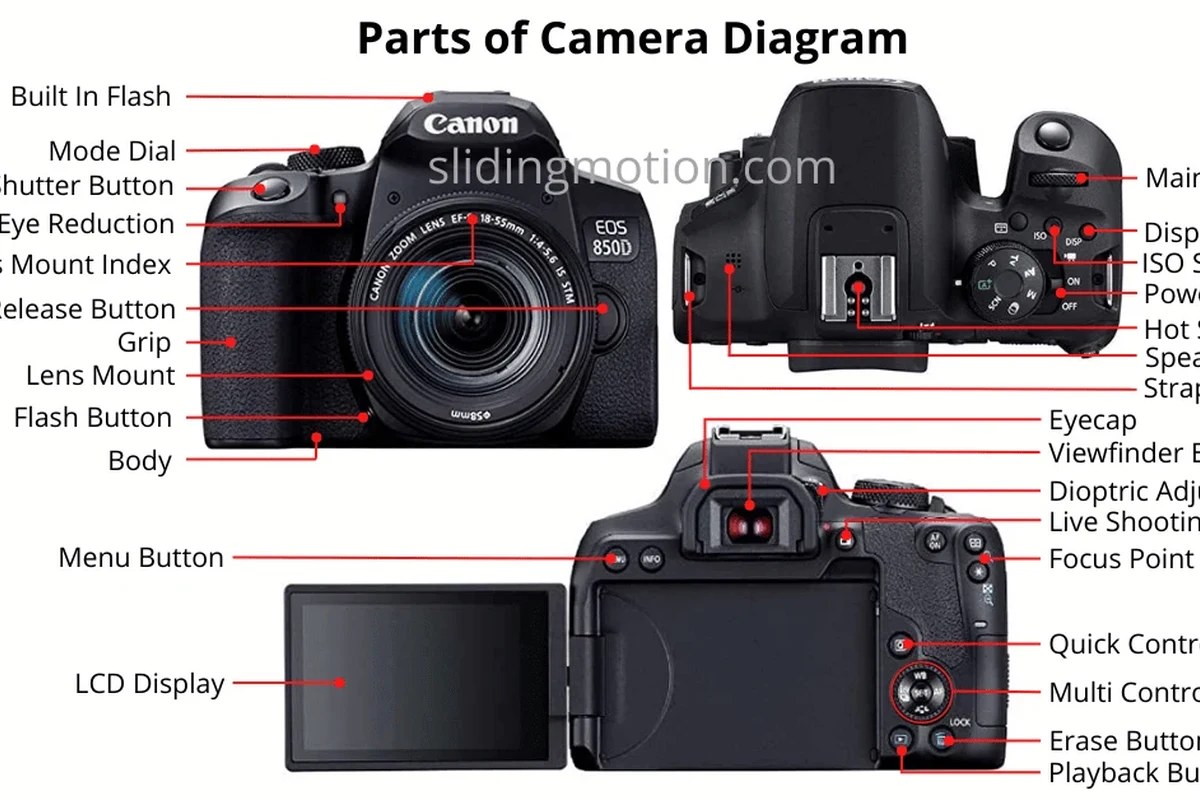
A camera is basically a light-capturing system with controls around it. The lens brings light in, the aperture controls how much enters, the shutter controls how long it enters, the sensor records it, and the processor turns that data into a photo or video file.
For most buyers, the most important camera parts names to learn are the lens, sensor, shutter, viewfinder or LCD, battery, memory card, and mount. Those parts affect image quality, speed, compatibility, and day-to-day usability more than cosmetic features do.
How a Camera Works: From Light Entry to Final Image
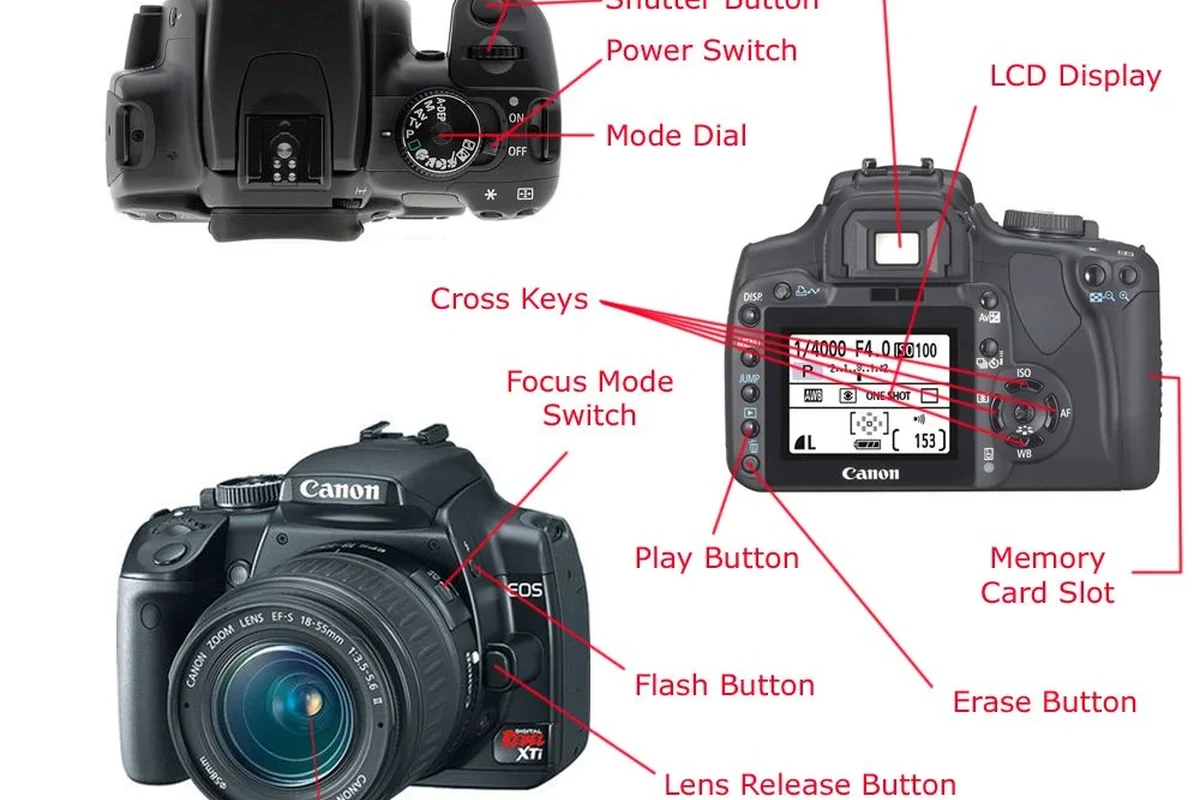
At a basic level, a camera works by directing light through the lens and onto a sensor. The lens focuses the scene, the aperture sets the light amount, and the shutter determines the exposure time.
After that, the sensor converts light into an electronic signal. The image processor interprets that signal, applies settings like white balance and noise reduction, and saves the result to the memory card.
This is why two cameras with similar megapixel counts can still produce very different results. Lens quality, sensor size, autofocus design, stabilization, and processing all matter in real use.
Core Camera Parts Names and What Each One Does
Lens, aperture, and focal length
The lens is the front optical system that gathers and focuses light. Different lenses are designed for different jobs, such as wide landscapes, portraits, close-up work, or distant subjects.
The aperture is the adjustable opening inside the lens. A wider aperture lets in more light and can blur the background more, while a narrower aperture keeps more of the scene in focus.
Focal length describes how “wide” or “zoomed in” a lens appears. Shorter focal lengths show more of the scene, while longer focal lengths make distant subjects look closer.
If you are comparing lenses, check the focal length range and maximum aperture together. A lens that sounds “zoomed” may still be poor for low light if its aperture is too narrow.
Shutter, sensor, and image processor
The shutter controls how long the sensor is exposed to light. A fast shutter freezes motion better, while a slower shutter can brighten dark scenes or create motion blur on purpose.
The sensor is the part that replaces film in digital cameras. Sensor size affects noise, dynamic range, depth of field, and how well the camera handles dim lighting, although results still depend on the lens and processing.
The image processor is the camera’s internal “brain.” It helps with autofocus behavior, burst shooting, video encoding, color rendering, and how quickly files are written to the card.
Megapixels matter, but they are only one part of image quality. A well-designed smaller sensor can still outperform a poorly matched larger setup in some everyday situations.
Viewfinder, LCD, and control dials
The viewfinder lets you frame the shot by looking through the camera instead of at the rear screen. Some cameras use an optical viewfinder, while others use an electronic viewfinder that shows a live digital preview.
The LCD is the rear display used for menus, playback, touch controls, and live view shooting. On many models, it also helps when filming video, vlogging, or shooting from awkward angles.
Control dials, buttons, and menus let you change exposure settings, focus modes, drive modes, and playback options. The layout varies a lot by model, so the official manual is worth reading before assuming a camera will feel intuitive.
Electronic viewfinders can show exposure preview and focus aids in real time, which helps many beginners learn faster than using only the rear screen.
Battery, memory card, and ports
The battery powers the camera and often the display, autofocus system, stabilization, and wireless features. Battery life varies widely by model, shooting style, temperature, screen use, and whether you record a lot of video.
The memory card stores photos and video. Card speed matters if you shoot bursts, high-resolution video, or long continuous clips, so the camera’s supported card types and speed classes should be checked before buying.
Ports may include USB, HDMI, microphone input, headphone output, or remote-control connections. Availability differs by model, and some entry cameras leave out ports that creators expect.
Use only the battery type, charger, and cable recommended by the manufacturer. Damaged batteries, swollen packs, or overheating chargers should be stopped and inspected immediately.
Camera Body Types and Who Each One Fits Best
DSLR vs mirrorless vs compact vs action camera
DSLRs use a mirror and optical viewfinder system. They can offer strong battery life and broad lens options, but they are usually bulkier than newer designs.
Mirrorless cameras remove the mirror box and rely on electronic viewing. They are often smaller, faster to preview changes, and heavily favored for hybrid photo/video work.
Compact cameras build the lens and body into one unit. They are convenient for travel and casual use, but they usually offer less upgrade flexibility.
Action cameras are built for portability, durability, and wide-angle recording. They fit active use cases, but they are not the best choice for shallow depth of field or lens swapping.
Entry-level users, hobbyists, creators, and pros
Entry-level users usually benefit most from simple controls, reliable autofocus, and a kit lens. Hobbyists may want better low-light performance, raw capture, and room to add lenses later.
Creators often care about video tools, microphone support, stabilization, and easy file transfer to phones or laptops. Pros usually look beyond the body alone and focus on system depth, lens availability, durability, and workflow speed.
- Smaller systems can be easier to carry every day
- Interchangeable lenses expand creative options
- Better controls can speed up learning and shooting
- More parts can mean more cost and complexity
- Some compact systems limit future upgrades
- Advanced bodies may overwhelm casual users
Key Specifications to Check Before Buying or Upgrading
Sensor size, megapixels, and low-light performance
Sensor size is one of the most important specs because it affects how much light the camera can gather and how much noise appears in dim scenes. Larger sensors often help, but the lens and processing still matter.
Megapixels tell you the image resolution, not automatically the image quality. More megapixels can help with cropping or large prints, but they can also create bigger files and demand better lenses, storage, and processing.
Low-light performance depends on the full system: sensor, lens aperture, stabilization, autofocus, and noise reduction. If you shoot indoors, at night, or in mixed lighting, this matters more than a spec sheet headline.
Mount compatibility, lens ecosystem, and accessory support
The mount is the physical connection between the body and lens. If you already own lenses, verify that the camera body supports them directly or through an adapter, and confirm whether autofocus and stabilization still work as expected.
Lens ecosystem size matters because it affects how easily you can grow later. A strong mount system usually gives you more choices for wide-angle, portrait, telephoto, macro, and third-party lenses.
- Confirm body mount, lens compatibility, and adapter limitations
- Check memory card format, battery model, and charger type
- Review microphone, flash, tripod, and remote accessory support
- Read the official manual and current compatibility list
Video features, stabilization, and connectivity
If you care about video, look at resolution, frame-rate support, recording limits, heat management guidance, microphone input, headphone monitoring, and autofocus behavior. Those details matter more than marketing language.
Stabilization may come from the lens, the body, or both. It can help handheld shooting, but the real result depends on focal length, movement, and whether you are walking while recording.
Connectivity options such as Wi-Fi, Bluetooth, USB-C, or app control can simplify transfers and remote shooting. App features vary by model and firmware, so it is smart to confirm current support before planning a workflow around them.
Real-World Benefits, Limitations, and Common Mistakes
How the right camera parts improve image quality and workflow
Understanding camera parts names helps you match the tool to the job. A better lens can improve sharpness and low-light results, a faster processor can improve burst shooting, and a larger sensor can make files cleaner in difficult lighting.
Workflow also improves when the body has the right controls, card slots, and connectivity. For home users, travelers, and creators, that can mean less time wrestling with menus and more time actually capturing usable images or clips.
Typical beginner mistakes with settings, handling, and lens care
Beginners often blame the camera when the issue is actually exposure, focus mode, or motion blur. Learning aperture, shutter speed, and ISO basics usually solves more problems than upgrading immediately.
Another common mistake is touching the front glass too often or storing lenses without caps. Dust is normal, but fingerprints, moisture, and careless cleaning can cause real damage over time.
- Learn the exposure triangle before chasing new gear.
- Keep one spare battery and one formatted memory card ready for important shoots.
- Use the camera strap or a secure grip when changing lenses.
- Check the official manual for cleaning and storage instructions.
Trade-offs in size, weight, cost, and complexity
Smaller cameras are easier to carry, but they may have fewer physical controls or less room for large batteries and ports. Larger cameras can be more comfortable for long sessions and often offer better ergonomics, but they add weight and bulk.
Cost also rises quickly once you add extra lenses, batteries, memory cards, filters, bags, and cleaning tools. That is why the best camera choice is often the one that fits your actual shooting habits, not the most expensive one on the shelf.
Safe Use, Maintenance, and Storage Tips for Camera Parts
Cleaning the lens, sensor, and exterior safely
Use a blower, microfiber cloth, and products recommended by the manufacturer for routine cleaning. Avoid aggressive wiping, harsh chemicals, or improvised tools that can scratch coatings or push debris deeper into the body.
Sensor cleaning is more delicate than lens cleaning. If your camera manual recommends professional service for sensor care, follow that guidance instead of improvising.
Stop using damaged electronics, swollen batteries, frayed cables, overheating chargers, or unstable accessories and follow the manufacturer’s guidance.
Battery care, heat limits, and proper storage conditions
Store batteries according to the manufacturer’s instructions, especially if the camera will sit unused for a while. Heat, direct sun, and fully draining a battery for long periods can shorten its useful life.
If the camera warms up during long video sessions, follow the model’s heat guidance and give it time to cool. Some cameras have recording limits or thermal warnings that should be respected rather than worked around.
Protecting ports, cards, and moving components from damage
Keep memory cards, ports, and battery compartments free from dust and moisture. Close covers properly, insert cards in the correct orientation, and avoid forcing connectors that do not fit.
Moving parts like zoom mechanisms, battery doors, and lens mounts should be handled gently. If something feels stuck, do not force it; check the manual or contact support.
Use a padded bag or case when traveling, and keep spare cards and batteries in small protective holders so they do not rattle or short against loose metal objects.
Best Value Choices and Final Recommendation for 2026 Buyers
Which camera parts matter most for different budgets
On a tight budget, prioritize the sensor, lens, and battery over flashy extras. A solid body with a good kit lens often delivers better real-world results than a feature-packed body paired with weak glass.
For a midrange buyer, the most valuable upgrades are usually better autofocus, stronger video tools, a more capable lens mount, and improved stabilization. For advanced users, accessory support, system depth, and reliability become just as important as image quality.
Beginners and most everyday users should prioritize a camera with a good lens ecosystem, dependable autofocus, and simple controls. Pros and serious creators should choose the system that best matches their lenses, workflow, and accessory needs, even if the body itself is not the cheapest option.
When to repair, replace, or upgrade individual components
Replace a battery when it no longer holds charge well or shows physical damage, and replace a memory card if errors become frequent. Lenses are worth repairing or upgrading when image quality, autofocus speed, or focal length needs no longer match your work.
For the body, upgrade only when your current camera is limiting your shooting in a meaningful way. That might be autofocus, low-light performance, video format support, card speed, or compatibility with the lenses and accessories you want.
Transparent verdict on the best path for beginners and pros
The best path is usually to learn the core camera parts names first, then buy for your real use case instead of chasing specs in isolation. Beginners should focus on usability and lens quality, while pros should focus on system compatibility, workflow, and long-term support.
If you are unsure, start with a camera system that has clear manual support, strong accessory compatibility, and room to grow. That approach is safer, more flexible, and usually more cost-effective than buying a body that looks advanced but does not fit your needs.
Frequently Asked Questions
Start with the lens, aperture, shutter, sensor, memory card, battery, and viewfinder or LCD. Those parts have the biggest impact on image quality and everyday use.
Sensor size affects low-light performance, noise, and depth of field. A larger sensor often helps, but the lens and processing still matter.
Most beginners benefit from a simple mirrorless or DSLR system with a good kit lens and clear controls. The better choice depends on lens availability, size, battery needs, and how you plan to shoot.
Check sensor size, lens mount compatibility, autofocus, video features, stabilization, battery support, and memory card type. Verify current compatibility details in the official manual or manufacturer specs.
Use a blower, microfiber cloth, and manufacturer-approved cleaning methods for the lens and exterior. Sensor cleaning is more delicate, so follow the manual or use professional service if needed.
Replace damaged batteries, failing memory cards, or worn accessories as soon as they start causing errors or safety concerns. Upgrade the body or lens only when your current setup limits image quality, autofocus, or workflow.