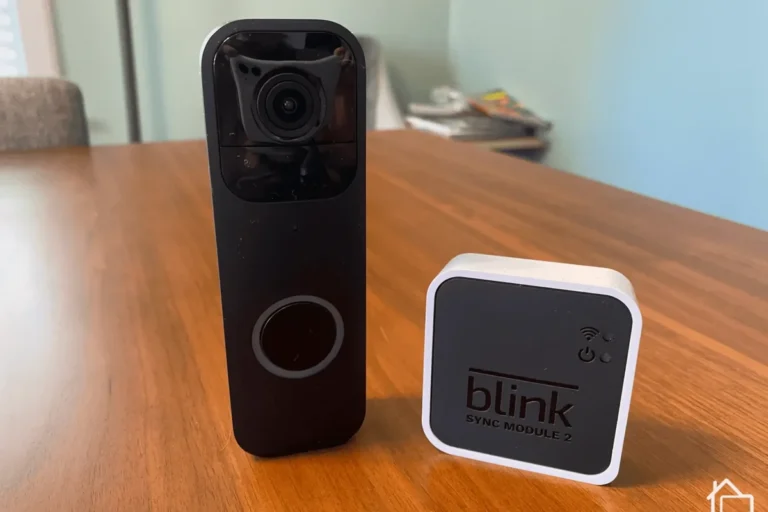
What Batteries Does Blink Video Doorbell Use Explained
Most Blink video doorbells use two AA batteries, and lithium AA cells are commonly the best choice to verify for performance. Wired power may be available on some models, but you should confirm the exact setup in the official manual.
If you’re asking what batteries does Blink video doorbell use, the short answer is that most Blink Video Doorbell setups use two AA batteries, and Blink commonly specifies lithium AA cells for best performance. Some installations can also use wired power, but the exact battery setup depends on the doorbell model and whether it’s installed as battery-powered or connected to existing doorbell wiring.
- Battery type: Most Blink video doorbells use two AA batteries, often with lithium AA recommended.
- Model matters: Power options can vary by Blink doorbell version, so check the exact model first.
- Battery life: Motion activity, Wi-Fi strength, and weather have a big impact on runtime.
- Best fit: Battery power suits easy installs, while wired power suits lower-maintenance households.
What Batteries Does Blink Video Doorbell Use? Quick Answer and Core Specs
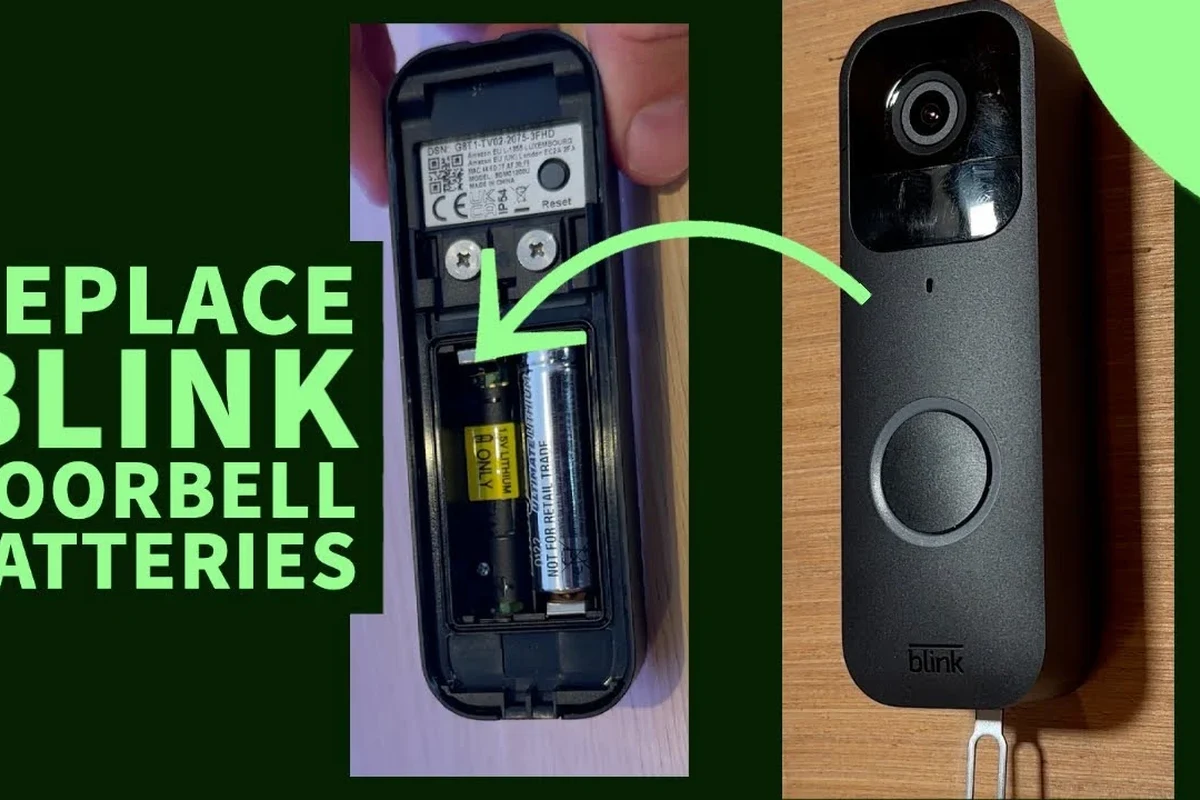
For most Blink Video Doorbell models, the battery answer is simple: two AA batteries. In Blink’s ecosystem, those are typically non-rechargeable lithium AA batteries rather than standard alkaline cells, because lithium AAs usually handle outdoor temperature swings and longer standby use better.
The most important detail is that battery choice is not just about fitting the compartment. It affects reliability, motion-trigger response, and how often you’ll need to open the app or physically replace cells. If you’re comparing battery-powered and wired options, our guide on what kind of video doorbell you should buy can help narrow down the best setup for your home.
How the Blink Video Doorbell Power System Works
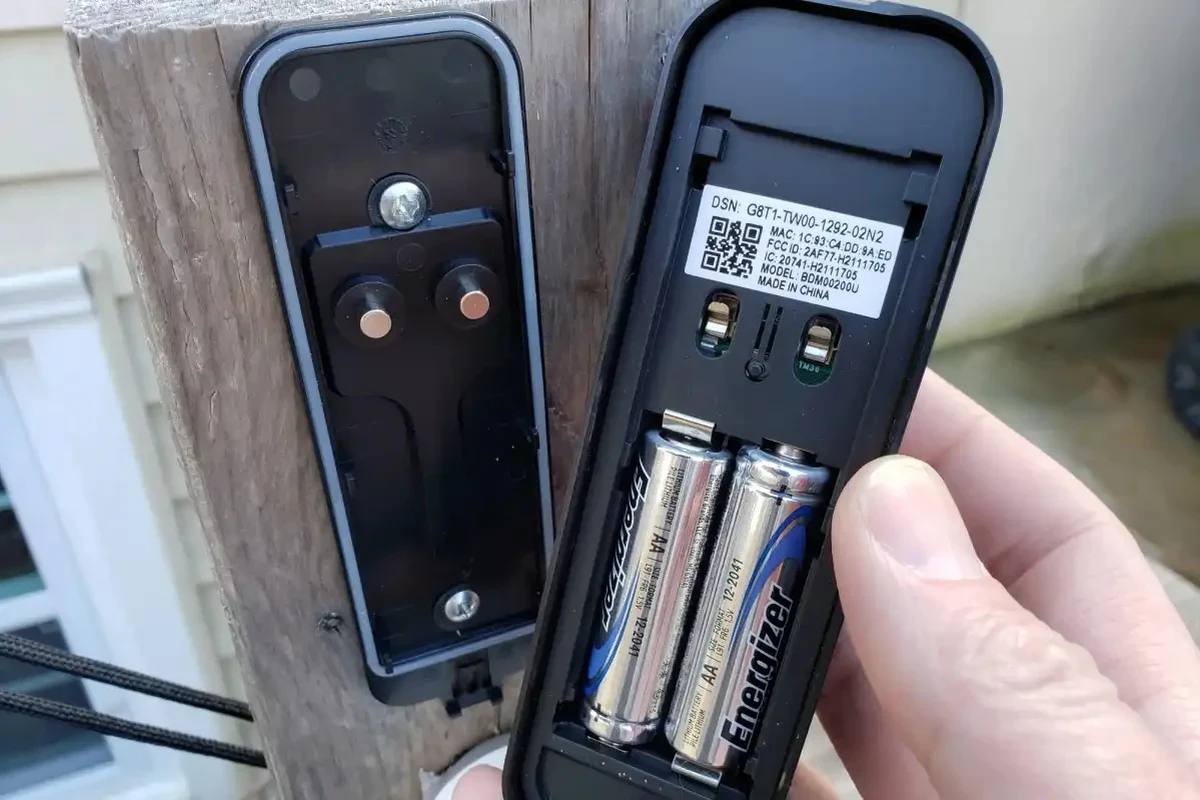
Blink’s doorbells are designed around low-power operation. That means the device spends much of its time in a standby state and only uses more energy when motion is detected, a button is pressed, or the live view is opened in the app. Battery life is therefore highly dependent on how often the doorbell wakes up.
For homeowners choosing between battery and wired power, it helps to think of the battery as the main energy source in a wireless setup, while wired power can either support the doorbell or reduce how often batteries need attention, depending on the model. If you’re still comparing home entry cameras, this broader look at whether video doorbells are worth it for home security may help set expectations.
Battery type, voltage, and runtime expectations
Blink doorbells generally use two AA cells, which together provide the operating power the doorbell needs for everyday use. Manufacturer guidance is the best source for the exact battery chemistry, but lithium AA batteries are commonly recommended because they tend to perform better in cold or hot outdoor environments than alkaline batteries.
Runtime is not fixed. It depends on motion sensitivity, live view frequency, Wi-Fi strength, temperature, and how busy the doorway is. A busy front porch with frequent alerts will drain batteries faster than a quiet side entrance. In other words, the best battery is only part of the equation; settings and placement matter just as much.
Battery-powered video doorbells often last longer when motion zones are tuned carefully, because fewer unnecessary wake-ups means less power use.
Wired vs battery-powered installation differences
A battery-powered Blink doorbell is simpler to install because it does not depend on existing doorbell wiring. That makes it appealing for renters, older homes, and entryways where wiring is unavailable or inconvenient. The tradeoff is that you will need to monitor battery status and replace cells when the app warns you.
A wired setup can be a better fit if you already have compatible doorbell wiring and want less routine battery maintenance. Even then, you should confirm whether your specific Blink model uses wiring as a power source, a supplemental source, or just for chime support. The official manual is the safest place to verify those details.
Not every Blink doorbell variant behaves the same way. Before purchasing replacement batteries, check the model name in the Blink app, the product label, or the user manual.
Which Blink Video Doorbell Models Use Which Batteries
Model names matter here because Blink has offered more than one doorbell configuration. Some versions are primarily battery powered, while others can be connected to existing wiring. The battery compartment itself is usually straightforward, but the power behavior around it is not always identical across product generations.
If you want a broader battery-life comparison across brands, you may also find our article on video doorbells with the best battery life useful when weighing alternatives.
Original Blink Video Doorbell battery requirements
The original Blink Video Doorbell is commonly associated with two AA batteries. In practice, that means you should plan for a pair of matching AA cells rather than mixing brands, battery ages, or chemistries. Matching batteries helps keep the voltage balanced and reduces uneven drain.
For best results, follow Blink’s battery guidance rather than assuming any AA battery will work equally well. Standard alkaline AA batteries may function, but performance in outdoor conditions can be less consistent than with lithium AAs, especially in colder climates.
- Confirm the exact Blink doorbell model in the app or manual
- Check whether the unit expects two AA batteries or supports wired power
- Match battery chemistry to the manufacturer’s recommendation
- Verify the return policy if you are buying a replacement pack
Newer Blink doorbell variants and compatibility notes
Newer Blink doorbell variants may retain the same basic AA battery concept while adding different power options, chime behavior, or installation requirements. That is why compatibility should be checked at the model level, not just the brand level. A battery pack that works in one Blink camera or doorbell may not be the right choice for another device.
If you are shopping for a replacement or a second unit, compare the model number, app support, mounting hardware, and power method before buying. For buyers who want to compare cost and value across doorbell categories, this video doorbell cost guide can help set a realistic budget.
Who This Doorbell Battery Setup Fits Best
Two-AA battery Blink doorbells are a strong fit for people who want fast installation, flexible placement, and fewer wiring concerns. They are especially practical for apartments, townhomes, older houses, and entryways where running new wiring would be difficult or expensive.
They also suit users who prefer a low-commitment setup. If you want a doorbell that can be moved later, installed temporarily, or used without electrical work, battery power is often the more convenient path.
Ideal users based on home layout, usage frequency, and climate
This setup makes the most sense for homes with moderate foot traffic and a stable Wi-Fi signal near the front door. It also tends to fit users in climates where battery performance is less likely to be stressed by extreme cold or heat, though lithium AAs can help in tougher conditions.
Pet owners, remote workers, and frequent package recipients may appreciate the flexibility, but high-alert households should expect more battery turnover. The more often the camera wakes up, the more often the batteries will need attention.
When a wired setup may be the better choice
If your home already has compatible doorbell wiring and you want fewer battery changes, wired power may be the better long-term choice. It can be especially helpful in busy households, on front doors with constant motion, or in locations where replacing batteries would be inconvenient.
Wired power is also worth considering if the doorbell is mounted in a hard-to-reach location. Fewer battery swaps mean less maintenance and fewer chances to disturb the device’s seal or mounting hardware.
Battery-powered Blink doorbells are best for homeowners who want easy installation and flexible placement, while wired setups are better for users who prioritize lower maintenance and already have compatible wiring.
Key Buying Criteria Before You Replace or Reuse Blink Batteries
Before you buy replacements, focus on the battery format, chemistry, and authenticity of the product listing. For a Blink doorbell, “AA” is only part of the answer; chemistry, quality, and source matter too.
It is also smart to confirm whether the batteries are fresh, sealed, and from a reputable seller. Counterfeit or poorly stored batteries can underperform, leak, or fail early, which is especially frustrating in an outdoor security device.
Battery format, capacity, and brand compatibility
Use the battery format specified by the manufacturer and avoid improvising with adapters or nonstandard cells. If Blink recommends lithium AA batteries, that recommendation is usually tied to outdoor performance and stability rather than convenience alone.
Capacity can matter, but bigger numbers do not automatically mean better real-world results. Battery life still depends heavily on signal strength, motion frequency, and temperature. A well-placed doorbell with good Wi-Fi can outperform a poorly placed one even with premium batteries.
Safety checks, warranty considerations, and counterfeit risks
Inspect batteries before installation. If a battery is dented, swollen, leaking, or has damaged packaging, do not use it. Keep batteries away from children and pets, and store spares in a cool, dry place away from metal objects that could short the terminals.
Stop using damaged batteries, frayed charging accessories, or any device that overheats, smells unusual, or shows corrosion. Follow the manufacturer’s battery and warranty guidance before replacing parts or attempting any workaround.
Warranty rules can vary by region and retailer, so confirm them before using third-party accessories or returning a device. If you are unsure about a battery listing, check the official Blink documentation and the retailer’s compatibility notes before you buy.
Setup, Replacement, and Safe Handling Guide
Replacing Blink doorbell batteries is usually simple, but it should still be done carefully. The goal is to preserve the battery contacts, keep the compartment clean, and avoid moisture or physical damage during the swap.
How to install or swap batteries correctly
Remove the doorbell according to the manual and avoid forcing the cover or latch.
Look for corrosion, dust, or bent contacts before inserting new batteries.
Use the correct orientation and replace both cells at the same time with the same type and brand when possible.
Make sure the unit powers on normally and check battery status in the Blink app after reinstalling.
Inspection, charging, and storage best practices
Most Blink doorbell battery setups use replaceable AA cells rather than built-in rechargeable packs, so “charging” usually means replacing the batteries, not plugging the doorbell itself into a charger. If you use rechargeable AA batteries in any accessory, make sure they are approved by the manufacturer and that their voltage and chemistry are compatible with the device.
Store spare batteries in their original packaging when possible. Keep them away from heat sources, direct sunlight, and loose coins, keys, or other metal items that could create a short.
Heat limits, cable quality, and charger wattage guidance
If your Blink doorbell is wired or connected through an accessory that uses a cable, use only quality cables and power equipment that match the manufacturer’s requirements. Do not assume any charger or adapter is safe just because it fits physically. Voltage, power output, and connector compatibility all matter.
For battery handling, heat is the bigger concern. Avoid leaving batteries in a hot car, near a radiator, or in prolonged direct sun during storage. Excess heat can shorten battery life and increase safety risks. If you are also comparing power-related home tech, our guide on whether a charger affects battery life explains why proper power matching matters across devices.
Do not install batteries with corrosion, swelling, or leakage. If the compartment shows residue or damage, consult the official support guidance before using the doorbell again.
Real-World Benefits, Limitations, and Common Mistakes
The biggest benefit of Blink’s AA battery approach is flexibility. You can install the doorbell without electrical work, move it more easily, and get up and running quickly. That makes it appealing for many everyday users who want practical security without a complicated setup.
The main limitation is maintenance. Battery-powered doorbells need periodic attention, and battery life can vary a lot based on motion activity, Wi-Fi quality, and weather.
Battery life trade-offs, motion settings, and connectivity impact
Battery life is shaped by how often the camera wakes up, not just by the batteries themselves. High motion sensitivity, frequent live view sessions, and weak Wi-Fi can all shorten runtime. In a busy front-yard setup, the same batteries may last much less time than they would at a quiet side door.
Connectivity also matters because a weak signal can force the device to work harder. If the doorbell is too far from the router or sync module, improving placement or network coverage may help battery life more than switching brands of AA cells.
Frequent user errors that shorten battery life
Common mistakes include mixing old and new batteries, using mismatched brands, installing the doorbell in a weak Wi-Fi zone, and setting motion alerts too aggressively. Another frequent issue is ignoring app warnings until the doorbell stops responding.
- Use the same battery chemistry and replace both cells together.
- Reduce unnecessary motion triggers with careful placement and settings.
- Keep the doorbell firmware and Blink app updated when possible.
- Check the battery compartment periodically for dust or corrosion.
Maintenance, Troubleshooting, and Final Recommendation
Good maintenance keeps a Blink doorbell reliable for longer. That means checking battery status in the app, cleaning the compartment carefully, and watching for signs that the batteries are nearing the end of their useful life.
How to extend battery life and know when to replace cells
To extend battery life, start with placement. Avoid pointing the camera at busy sidewalks, reflective surfaces, or moving tree branches if those objects trigger unnecessary alerts. Then review motion zones and sensitivity settings so the doorbell only wakes when it should.
Replace cells when the app reports low battery, when alerts become unreliable, or when the unit starts missing expected events. If battery drain becomes unusually fast after a fresh replacement, check Wi-Fi strength, mounting position, and whether the doorbell is being triggered too often.
Final verdict for homeowners choosing Blink doorbell power options
For most buyers, Blink video doorbells use two AA batteries, usually with lithium AA cells being the safest performance choice to verify against the manual. That setup is best for people who want simple installation, flexible placement, and minimal electrical work.
If you already have compatible wiring and want less battery maintenance, a wired setup may be more convenient over time. The right choice comes down to your home layout, how busy your doorway is, and whether you prefer convenience now or lower upkeep later.
- Most Blink video doorbells use two AA batteries, often with lithium AA cells recommended for better outdoor performance.
- Battery life depends heavily on motion activity, Wi-Fi strength, climate, and app settings.
- Check the exact model before buying replacements because power options can vary by version.
- Wired power can reduce maintenance if your home already has compatible doorbell wiring.
Frequently Asked Questions
Most Blink video doorbells use two AA batteries. Blink commonly recommends lithium AA cells for better outdoor performance, but you should confirm the exact model in the manual or app.
They may work in some setups, but performance can be less consistent than lithium AA batteries. Check the manufacturer’s guidance for your exact model before buying replacements.
Battery life varies widely based on motion activity, live view usage, Wi-Fi strength, weather, and placement. A busy doorway will drain batteries faster than a quiet one.
Not always. Many Blink doorbells can run on batteries, while some installations can also use existing wiring depending on the model and setup.
Verify the model number, battery chemistry, and whether the batteries are fresh and from a reputable seller. Avoid damaged, leaking, or counterfeit-looking batteries.
Wired power is often better if you already have compatible doorbell wiring and want less routine battery maintenance. It can also help in busy households with frequent motion alerts.