Cameras in the Rear View Mirrors of semi-trucks can improve blind-spot awareness, low-light visibility, lane changes, and docking—but only when the display, camera placement, wiring, and truck compatibility are correct.
Mirror cameras on semi-trucks can improve visibility, especially in bad weather, lane changes, and tight docking. They are most useful when the system is well matched to the truck and installed correctly.
Commercial semi-truck camera-mirror systems should be selected by exact cab, trailer, voltage, mounting, display, and weather-resistance requirements. The two Amazon products featured below are aftermarket mirror-display camera systems and should be treated as retrofit alternatives for compatible vehicles—not automatic replacements for commercial side-mirror camera systems.
Cameras in the Rear View Mirrors of Semi-Trucks are camera-based mirror systems that replace the mirror housing with exterior cameras and in-cab displays, or they work alongside traditional mirrors. They matter because they can widen the driver’s field of view, reduce blind spots, and make lane changes, backing, and night driving easier to manage when the system is properly installed and maintained.
- Visibility first: The biggest benefit is wider, clearer side and blind-spot coverage.
- Fit matters: Compatibility with cab layout, wiring, and trailer type is essential.
- Screen quality counts: Brightness, anti-glare, and low-latency performance affect safety.
- Maintenance is ongoing: Clean lenses, inspect cables, and verify camera angles regularly.
Cameras in the Rear View Mirrors of Semi-Trucks: What They Are and Why They Matter
These systems are often called mirror-cam systems, digital mirror systems, or camera mirror systems. In practice, the goal is simple: give the driver a clearer, more adaptable view than a fixed glass mirror can provide, especially around trailers, in bad weather, and during long hours behind the wheel.
Quick answer: how mirror cameras replace or assist traditional truck mirrors
Some setups fully replace the side mirror housing with a camera and display pair, while others keep the physical mirror and add cameras for blind spots or trailer views. The best choice depends on cab layout, route type, and whether the truck is operated in a fleet that standardizes equipment across vehicles.
Why fleets and owner-operators are adopting camera-based mirror systems in 2026
Fleets like systems that can improve visibility consistency across different drivers and trucks. Owner-operators often look at them for comfort, aerodynamic benefits, and easier maneuvering in dense traffic, but the value depends heavily on the exact model, installation quality, and whether the driver is comfortable relying on screens instead of glass.
How Semi-Truck Rearview Mirror Cameras Work
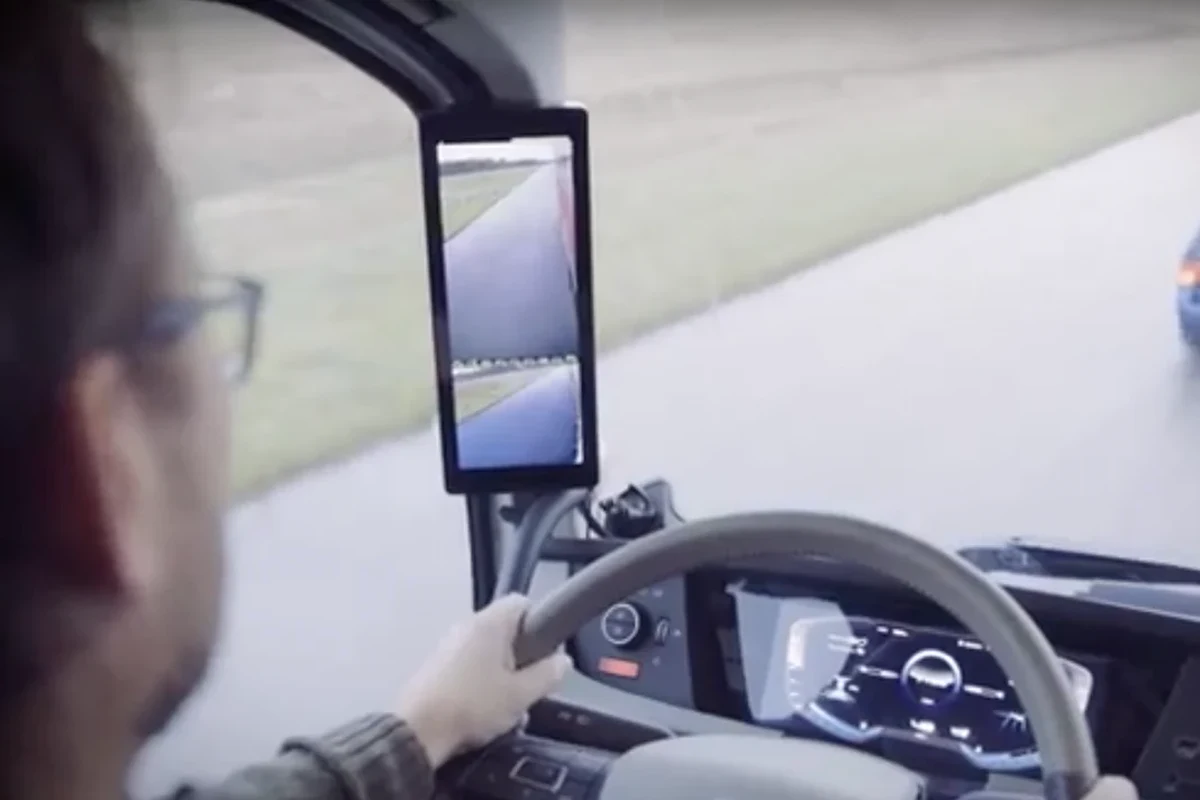
At a basic level, a camera mounted outside the cab captures the side or rearward view and sends it to an in-cab display. The system may include processing hardware that adjusts brightness, image angle, and overlay information, but features vary widely by model and firmware.
Core components: exterior camera units, in-cab displays, wiring, and control modules
Most systems include weather-sealed exterior camera units, one or more displays mounted inside the cab, wiring harnesses, and a control module. Some also integrate with turn signals, trailer cameras, or recording functions, so buyers should confirm exactly what is included in the box and what must be purchased separately.
- Camera modules and mounting brackets
- In-cab display or displays
- Wiring harness, connectors, and installation manual
- Control module, if required by the system
Signal path, latency, low-light performance, and weather resistance
Image quality depends on how quickly the signal moves from camera to screen, how the system handles darkness, and how well the housing resists water, dust, vibration, and temperature swings. Lower latency is important because a delayed image can make lane changes and close-quarters maneuvering feel less natural, while strong low-light performance helps when driving before sunrise or after dark.
Manufacturers may describe image processing differently, and actual performance can vary with cab voltage, wiring quality, display brightness, and firmware version. Check the current manual and spec sheet for the exact truck model or kit.
How blind-spot coverage and wide-angle views improve visibility
Many systems use a wider field of view than a standard mirror, which can help show vehicles approaching from behind or alongside the trailer. That wider coverage can reduce head movement and make it easier to monitor adjacent lanes, but a wide view can also make objects look farther away than they really are, so drivers still need time to adapt.
Who These Systems Fit Best: Fleet, Long-Haul, Regional, and Owner-Operator Use Cases
Camera mirror systems are not a universal upgrade. They fit best when the operation values visibility, consistency, and reduced drag more than the familiarity of traditional mirrors.
Best-fit drivers and operations for camera mirror setups
Fleet trucks that run the same route patterns, long-haul rigs that spend many hours in changing light, and regional operators who deal with heavy traffic can all benefit from a well-designed system. Drivers who frequently back into tight docks may also appreciate a clearer trailer-side view, especially if the display placement is ergonomic and easy to glance at.
Drivers who want better blind-spot awareness and are willing to adapt to screen-based viewing, especially in fleets that can standardize training, maintenance, and replacement parts.
When traditional mirrors may still be the better choice
Traditional mirrors may be preferable for drivers who want a fully familiar visual reference, operate older trucks with limited electrical infrastructure, or work in environments where a screen failure would be especially disruptive. They can also be simpler for mixed-driver fleets if training time is limited.
Compatibility considerations for different truck cab layouts and trailer types
Not every cab or trailer combination is an easy fit. Buyers should verify mounting points, cable routing paths, trailer length, and whether the system is designed for the specific cab height and mirror arm geometry in use.
Key Specifications and Buying Criteria to Check Before You Buy
Because these systems vary so much, the most important buying step is comparing the spec sheet against your truck and your daily driving conditions. Do not rely on a generic “fits most trucks” claim without confirming the exact mounting and power requirements.
Display size, resolution, brightness, and anti-glare performance
The display needs to be large enough to read quickly without forcing the driver to look away from the road for too long. Resolution, brightness, and anti-glare treatment matter together: a sharp screen can still be hard to use if it washes out in daylight or reflects cabin light at night.
Camera field of view, night vision, HDR, and weather sealing
Field of view determines how much of the lane and trailer side you can see, while night vision and HDR-like processing can help balance bright headlights and dark roads. Weather sealing is equally important because a camera exposed to road spray, ice, and vibration needs to stay clear and stable over time.
Look for systems that clearly state their water and dust protection, mounting method, and temperature operating range in the manual rather than only in marketing copy.
Power draw, wiring quality, mounting hardware, and durability ratings
Power needs vary by model, and a system that seems simple can still create problems if the wiring harness is thin, poorly routed, or not rated for truck use. Durable mounting hardware matters because vibration can loosen brackets, shift camera angles, and slowly ruin image consistency.
Connectivity, integration with existing dash tech, and warranty coverage to verify
Some systems integrate with dash cameras, telematics, or trailer cameras, but that compatibility is not automatic. Before buying, confirm whether the system works with your existing display ecosystem, whether software updates are required, and what the warranty actually covers for cameras, screens, cables, and water intrusion.
- Check the exact truck cab, mirror arm, and trailer compatibility
- Confirm display brightness, camera field of view, and low-light behavior
- Verify wiring length, connector type, and power requirements
- Review warranty terms, replacement policy, and update support
Real-World Benefits and Practical Trade-Offs
In the right conditions, camera mirror systems can make driving feel less stressful and more controlled. But they also change how a driver perceives distance, motion, and peripheral activity, so the benefits come with a learning curve.
Visibility gains in rain, darkness, lane changes, and tight docking maneuvers
One of the biggest advantages is clearer visibility when glass mirrors are compromised by spray, rain, or poor angles. A properly positioned camera can also help during lane changes and docking because the driver gets a more consistent view of the trailer edge and adjacent traffic.
Potential advantages for fuel efficiency, aerodynamics, and driver fatigue
Replacing bulky mirror housings can improve aerodynamics, which may help fuel efficiency, though the actual benefit depends on the truck and route. Some drivers also report less neck strain because they can glance at a display instead of turning as far to inspect blind spots, but comfort is personal and depends on screen placement.
Limitations: glare, screen dependence, failure points, and learning curve
Screen glare, condensation, or a dead display can create a serious visibility gap if the system is fully relied on. There is also a learning curve because the image may feel less intuitive than a mirror at first, especially when judging distance to a vehicle in the next lane.
- Wider blind-spot coverage than many standard mirrors
- Can improve visibility in rain, darkness, and spray
- May reduce drag when designed as a mirror replacement
- Depends on power, wiring, and display reliability
- Can take time to learn distance judgment on a screen
- Not ideal if the truck needs a simple, low-tech backup view
Installation and Setup Guide: What Drivers and Fleet Managers Should Expect
Installation quality has a direct effect on safety and image quality. A poorly mounted camera or badly routed cable can create intermittent issues that are hard to diagnose later, so professional installation is often worth considering for commercial vehicles.
Typical install steps and where professional installation is strongly recommended
A typical install involves mounting the exterior cameras, placing the in-cab displays, routing cables through protected paths, connecting power, and then checking image alignment. Professional installation is strongly recommended when the truck is under warranty, when wiring must pass through sealed body panels, or when the system integrates with multiple cameras and control modules.
Use the manufacturer’s bracket and location guidance so the view matches the intended lane and trailer coverage.
Keep wiring away from sharp edges, moving parts, and heat sources, and use proper grommets or seals where required.
Verify that the display shows the correct lane position, trailer edge, and blind-spot coverage before road use.

The detached front lens and OEM-style mirror-display approach may appeal to buyers who want a cleaner installation than a conventional windshield-mounted camera.
- Detached front lens offers more installation flexibility
- Mirror-display format keeps the viewing area near the normal rearview position
- Useful as an auxiliary rear-view or recording system in compatible vehicles
Mounting, calibration, cable routing, and weatherproofing checks
After mounting, calibration should confirm that both sides show a consistent perspective and that the display is positioned where it can be checked quickly without blocking the road view. Weatherproofing checks matter too, especially around connectors, cable entry points, and any exposed seams that could let in moisture.
Common setup mistakes that reduce image quality or safety
Common mistakes include aiming the camera too high or too low, placing the display where sunlight washes it out, and leaving cables loose enough to vibrate or chafe. Another frequent issue is skipping a full night test, which can hide glare and low-light problems until the truck is already on the road.
Safety, Maintenance, and Troubleshooting for Long-Term Reliability
Like any truck electronics, mirror-camera systems need routine checks. The goal is not just to keep them working, but to make sure they remain trustworthy under changing weather, load conditions, and driver schedules.
Safe-use practices: pre-trip inspections, cleaning lenses, and verifying camera angles
Drivers should include the cameras and displays in pre-trip checks, just as they would inspect mirrors or lights. Clean lenses with the manufacturer-recommended method, and confirm that the camera angle still shows the correct lane and trailer area after loading, unloading, or hitting rough roads.
Stop using damaged electronics, frayed cables, unstable mounts, or displays that flicker, overheat, or repeatedly lose signal until the manufacturer’s guidance or a qualified service technician addresses the issue.
Routine care: cable inspection, connector checks, software updates, and replacement timing
Routine care should include looking for cracked insulation, loose connectors, corrosion, and water intrusion. If the system uses software or firmware updates, follow the manufacturer’s instructions and update notes, because some image or compatibility issues are fixed that way rather than by hardware replacement.
Common problems: image lag, condensation, dead displays, and power issues
Image lag can come from processing delays, weak connections, or power instability. Condensation inside the lens housing may point to a seal problem, while a dead display can indicate a fuse, wiring, or module issue that should be diagnosed according to the manual rather than by guesswork.
Even small changes in camera angle can make a trailer look farther away or closer than it is, which is why calibration after installation matters so much.
Value, Alternatives, and Final Recommendation
The right value comparison is not just price versus price. It is reliability, visibility, installation complexity, and how much confidence the system gives the driver in real traffic and weather.
How camera mirror systems compare with conventional mirrors and dash-mounted add-ons
Conventional mirrors are simple, familiar, and easy to understand when something goes wrong. Dash-mounted add-ons, such as auxiliary cameras or recorders, can improve visibility in specific situations, but they usually do not replace the continuous side-view function that a dedicated mirror-camera system is designed to provide.
| Option | Best For | Key Consideration |
|---|---|---|
| Traditional mirrors | Drivers wanting simplicity and familiarity | Less adaptable in poor weather and blind-spot-heavy traffic |
| Mirror-camera systems | Fleets and drivers prioritizing visibility and aerodynamics | Requires good installation, power, and screen quality |
| Auxiliary dash cameras | Adding specific views or recording | Usually supplements rather than replaces mirrors |

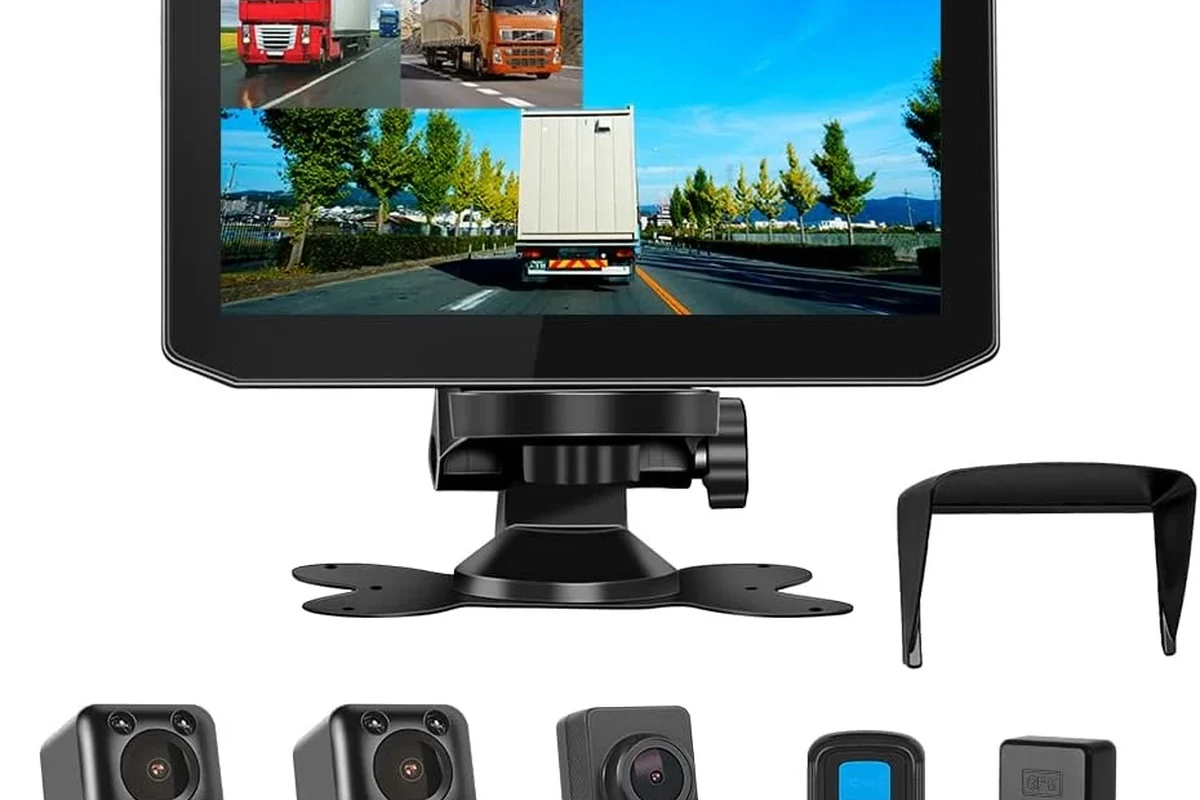
This premium mirror-display camera system is most relevant for buyers who want multiple recorded views and a large digital mirror display in a compatible vehicle.
- Three-channel camera layout for broader recorded coverage
- Mirror-style display can provide a cleaner in-cab viewing position
- Premium option for owner-operators comparing auxiliary camera systems
What buyers should expect on price, durability, and total cost of ownership
Pricing varies widely by truck type, camera count, display quality, and whether the system is a retrofit or factory-style package. Total cost of ownership should also include installation, replacement parts, calibration time, and the possibility of upgrading firmware or swapping components over the life of the truck.
Cameras in the Rear View Mirrors can be valuable when the system is compatible with the truck, installed correctly, and maintained as part of regular pre-trip inspections.
Review compatibility carefully before choosing an aftermarket kit for a commercial vehicle.
Transparent verdict: when Cameras in the Rear View Mirrors are worth it in 2026
Cameras in the Rear View Mirrors of Semi-Trucks are worth considering when visibility, aerodynamics, and driver comfort matter enough to justify the added complexity. They make the most sense for fleets and owner-operators who can verify compatibility, accept the learning curve, and commit to proper maintenance; drivers who want the simplest possible backup view may still be better served by conventional mirrors.
Frequently Asked Questions
Do camera mirror systems fully replace traditional semi-truck mirrors?
Some systems are designed to replace the mirror housing, while others only assist with blind spots and trailer views. The right setup depends on the truck, route, and driver preference.
What should I check before buying a mirror-camera system?
Verify cab compatibility, display brightness, camera field of view, wiring length, weather sealing, and warranty coverage. It is also important to confirm that the system fits your trailer and mounting layout.
Are mirror cameras better in rain and darkness?
They can be, especially if the camera and display are designed for low-light and wet-weather use. Performance still depends on lens quality, placement, and how well the system handles glare and spray.
Can a mirror-camera system improve fuel efficiency?
Some mirror-replacement designs can improve aerodynamics, which may help fuel efficiency. The actual result varies by truck, route, and the specific product design.
How hard is it to install a semi-truck mirror camera system?
Installation can be straightforward for a simple kit, but many commercial setups need careful wiring, calibration, and weatherproofing. Professional installation is often recommended when the system is tied into multiple truck electronics or warranty-covered equipment.
What maintenance do these systems need?
They need regular lens cleaning, cable and connector checks, pre-trip image verification, and any manufacturer-recommended software updates. If a display flickers, a cable is damaged, or the camera housing is compromised, the system should be inspected before use.