Does Arlo Video Doorbell Have to Be Wired or Not
Some Arlo video doorbells are wired, while others are battery-powered and do not require existing doorbell wiring. The exact answer depends on the model number, so verify the official specs before buying or installing.
If you’re asking does Arlo video doorbell have to be wired, the short answer is no for some models and yes for others. Arlo sells both wired and battery-powered doorbells, so the real answer depends on the exact model you choose and how you want it installed.
- Model matters: Arlo makes both wired and battery-powered doorbells, so wiring is not universal.
- Check compatibility: Verify voltage range, chime support, and mounting fit before purchase.
- Wired is lower maintenance: It suits homes with existing compatible doorbell wiring.
- Battery is more flexible: It is usually better for renters, older homes, or wire-free installs.
Does Arlo Video Doorbell Have to Be Wired? Quick Answer and What It Means
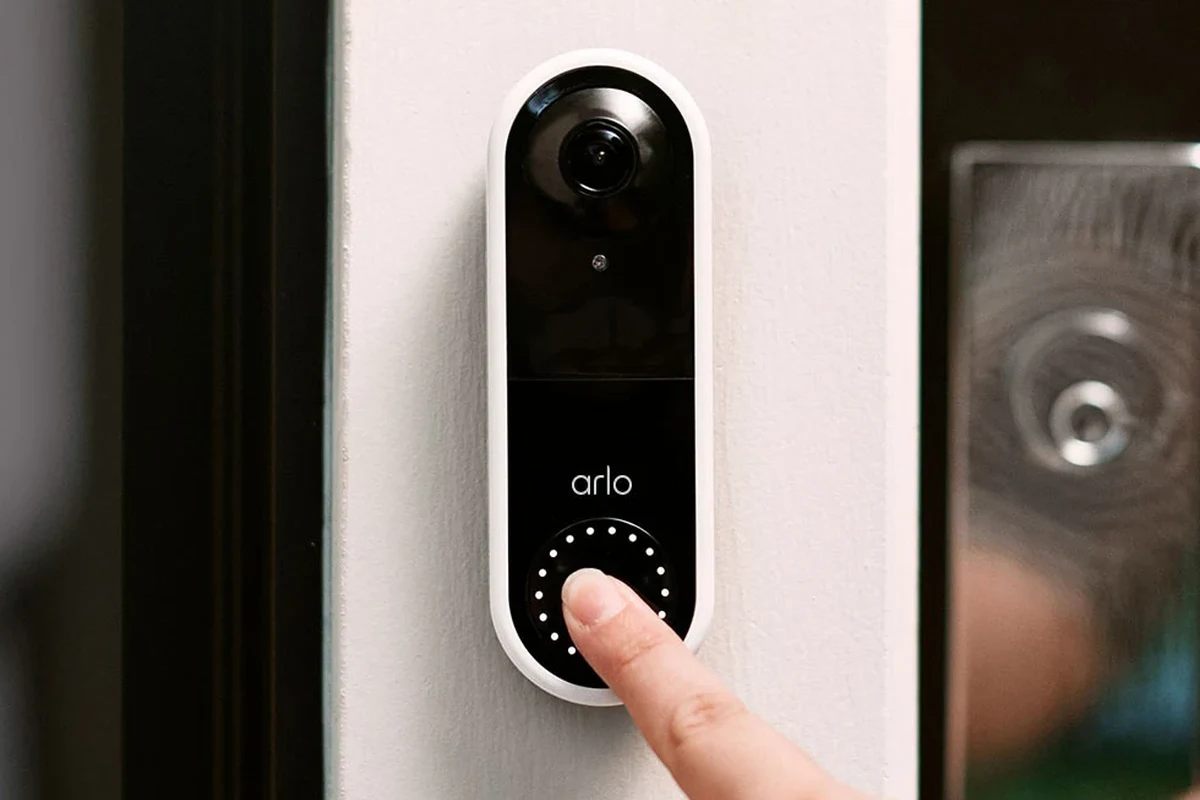
Arlo video doorbells are not all built the same. Some versions are designed to work with existing doorbell wiring, while others can run on battery power and only use wiring as an optional power source or for charging support.
That means the wiring question is really a buying decision, not just an installation detail. If your home already has a doorbell circuit, a wired setup can be convenient; if not, a wire-free model may be the easier path.
How the Arlo Video Doorbell Gets Power: Wired vs. Battery-Operated Setup
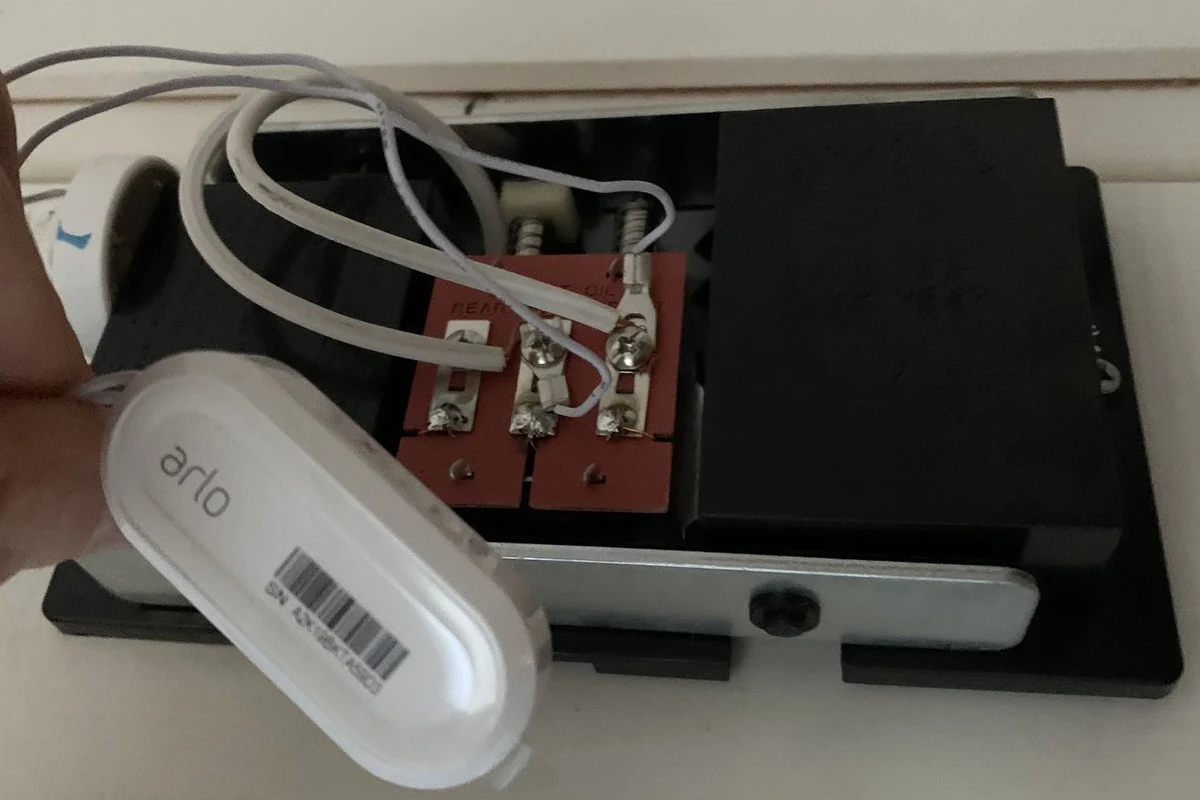
Power source affects installation, maintenance, and how the doorbell behaves day to day. Before buying, it helps to separate “wired power,” “battery power,” and “wire-free installation,” because those terms are often used loosely in product listings.
What “wired” means for Arlo models
For Arlo, “wired” usually means the doorbell connects to existing low-voltage doorbell wiring in the wall. In that setup, the wiring can supply power continuously, which reduces or eliminates the need to recharge a battery depending on the model.
Wired installation is usually best when you already have a compatible doorbell transformer and safe, intact wiring at the mounting location. If the home wiring is old, damaged, or outside the doorbell’s supported voltage range, you should verify compatibility before installation.
Voltage, transformer requirements, and whether wiring is required can vary by Arlo model and region. Always confirm the exact model number in the official manual or product page before purchase.
How battery-powered operation changes installation
A battery-powered Arlo doorbell is easier to place in homes without existing doorbell wiring. That can be helpful for renters, older homes, or anyone who wants a simpler install without opening up electrical connections.
The trade-off is maintenance. Battery-powered models need recharging or power management, and the experience depends on motion activity, notification settings, Wi-Fi strength, temperature, and how often the live view is used.
If you want the least complicated setup, look for a battery-capable model and then confirm whether the included mount, charging cable, and wiring options match your home layout.
Which Arlo Video Doorbell Models Need Wiring and Which Do Not
Arlo’s lineup changes over time, so don’t rely on a product name alone. The safest approach is to check the exact model number and the current spec sheet before buying, especially if you are choosing between a wired and battery-first version.
Model-by-model power requirements to verify
Some Arlo doorbells are sold as wired models, while others are battery-powered and may also support wiring for supplemental power. Because model names and bundle contents can differ by retailer, verify the power section of the listing instead of assuming every Arlo doorbell works the same way.
If you are comparing options, look for these details in the official documentation: required voltage range, whether a chime is supported, whether wiring is mandatory, and whether the battery is removable or rechargeable. For a broader buying overview, see this video doorbell buying guide.
Compatibility differences that affect your choice
Compatibility is where many buyers get tripped up. A doorbell can be technically “wired” but still not work with every home setup if the transformer output, chime type, or wiring condition is not compatible.
For homes with existing wiring, it is worth checking whether the Arlo model supports your current chime, smart-home platform, and mounting space. If you’re comparing brands and power styles, our guide to the best wireless video doorbells can help you weigh the no-wiring route against a hardwired option.
- Confirm the exact Arlo model number and power type
- Check voltage range, chime compatibility, and mounting size
- Verify whether wiring is required or optional for your setup
- Review app, Wi-Fi, and firmware requirements before installation
Key Specs That Matter Before You Buy
Power is only one part of the decision. Video quality, field of view, dimensions, and app connectivity can matter just as much, especially if you want a doorbell that fits your porch and your daily routine.
Power source, voltage limits, and charger/wiring considerations
For wired models, the most important spec is the supported voltage range and whether the existing transformer can provide stable power. For battery models, the key questions are how the battery is charged, whether charging is convenient, and how often you’ll need to repeat the process based on use.
Do not assume any low-voltage doorbell wire is automatically safe or compatible. If wiring looks damaged, loose, corroded, or poorly labeled, stop and confirm the setup with the manual or a qualified electrician.
Never work on household wiring if you are unsure about voltage, transformer compatibility, or safe disconnect procedures. If the wiring is damaged, overheated, or unstable, follow manufacturer guidance and contact a licensed electrician.
Video quality, field of view, and connectivity requirements
Arlo doorbells are typically purchased for more than just power style. Buyers also care about image clarity, motion detection, night performance, and how well the device stays connected to home Wi-Fi.
Video quality and motion alerts can be affected by internet speed, router placement, and the strength of the signal at the front door. If camera clarity is your top priority, compare models carefully and review the latest specs in our article on the best video doorbell picture quality.
Dimensions, mounting space, and home setup fit
Before buying, check the physical size of the doorbell and the clearance around your trim, siding, or door frame. A model that fits electrically may still be awkward to mount if the porch area is narrow or the old doorbell location is unusual.
It also helps to think about sun exposure, rain, and the angle of the front entrance. Placement affects visibility, motion detection, and how comfortable the device is to maintain over time.
Who Should Choose a Wired Arlo Doorbell and Who Should Not
The best choice depends less on brand preference and more on your home and habits. A wired model suits some households extremely well, while a wire-free model is easier for others to live with.
Best fit for homes with existing doorbell wiring
If your home already has compatible doorbell wiring, a wired Arlo model can be a strong fit. It is especially practical for homeowners who want fewer charging chores and a more permanent installation.
Wired power can also make sense if your front door gets a lot of activity from deliveries, guests, or family traffic. In that case, reducing battery maintenance may matter more than the convenience of a wire-free install. If you’re still deciding whether a wired setup is worth it, our best wired video doorbell guide can help you compare the category.
Best fit for renters, older homes, or wireless-first setups
If you rent, move often, or live in a home without usable doorbell wiring, a battery-powered Arlo model is usually the safer and simpler choice. It avoids the need to modify wiring and can make installation much more flexible.
Battery-first setups also appeal to people who want to test a video doorbell before committing to a permanent electrical install. That said, you should still plan for charging access and check whether the device’s mounting location makes battery removal easy.
Real-World Benefits and Trade-Offs of Wired vs. Wire-Free Use
In everyday use, the power method affects reliability, upkeep, and how you feel about the device after the novelty wears off. The “best” option is the one that matches your tolerance for maintenance and your home’s existing setup.
Continuous power, notifications, and reliability
Wired power is attractive because it can reduce interruptions caused by low battery or charging downtime. For households that depend on front-door alerts for packages, visitors, or security awareness, that consistency matters.
Even so, reliability is not only about power. Wi-Fi stability, app permissions, motion settings, and firmware updates can all affect whether notifications arrive promptly and whether the camera behaves the way you expect.
Battery life, recharge habits, and convenience limits
Battery-powered models are convenient at first, but they do require a habit. How often you recharge depends on traffic at the door, cold weather, live-view usage, and notification settings, so there is no single battery-life promise that fits every home.
If you prefer a lower-maintenance battery experience, compare models carefully and read the current manufacturer guidance rather than assuming similar products behave the same. For more context, see our guide to the video doorbells with the best battery life.
Heat, weather exposure, and safe operating conditions
Outdoor electronics face sun, cold, rain, and seasonal temperature swings. Those conditions can affect battery performance, charging speed, and long-term reliability, especially if the unit is mounted in a spot with direct weather exposure.
Use only the charging method, power accessories, and mounting hardware approved by the manufacturer. If a battery swells, a cable frays, or the device runs unusually hot, stop using it and follow the official support instructions.
Stop using damaged electronics, swollen batteries, frayed cables, overheating chargers, or unstable mounts and follow the manufacturer’s guidance.
Common Setup Mistakes, Maintenance Needs, and Safety Checks
Most installation problems come from small oversights: loose wiring, poor Wi-Fi placement, or skipping the compatibility check. A careful setup saves time later and helps the doorbell work the way it should.
Wiring mistakes, loose connections, and cable quality checks
If you are wiring the doorbell, make sure connections are secure and that the cable condition looks clean and intact. Loose terminals, damaged insulation, or signs of corrosion should be addressed before the device is powered on.
It is also smart to verify the transformer and chime compatibility before mounting the unit permanently. A doorbell that powers up inconsistently can be a sign that the electrical setup needs review.
Inspection, replacement guidance, and when to call an electrician
Check the mount, screws, and wiring periodically, especially after storms, extreme temperatures, or repeated door slams. Outdoor devices can loosen over time, and small mechanical issues can become bigger problems if ignored.
Call a licensed electrician if you are unsure about your transformer, if the wiring is old or damaged, or if the doorbell repeatedly loses power. That is the safest route when the issue may involve household electrical work.
App setup, connectivity, and firmware maintenance
Arlo doorbells depend on the app for setup, alerts, settings, and firmware updates. During installation, keep your phone nearby, sign in to the correct account, and confirm that notifications are enabled so you do not miss important alerts.
Firmware updates can improve stability and sometimes change features, so it is worth checking the app regularly. Also review privacy and motion settings after setup, since default settings may not match how you want the camera to behave.
- Test Wi-Fi signal at the front door before final mounting
- Keep the app updated and review notification permissions after setup
- Label wiring before disconnecting anything so reinstallation is easier
- Confirm charging access if you choose a battery-powered model
Final Recommendation: Is a Wired Arlo Video Doorbell Worth It in 2026?
A wired Arlo doorbell is worth it if your home already has compatible wiring and you want the most hands-off setup possible. A battery-powered Arlo model makes more sense if you need flexibility, rent your home, or want to avoid electrical work.
Best-value choice by user type
Homeowners with existing wiring usually get the best long-term convenience from a wired model. Renters, apartment dwellers, and owners of older homes without usable wiring usually get better installation flexibility from a battery-first model.
If you want to compare cost, installation effort, and long-term upkeep across different doorbell styles, our article on how much a video doorbell costs is a useful next step.
Transparent verdict on wiring requirements and buying confidence
The safest answer is this: Arlo video doorbells do not always have to be wired, but some models do require wiring and others do not. The exact requirement depends on the model, so verify the product page, manual, and voltage compatibility before you buy.
If you want the simplest decision rule, choose wired only when your home wiring is ready and compatible; otherwise, choose a battery-capable Arlo model and plan for routine charging. That approach gives you the highest buying confidence without guessing at installation requirements.
Frequently Asked Questions
No. Some Arlo models are battery-powered and can be installed without existing doorbell wiring. Others are designed for wired power, so you need to check the exact model first.
Wired is usually better if you already have compatible wiring and want less maintenance. Battery-powered is better if you want easier installation or do not have usable wiring.
Check the model number, voltage requirements, chime compatibility, and whether wiring is required or optional. Also confirm app, Wi-Fi, and mounting requirements.
It varies by usage, motion activity, temperature, and settings. There is no single battery-life number that fits every home, so review the current manufacturer guidance.
Many people can handle the basic setup, especially with battery-powered models. If wiring is damaged, unclear, or outside the supported range, contact a licensed electrician.
Check wiring, transformer compatibility, Wi-Fi signal, and app settings first. If the device or cable is damaged, stop using it and follow the manufacturer’s instructions.