Is Ring Video Doorbell Battery Operated Guide for Buyers
Yes, many Ring video doorbells are battery operated, but some models are wired or hybrid instead. The right choice depends on whether you want easier installation or less charging upkeep.
If you’re asking is Ring Video Doorbell battery operated, the short answer is yes for many Ring models, but not all of them. Ring sells both battery-powered and wired options, so the right choice depends on whether you want easier installation, continuous power, or a mix of both.
- Power type varies: Ring sells battery, wired, and hybrid doorbells, so check the exact model.
- Battery models are easier to install: They work well for rentals, apartments, and homes without wiring.
- Upkeep still matters: Battery life depends on motion activity, Wi-Fi quality, and weather.
- Verify before buying: Confirm app support, dimensions, charging method, and warranty terms.
Is Ring Video Doorbell Battery Operated? Quick Answer and What That Means for Buyers
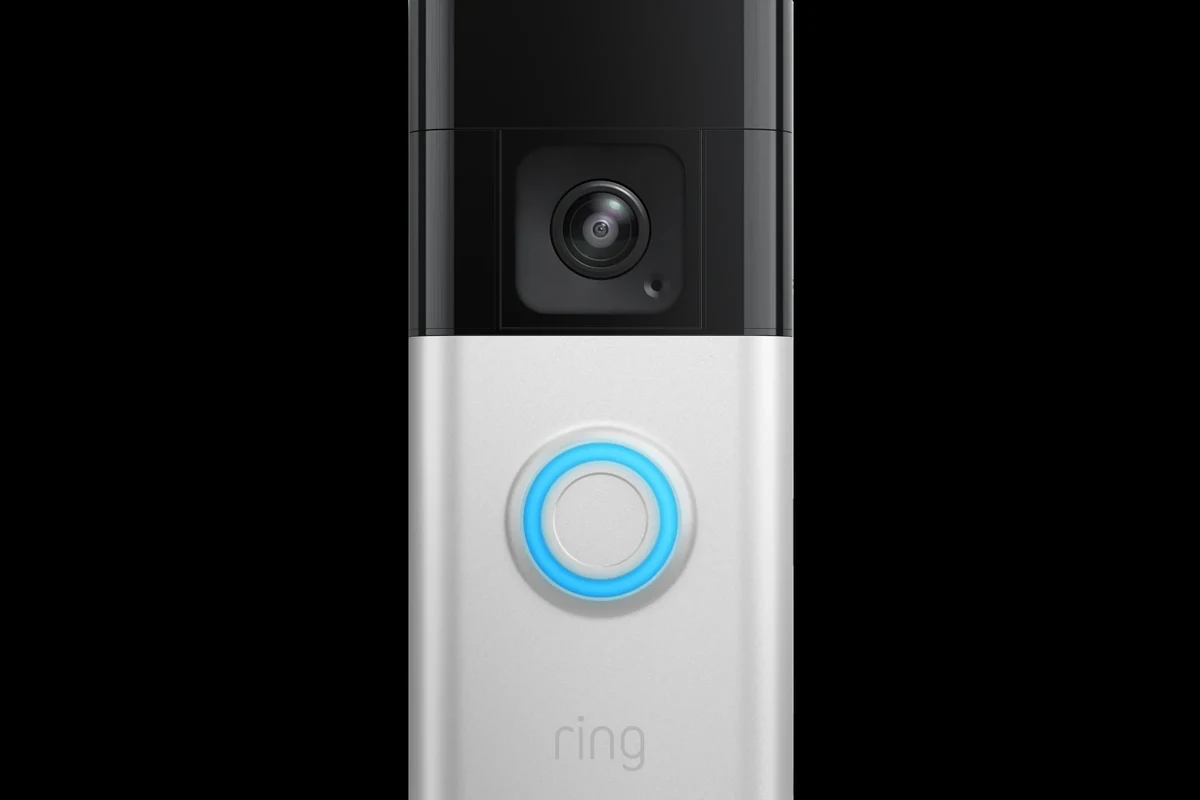
Ring’s lineup includes battery-operated video doorbells, hardwired models, and some hybrid designs that can run on wiring while still using a battery for backup or power smoothing. For buyers, that means “Ring doorbell” is not a single power type, so the model number matters more than the brand name.
In practical terms, a battery-operated Ring doorbell is usually the better fit if you don’t have existing doorbell wiring, want a simpler install, or expect to move the device later. A wired model can be better if you want fewer charging interruptions and a more permanent setup, especially in a home where the doorbell is used heavily.
How Ring Video Doorbells Are Powered in 2026: Battery, Hardwired, and Hybrid Options
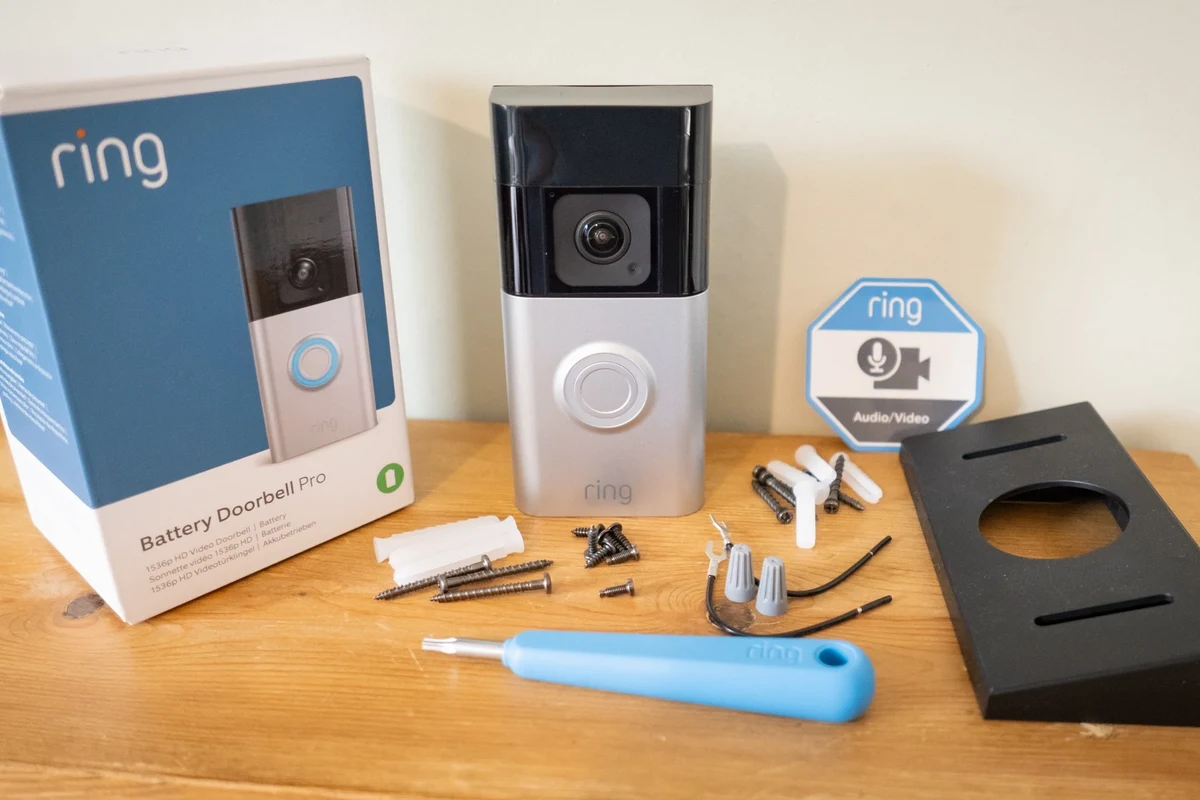
Ring’s current approach is best understood as a power-options system rather than a single design. Some models are made to be battery-first, some are meant to connect to existing doorbell wiring, and some can do both depending on the installation and the exact product version.
Battery-only models vs. rechargeable battery models
In everyday shopping language, people often say “battery-only” when they mean a doorbell that does not require existing wiring. In many cases, these models still use a rechargeable battery pack rather than disposable batteries, which matters because you’ll need to remove and recharge the unit periodically.
That difference is important for maintenance. A rechargeable battery model is convenient, but it also means you should plan for charging time, battery health over months of use, and the possibility that motion-heavy settings will drain power faster than expected.
Hardwired models with battery backup or trickle charging
Some Ring doorbells are designed to connect to existing low-voltage doorbell wiring. In those setups, the wiring may help keep the battery topped up or support operation while still relying on the battery for part of the power handling, depending on the model.
This is where buyers should verify the exact product page and manual. Ring’s wiring behavior can vary by model, so it’s worth checking the official compatibility notes before assuming a hardwired unit will behave like a traditional always-on doorbell.
How power choice affects installation and performance
Battery models usually win on installation speed because they avoid the need to work with existing doorbell wiring. That makes them appealing for renters, older homes, and anyone who wants a less technical setup.
Wired or hybrid models may offer more consistent uptime, but they can also require more planning during installation. If you are comparing options, it may help to read a broader guide such as best battery operated video doorbell or best wired video doorbell home guide to match the power style to your home.
Exact power behavior can vary by model, firmware, and whether the doorbell is installed with compatible wiring. Always confirm the current manual and compatibility page before buying.
How the Battery Operates: Charging, Runtime, and Power Management
Battery operation sounds simple, but real-world runtime depends on motion activity, live view usage, Wi-Fi strength, temperature, and alert settings. A doorbell in a busy front entry may need charging more often than one on a quiet porch.
Typical battery life expectations and what changes them
Manufacturers typically describe battery life as variable rather than fixed, because usage patterns change everything. Frequent motion events, repeated live-view sessions, poor Wi-Fi, and cold weather can all shorten the time between charges.
If you want the best estimate for your home, look at the official product listing and manual for the specific model you are considering. That is more reliable than generic battery-life claims, especially if your household has constant foot traffic, pets, or delivery activity near the door.
Charging method, cable quality, and safe wattage guidance to verify
Ring battery doorbells usually recharge through a cable and power source specified by the manufacturer. Because charging requirements can differ by model, it’s smart to verify the recommended adapter type, cable type, and wattage in the official documentation instead of assuming any phone charger will do.
Use only manufacturer-approved or clearly compatible charging accessories. If a battery, cable, or charger shows heat damage, swelling, fraying, or intermittent connection, stop using it and follow the manufacturer’s guidance.
Heat, cold, and weather limits that affect battery health
Outdoor battery devices are exposed to seasonal temperature swings, and that affects both runtime and long-term battery health. Heat can accelerate battery wear, while cold can reduce short-term performance and make the battery seem weaker than it really is.
For that reason, buyers should check the temperature range listed for the exact model, along with any weather-resistance notes. If your front door gets direct afternoon sun or harsh winter exposure, those conditions matter as much as the battery specification itself.
Battery life in smart doorbells is often more affected by motion alerts and Wi-Fi quality than by the battery capacity alone.
Key Specs and Buying Criteria to Check Before You Choose
Power type is only one part of the decision. A battery-operated Ring doorbell still needs the right camera specs, app support, mounting fit, and subscription expectations to be a good buy.
Video resolution, motion detection, and field of view
Look at resolution, motion-detection options, and the camera’s field of view together. A higher-resolution camera may help with detail, but it won’t matter much if the motion zone is poorly set or the viewing angle misses the walkway.
If image quality is your top priority, compare the exact model’s specs with a dedicated guide like best video doorbell picture quality 2026. That can help you decide whether battery convenience is worth any trade-off in advanced imaging features.
Wi-Fi requirements, app setup, and smart home compatibility
Battery doorbells still depend on reliable Wi-Fi and the official app for alerts, live view, and settings management. Weak wireless coverage can create delays, missed events, or frustrating setup issues even when the battery is fully charged.
Before buying, confirm the supported Wi-Fi band, phone operating system, and any smart-home integrations you care about. Compatibility can vary by region, app version, and ecosystem, so check the current listing rather than relying on older forum advice.
Dimensions, mounting options, and doorframe fit considerations
Physical size matters more than many shoppers expect. A battery-powered model may be thicker than a wired one because it has to make room for the battery pack, so it can protrude farther from narrow trim or a tight doorframe.
- Check model number, battery style, app requirements, and mounting dimensions
- Confirm doorframe clearance, Wi-Fi strength, and whether wiring is optional or required
- Verify warranty terms, return policy, update support, and current compatibility notes
Subscription features, storage options, and warranty details to verify
Many buyers focus on hardware and forget the software side. Features like video history, cloud storage, and advanced alerts may depend on a subscription or account setup, and those terms can change over time.
Warranty coverage is another item to confirm before purchase. Check the official warranty page and any retailer return window so you understand what happens if the battery underperforms or the doorbell does not fit your install location.
Who a Battery-Operated Ring Video Doorbell Fits Best
Battery power is not the best choice for everyone, but it is a strong fit for several common buyer groups. The best match is usually the person who values flexibility more than absolute convenience over the long term.
Renters, apartments, and homes without existing doorbell wiring
If you live in a rental or a unit without usable doorbell wiring, a battery-operated model is often the easiest path to a video doorbell. It avoids the need to depend on building wiring that may be unavailable, outdated, or off-limits to modify.
This is also why battery models are popular in apartments, townhomes, and older houses. They let you add front-door monitoring without committing to electrical work you may not be allowed to do.
Busy households that want easier installation and relocation
Families and busy households often prefer battery models because installation is typically simpler and relocation is easier if the front entry changes. If you move, you can usually take the doorbell with you more easily than a wired system that was integrated into the home.
For readers comparing Ring against other brands, it may also help to review what video doorbell is better than Ring if you want to compare power flexibility across ecosystems.
Users who need flexible placement over always-on power
Battery operation is useful when placement matters more than continuous power. For example, if your ideal mounting spot is not near existing wiring, a battery model can still let you position the camera where it sees the walkway clearly.
That flexibility is especially helpful for side entrances, back doors, temporary housing, and seasonal homes. The trade-off is that you’ll need a charging routine, which is worth considering before you buy.
Real-World Benefits and Practical Trade-Offs
Battery-operated doorbells are popular because they solve a real problem: many homes do not have convenient doorbell wiring. But the convenience comes with upkeep, and buyers should weigh both sides instead of focusing only on the easy install.
Installation simplicity, portability, and placement flexibility
The biggest advantage is simple setup. A battery model can often be mounted without dealing with low-voltage wiring, which lowers the barrier for first-time smart-home buyers and reduces the chance of installation mistakes.
Portability is another benefit. If you rearrange your entryway, move homes, or want to try a different mounting height, a battery doorbell is easier to reposition than a hardwired system.
Limitations: charging downtime, motion settings, and battery drain
The main drawback is upkeep. At some point, the battery needs to be removed and charged, which means the doorbell is not actively monitoring the door during that time unless your specific model has an alternate power arrangement.
Battery drain can also increase if motion zones are too broad, sensitivity is too high, or live view is used often. In other words, the best battery life usually comes from thoughtful settings, not just from the size of the battery.
Evidence limits: what product specs can tell buyers vs. what they cannot
Product specs can tell you the battery type, the power method, the supported app, and the listed compatibility. They cannot fully predict how the doorbell will behave in your home, because your Wi-Fi, weather, foot traffic, and alert habits all change the outcome.
That is why it’s smart to treat manufacturer claims as a starting point rather than a guarantee. If you want a broader buying perspective, are video doorbells worth it home security is a helpful next read for understanding the bigger value question.
Setup, Safe Use, and Maintenance Guide
Battery-operated Ring doorbells are usually straightforward to live with, but they still need basic care. Good setup and routine maintenance help reduce missed alerts, charging surprises, and weather-related wear.
Initial setup steps, app requirements, and connectivity checks
Check the box, product page, or manual so you know whether the unit is battery-only, rechargeable, or wired-capable.
Use the current app from the official store listing and sign in before mounting if the setup flow recommends it.
Make sure the signal is strong enough where the doorbell will live, especially if your router is far from the entry.
Safe charging practices, inspection of ports and cables, and replacement guidance
Charge the battery only as the manufacturer instructs, and inspect the cable and charging port before each use. A loose connection, bent connector, or damaged cable can create unreliable charging or extra heat.
Stop using damaged batteries, swollen packs, frayed cables, or chargers that run unusually hot. Replace them using the manufacturer’s recommended parts or approved alternatives.
Routine cleaning, weather protection, and storage when not in use
Keep the camera lens and sensor area clean with gentle, dry methods recommended by the manual. Dirt, pollen, spider webs, and rain residue can affect motion detection and image clarity more than many buyers expect.
If you remove the doorbell for a long trip or seasonal storage, keep it in a cool, dry place with the battery managed according to the manual. Before reinstalling, check for corrosion, moisture, and any firmware updates that may improve performance.
- Place the doorbell where Wi-Fi is strong, not just where the view looks best.
- Use narrower motion zones to reduce unnecessary battery drain.
- Check charging reminders before the battery reaches a low level that could interrupt coverage.
- Review app permissions and notification settings after setup so alerts behave the way you expect.
Verdict: Is a Battery-Operated Ring Video Doorbell Worth It in 2026?
For many buyers, yes — a battery-operated Ring video doorbell is worth considering if convenience, flexible placement, and simpler installation matter most. It makes the most sense for renters, homes without existing wiring, and anyone who wants a lower-barrier way to add front-door video monitoring.
Best-value buyer profile and when to choose a wired alternative
The best-value buyer is someone who can accept periodic charging in exchange for easier setup and easier relocation. If you have existing wiring, want less maintenance, or prefer a more permanent installation, a wired model may be the better long-term fit.
Transparent recommendation based on convenience, upkeep, and long-term value
My practical recommendation is to choose battery-operated Ring if you want the simplest path into smart doorbell ownership and you’re comfortable checking battery status as part of routine home care. Choose wired or hybrid instead if you want fewer interruptions and your home already supports that kind of installation.
For readers who are still deciding, the most helpful next step is to compare the exact Ring model, its power method, and its app features against your home layout and daily usage pattern. That approach is more reliable than choosing by brand alone.
Frequently Asked Questions
No. Ring offers battery-powered, hardwired, and hybrid models, so the power type depends on the exact product. Always check the model page and manual before buying.
Battery life varies by model and usage. Motion activity, live view, Wi-Fi strength, and weather can all shorten runtime.
Not always. Verify the charger type, cable, and wattage in the official documentation for your exact model before charging.
Yes, many battery models are designed to work without existing doorbell wiring. Some hybrid models can also use wiring for additional power support.
Often yes, because it usually avoids the need for permanent wiring changes. It is a common choice for apartments, rentals, and homes without existing doorbell wiring.
Check the exact model number, power method, dimensions, Wi-Fi requirements, app support, subscription features, and warranty terms before you buy.