Parts of DSLR Camera Explained for Beginners
A DSLR camera works by sending light through the lens and mirror system to the sensor when you press the shutter. Beginners should learn the body parts, lens specs, and compatibility checks before buying or using one.
If you want to understand the parts of DSLR camera bodies and lenses without getting lost in jargon, focus on the imaging path first: light enters the lens, reflects through a mirror and viewfinder, then reaches the sensor when you take a photo. After that, the external controls, sensor, autofocus system, and lens specs become much easier to compare when you shop or learn to use one.
- Core path: Lens, mirror, viewfinder, shutter, and sensor are the heart of a DSLR.
- Best buying focus: Lens mount, sensor size, and autofocus matter more than extra body features.
- Beginner priority: Learn the mode dial, shutter button, screen, and battery/card access first.
- Safety: Change lenses carefully and avoid using damaged batteries or forced fittings.
- Value check: Total system cost includes lenses, cards, batteries, and warranty support.
Parts of a DSLR Camera Explained: What Each Component Does and Why It Matters
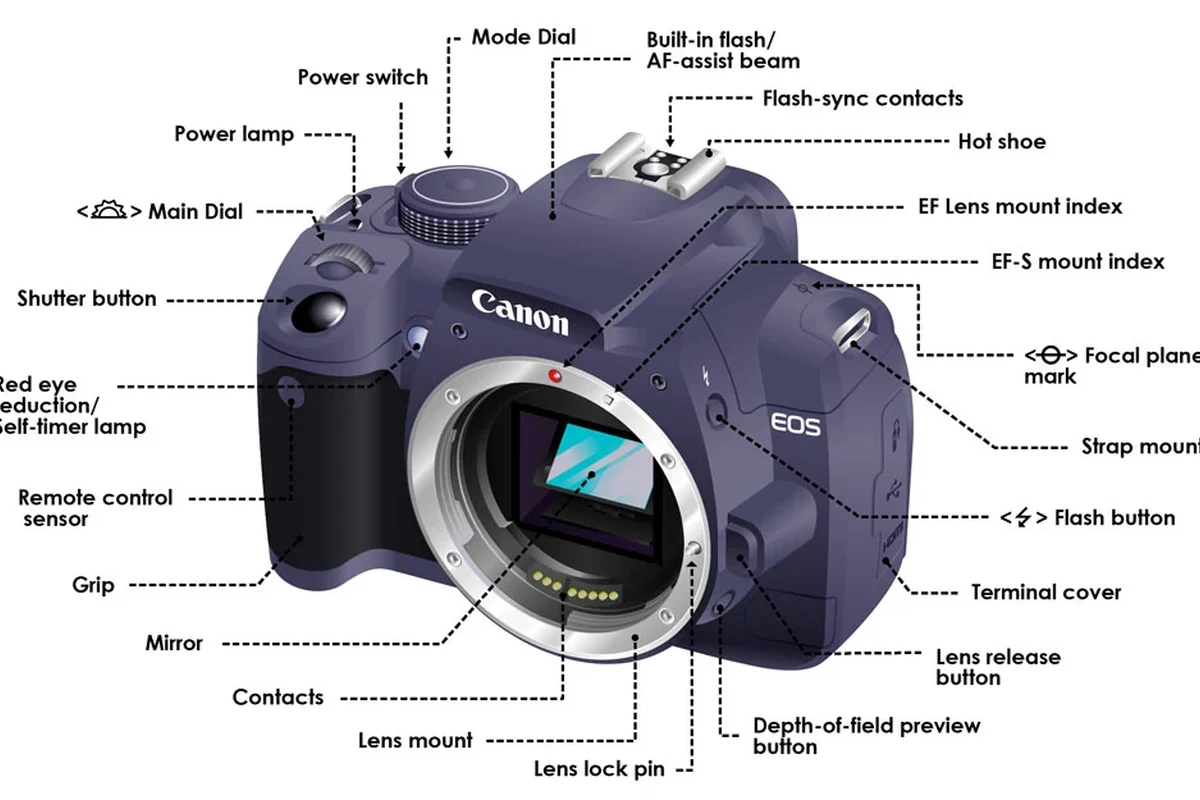
A DSLR is built around a simple idea: give you an optical view of the scene through a mirror system, then capture the image with a digital sensor. The main parts all work together, but each one affects a different part of the shooting experience, from framing and focus to image quality and handling.
The lens determines how much light and scene detail reaches the camera. The sensor, processor, autofocus system, and shutter determine how that light becomes a file you can edit, share, or print.
That is why two DSLR cameras can feel very different even if they look similar from the outside. One may be better for portraits, another for sports, and another for general family photos depending on the lens options, autofocus performance, and sensor size.
How a DSLR Camera Works: From Light Entry to Captured Image
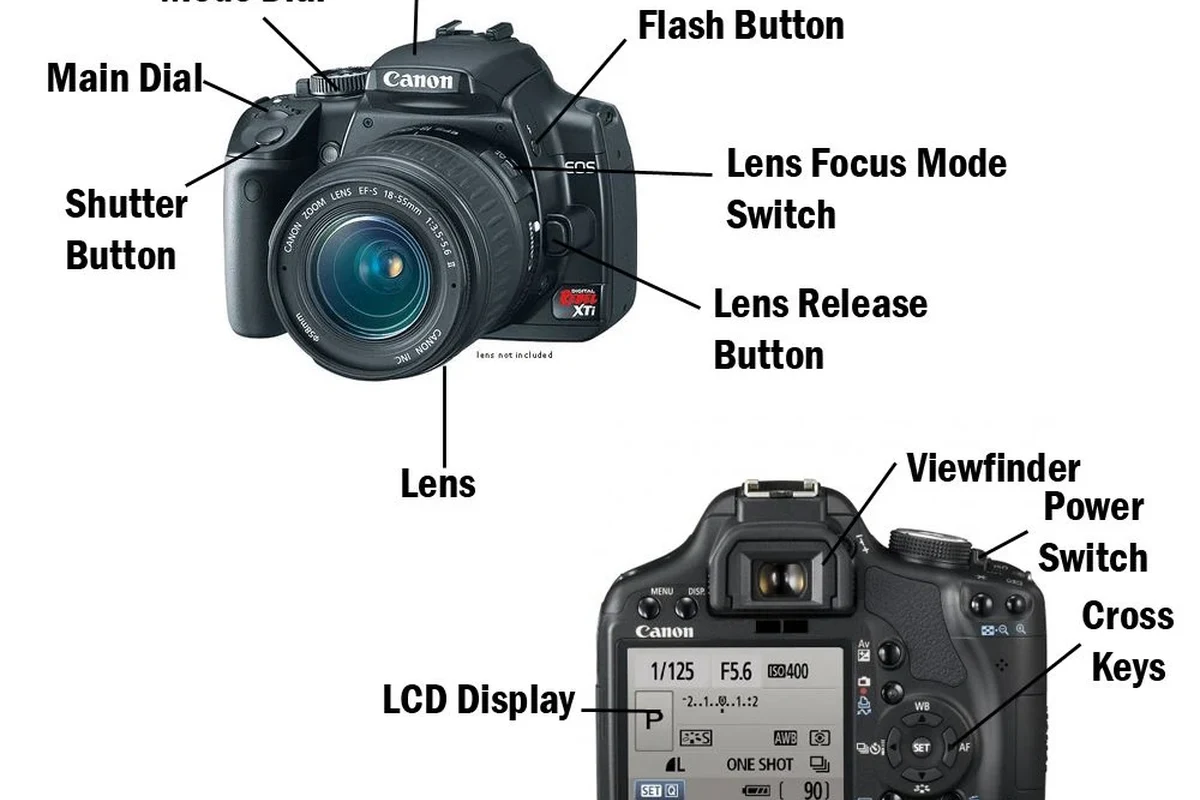
Understanding how a DSLR works helps you understand why certain parts matter more than others. The process starts with the lens collecting light and ends with the camera converting that light into a digital image.
Lens, mirror, and optical viewfinder: the core imaging path
In a DSLR, light enters through the lens and hits a mirror inside the body. That mirror sends the image upward into the optical viewfinder, which lets you see the scene directly through the lens path rather than on a screen.
When you press the shutter button, the mirror flips up out of the way. That clears the path so light can reach the sensor behind it. This mirror-based design is the main reason DSLRs feel different from mirrorless cameras.
The “reflex” in DSLR refers to the mirror reflex system that sends light to the optical viewfinder before capture.
Sensor, shutter, and image processor: what happens when you press the shutter
Once the mirror lifts, the shutter opens for a brief moment and exposes the sensor to light. The sensor converts that light into data, and the image processor turns that data into a photo file such as JPEG or RAW, depending on the camera settings.
The shutter speed controls how long the sensor sees the scene. Faster speeds freeze motion better, while slower speeds let in more light but can blur movement if the camera or subject shifts.
Exact RAW support, burst behavior, and processing options vary by model and firmware. Always confirm the official specifications for the camera you are considering.
External DSLR Camera Parts Beginners Should Know First
If you are new to cameras, start with the controls you touch most often. These external parts affect how comfortable the camera feels and how quickly you can change settings in real use.
Body, grip, mode dial, shutter button, and command dials
The body is the main shell that holds the internal components. The grip is the shaped area for your right hand, and a deeper grip usually helps the camera feel steadier during handheld shooting.
The mode dial lets you choose shooting modes such as auto, aperture priority, shutter priority, or manual. The shutter button is usually half-pressed to focus and fully pressed to take the photo, while command dials let you change settings like aperture, shutter speed, or menu values.
- Learn the mode dial before exploring advanced menus.
- Practice half-pressing the shutter button to focus smoothly.
- Check whether the camera has one or two command dials, since that changes how fast you can adjust settings.
LCD screen, viewfinder, memory card slot, and battery compartment
The LCD screen is used for menu navigation, image review, and sometimes live view shooting. The optical viewfinder is still important because it stays visible in bright light and often uses less battery than the rear screen.
The memory card slot stores your photos and videos, while the battery compartment holds the rechargeable battery that powers the camera. Some models place these in the same access door, while others separate them depending on body design.
- Check which memory card type the camera supports.
- Confirm the battery model and whether a charger is included.
- Review screen size, articulation, and viewfinder type in the manual.
Ports, hot shoe, strap lugs, and tripod mount
Ports connect the camera to accessories, computers, or external power options, but the exact port layout varies by model. The hot shoe on top is used for compatible flashes, microphones, or wireless triggers depending on the accessory and camera support.
Strap lugs are the attachment points for a neck or shoulder strap, and the tripod mount on the bottom lets you attach the camera to a tripod or other support. These parts may seem minor, but they matter a lot for travel, indoor shooting, and long sessions.
If you plan to connect cameras or accessories in a smart home or content-creation setup, it is worth checking the official manual and accessory compatibility list before buying anything extra. For cable-related care in wet conditions, you may also find our guide on safe ways to handle a wet charging port useful as a general electronics-safety reference.
Lens Parts and Key Specs to Compare Before Buying
For many beginners, the lens is the most important purchase after the camera body. It shapes how wide or tight your image looks, how much light reaches the sensor, and how easily you can shoot in different rooms or outdoor settings.
Focal length, aperture, zoom range, and image stabilization
Focal length is measured in millimeters and affects how much of the scene fits in the frame. Shorter focal lengths are wider, while longer focal lengths make subjects appear closer.
Aperture describes how wide the lens opening can get. A wider aperture lets in more light and can create a blurrier background, which is useful for portraits, low light, and subject separation. Zoom range matters if you want one lens to cover multiple situations, and image stabilization can help reduce blur from small hand movements in some shooting conditions.
Lens mount compatibility and crop-sensor vs full-frame considerations
Lens mount compatibility is non-negotiable. A lens must match the camera mount or be supported through an approved adapter if the manufacturer allows one.
Crop-sensor and full-frame cameras also affect how a lens behaves. A lens on a crop-sensor body gives a narrower field of view than the same lens on a full-frame body, so the same focal length can feel different depending on the camera type. That is why beginners should verify whether they are buying lenses for APS-C or full-frame use.
Inside the Camera: Sensor, Processor, Autofocus, and Shutter System
The inside components determine how well the camera handles detail, motion, low light, and focus accuracy. These are the parts that often separate a basic DSLR from a more capable one.
Sensor size, resolution, ISO performance, and image quality trade-offs
Sensor size influences image quality, low-light performance, and depth of field control. Resolution, measured in megapixels, affects how much detail the camera can record, but more megapixels are not automatically better if the sensor or lens is weak.
ISO controls the sensor’s sensitivity to light. Higher ISO settings help in darker environments, but they can also increase noise. For beginners, the best balance is usually a camera that produces clean files at the ISO levels they actually expect to use, not just the highest number on the spec sheet.
When comparing cameras, look at how the sensor size, megapixel count, and lens choice work together instead of judging any one spec alone.
Autofocus points, burst rate, and shutter durability limits
Autofocus points help the camera lock onto a subject, and the layout of those points affects how easy it is to track moving people, pets, or sports action. Burst rate tells you how many frames the camera can capture per second, which matters if you want to catch a fast expression or a moving subject.
Shutter durability is often listed as an estimated shutter life figure by the manufacturer, but it is not a guarantee. It is best treated as a reference point rather than a promise, because real-world wear depends on use, environment, and maintenance.
Stop using any camera that shows error messages, a jammed shutter, battery swelling, or physical damage around the battery door or card slot. Follow the manufacturer’s support guidance and warranty terms before attempting any remedy.
Who a DSLR Camera Is Best For in 2026
DSLRs still make sense for many buyers, especially when cost, lens availability, and familiar controls matter more than having the newest body style. The best choice depends on how you plan to shoot and how much gear you want to carry.
Beginners, students, hobbyists, and budget-conscious creators
Beginners often like DSLRs because the controls are visible, the grip is usually comfortable, and the optical viewfinder feels straightforward. Students and hobbyists may also appreciate the large used-market selection of bodies and lenses, which can make system building more affordable.
Budget-conscious creators may prefer a DSLR if they want a reliable camera for home projects, family photos, product shots, or basic video without paying for a newer mirrorless ecosystem. That said, the best value depends on the specific model, the lens bundle, and whether accessories are included.
When a DSLR still makes sense versus mirrorless alternatives
A DSLR can still be a smart pick if you value battery efficiency, an optical viewfinder, and access to existing DSLR lenses. It can also be a practical option if you are buying into a used system and want to keep initial costs controlled.
Mirrorless cameras may offer newer autofocus features, smaller bodies, and more modern video tools in many cases, but they are not automatically better for every buyer. The right choice depends on your shooting style, lens needs, and whether you care more about compactness or traditional handling.
First-time buyers who want a familiar grip, an optical viewfinder, and a wide range of affordable lenses should still consider a DSLR, especially if they plan to learn photography step by step. Just verify current lens support, battery availability, and service options for the specific model.
Common Beginner Mistakes and Safe Handling Tips
Most beginner problems come from handling, storage, and compatibility mistakes rather than from the camera itself. A little care goes a long way toward keeping the body, sensor, and lens in good condition.
Changing lenses carefully, protecting the sensor, and avoiding dust
Change lenses in a clean, low-dust place and keep the camera mount opening pointed downward when possible. That helps reduce the chance of dust falling onto the sensor or into the body.
When a lens is removed, replace both caps as soon as you can. Avoid touching the sensor directly, and if you see dust spots in your photos, use the camera’s recommended cleaning method or a qualified service provider rather than improvised tools.
Never use force on a lens mount, battery door, memory card slot, or hot shoe. If a part does not fit normally, confirm compatibility in the manual instead of pushing it.
Battery care, storage conditions, strap use, and transport safety
Use the battery and charger recommended by the manufacturer whenever possible. Store batteries in a cool, dry place, and stop using any battery that looks swollen, damaged, or unusually hot.
A strap is not optional if you are carrying the camera for long periods or moving around crowded spaces. For transport, a padded bag or insert helps protect the body, lens, and accessories from bumps, dust, and moisture.
If you are storing the camera for a while, remove the battery if the manual recommends it and keep the gear in a dry location away from heat. For home setups, it is also smart to review firmware updates, app requirements, and accessory compatibility before leaving the camera unused for months.
Maintenance, Value, and Final Buying Recommendation
The best DSLR for a beginner is not the one with the most impressive spec sheet. It is the one that matches your lens budget, comfort level, and long-term use case while staying easy to maintain.
Cleaning, firmware updates, accessory costs, and warranty details to verify
Basic maintenance includes keeping the body clean, protecting the lens front element, checking the sensor for dust when needed, and updating firmware only through the manufacturer’s official instructions. Firmware support, menu behavior, and accessory compatibility can vary by model, so it is worth checking current documentation before buying.
Accessory costs also matter. A camera body may look affordable until you add a lens, memory card, extra battery, charger, strap, and bag. Before purchase, verify warranty length, return policy, and whether the seller is an authorized retailer if that matters to you.
- The lens, sensor, mirror, and shutter are the core parts that define how a DSLR captures images.
- External controls like the mode dial, grip, screen, and ports affect comfort and everyday usability.
- Lens compatibility, autofocus, and sensor size matter more than flashy extras for most beginners.
- Always confirm current specs, firmware support, and warranty details for the exact model you plan to buy.
Best-value feature checklist and final recommendation for first-time buyers
For a first DSLR, look for a comfortable grip, easy-to-read controls, a lens mount with affordable options, a sensor size that fits your goals, and a battery system you can support without trouble. If you plan to shoot family, travel, school projects, or content for home and social use, a well-chosen DSLR can still be a very practical camera system.
My recommendation is simple: choose the DSLR that gives you the best combination of lens compatibility, ease of use, and total system cost, not just the body price. If a mirrorless camera offers a clearly better fit for your needs, compare both systems side by side before deciding.
Frequently Asked Questions
The main parts include the lens, mirror, optical viewfinder, sensor, shutter, processor, body, grip, mode dial, screen, memory card slot, and battery compartment. Together, they control how light is framed, focused, and turned into a photo.
The lens and sensor matter most for image quality, with the processor and autofocus system also playing important roles. A strong body cannot fully compensate for a weak lens or an unsuitable sensor size.
Check the camera mount and confirm whether the lens is designed for your body type. Also verify whether the lens is intended for crop-sensor or full-frame use, since that changes the field of view.
Yes, many beginners find DSLRs easy to learn because the controls are straightforward and the grip is comfortable. They can be a strong value if you want affordable lenses and a familiar shooting experience.
Keep the lens and body caps on when not in use, change lenses in a clean area, and store batteries in a cool, dry place. Follow the manufacturer’s cleaning and firmware instructions and stop using any damaged battery or part.
Choose a DSLR if you want an optical viewfinder, strong battery life, and access to affordable used lenses. Choose mirrorless if you want a smaller body or newer autofocus and video features, but compare the total system cost before deciding.